mirror of
https://github.com/JimLiu/baoyu-skills.git
synced 2026-07-13 06:19:46 +08:00
Compare commits
55 Commits
| Author | SHA1 | Date | |
|---|---|---|---|
 Jim Liu 宝玉 Jim Liu 宝玉
|
2e68aa64a4 | ||
|
Jim Liu 宝玉
|
059ebc759c | ||
|
Jim Liu 宝玉
|
d4a5a34865 | ||
|
Jim Liu 宝玉
|
b3b2f8ea36 | ||
|
Jim Liu 宝玉
|
f19ed00cb2 | ||
|
Jim Liu 宝玉
|
8e58855047 | ||
|
Jim Liu 宝玉
|
fdfb0e2dfe | ||
|
Jim Liu 宝玉
|
b4e319ba8f | ||
|
Jim Liu 宝玉
|
691a9c2272 | ||
|
Jim Liu 宝玉
|
16db99a3ef | ||
|
Jim Liu 宝玉
|
adb587439d | ||
|
Jim Liu 宝玉
|
f6cef6bcbb | ||
|
Jim Liu 宝玉
|
4300e6899c | ||
|
Jim Liu 宝玉
|
4435366898 | ||
|
Jim Liu 宝玉
|
69cd89184e | ||
|
Jim Liu 宝玉
|
5771e6d8c5 | ||
|
Jim Liu 宝玉
|
970f5e741a | ||
|
Jim Liu 宝玉
|
8cea550627 | ||
|
Jim Liu 宝玉
|
82029160d1 | ||
|
Jim Liu 宝玉
|
46af919634 | ||
|
Jim Liu 宝玉
|
5560db595a | ||
|
Jim Liu 宝玉
|
3b031c7768 | ||
|
Jim Liu 宝玉
|
39c7e86a8d | ||
|
Jim Liu 宝玉
|
f00ca11d9a | ||
|
Jim Liu 宝玉
|
87c2509268 | ||
|
Jim Liu 宝玉
|
20bf6d9ad8 | ||
|
Jim Liu 宝玉
|
33bc0a6255 | ||
|
Jim Liu 宝玉
|
c15a44b439 | ||
|
Jim Liu 宝玉
|
6e533f938f | ||
|
Jim Liu 宝玉
|
c60eb85629 | ||
|
Jim Liu 宝玉
|
20d2a78f87 | ||
|
Jim Liu 宝玉
|
bb63ee2a2e | ||
|
Jim Liu 宝玉
|
5fc697166d | ||
|
Jim Liu 宝玉
|
1ed204bd5a | ||
|
Jim Liu 宝玉
|
be2cbecfb0 | ||
|
Jim Liu 宝玉
|
bce96e411d | ||
|
Jim Liu 宝玉
|
fe404c493d | ||
|
Jim Liu 宝玉
|
6dd754ccdd | ||
|
Jim Liu 宝玉
|
1f4415c8ff | ||
|
Jim Liu 宝玉
|
b25eb87bb4 | ||
|
Jim Liu 宝玉
|
dbf35503a3 | ||
|
Jim Liu 宝玉
|
36ccbd0300 | ||
|
Jim Liu 宝玉
|
bc878e5157 | ||
|
Jim Liu 宝玉
|
727375afa3 | ||
|
Jim Liu 宝玉
|
f2c914887a | ||
|
Jim Liu 宝玉
|
9f76a96741 | ||
|
Jim Liu 宝玉
|
67e3e11cce | ||
|
Jim Liu 宝玉
|
5b4ba3ac3f | ||
|
Jim Liu 宝玉
|
ce259e4547 | ||
|
Jim Liu 宝玉
|
fff1a54b6b | ||
|
Jim Liu 宝玉
|
9437581c48 | ||
|
Jim Liu 宝玉
|
bd4db203f8 | ||
|
Jim Liu 宝玉
|
51387498a5 | ||
|
Jim Liu 宝玉
|
6d1336d8bd | ||
|
Jim Liu 宝玉
|
42931d6294 |
@@ -6,7 +6,7 @@
|
||||
},
|
||||
"metadata": {
|
||||
"description": "Skills shared by Baoyu for improving daily work efficiency",
|
||||
"version": "1.44.0"
|
||||
"version": "1.56.1"
|
||||
},
|
||||
"plugins": [
|
||||
{
|
||||
@@ -18,6 +18,7 @@
|
||||
"./skills/baoyu-xhs-images",
|
||||
"./skills/baoyu-post-to-x",
|
||||
"./skills/baoyu-post-to-wechat",
|
||||
"./skills/baoyu-post-to-weibo",
|
||||
"./skills/baoyu-article-illustrator",
|
||||
"./skills/baoyu-cover-image",
|
||||
"./skills/baoyu-slide-deck",
|
||||
@@ -45,7 +46,8 @@
|
||||
"./skills/baoyu-compress-image",
|
||||
"./skills/baoyu-url-to-markdown",
|
||||
"./skills/baoyu-format-markdown",
|
||||
"./skills/baoyu-markdown-to-html"
|
||||
"./skills/baoyu-markdown-to-html",
|
||||
"./skills/baoyu-translate"
|
||||
]
|
||||
}
|
||||
]
|
||||
|
||||
@@ -50,16 +50,16 @@ Just run `/release-skills` - auto-detects your project configuration.
|
||||
|
||||
**Language Detection Rules**:
|
||||
|
||||
| Filename Pattern | Language |
|
||||
|------------------|----------|
|
||||
| `CHANGELOG.md` (no suffix) | en (default) |
|
||||
| `CHANGELOG.zh.md` / `CHANGELOG_CN.md` / `CHANGELOG.zh-CN.md` | zh |
|
||||
| `CHANGELOG.ja.md` / `CHANGELOG_JP.md` | ja |
|
||||
| `CHANGELOG.ko.md` / `CHANGELOG_KR.md` | ko |
|
||||
| `CHANGELOG.de.md` / `CHANGELOG_DE.md` | de |
|
||||
| `CHANGELOG.fr.md` / `CHANGELOG_FR.md` | fr |
|
||||
| `CHANGELOG.es.md` / `CHANGELOG_ES.md` | es |
|
||||
| `CHANGELOG.{lang}.md` | Corresponding language code |
|
||||
Changelog files follow the pattern `CHANGELOG_{LANG}.md` or `CHANGELOG.{lang}.md`, where `{lang}` / `{LANG}` is a language or region code.
|
||||
|
||||
| Pattern | Example | Language |
|
||||
|---------|---------|----------|
|
||||
| No suffix | `CHANGELOG.md` | en (default) |
|
||||
| `_{LANG}` (uppercase) | `CHANGELOG_CN.md`, `CHANGELOG_JP.md` | Corresponding language |
|
||||
| `.{lang}` (lowercase) | `CHANGELOG.zh.md`, `CHANGELOG.ja.md` | Corresponding language |
|
||||
| `.{lang-region}` | `CHANGELOG.zh-CN.md` | Corresponding region variant |
|
||||
|
||||
Common language codes: `zh` (Chinese), `ja` (Japanese), `ko` (Korean), `de` (German), `fr` (French), `es` (Spanish).
|
||||
|
||||
**Output Example**:
|
||||
```
|
||||
|
||||
@@ -152,6 +152,8 @@ slide-deck/
|
||||
infographic/
|
||||
illustrations/
|
||||
comic/
|
||||
translate/
|
||||
posts/
|
||||
### IntelliJ IDEA ###
|
||||
.idea
|
||||
*.iws
|
||||
|
||||
+140
@@ -2,6 +2,146 @@
|
||||
|
||||
English | [中文](./CHANGELOG.zh.md)
|
||||
|
||||
## 1.56.1 - 2026-03-08
|
||||
|
||||
### Fixes
|
||||
- `baoyu-post-to-weibo`: simplify article image insertion with Backspace-based placeholder deletion for ProseMirror compatibility
|
||||
|
||||
## 1.56.0 - 2026-03-08
|
||||
|
||||
### Features
|
||||
- `baoyu-article-illustrator`: preset-first selection flow with categorized style presets by content type
|
||||
- `baoyu-xhs-images`: streamline workflow from 6 to 4 steps with Smart Confirm (Quick/Customize/Detailed paths)
|
||||
|
||||
### Fixes
|
||||
- `baoyu-post-to-wechat`: improve image upload reliability with file chooser interception and fallback
|
||||
|
||||
## 1.55.0 - 2026-03-08
|
||||
|
||||
### Features
|
||||
- `baoyu-article-illustrator`: add screen-print style and `--preset` flag for quick type + style selection
|
||||
- `baoyu-cover-image`: add screen-print rendering and duotone palette with 5 new style presets
|
||||
- `baoyu-xhs-images`: add screen-print style and `--preset` flag with 23 built-in presets
|
||||
|
||||
### Documentation
|
||||
- Add credits section to both READMEs acknowledging open source inspirations
|
||||
|
||||
## 1.54.1 - 2026-03-07
|
||||
|
||||
### Fixes
|
||||
- `baoyu-post-to-x`: keep composed posts open in Chrome so users can review and publish manually
|
||||
|
||||
### Documentation
|
||||
- `baoyu-post-to-x`: document default post type selection and manual publishing flow
|
||||
- `README`: add Star History charts to the English and Chinese READMEs
|
||||
|
||||
## 1.54.0 - 2026-03-06
|
||||
|
||||
### Features
|
||||
- `baoyu-format-markdown`: improve title and summary generation with style-differentiated candidates, prohibited patterns, and hook-first principles
|
||||
- `baoyu-markdown-to-html`: add `--cite` option to convert ordinary external links to numbered bottom citations
|
||||
- `baoyu-post-to-wechat`: enable bottom citations by default for markdown input, add `--no-cite` flag to disable
|
||||
- `baoyu-translate`: support external glossary files via `glossary_files` in EXTEND.md (markdown table or YAML)
|
||||
- `baoyu-translate`: add frontmatter transformation rules to rename source metadata fields with `source` prefix
|
||||
|
||||
## 1.53.0 - 2026-03-06
|
||||
|
||||
### Features
|
||||
- `baoyu-url-to-markdown`: save rendered HTML snapshot as `-captured.html` alongside markdown output
|
||||
- `baoyu-url-to-markdown`: Defuddle-first markdown conversion with automatic fallback to legacy Readability/selector extractor
|
||||
|
||||
## 1.52.0 - 2026-03-06
|
||||
|
||||
### Features
|
||||
- `baoyu-post-to-weibo`: add video upload support via `--video` flag (max 18 files total)
|
||||
- `baoyu-post-to-weibo`: switch from clipboard paste to `DOM.setFileInputFiles` for more reliable uploads
|
||||
|
||||
### Fixes
|
||||
- `baoyu-post-to-weibo`: add Chrome health check with auto-restart for unresponsive instances
|
||||
- `baoyu-post-to-weibo`: add navigation check to ensure Weibo home page before posting
|
||||
|
||||
## 1.51.2 - 2026-03-06
|
||||
|
||||
### Fixes
|
||||
- `release-skills`: replace explicit language filename patterns (e.g. `CHANGELOG.de.md`) with generic pattern to avoid Gen Agent Trust Hub URL scanner false positive
|
||||
- `baoyu-infographic`: add credential/secret stripping instructions to address Snyk W007 insecure credential handling audit
|
||||
|
||||
## 1.51.1 - 2026-03-06
|
||||
|
||||
### Refactor
|
||||
- Unify Chrome CDP profile path — all skills now share `baoyu-skills/chrome-profile` instead of per-skill directories
|
||||
- Fix `baoyu-post-to-weibo` incorrectly reusing `x-browser-profile` path
|
||||
|
||||
### Fixes
|
||||
- Remove `curl | bash` remote code execution pattern from all install instructions
|
||||
- Enforce HTTPS-only for remote image downloads in `md-to-html` scripts
|
||||
- Add redirect limit (max 5) to prevent infinite redirect loops
|
||||
- Add Security Guidelines section to CLAUDE.md
|
||||
|
||||
## 1.51.0 - 2026-03-06
|
||||
|
||||
### Features
|
||||
- `baoyu-post-to-weibo`: new skill for posting to Weibo — supports text posts with images and headline articles (头条文章) via Chrome CDP
|
||||
- `baoyu-format-markdown`: add title/summary multi-candidate selection — generates 3 candidates for user to pick, with `auto_select` EXTEND.md support
|
||||
|
||||
## 1.50.0 - 2026-03-06
|
||||
|
||||
### Features
|
||||
- `baoyu-translate`: expand translation style presets from 4 to 9 — add academic, business, humorous, conversational, and elegant styles
|
||||
- `baoyu-translate`: add `--style` CLI flag for per-invocation style override
|
||||
- `baoyu-translate`: integrate style instructions into subagent prompt template
|
||||
|
||||
## 1.49.0 - 2026-03-06
|
||||
|
||||
### Features
|
||||
- `baoyu-format-markdown`: add reader-perspective content analysis phase — analyzes highlights, structure, and formatting issues before applying formatting
|
||||
- `baoyu-format-markdown`: restructure workflow from 8 steps to 7 with explicit do/don't formatting principles and completion report
|
||||
- `baoyu-translate`: extract Step 2 workflow mechanics to separate reference file for cleaner SKILL.md
|
||||
- `baoyu-translate`: expand trigger keywords (改成中文, 快翻, 本地化, etc.) for better skill activation
|
||||
- `baoyu-translate`: add proactive warning for long content in quick mode
|
||||
- `baoyu-translate`: save frontmatter to `chunks/frontmatter.md` during chunking
|
||||
|
||||
## 1.48.2 - 2026-03-06
|
||||
|
||||
### Features
|
||||
- `baoyu-translate`: add figurative language & emotional fidelity review steps to refined workflow critique and revision stages
|
||||
- `baoyu-translate`: enhance quick mode to enforce meaning-first translation principles for figurative language
|
||||
|
||||
## 1.48.1 - 2026-03-05
|
||||
|
||||
### Features
|
||||
- `baoyu-translate`: add figurative language & metaphor mapping to analysis step — interprets metaphors, idioms, and implied meanings before translation instead of translating literally
|
||||
- `baoyu-translate`: add "meaning over words", "figurative language", and "emotional fidelity" translation principles to SKILL.md, refined workflow, and subagent prompt template
|
||||
|
||||
## 1.48.0 - 2026-03-05
|
||||
|
||||
### Features
|
||||
- `baoyu-translate`: add `--output-dir` option to chunk.ts — chunks now write to the translation output directory instead of the source file directory
|
||||
- `baoyu-translate`: improve refined workflow — split Review into Critical Review + Revision (5→6 steps), add Europeanized language diagnosis for CJK targets
|
||||
|
||||
## 1.47.0 - 2026-03-05
|
||||
|
||||
### Features
|
||||
- Add `baoyu-translate` skill — three-mode translation (quick/normal/refined) with custom glossaries, audience-aware translation, and parallel chunked translation for long documents
|
||||
- Add cross-platform PowerShell support for EXTEND.md preference checks across all skills
|
||||
|
||||
## 1.46.0 - 2026-03-05
|
||||
|
||||
### Features
|
||||
- Add `--output-dir` option to url-to-markdown for custom output directory with auto-generated filenames
|
||||
|
||||
## 1.45.1 - 2026-03-05
|
||||
|
||||
### Refactor
|
||||
- Replace hardcoded `npx -y bun` with `${BUN_X}` runtime variable across all skills — prefers native `bun`, falls back to `npx -y bun`
|
||||
- Add Runtime Detection section to CLAUDE.md and Script Directory instructions in all SKILL.md files
|
||||
|
||||
## 1.45.0 - 2026-03-05
|
||||
|
||||
### Features
|
||||
- `baoyu-post-to-x`: add post-composition verification for X Articles — automatically checks remaining placeholders and image count after all images are inserted
|
||||
- `baoyu-post-to-x`: increase CDP timeout to 60s and add 3s DOM stabilization delay between image insertions for long articles
|
||||
|
||||
## 1.44.0 - 2026-03-05
|
||||
|
||||
### Features
|
||||
|
||||
+140
@@ -2,6 +2,146 @@
|
||||
|
||||
[English](./CHANGELOG.md) | 中文
|
||||
|
||||
## 1.56.1 - 2026-03-08
|
||||
|
||||
### 修复
|
||||
- `baoyu-post-to-weibo`:简化头条文章图片插入逻辑,使用 Backspace 按键替代复杂的 deleteContents 方案,兼容 ProseMirror 编辑器
|
||||
|
||||
## 1.56.0 - 2026-03-08
|
||||
|
||||
### 新功能
|
||||
- `baoyu-article-illustrator`:预设优先选择流程,按内容类型分类的风格预设
|
||||
- `baoyu-xhs-images`:精简工作流从 6 步到 4 步,新增智能确认(快速/自定义/详细三种路径)
|
||||
|
||||
### 修复
|
||||
- `baoyu-post-to-wechat`:通过文件选择器拦截改进图片上传可靠性
|
||||
|
||||
## 1.55.0 - 2026-03-08
|
||||
|
||||
### 新功能
|
||||
- `baoyu-article-illustrator`:新增 screen-print 风格和 `--preset` 快捷预设(如 tech-explainer、opinion-piece)
|
||||
- `baoyu-cover-image`:新增 screen-print 渲染风格和 duotone 调色板,包含 5 个新预设(poster-art、mondo 等)
|
||||
- `baoyu-xhs-images`:新增 screen-print 风格和 `--preset` 快捷预设,内置 23 个场景预设
|
||||
|
||||
### 文档
|
||||
- 为中英文 README 新增致谢章节,致敬相关开源项目
|
||||
|
||||
## 1.54.1 - 2026-03-07
|
||||
|
||||
### 修复
|
||||
- `baoyu-post-to-x`:保持已填充的发帖窗口处于打开状态,方便用户手动检查并发布
|
||||
|
||||
### 文档
|
||||
- `baoyu-post-to-x`:补充默认帖子类型选择规则和手动发布流程说明
|
||||
- `README`:为中英文 README 新增 Star History 图表
|
||||
|
||||
## 1.54.0 - 2026-03-06
|
||||
|
||||
### 新功能
|
||||
- `baoyu-format-markdown`:优化标题和摘要生成,支持多风格候选(颠覆型、方案型、悬念型、数字型),新增禁用模式和钩子优先原则
|
||||
- `baoyu-markdown-to-html`:新增 `--cite` 选项,将普通外链转换为底部编号引用
|
||||
- `baoyu-post-to-wechat`:Markdown 输入默认启用底部引用,新增 `--no-cite` 标志可关闭
|
||||
- `baoyu-translate`:EXTEND.md 支持 `glossary_files` 加载外部术语表文件(Markdown 表格或 YAML 格式)
|
||||
- `baoyu-translate`:新增 frontmatter 转换规则,翻译时将源文章元数据字段添加 `source` 前缀
|
||||
|
||||
## 1.53.0 - 2026-03-06
|
||||
|
||||
### 新功能
|
||||
- `baoyu-url-to-markdown`:将渲染后的 HTML 快照保存为 `-captured.html`,与 Markdown 文件并列输出
|
||||
- `baoyu-url-to-markdown`:优先使用 Defuddle 转换,失败时自动回退到旧版 Readability/选择器提取器
|
||||
|
||||
## 1.52.0 - 2026-03-06
|
||||
|
||||
### 新功能
|
||||
- `baoyu-post-to-weibo`:新增 `--video` 视频上传支持(图片+视频最多 18 个文件)
|
||||
- `baoyu-post-to-weibo`:上传方式从剪贴板粘贴改为 `DOM.setFileInputFiles`,提升上传可靠性
|
||||
|
||||
### 修复
|
||||
- `baoyu-post-to-weibo`:新增 Chrome 健康检查,无响应时自动重启
|
||||
- `baoyu-post-to-weibo`:发布前检查页面是否在微博首页,避免在错误页面操作
|
||||
|
||||
## 1.51.2 - 2026-03-06
|
||||
|
||||
### 修复
|
||||
- `release-skills`:将显式语言文件名模式(如 `CHANGELOG.de.md`)替换为通用模式,避免 Gen Agent Trust Hub URL 扫描器误报
|
||||
- `baoyu-infographic`:新增凭证/密钥剥离指令,解决 Snyk W007 不安全凭证处理审计问题
|
||||
|
||||
## 1.51.1 - 2026-03-06
|
||||
|
||||
### 重构
|
||||
- 统一 Chrome CDP profile 路径——所有 skill 共享 `baoyu-skills/chrome-profile`,不再各自独立目录
|
||||
- 修复 `baoyu-post-to-weibo` 错误复用 `x-browser-profile` 路径的问题
|
||||
|
||||
### 修复
|
||||
- 移除所有安装说明中的 `curl | bash` 远程代码执行模式
|
||||
- `md-to-html` 脚本强制仅允许 HTTPS 下载远程图片
|
||||
- 添加重定向次数限制(最多 5 次),防止无限重定向
|
||||
- 在 CLAUDE.md 中新增安全准则章节
|
||||
|
||||
## 1.51.0 - 2026-03-06
|
||||
|
||||
### 新功能
|
||||
- `baoyu-post-to-weibo`:新增微博发布技能——支持带图文本发布和头条文章,通过 Chrome CDP 自动化操作
|
||||
- `baoyu-format-markdown`:新增标题/摘要多候选项选择——生成 3 个候选供用户选择,支持 EXTEND.md 中的 `auto_select` 配置
|
||||
|
||||
## 1.50.0 - 2026-03-06
|
||||
|
||||
### 新功能
|
||||
- `baoyu-translate`:翻译风格预设从 4 种扩展到 9 种——新增学术、商务、幽默、口语化和优雅风格
|
||||
- `baoyu-translate`:新增 `--style` 命令行参数,支持按次指定翻译风格
|
||||
- `baoyu-translate`:将风格指令集成到子代理提示词模板
|
||||
|
||||
## 1.49.0 - 2026-03-06
|
||||
|
||||
### 新功能
|
||||
- `baoyu-format-markdown`:新增读者视角内容分析阶段——在应用格式之前先分析要点、结构和格式问题
|
||||
- `baoyu-format-markdown`:重构工作流从 8 步精简为 7 步,新增明确的格式化原则和完成报告模板
|
||||
- `baoyu-translate`:将步骤 2 的工作流机制提取到独立参考文件,精简 SKILL.md
|
||||
- `baoyu-translate`:扩展触发关键词(改成中文、快翻、本地化等),提升技能激活准确度
|
||||
- `baoyu-translate`:快速翻译模式下对长内容主动提示切换建议
|
||||
- `baoyu-translate`:分块时将 frontmatter 保存到 `chunks/frontmatter.md`
|
||||
|
||||
## 1.48.2 - 2026-03-06
|
||||
|
||||
### 新功能
|
||||
- `baoyu-translate`:在精翻工作流的审查和修订阶段新增比喻语言与情感忠实度检查
|
||||
- `baoyu-translate`:增强快速翻译模式,强制执行比喻语言的意义优先翻译原则
|
||||
|
||||
## 1.48.1 - 2026-03-05
|
||||
|
||||
### 新功能
|
||||
- `baoyu-translate`:在分析阶段新增比喻语言与隐喻映射——翻译前先解读隐喻、习语和隐含意义,避免字面直译
|
||||
- `baoyu-translate`:新增"意义优先于字面"、"比喻语言解读"、"情感忠实度"三项翻译原则,同步更新 SKILL.md、精翻工作流和子代理提示词模板
|
||||
|
||||
## 1.48.0 - 2026-03-05
|
||||
|
||||
### 新功能
|
||||
- `baoyu-translate`:为 chunk.ts 新增 `--output-dir` 选项——分块文件现在写入翻译输出目录而非源文件目录
|
||||
- `baoyu-translate`:优化精翻工作流——将审校拆分为批判性审查 + 修订(5→6 步),新增中日韩目标语言的欧化表达诊断
|
||||
|
||||
## 1.47.0 - 2026-03-05
|
||||
|
||||
### 新功能
|
||||
- 新增 `baoyu-translate` 翻译技能——支持快速/标准/精翻三种模式,自定义术语表、面向受众翻译、长文档自动分块并行翻译
|
||||
- 为所有技能的 EXTEND.md 偏好检测添加 PowerShell 跨平台支持
|
||||
|
||||
## 1.46.0 - 2026-03-05
|
||||
|
||||
### 新功能
|
||||
- 为 url-to-markdown 新增 `--output-dir` 选项,支持自定义输出目录并自动生成文件名
|
||||
|
||||
## 1.45.1 - 2026-03-05
|
||||
|
||||
### 重构
|
||||
- 将所有技能中硬编码的 `npx -y bun` 替换为 `${BUN_X}` 运行时变量——优先使用原生 `bun`,回退到 `npx -y bun`
|
||||
- 在 CLAUDE.md 中新增运行时检测章节,在所有 SKILL.md 的脚本目录说明中添加运行时解析步骤
|
||||
|
||||
## 1.45.0 - 2026-03-05
|
||||
|
||||
### 新功能
|
||||
- `baoyu-post-to-x`:X 文章发布后自动验证——检查残留占位符和图片数量是否正确
|
||||
- `baoyu-post-to-x`:增加 CDP 超时至 60 秒,图片插入间隔增加 3 秒 DOM 稳定等待,改善长文章发布稳定性
|
||||
|
||||
## 1.44.0 - 2026-03-05
|
||||
|
||||
### 新功能
|
||||
|
||||
@@ -43,30 +43,122 @@ Each skill contains:
|
||||
|
||||
## Running Skills
|
||||
|
||||
All scripts run via Bun (no build step):
|
||||
All scripts are TypeScript, executed via Bun runtime (no build step).
|
||||
|
||||
### Runtime Detection (`${BUN_X}`)
|
||||
|
||||
Before running any script, the agent MUST detect the runtime **once per session** and set `${BUN_X}`:
|
||||
|
||||
```bash
|
||||
npx -y bun skills/<skill>/scripts/main.ts [options]
|
||||
# Detect runtime (run once, reuse result)
|
||||
if command -v bun &>/dev/null; then
|
||||
BUN_X="bun"
|
||||
elif command -v npx &>/dev/null; then
|
||||
BUN_X="npx -y bun"
|
||||
else
|
||||
echo "Error: Neither bun nor npx found. Install bun: brew install oven-sh/bun/bun (macOS) or npm install -g bun"
|
||||
exit 1
|
||||
fi
|
||||
```
|
||||
|
||||
| Priority | Condition | `${BUN_X}` value | Notes |
|
||||
|----------|-----------|-------------------|-------|
|
||||
| 1 | `bun` installed | `bun` | Fastest, native execution |
|
||||
| 2 | `npx` available | `npx -y bun` | Downloads bun on first run via npm |
|
||||
| 3 | Neither found | Error + install guide | `brew install oven-sh/bun/bun` (macOS) or `npm install -g bun` |
|
||||
|
||||
### Script Execution
|
||||
|
||||
```bash
|
||||
${BUN_X} skills/<skill>/scripts/main.ts [options]
|
||||
```
|
||||
|
||||
Examples:
|
||||
```bash
|
||||
# Text generation
|
||||
npx -y bun skills/baoyu-danger-gemini-web/scripts/main.ts "Hello"
|
||||
${BUN_X} skills/baoyu-danger-gemini-web/scripts/main.ts "Hello"
|
||||
|
||||
# Image generation
|
||||
npx -y bun skills/baoyu-danger-gemini-web/scripts/main.ts --prompt "A cat" --image cat.png
|
||||
${BUN_X} skills/baoyu-danger-gemini-web/scripts/main.ts --prompt "A cat" --image cat.png
|
||||
|
||||
# From prompt files
|
||||
npx -y bun skills/baoyu-danger-gemini-web/scripts/main.ts --promptfiles system.md content.md --image out.png
|
||||
${BUN_X} skills/baoyu-danger-gemini-web/scripts/main.ts --promptfiles system.md content.md --image out.png
|
||||
```
|
||||
|
||||
## Key Dependencies
|
||||
|
||||
- **Bun**: TypeScript runtime (via `npx -y bun`)
|
||||
- **Bun**: TypeScript runtime (native `bun` preferred, fallback `npx -y bun`)
|
||||
- **Chrome**: Required for `baoyu-danger-gemini-web` auth and `baoyu-post-to-x` automation
|
||||
- **No npm packages**: Self-contained TypeScript, no external dependencies
|
||||
|
||||
## Chrome Profile (Unified)
|
||||
|
||||
All skills that use Chrome CDP share a **single** profile directory. Do NOT create per-skill profiles.
|
||||
|
||||
| Platform | Default Path |
|
||||
|----------|-------------|
|
||||
| macOS | `~/Library/Application Support/baoyu-skills/chrome-profile` |
|
||||
| Linux | `$XDG_DATA_HOME/baoyu-skills/chrome-profile` (fallback `~/.local/share/baoyu-skills/chrome-profile`) |
|
||||
| Windows | `%APPDATA%/baoyu-skills/chrome-profile` |
|
||||
| WSL | Windows home `/.local/share/baoyu-skills/chrome-profile` |
|
||||
|
||||
**Environment variable override**: `BAOYU_CHROME_PROFILE_DIR` (takes priority, all skills respect it).
|
||||
|
||||
Each skill also accepts its own legacy env var as fallback (e.g., `X_BROWSER_PROFILE_DIR`), but new skills should only use `BAOYU_CHROME_PROFILE_DIR`.
|
||||
|
||||
### Implementation Pattern
|
||||
|
||||
When adding a new skill that needs Chrome CDP:
|
||||
|
||||
```typescript
|
||||
function getDefaultProfileDir(): string {
|
||||
const override = process.env.BAOYU_CHROME_PROFILE_DIR?.trim();
|
||||
if (override) return path.resolve(override);
|
||||
const base = process.platform === 'darwin'
|
||||
? path.join(os.homedir(), 'Library', 'Application Support')
|
||||
: process.env.XDG_DATA_HOME || path.join(os.homedir(), '.local', 'share');
|
||||
return path.join(base, 'baoyu-skills', 'chrome-profile');
|
||||
}
|
||||
```
|
||||
|
||||
## Security Guidelines
|
||||
|
||||
### No Piped Shell Installs
|
||||
|
||||
**NEVER** use `curl | bash` or `wget | sh` patterns in code, docs, or error messages. Use package managers instead:
|
||||
|
||||
| Platform | Install Command |
|
||||
|----------|----------------|
|
||||
| macOS | `brew install oven-sh/bun/bun` |
|
||||
| npm | `npm install -g bun` |
|
||||
|
||||
### Remote Downloads
|
||||
|
||||
Skills that download remote content (e.g., images in Markdown) MUST:
|
||||
- **HTTPS only**: Reject `http://` URLs
|
||||
- **Redirect limit**: Cap redirects (max 5) to prevent infinite loops
|
||||
- **Timeout**: Set request timeouts (30s default)
|
||||
- **Scope**: Only download expected content types (images, not scripts)
|
||||
|
||||
### System Command Execution
|
||||
|
||||
Skills use platform-specific commands for clipboard and browser automation:
|
||||
- **macOS**: `osascript` (System Events), `swift` (AppKit clipboard)
|
||||
- **Windows**: `powershell.exe` (SendKeys, Clipboard)
|
||||
- **Linux**: `xdotool`/`ydotool` (keyboard simulation)
|
||||
|
||||
These are necessary for CDP-based posting skills. When adding new system commands:
|
||||
- Never pass unsanitized user input to shell commands
|
||||
- Use array-form `spawn`/`execFile` instead of shell string interpolation
|
||||
- Validate file paths are absolute or resolve from known base directories
|
||||
|
||||
### External Content Processing
|
||||
|
||||
Skills that process external Markdown/HTML should treat content as untrusted:
|
||||
- Do not execute code blocks or scripts found in content
|
||||
- Sanitize HTML output where applicable
|
||||
- File paths from content should be resolved against known base directories only
|
||||
|
||||
## Authentication
|
||||
|
||||
`baoyu-danger-gemini-web` uses browser cookies for Google auth:
|
||||
@@ -176,7 +268,8 @@ Every SKILL.md with scripts MUST include this section after Usage:
|
||||
**Agent Execution Instructions**:
|
||||
1. Determine this SKILL.md file's directory path as `SKILL_DIR`
|
||||
2. Script path = `${SKILL_DIR}/scripts/<script-name>.ts`
|
||||
3. Replace all `${SKILL_DIR}` in this document with the actual path
|
||||
3. Resolve `${BUN_X}` runtime: if `bun` installed → `bun`; if `npx` available → `npx -y bun`; else suggest installing bun
|
||||
4. Replace all `${SKILL_DIR}` and `${BUN_X}` in this document with actual values
|
||||
|
||||
**Script Reference**:
|
||||
| Script | Purpose |
|
||||
@@ -185,7 +278,7 @@ Every SKILL.md with scripts MUST include this section after Usage:
|
||||
| `scripts/other.ts` | Other functionality |
|
||||
```
|
||||
|
||||
When referencing scripts in workflow sections, use `${SKILL_DIR}/scripts/<name>.ts` so agents can resolve the correct path.
|
||||
When referencing scripts in workflow sections, use `${BUN_X} ${SKILL_DIR}/scripts/<name>.ts` so agents can resolve the correct runtime and path.
|
||||
|
||||
### Progressive Disclosure
|
||||
|
||||
@@ -320,13 +413,13 @@ When adding, updating, or deleting styles for `baoyu-comic`, follow this workflo
|
||||
- Add auto-selection entry if applicable
|
||||
3. **Generate showcase image**:
|
||||
```bash
|
||||
npx -y bun skills/baoyu-danger-gemini-web/scripts/main.ts \
|
||||
${BUN_X} skills/baoyu-danger-gemini-web/scripts/main.ts \
|
||||
--prompt "A single comic book page in <style-name> style showing [appropriate scene]. Features: [style characteristics from style definition]. 3:4 portrait aspect ratio comic page." \
|
||||
--image screenshots/comic-styles/<style-name>.png
|
||||
```
|
||||
4. **Compress to WebP**:
|
||||
```bash
|
||||
npx -y bun skills/baoyu-compress-image/scripts/main.ts screenshots/comic-styles/<style-name>.png
|
||||
${BUN_X} skills/baoyu-compress-image/scripts/main.ts screenshots/comic-styles/<style-name>.png
|
||||
```
|
||||
5. **Update both READMEs** (`README.md` and `README.zh.md`):
|
||||
- Add style to `--style` options
|
||||
@@ -374,16 +467,20 @@ For skills with workflows, add as Step 1.1. For utility skills, add as "Preferen
|
||||
```markdown
|
||||
**1.1 Load Preferences (EXTEND.md)**
|
||||
|
||||
Use Bash to check EXTEND.md existence (priority order):
|
||||
Check EXTEND.md existence (priority order):
|
||||
|
||||
\`\`\`bash
|
||||
# Check project-level first
|
||||
# macOS, Linux, WSL, Git Bash
|
||||
test -f .baoyu-skills/<skill-name>/EXTEND.md && echo "project"
|
||||
|
||||
# Then user-level (cross-platform: $HOME works on macOS/Linux/WSL)
|
||||
test -f "$HOME/.baoyu-skills/<skill-name>/EXTEND.md" && echo "user"
|
||||
\`\`\`
|
||||
|
||||
\`\`\`powershell
|
||||
# PowerShell (Windows)
|
||||
if (Test-Path .baoyu-skills/<skill-name>/EXTEND.md) { "project" }
|
||||
if (Test-Path "$HOME/.baoyu-skills/<skill-name>/EXTEND.md") { "user" }
|
||||
\`\`\`
|
||||
|
||||
┌────────────────────────────────────────────┬───────────────────┐
|
||||
│ Path │ Location │
|
||||
├────────────────────────────────────────────┼───────────────────┤
|
||||
@@ -425,6 +522,6 @@ Custom configurations via EXTEND.md. See **Preferences** section for paths and s
|
||||
|
||||
**Notes**:
|
||||
- Replace `<skill-name>` with actual skill name (e.g., `baoyu-cover-image`)
|
||||
- Use `$HOME` instead of `~` for cross-platform compatibility (macOS/Linux/WSL)
|
||||
- Use `test -f` Bash command for explicit file existence check
|
||||
- Use `$HOME` instead of `~` for cross-platform compatibility (macOS/Linux/WSL/PowerShell)
|
||||
- Use `test -f` (Bash) or `Test-Path` (PowerShell) for explicit file existence check
|
||||
- ASCII tables for clear visual formatting
|
||||
|
||||
@@ -53,9 +53,9 @@ Simply tell Claude Code:
|
||||
|
||||
| Plugin | Description | Skills |
|
||||
|--------|-------------|--------|
|
||||
| **content-skills** | Content generation and publishing | [xhs-images](#baoyu-xhs-images), [infographic](#baoyu-infographic), [cover-image](#baoyu-cover-image), [slide-deck](#baoyu-slide-deck), [comic](#baoyu-comic), [article-illustrator](#baoyu-article-illustrator), [post-to-x](#baoyu-post-to-x), [post-to-wechat](#baoyu-post-to-wechat) |
|
||||
| **content-skills** | Content generation and publishing | [xhs-images](#baoyu-xhs-images), [infographic](#baoyu-infographic), [cover-image](#baoyu-cover-image), [slide-deck](#baoyu-slide-deck), [comic](#baoyu-comic), [article-illustrator](#baoyu-article-illustrator), [post-to-x](#baoyu-post-to-x), [post-to-wechat](#baoyu-post-to-wechat), [post-to-weibo](#baoyu-post-to-weibo) |
|
||||
| **ai-generation-skills** | AI-powered generation backends | [image-gen](#baoyu-image-gen), [danger-gemini-web](#baoyu-danger-gemini-web) |
|
||||
| **utility-skills** | Utility tools for content processing | [url-to-markdown](#baoyu-url-to-markdown), [danger-x-to-markdown](#baoyu-danger-x-to-markdown), [compress-image](#baoyu-compress-image), [format-markdown](#baoyu-format-markdown) |
|
||||
| **utility-skills** | Utility tools for content processing | [url-to-markdown](#baoyu-url-to-markdown), [danger-x-to-markdown](#baoyu-danger-x-to-markdown), [compress-image](#baoyu-compress-image), [format-markdown](#baoyu-format-markdown), [translate](#baoyu-translate) |
|
||||
|
||||
## Update Skills
|
||||
|
||||
@@ -504,6 +504,8 @@ Smart article illustration skill with Type × Style two-dimension approach. Anal
|
||||
|
||||
Post content and articles to X (Twitter). Supports regular posts with images and X Articles (long-form Markdown). Uses real Chrome with CDP to bypass anti-automation.
|
||||
|
||||
Plain text input is treated as a regular post. Markdown files are treated as X Articles. Scripts fill content into the browser, and the user reviews and publishes manually.
|
||||
|
||||
```bash
|
||||
# Post with text
|
||||
/baoyu-post-to-x "Hello from Claude Code!"
|
||||
@@ -558,6 +560,42 @@ To obtain credentials:
|
||||
|
||||
**Browser Method** (no API setup needed): Requires Google Chrome. First run opens browser for QR code login (session preserved).
|
||||
|
||||
#### baoyu-post-to-weibo
|
||||
|
||||
Post content to Weibo (微博). Supports regular posts with text, images, and videos, and headline articles (头条文章) with Markdown input. Uses real Chrome with CDP to bypass anti-automation.
|
||||
|
||||
**Regular Posts** - Text + images/videos (max 18 files):
|
||||
|
||||
```bash
|
||||
# Post with text
|
||||
/baoyu-post-to-weibo "Hello Weibo!"
|
||||
|
||||
# Post with images
|
||||
/baoyu-post-to-weibo "Check this out" --image photo.png
|
||||
|
||||
# Post with video
|
||||
/baoyu-post-to-weibo "Watch this" --video clip.mp4
|
||||
```
|
||||
|
||||
**Headline Articles (头条文章)** - Long-form Markdown:
|
||||
|
||||
```bash
|
||||
# Publish article
|
||||
/baoyu-post-to-weibo --article article.md
|
||||
|
||||
# With cover image
|
||||
/baoyu-post-to-weibo --article article.md --cover cover.jpg
|
||||
```
|
||||
|
||||
**Article Options**:
|
||||
| Option | Description |
|
||||
|--------|-------------|
|
||||
| `--cover <path>` | Cover image |
|
||||
| `--title <text>` | Override title (max 32 chars) |
|
||||
| `--summary <text>` | Override summary (max 44 chars) |
|
||||
|
||||
**Note**: Scripts fill content into the browser. User reviews and publishes manually. First run requires manual Weibo login (session persists).
|
||||
|
||||
### AI Generation Skills
|
||||
|
||||
AI-powered generation backends.
|
||||
@@ -641,7 +679,7 @@ Utility tools for content processing.
|
||||
|
||||
#### baoyu-url-to-markdown
|
||||
|
||||
Fetch any URL via Chrome CDP and convert to clean markdown. Supports two capture modes for different scenarios.
|
||||
Fetch any URL via Chrome CDP and convert to clean markdown. Saves rendered HTML snapshot alongside the markdown, and automatically falls back to a legacy extractor when Defuddle fails.
|
||||
|
||||
```bash
|
||||
# Auto mode (default) - capture when page loads
|
||||
@@ -739,6 +777,86 @@ Format plain text or markdown files with proper frontmatter, titles, summaries,
|
||||
| Code/commands | `` `inline` `` or ` ```block``` ` |
|
||||
| Quotes | `>` blockquote |
|
||||
|
||||
#### baoyu-translate
|
||||
|
||||
Translate articles and documents between languages with three modes: quick (direct), normal (analysis-informed), and refined (full publication-quality workflow with review and polish).
|
||||
|
||||
```bash
|
||||
# Normal mode (default) - analyze then translate
|
||||
/translate article.md --to zh-CN
|
||||
|
||||
# Quick mode - direct translation
|
||||
/translate article.md --mode quick --to ja
|
||||
|
||||
# Refined mode - full workflow with review and polish
|
||||
/translate article.md --mode refined --to zh-CN
|
||||
|
||||
# Translate a URL
|
||||
/translate https://example.com/article --to zh-CN
|
||||
|
||||
# Specify audience
|
||||
/translate article.md --to zh-CN --audience technical
|
||||
|
||||
# Specify style
|
||||
/translate article.md --to zh-CN --style humorous
|
||||
|
||||
# With additional glossary
|
||||
/translate article.md --to zh-CN --glossary my-terms.md
|
||||
```
|
||||
|
||||
**Options**:
|
||||
| Option | Description |
|
||||
|--------|-------------|
|
||||
| `<source>` | File path, URL, or inline text |
|
||||
| `--mode <mode>` | `quick`, `normal` (default), `refined` |
|
||||
| `--from <lang>` | Source language (auto-detect if omitted) |
|
||||
| `--to <lang>` | Target language (default: `zh-CN`) |
|
||||
| `--audience <type>` | Target reader profile (default: `general`) |
|
||||
| `--style <style>` | Translation style (default: `storytelling`) |
|
||||
| `--glossary <file>` | Additional glossary file |
|
||||
|
||||
**Modes**:
|
||||
| Mode | Steps | Use Case |
|
||||
|------|-------|----------|
|
||||
| Quick | Translate | Short texts, informal content |
|
||||
| Normal | Analyze → Translate | Articles, blog posts |
|
||||
| Refined | Analyze → Translate → Review → Polish | Publication-quality documents |
|
||||
|
||||
After normal mode completes, you can reply "继续润色" or "refine" to continue with review and polish steps.
|
||||
|
||||
**Audience Presets**:
|
||||
| Value | Description |
|
||||
|-------|-------------|
|
||||
| `general` | General readers (default) — plain language, more translator's notes |
|
||||
| `technical` | Developers / engineers — less annotation on common tech terms |
|
||||
| `academic` | Researchers / scholars — formal register, precise terminology |
|
||||
| `business` | Business professionals — business-friendly tone |
|
||||
|
||||
Custom audience descriptions are also accepted, e.g., `--audience "AI-interested general readers"`.
|
||||
|
||||
**Style Presets**:
|
||||
| Value | Description |
|
||||
|-------|-------------|
|
||||
| `storytelling` | Engaging narrative flow (default) — smooth transitions, vivid phrasing |
|
||||
| `formal` | Professional, structured — neutral tone, no colloquialisms |
|
||||
| `technical` | Precise, documentation-style — concise, terminology-heavy |
|
||||
| `literal` | Close to original structure — minimal restructuring |
|
||||
| `academic` | Scholarly, rigorous — formal register, complex clauses OK |
|
||||
| `business` | Concise, results-focused — action-oriented, executive-friendly |
|
||||
| `humorous` | Preserves and adapts humor — witty, recreates comedic effect |
|
||||
| `conversational` | Casual, spoken-like — friendly, as if explaining to a friend |
|
||||
| `elegant` | Literary, polished prose — aesthetically refined, carefully crafted |
|
||||
|
||||
Custom style descriptions are also accepted, e.g., `--style "poetic and lyrical"`.
|
||||
|
||||
**Features**:
|
||||
- Custom glossaries via EXTEND.md with built-in EN→ZH glossary
|
||||
- Audience-aware translation with adjustable annotation depth
|
||||
- Automatic chunking for long documents (4000+ words) with parallel subagent translation
|
||||
- Figurative language interpreted by meaning, not word-for-word
|
||||
- Translator's notes for cultural/domain-specific references
|
||||
- Output directory with all intermediate files preserved
|
||||
|
||||
## Environment Configuration
|
||||
|
||||
Some skills require API keys or custom configuration. Environment variables can be set in `.env` files:
|
||||
@@ -842,6 +960,19 @@ This skill uses a reverse-engineered X (Twitter) API.
|
||||
- First use requires consent acknowledgment
|
||||
- Authentication via environment variables or Chrome login
|
||||
|
||||
## Credits
|
||||
|
||||
This project was inspired by and builds upon the following open source projects:
|
||||
|
||||
- [x-article-publisher-skill](https://github.com/wshuyi/x-article-publisher-skill) by [@wshuyi](https://github.com/wshuyi) — Inspiration for the X article publishing skill
|
||||
- [doocs/md](https://github.com/doocs/md) by [@doocs](https://github.com/doocs) — Core implementation logic for Markdown to HTML conversion
|
||||
- [High-density Infographic Prompt](https://waytoagi.feishu.cn/wiki/YG0zwalijihRREkgmPzcWRInnUg) by AJ@WaytoAGI — Inspiration for the infographic skill
|
||||
- [qiaomu-mondo-poster-design](https://github.com/joeseesun/qiaomu-mondo-poster-design) by [@joeseesun](https://github.com/joeseesun)(乔木) — Inspiration for the Mondo style
|
||||
|
||||
## License
|
||||
|
||||
MIT
|
||||
|
||||
## Star History
|
||||
|
||||
[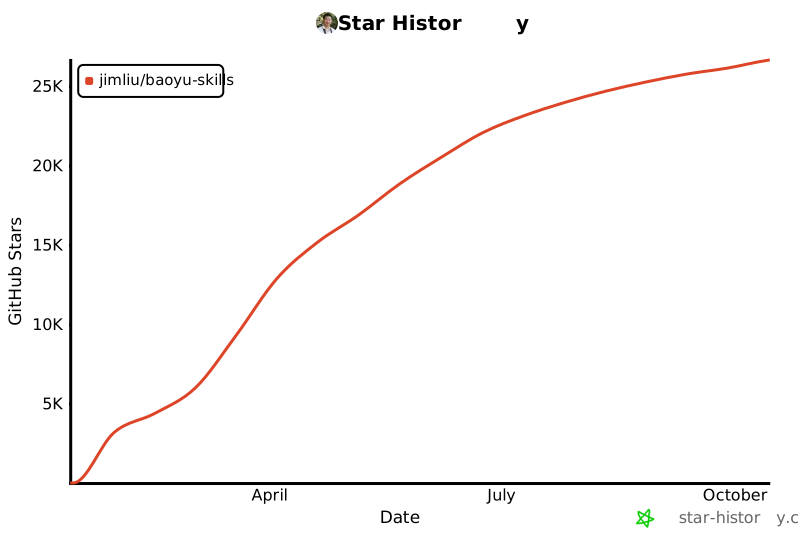](https://www.star-history.com/#JimLiu/baoyu-skills&Date)
|
||||
|
||||
+134
-3
@@ -53,9 +53,9 @@ npx skills add jimliu/baoyu-skills
|
||||
|
||||
| 插件 | 说明 | 包含技能 |
|
||||
|------|------|----------|
|
||||
| **content-skills** | 内容生成和发布 | [xhs-images](#baoyu-xhs-images), [infographic](#baoyu-infographic), [cover-image](#baoyu-cover-image), [slide-deck](#baoyu-slide-deck), [comic](#baoyu-comic), [article-illustrator](#baoyu-article-illustrator), [post-to-x](#baoyu-post-to-x), [post-to-wechat](#baoyu-post-to-wechat) |
|
||||
| **content-skills** | 内容生成和发布 | [xhs-images](#baoyu-xhs-images), [infographic](#baoyu-infographic), [cover-image](#baoyu-cover-image), [slide-deck](#baoyu-slide-deck), [comic](#baoyu-comic), [article-illustrator](#baoyu-article-illustrator), [post-to-x](#baoyu-post-to-x), [post-to-wechat](#baoyu-post-to-wechat), [post-to-weibo](#baoyu-post-to-weibo) |
|
||||
| **ai-generation-skills** | AI 生成后端 | [image-gen](#baoyu-image-gen), [danger-gemini-web](#baoyu-danger-gemini-web) |
|
||||
| **utility-skills** | 内容处理工具 | [url-to-markdown](#baoyu-url-to-markdown), [danger-x-to-markdown](#baoyu-danger-x-to-markdown), [compress-image](#baoyu-compress-image), [format-markdown](#baoyu-format-markdown) |
|
||||
| **utility-skills** | 内容处理工具 | [url-to-markdown](#baoyu-url-to-markdown), [danger-x-to-markdown](#baoyu-danger-x-to-markdown), [compress-image](#baoyu-compress-image), [format-markdown](#baoyu-format-markdown), [translate](#baoyu-translate) |
|
||||
|
||||
## 更新技能
|
||||
|
||||
@@ -504,6 +504,8 @@ npx skills add jimliu/baoyu-skills
|
||||
|
||||
发布内容和文章到 X (Twitter)。支持带图片的普通帖子和 X 文章(长篇 Markdown)。使用真实 Chrome + CDP 绕过反自动化检测。
|
||||
|
||||
纯文本输入默认按普通帖子处理,Markdown 文件默认按 X 文章处理。脚本会将内容填入浏览器,用户需手动检查并发布。
|
||||
|
||||
```bash
|
||||
# 发布文字
|
||||
/baoyu-post-to-x "Hello from Claude Code!"
|
||||
@@ -558,6 +560,42 @@ WECHAT_APP_SECRET=你的AppSecret
|
||||
|
||||
**浏览器方式**(无需 API 配置):需已安装 Google Chrome,首次运行需扫码登录(登录状态会保存)
|
||||
|
||||
#### baoyu-post-to-weibo
|
||||
|
||||
发布内容到微博。支持文字、图片、视频发布和头条文章(长篇 Markdown)。使用真实 Chrome + CDP 绕过反自动化检测。
|
||||
|
||||
**普通微博** - 文字 + 图片/视频(最多 18 个文件):
|
||||
|
||||
```bash
|
||||
# 发布文字
|
||||
/baoyu-post-to-weibo "Hello Weibo!"
|
||||
|
||||
# 发布带图片
|
||||
/baoyu-post-to-weibo "看看这个" --image photo.png
|
||||
|
||||
# 发布带视频
|
||||
/baoyu-post-to-weibo "看这个" --video clip.mp4
|
||||
```
|
||||
|
||||
**头条文章** - 长篇 Markdown 文章:
|
||||
|
||||
```bash
|
||||
# 发布文章
|
||||
/baoyu-post-to-weibo --article article.md
|
||||
|
||||
# 带封面图
|
||||
/baoyu-post-to-weibo --article article.md --cover cover.jpg
|
||||
```
|
||||
|
||||
**文章选项**:
|
||||
| 选项 | 说明 |
|
||||
|------|------|
|
||||
| `--cover <path>` | 封面图 |
|
||||
| `--title <text>` | 覆盖标题(最多 32 字) |
|
||||
| `--summary <text>` | 覆盖摘要(最多 44 字) |
|
||||
|
||||
**说明**:脚本会将内容填入浏览器,用户需手动检查并发布。首次运行需手动登录微博(登录状态会保存)。
|
||||
|
||||
### AI 生成技能 (AI Generation Skills)
|
||||
|
||||
AI 驱动的生成后端。
|
||||
@@ -641,7 +679,7 @@ AI 驱动的生成后端。
|
||||
|
||||
#### baoyu-url-to-markdown
|
||||
|
||||
通过 Chrome CDP 抓取任意 URL 并转换为干净的 Markdown。支持两种抓取模式,适应不同场景。
|
||||
通过 Chrome CDP 抓取任意 URL 并转换为 Markdown。同时保存渲染后的 HTML 快照,Defuddle 失败时自动回退到旧版提取器。
|
||||
|
||||
```bash
|
||||
# 自动模式(默认)- 页面加载后立即抓取
|
||||
@@ -739,6 +777,86 @@ AI 驱动的生成后端。
|
||||
| 代码/命令 | `` `行内` `` 或 ` ```代码块``` ` |
|
||||
| 引用 | `>` 引用块 |
|
||||
|
||||
#### baoyu-translate
|
||||
|
||||
三模式翻译技能:快速(直接翻译)、标准(分析后翻译)、精翻(完整出版级工作流,含审校与润色)。
|
||||
|
||||
```bash
|
||||
# 标准模式(默认)- 先分析再翻译
|
||||
/translate article.md --to zh-CN
|
||||
|
||||
# 快速模式 - 直接翻译
|
||||
/translate article.md --mode quick --to ja
|
||||
|
||||
# 精翻模式 - 完整工作流,含审校与润色
|
||||
/translate article.md --mode refined --to zh-CN
|
||||
|
||||
# 翻译 URL
|
||||
/translate https://example.com/article --to zh-CN
|
||||
|
||||
# 指定受众
|
||||
/translate article.md --to zh-CN --audience technical
|
||||
|
||||
# 指定风格
|
||||
/translate article.md --to zh-CN --style humorous
|
||||
|
||||
# 附加术语表
|
||||
/translate article.md --to zh-CN --glossary my-terms.md
|
||||
```
|
||||
|
||||
**选项**:
|
||||
| 选项 | 说明 |
|
||||
|------|------|
|
||||
| `<source>` | 文件路径、URL 或行内文本 |
|
||||
| `--mode <mode>` | `quick`、`normal`(默认)、`refined` |
|
||||
| `--from <lang>` | 源语言(省略则自动检测) |
|
||||
| `--to <lang>` | 目标语言(默认:`zh-CN`) |
|
||||
| `--audience <type>` | 目标读者(默认:`general`) |
|
||||
| `--style <style>` | 翻译风格(默认:`storytelling`) |
|
||||
| `--glossary <file>` | 附加术语表文件 |
|
||||
|
||||
**模式**:
|
||||
| 模式 | 步骤 | 适用场景 |
|
||||
|------|------|----------|
|
||||
| 快速 | 翻译 | 短文本、非正式内容 |
|
||||
| 标准 | 分析 → 翻译 | 文章、博客 |
|
||||
| 精翻 | 分析 → 翻译 → 审校 → 润色 | 出版级文档 |
|
||||
|
||||
标准模式完成后,可回复「继续润色」或「refine」继续审校润色步骤。
|
||||
|
||||
**受众预设**:
|
||||
| 值 | 说明 |
|
||||
|----|------|
|
||||
| `general` | 普通读者(默认)— 通俗语言,更多译注 |
|
||||
| `technical` | 开发者/工程师 — 常见技术术语少加注释 |
|
||||
| `academic` | 研究者/学者 — 正式语体,精确术语 |
|
||||
| `business` | 商务人士 — 商务友好语气 |
|
||||
|
||||
也支持自定义受众描述,如 `--audience "对 AI 感兴趣的普通读者"`。
|
||||
|
||||
**风格预设**:
|
||||
| 值 | 说明 |
|
||||
|----|------|
|
||||
| `storytelling` | 叙事流畅(默认)— 过渡自然,表达生动 |
|
||||
| `formal` | 正式、结构化 — 中性语气,无口语化表达 |
|
||||
| `technical` | 精确、文档风格 — 简洁,术语密集 |
|
||||
| `literal` | 贴近原文结构 — 最小化重构 |
|
||||
| `academic` | 学术、严谨 — 正式语体,复杂从句可接受 |
|
||||
| `business` | 简洁、结果导向 — 行动导向,高管友好 |
|
||||
| `humorous` | 保留幽默感 — 诙谐,在目标语言中重现喜剧效果 |
|
||||
| `conversational` | 口语化、亲切 — 友好,如同朋友间解释 |
|
||||
| `elegant` | 文学性、优雅 — 精心雕琢,注重韵律美感 |
|
||||
|
||||
也支持自定义风格描述,如 `--style "诗意而抒情"`。
|
||||
|
||||
**特性**:
|
||||
- 通过 EXTEND.md 自定义术语表,内置英中术语表
|
||||
- 面向受众的翻译,可调节注释深度
|
||||
- 长文档(4000+ 词)自动分块并行翻译
|
||||
- 比喻和修辞按意译而非逐字翻译
|
||||
- 为文化/专业术语添加译注
|
||||
- 输出目录保留所有中间文件
|
||||
|
||||
## 环境配置
|
||||
|
||||
部分技能需要 API 密钥或自定义配置。环境变量可以在 `.env` 文件中设置:
|
||||
@@ -842,6 +960,19 @@ HTTP_PROXY=http://127.0.0.1:7890 HTTPS_PROXY=http://127.0.0.1:7890 /baoyu-danger
|
||||
- 首次使用需确认免责声明
|
||||
- 通过环境变量或 Chrome 登录进行身份验证
|
||||
|
||||
## 致谢
|
||||
|
||||
本项目受到以下开源项目的启发,感谢它们的作者:
|
||||
|
||||
- [x-article-publisher-skill](https://github.com/wshuyi/x-article-publisher-skill) by [@wshuyi](https://github.com/wshuyi) — 发布 X 文章技能的灵感来源
|
||||
- [doocs/md](https://github.com/doocs/md) by [@doocs](https://github.com/doocs) — Markdown 转 HTML 的核心实现逻辑
|
||||
- [高密度信息图 Prompt](https://waytoagi.feishu.cn/wiki/YG0zwalijihRREkgmPzcWRInnUg) by AJ@WaytoAGI — 信息图技能的灵感来源
|
||||
- [qiaomu-mondo-poster-design](https://github.com/joeseesun/qiaomu-mondo-poster-design) by [@joeseesun](https://github.com/joeseesun)(乔木) — Mondo 风格的灵感来源
|
||||
|
||||
## 许可证
|
||||
|
||||
MIT
|
||||
|
||||
## Star History
|
||||
|
||||
[](https://www.star-history.com/#JimLiu/baoyu-skills&Date)
|
||||
|
||||
@@ -16,6 +16,8 @@ Analyze articles, identify illustration positions, generate images with Type ×
|
||||
|
||||
Combine freely: `--type infographic --style blueprint`
|
||||
|
||||
Or use presets: `--preset tech-explainer` → type + style in one flag. See [Style Presets](references/style-presets.md).
|
||||
|
||||
## Types
|
||||
|
||||
| Type | Best For |
|
||||
@@ -47,10 +49,17 @@ See [references/styles.md](references/styles.md) for Core Styles, full gallery,
|
||||
**1.5 Load Preferences (EXTEND.md) ⛔ BLOCKING**
|
||||
|
||||
```bash
|
||||
# macOS, Linux, WSL, Git Bash
|
||||
test -f .baoyu-skills/baoyu-article-illustrator/EXTEND.md && echo "project"
|
||||
test -f "$HOME/.baoyu-skills/baoyu-article-illustrator/EXTEND.md" && echo "user"
|
||||
```
|
||||
|
||||
```powershell
|
||||
# PowerShell (Windows)
|
||||
if (Test-Path .baoyu-skills/baoyu-article-illustrator/EXTEND.md) { "project" }
|
||||
if (Test-Path "$HOME/.baoyu-skills/baoyu-article-illustrator/EXTEND.md") { "user" }
|
||||
```
|
||||
|
||||
| Result | Action |
|
||||
|--------|--------|
|
||||
| Found | Read, parse, display summary |
|
||||
@@ -73,13 +82,13 @@ Full procedures: [references/workflow.md](references/workflow.md#step-2-setup--a
|
||||
|
||||
### Step 3: Confirm Settings ⚠️
|
||||
|
||||
**ONE AskUserQuestion, max 4 Qs. Q1-Q3 REQUIRED.**
|
||||
**ONE AskUserQuestion, max 4 Qs. Q1-Q2 REQUIRED. Q3 required unless preset chosen.**
|
||||
|
||||
| Q | Options |
|
||||
|---|---------|
|
||||
| **Q1: Type** | [Recommended], infographic, scene, flowchart, comparison, framework, timeline, mixed |
|
||||
| **Q1: Preset or Type** | [Recommended preset], [alt preset], or manual: infographic, scene, flowchart, comparison, framework, timeline, mixed |
|
||||
| **Q2: Density** | minimal (1-2), balanced (3-5), per-section (Recommended), rich (6+) |
|
||||
| **Q3: Style** | [Recommended], minimal-flat, sci-fi, hand-drawn, editorial, scene, Other |
|
||||
| **Q3: Style** | [Recommended], minimal-flat, sci-fi, hand-drawn, editorial, scene, poster, Other — **skip if preset chosen** |
|
||||
| Q4: Language | When article language ≠ EXTEND.md setting |
|
||||
|
||||
Full procedures: [references/workflow.md](references/workflow.md#step-3-confirm-settings-)
|
||||
@@ -151,5 +160,6 @@ illustrations/{topic-slug}/
|
||||
| [references/workflow.md](references/workflow.md) | Detailed procedures |
|
||||
| [references/usage.md](references/usage.md) | Command syntax |
|
||||
| [references/styles.md](references/styles.md) | Style gallery |
|
||||
| [references/style-presets.md](references/style-presets.md) | Preset shortcuts (type + style) |
|
||||
| [references/prompt-construction.md](references/prompt-construction.md) | Prompt templates |
|
||||
| [references/config/first-time-setup.md](references/config/first-time-setup.md) | First-time setup |
|
||||
|
||||
@@ -236,6 +236,38 @@ STYLE: [style characteristics]
|
||||
ASPECT: 16:9
|
||||
```
|
||||
|
||||
### Screen-Print Style Override
|
||||
|
||||
When `style: screen-print`, replace standard style instructions with:
|
||||
|
||||
```
|
||||
Screen print / silkscreen poster art. Flat color blocks, NO gradients.
|
||||
COLORS: 2-5 colors maximum. [Choose from style palette or duotone pair]
|
||||
TEXTURE: Halftone dot patterns, slight color layer misregistration, paper grain
|
||||
COMPOSITION: Bold silhouettes, geometric framing, negative space as storytelling element
|
||||
FIGURES: Silhouettes only, no detailed faces, stencil-cut edges
|
||||
TYPOGRAPHY: Bold condensed sans-serif integrated into composition (not overlaid)
|
||||
```
|
||||
|
||||
**Scene + screen-print**:
|
||||
```
|
||||
Conceptual poster scene. Single symbolic focal point, NOT literal illustration.
|
||||
COLORS: Duotone pair (e.g., Burnt Orange #E8751A + Deep Teal #0A6E6E) on Off-Black #121212
|
||||
COMPOSITION: Centered silhouette or geometric frame, 60%+ negative space
|
||||
TEXTURE: Halftone dots, paper grain, slight print misregistration
|
||||
```
|
||||
|
||||
**Comparison + screen-print**:
|
||||
```
|
||||
Split poster composition. Each side dominated by one color from duotone pair.
|
||||
LEFT: [Color A] side with silhouette/icon for [Option A]
|
||||
RIGHT: [Color B] side with silhouette/icon for [Option B]
|
||||
DIVIDER: Geometric shape or negative space boundary
|
||||
TEXTURE: Halftone transitions between sides
|
||||
```
|
||||
|
||||
---
|
||||
|
||||
## What to Avoid
|
||||
|
||||
- Vague descriptions ("a nice image")
|
||||
|
||||
@@ -0,0 +1,72 @@
|
||||
# Style Presets
|
||||
|
||||
`--preset X` expands to a type + style combination. Users can override either dimension.
|
||||
|
||||
## By Category
|
||||
|
||||
### Technical & Engineering
|
||||
|
||||
| --preset | Type | Style | Best For |
|
||||
|----------|------|-------|----------|
|
||||
| `tech-explainer` | `infographic` | `blueprint` | API docs, system metrics, technical deep-dives |
|
||||
| `system-design` | `framework` | `blueprint` | Architecture diagrams, system design |
|
||||
| `architecture` | `framework` | `vector-illustration` | Component relationships, module structure |
|
||||
| `science-paper` | `infographic` | `scientific` | Research findings, lab results, academic |
|
||||
|
||||
### Knowledge & Education
|
||||
|
||||
| --preset | Type | Style | Best For |
|
||||
|----------|------|-------|----------|
|
||||
| `knowledge-base` | `infographic` | `vector-illustration` | Concept explainers, tutorials, how-to |
|
||||
| `saas-guide` | `infographic` | `notion` | Product guides, SaaS docs, tool walkthroughs |
|
||||
| `tutorial` | `flowchart` | `vector-illustration` | Step-by-step tutorials, setup guides |
|
||||
| `process-flow` | `flowchart` | `notion` | Workflow documentation, onboarding flows |
|
||||
|
||||
### Data & Analysis
|
||||
|
||||
| --preset | Type | Style | Best For |
|
||||
|----------|------|-------|----------|
|
||||
| `data-report` | `infographic` | `editorial` | Data journalism, metrics reports, dashboards |
|
||||
| `versus` | `comparison` | `vector-illustration` | Tech comparisons, framework shootouts |
|
||||
| `business-compare` | `comparison` | `elegant` | Product evaluations, strategy options |
|
||||
|
||||
### Narrative & Creative
|
||||
|
||||
| --preset | Type | Style | Best For |
|
||||
|----------|------|-------|----------|
|
||||
| `storytelling` | `scene` | `warm` | Personal essays, reflections, growth stories |
|
||||
| `lifestyle` | `scene` | `watercolor` | Travel, wellness, lifestyle, creative |
|
||||
| `history` | `timeline` | `elegant` | Historical overviews, milestones |
|
||||
| `evolution` | `timeline` | `warm` | Progress narratives, growth journeys |
|
||||
|
||||
### Editorial & Opinion
|
||||
|
||||
| --preset | Type | Style | Best For |
|
||||
|----------|------|-------|----------|
|
||||
| `opinion-piece` | `scene` | `screen-print` | Op-eds, commentary, critical essays |
|
||||
| `editorial-poster` | `comparison` | `screen-print` | Debate, contrasting viewpoints |
|
||||
| `cinematic` | `scene` | `screen-print` | Dramatic narratives, cultural essays |
|
||||
|
||||
## Content Type → Preset Recommendations
|
||||
|
||||
Use this table during Step 3 to recommend presets based on Step 2 content analysis:
|
||||
|
||||
| Content Type (Step 2) | Primary Preset | Alternatives |
|
||||
|------------------------|----------------|--------------|
|
||||
| Technical | `tech-explainer` | `system-design`, `architecture` |
|
||||
| Tutorial | `tutorial` | `process-flow`, `knowledge-base` |
|
||||
| Methodology / Framework | `system-design` | `architecture`, `process-flow` |
|
||||
| Data / Metrics | `data-report` | `versus`, `tech-explainer` |
|
||||
| Comparison / Review | `versus` | `business-compare`, `editorial-poster` |
|
||||
| Narrative / Personal | `storytelling` | `lifestyle`, `evolution` |
|
||||
| Opinion / Editorial | `opinion-piece` | `cinematic`, `editorial-poster` |
|
||||
| Historical / Timeline | `history` | `evolution` |
|
||||
| Academic / Research | `science-paper` | `tech-explainer`, `data-report` |
|
||||
| SaaS / Product | `saas-guide` | `knowledge-base`, `process-flow` |
|
||||
|
||||
## Override Examples
|
||||
|
||||
- `--preset tech-explainer --style notion` = infographic type with notion style
|
||||
- `--preset storytelling --type timeline` = timeline type with warm style
|
||||
|
||||
Explicit `--type`/`--style` flags always override preset values.
|
||||
@@ -12,6 +12,7 @@ Simplified style tier for quick selection:
|
||||
| `hand-drawn` | sketch/warm | Relaxed, reflective, casual content |
|
||||
| `editorial` | editorial | Processes, data, journalism |
|
||||
| `scene` | warm/watercolor | Narratives, emotional, lifestyle |
|
||||
| `poster` | screen-print | Opinion, editorial, cultural, cinematic |
|
||||
|
||||
Use Core Styles for most cases. See full Style Gallery below for granular control.
|
||||
|
||||
@@ -40,6 +41,7 @@ Use Core Styles for most cases. See full Style Gallery below for granular contro
|
||||
| `playful` | Whimsical pastel doodles | Fun, casual, educational |
|
||||
| `retro` | 80s/90s neon geometric | 80s/90s nostalgic, bold |
|
||||
| `sketch` | Raw pencil notebook style | Brainstorming, creative exploration |
|
||||
| `screen-print` | Bold poster art, halftone textures, limited colors | Opinion, editorial, cultural, cinematic |
|
||||
| `sketch-notes` | Soft hand-drawn warm notes | Educational, warm notes |
|
||||
| `vintage` | Aged parchment historical | Historical, heritage |
|
||||
|
||||
@@ -47,14 +49,14 @@ Full specifications: `references/styles/<style>.md`
|
||||
|
||||
## Type × Style Compatibility Matrix
|
||||
|
||||
| | vector-illustration | notion | warm | minimal | blueprint | watercolor | elegant | editorial | scientific |
|
||||
|---|:---:|:---:|:---:|:---:|:---:|:---:|:---:|:---:|:---:|
|
||||
| infographic | ✓✓ | ✓✓ | ✓ | ✓✓ | ✓✓ | ✓ | ✓✓ | ✓✓ | ✓✓ |
|
||||
| scene | ✓ | ✓ | ✓✓ | ✓ | ✗ | ✓✓ | ✓ | ✓ | ✗ |
|
||||
| flowchart | ✓✓ | ✓✓ | ✓ | ✓ | ✓✓ | ✗ | ✓ | ✓✓ | ✓ |
|
||||
| comparison | ✓✓ | ✓✓ | ✓ | ✓✓ | ✓ | ✓ | ✓✓ | ✓✓ | ✓ |
|
||||
| framework | ✓✓ | ✓✓ | ✓ | ✓✓ | ✓✓ | ✗ | ✓✓ | ✓ | ✓✓ |
|
||||
| timeline | ✓ | ✓✓ | ✓ | ✓ | ✓ | ✓✓ | ✓✓ | ✓✓ | ✓ |
|
||||
| | vector-illustration | notion | warm | minimal | blueprint | watercolor | elegant | editorial | scientific | screen-print |
|
||||
|---|:---:|:---:|:---:|:---:|:---:|:---:|:---:|:---:|:---:|:---:|
|
||||
| infographic | ✓✓ | ✓✓ | ✓ | ✓✓ | ✓✓ | ✓ | ✓✓ | ✓✓ | ✓✓ | ✓ |
|
||||
| scene | ✓ | ✓ | ✓✓ | ✓ | ✗ | ✓✓ | ✓ | ✓ | ✗ | ✓✓ |
|
||||
| flowchart | ✓✓ | ✓✓ | ✓ | ✓ | ✓✓ | ✗ | ✓ | ✓✓ | ✓ | ✗ |
|
||||
| comparison | ✓✓ | ✓✓ | ✓ | ✓✓ | ✓ | ✓ | ✓✓ | ✓✓ | ✓ | ✓ |
|
||||
| framework | ✓✓ | ✓✓ | ✓ | ✓✓ | ✓✓ | ✗ | ✓✓ | ✓ | ✓✓ | ✓ |
|
||||
| timeline | ✓ | ✓✓ | ✓ | ✓ | ✓ | ✓✓ | ✓✓ | ✓✓ | ✓ | ✓ |
|
||||
|
||||
✓✓ = highly recommended | ✓ = compatible | ✗ = not recommended
|
||||
|
||||
@@ -83,6 +85,7 @@ Full specifications: `references/styles/<style>.md`
|
||||
| History, timeline, progress, evolution | timeline | elegant, warm |
|
||||
| Productivity, SaaS, tool, app, software | infographic | notion, vector-illustration |
|
||||
| Business, professional, strategy, corporate | framework | elegant |
|
||||
| Opinion, editorial, culture, philosophy, cinematic, dramatic, poster | scene | screen-print |
|
||||
| Biology, chemistry, medical, scientific | infographic | scientific |
|
||||
| Explainer, journalism, magazine, investigation | infographic | editorial |
|
||||
|
||||
@@ -172,3 +175,22 @@ Full specifications: `references/styles/<style>.md`
|
||||
- Organic flow
|
||||
- Personal journey feel
|
||||
- Growth narratives
|
||||
|
||||
### scene + screen-print
|
||||
- Bold silhouettes, symbolic compositions
|
||||
- 2-5 flat colors with halftone textures
|
||||
- Figure-ground inversion (negative space tells secondary story)
|
||||
- Vintage poster aesthetic, conceptual not literal
|
||||
- Great for opinion pieces and cultural commentary
|
||||
|
||||
### comparison + screen-print
|
||||
- Split duotone composition (one color per side)
|
||||
- Bold geometric dividers
|
||||
- Symbolic icons over detailed rendering
|
||||
- High contrast, immediate visual impact
|
||||
|
||||
### framework + screen-print
|
||||
- Geometric node representations with stencil-cut edges
|
||||
- Limited color coding (one color per concept level)
|
||||
- Clean silhouette-based iconography
|
||||
- Poster-style hierarchy with bold typography
|
||||
|
||||
@@ -0,0 +1,70 @@
|
||||
# screen-print
|
||||
|
||||
Bold poster art with limited colors, halftone textures, and symbolic storytelling
|
||||
|
||||
## Design Aesthetic
|
||||
|
||||
Screen print / silkscreen aesthetic inspired by Mondo limited-edition posters and vintage concert prints. Flat color blocks, halftone dot patterns, bold silhouettes, and deliberate print imperfections. Conceptual and symbolic rather than literal — one iconic image tells the whole story. Perfect for opinion pieces, cultural commentary, and editorial content.
|
||||
|
||||
## Background
|
||||
|
||||
- Color: Off-Black (#121212) or Warm Cream (#F5E6D0)
|
||||
- Texture: Paper grain with subtle halftone dot overlay
|
||||
|
||||
## Color Palette
|
||||
|
||||
| Role | Color | Hex | Usage |
|
||||
|------|-------|-----|-------|
|
||||
| Background | Off-Black | #121212 | Dark compositions |
|
||||
| Background Alt | Warm Cream | #F5E6D0 | Light compositions |
|
||||
| Primary | Burnt Orange | #E8751A | Main accent |
|
||||
| Secondary | Deep Teal | #0A6E6E | Contrast accent |
|
||||
| Tertiary | Crimson | #C0392B | Bold emphasis |
|
||||
| Highlight | Amber | #F4A623 | Small accents |
|
||||
| Text | Cream White | #FAF3E0 | On dark backgrounds |
|
||||
|
||||
**Duotone Pairs** (choose ONE pair for high-impact compositions):
|
||||
|
||||
| Pair | Color A | Color B | Feel |
|
||||
|------|---------|---------|------|
|
||||
| Orange + Teal | #E8751A | #0A6E6E | Cinematic, action |
|
||||
| Red + Cream | #C0392B | #F5E6D0 | Bold, classic |
|
||||
| Blue + Gold | #1A3A5C | #D4A843 | Prestigious, premium |
|
||||
| Crimson + Navy | #DC143C | #0D1B2A | Dramatic, noir |
|
||||
|
||||
**Rule**: Use 2-5 colors maximum. Fewer colors = stronger impact.
|
||||
|
||||
## Visual Elements
|
||||
|
||||
- Bold silhouettes and symbolic shapes
|
||||
- Halftone dot patterns within color fills
|
||||
- Slight color layer misregistration (print offset effect)
|
||||
- Geometric framing (circles, arches, triangles)
|
||||
- Figure-ground inversion (negative space forms secondary image)
|
||||
- Stencil-cut edges, no outlines — shapes defined by color boundaries
|
||||
- Typography integrated as design element, not overlay
|
||||
- Vintage poster border treatments
|
||||
|
||||
## Style Rules
|
||||
|
||||
### Do
|
||||
|
||||
- Limit to 2-5 flat colors
|
||||
- Use bold silhouettes over detailed rendering
|
||||
- Let negative space tell part of the story
|
||||
- Add halftone texture for authenticity
|
||||
- Use geometric composition (centered, symmetrical)
|
||||
- Reference vintage decades (60s/70s/80s) for era feel
|
||||
|
||||
### Don't
|
||||
|
||||
- Use photorealistic rendering or gradients
|
||||
- Add complex facial details (silhouettes preferred)
|
||||
- Mix too many visual elements (one focal point)
|
||||
- Use modern digital aesthetic
|
||||
- Create busy or cluttered compositions
|
||||
- Use more than 5 colors
|
||||
|
||||
## Best For
|
||||
|
||||
Opinion/editorial articles, cultural commentary, philosophy and strategy, dramatic narratives, cinematic storytelling, music and entertainment, event announcements, bold branding content
|
||||
@@ -29,6 +29,7 @@
|
||||
|--------|-------------|
|
||||
| `--type <name>` | Illustration type (see Type Gallery in SKILL.md) |
|
||||
| `--style <name>` | Visual style (see references/styles.md) |
|
||||
| `--preset <name>` | Shorthand for type + style combo (see [references/style-presets.md](references/style-presets.md)) |
|
||||
| `--density <level>` | Image count: minimal / balanced / rich |
|
||||
|
||||
## Input Modes
|
||||
@@ -55,12 +56,27 @@ Configure in EXTEND.md: `default_output_dir: illustrations-subdir`
|
||||
/baoyu-article-illustrator api-design.md --type infographic --style blueprint
|
||||
```
|
||||
|
||||
**Same thing with preset**:
|
||||
```bash
|
||||
/baoyu-article-illustrator api-design.md --preset tech-explainer
|
||||
```
|
||||
|
||||
**Personal story**:
|
||||
```bash
|
||||
/baoyu-article-illustrator journey.md --type scene --style warm
|
||||
/baoyu-article-illustrator journey.md --preset storytelling
|
||||
```
|
||||
|
||||
**Tutorial with steps**:
|
||||
```bash
|
||||
/baoyu-article-illustrator how-to-deploy.md --type flowchart --density rich
|
||||
/baoyu-article-illustrator how-to-deploy.md --preset tutorial --density rich
|
||||
```
|
||||
|
||||
**Opinion article with poster style**:
|
||||
```bash
|
||||
/baoyu-article-illustrator opinion.md --preset opinion-piece
|
||||
```
|
||||
|
||||
**Preset with override**:
|
||||
```bash
|
||||
/baoyu-article-illustrator article.md --preset tech-explainer --style notion
|
||||
```
|
||||
|
||||
@@ -86,10 +86,17 @@ Check preferences and existing state, then ask ALL needed questions in ONE AskUs
|
||||
**CRITICAL**: If EXTEND.md not found, MUST complete first-time setup before ANY other questions or steps. Do NOT proceed to reference images, do NOT ask about content, do NOT ask about type/style — ONLY complete the preferences setup first.
|
||||
|
||||
```bash
|
||||
# macOS, Linux, WSL, Git Bash
|
||||
test -f .baoyu-skills/baoyu-article-illustrator/EXTEND.md && echo "project"
|
||||
test -f "$HOME/.baoyu-skills/baoyu-article-illustrator/EXTEND.md" && echo "user"
|
||||
```
|
||||
|
||||
```powershell
|
||||
# PowerShell (Windows)
|
||||
if (Test-Path .baoyu-skills/baoyu-article-illustrator/EXTEND.md) { "project" }
|
||||
if (Test-Path "$HOME/.baoyu-skills/baoyu-article-illustrator/EXTEND.md") { "user" }
|
||||
```
|
||||
|
||||
| Result | Action |
|
||||
|--------|--------|
|
||||
| Found | Read, parse, display summary → Continue |
|
||||
@@ -158,9 +165,16 @@ For each reference image:
|
||||
|
||||
**Do NOT skip.** Use ONE AskUserQuestion call with max 4 questions. **Q1, Q2, Q3 are ALL REQUIRED.**
|
||||
|
||||
### Q1: Illustration Type ⚠️ REQUIRED
|
||||
- [Recommended based on analysis] (Recommended)
|
||||
- infographic / scene / flowchart / comparison / framework / timeline / mixed
|
||||
### Q1: Preset or Type ⚠️ REQUIRED
|
||||
|
||||
Based on Step 2 content analysis, recommend a preset first (sets both type & style). Look up [style-presets.md](style-presets.md) "Content Type → Preset Recommendations" table.
|
||||
|
||||
- [Recommended preset] — [brief: type + style + why] (Recommended)
|
||||
- [Alternative preset] — [brief]
|
||||
- Or choose type manually: infographic / scene / flowchart / comparison / framework / timeline / mixed
|
||||
|
||||
**If user picks a preset → skip Q3** (type & style both resolved).
|
||||
**If user picks a type → Q3 is REQUIRED.**
|
||||
|
||||
### Q2: Density ⚠️ REQUIRED - DO NOT SKIP
|
||||
- minimal (1-2) - Core concepts only
|
||||
@@ -168,7 +182,7 @@ For each reference image:
|
||||
- per-section - At least 1 per section/chapter (Recommended)
|
||||
- rich (6+) - Comprehensive coverage
|
||||
|
||||
### Q3: Style ⚠️ REQUIRED (ALWAYS ask, even with preferred_style in EXTEND.md)
|
||||
### Q3: Style ⚠️ REQUIRED (skip if preset chosen in Q1)
|
||||
|
||||
If EXTEND.md has `preferred_style`:
|
||||
- [Custom style name + brief description] (Recommended)
|
||||
@@ -184,13 +198,14 @@ If no `preferred_style` (present Core Styles first):
|
||||
|
||||
**Core Styles** (simplified selection):
|
||||
|
||||
| Core Style | Best For |
|
||||
|------------|----------|
|
||||
| `minimal-flat` | General, knowledge sharing, SaaS |
|
||||
| `sci-fi` | AI, frontier tech, system design |
|
||||
| `hand-drawn` | Relaxed, reflective, casual |
|
||||
| `editorial` | Processes, data, journalism |
|
||||
| `scene` | Narratives, emotional, lifestyle |
|
||||
| Core Style | Maps To | Best For |
|
||||
|------------|---------|----------|
|
||||
| `minimal-flat` | notion | General, knowledge sharing, SaaS |
|
||||
| `sci-fi` | blueprint | AI, frontier tech, system design |
|
||||
| `hand-drawn` | sketch/warm | Relaxed, reflective, casual |
|
||||
| `editorial` | editorial | Processes, data, journalism |
|
||||
| `scene` | warm/watercolor | Narratives, emotional, lifestyle |
|
||||
| `poster` | screen-print | Opinion, editorial, cultural, cinematic |
|
||||
|
||||
Style selection based on Type × Style compatibility matrix (styles.md).
|
||||
Full specs: `styles/<style>.md`
|
||||
|
||||
@@ -107,6 +107,7 @@ Details: [references/auto-selection.md](references/auto-selection.md)
|
||||
1. Determine this SKILL.md file's directory path as `SKILL_DIR`
|
||||
2. Script path = `${SKILL_DIR}/scripts/<script-name>.ts`
|
||||
3. Replace all `${SKILL_DIR}` in this document with the actual path
|
||||
4. Resolve `${BUN_X}` runtime: if `bun` installed → `bun`; if `npx` available → `npx -y bun`; else suggest installing bun
|
||||
|
||||
**Script Reference**:
|
||||
| Script | Purpose |
|
||||
@@ -209,7 +210,7 @@ Analyze → [Check Existing?] → [Confirm: Style + Reviews] → Storyboard →
|
||||
- **Backup rule**: If `characters/characters.png` exists, rename to `characters/characters-backup-YYYYMMDD-HHMMSS.png`
|
||||
```bash
|
||||
# Use Reference Sheet Prompt from characters/characters.md
|
||||
npx -y bun ${SKILL_DIR}/../baoyu-image-gen/scripts/main.ts \
|
||||
${BUN_X} ${SKILL_DIR}/../baoyu-image-gen/scripts/main.ts \
|
||||
--promptfiles characters/characters.md \
|
||||
--image characters/characters.png --ar 4:3
|
||||
```
|
||||
@@ -233,7 +234,7 @@ Compress to reduce token usage when used as reference image:
|
||||
|
||||
```bash
|
||||
# Example: ALWAYS include --ref for consistency
|
||||
npx -y bun ${SKILL_DIR}/../baoyu-image-gen/scripts/main.ts \
|
||||
${BUN_X} ${SKILL_DIR}/../baoyu-image-gen/scripts/main.ts \
|
||||
--promptfiles prompts/01-page-xxx.md \
|
||||
--image 01-page-xxx.png --ar 3:4 \
|
||||
--ref characters/characters.png
|
||||
|
||||
@@ -34,16 +34,20 @@ Input → Preferences → Analyze → [Check Existing?] → [Confirm 1: Style +
|
||||
|
||||
### 1.1 Load Preferences (EXTEND.md)
|
||||
|
||||
Use Bash to check EXTEND.md existence (priority order):
|
||||
Check EXTEND.md existence (priority order):
|
||||
|
||||
```bash
|
||||
# Check project-level first
|
||||
# macOS, Linux, WSL, Git Bash
|
||||
test -f .baoyu-skills/baoyu-comic/EXTEND.md && echo "project"
|
||||
|
||||
# Then user-level (cross-platform: $HOME works on macOS/Linux/WSL)
|
||||
test -f "$HOME/.baoyu-skills/baoyu-comic/EXTEND.md" && echo "user"
|
||||
```
|
||||
|
||||
```powershell
|
||||
# PowerShell (Windows)
|
||||
if (Test-Path .baoyu-skills/baoyu-comic/EXTEND.md) { "project" }
|
||||
if (Test-Path "$HOME/.baoyu-skills/baoyu-comic/EXTEND.md") { "user" }
|
||||
```
|
||||
|
||||
| Path | Location |
|
||||
|------|----------|
|
||||
| `.baoyu-skills/baoyu-comic/EXTEND.md` | Project directory |
|
||||
@@ -431,7 +435,7 @@ With confirmed prompts from Step 5/6:
|
||||
|
||||
```bash
|
||||
# Each page generation MUST include --ref
|
||||
npx -y bun ${SKILL_DIR}/../baoyu-image-gen/scripts/main.ts \
|
||||
${BUN_X} ${SKILL_DIR}/../baoyu-image-gen/scripts/main.ts \
|
||||
--promptfiles prompts/01-page-xxx.md \
|
||||
--image 01-page-xxx.png \
|
||||
--ar 3:4 \
|
||||
@@ -474,7 +478,7 @@ If image generation skill supports `--sessionId`:
|
||||
After all images generated:
|
||||
|
||||
```bash
|
||||
npx -y bun ${SKILL_DIR}/scripts/merge-to-pdf.ts <comic-dir>
|
||||
${BUN_X} ${SKILL_DIR}/scripts/merge-to-pdf.ts <comic-dir>
|
||||
```
|
||||
|
||||
Creates `{topic-slug}.pdf` with all pages as full-page images.
|
||||
|
||||
@@ -9,7 +9,7 @@ Compresses images using best available tool (sips → cwebp → ImageMagick →
|
||||
|
||||
## Script Directory
|
||||
|
||||
Scripts in `scripts/` subdirectory. Replace `${SKILL_DIR}` with this SKILL.md's directory path.
|
||||
Scripts in `scripts/` subdirectory. `${SKILL_DIR}` = this SKILL.md's directory path. Resolve `${BUN_X}` runtime: if `bun` installed → `bun`; if `npx` available → `npx -y bun`; else suggest installing bun. Replace `${SKILL_DIR}` and `${BUN_X}` with actual values.
|
||||
|
||||
| Script | Purpose |
|
||||
|--------|---------|
|
||||
@@ -17,16 +17,20 @@ Scripts in `scripts/` subdirectory. Replace `${SKILL_DIR}` with this SKILL.md's
|
||||
|
||||
## Preferences (EXTEND.md)
|
||||
|
||||
Use Bash to check EXTEND.md existence (priority order):
|
||||
Check EXTEND.md existence (priority order):
|
||||
|
||||
```bash
|
||||
# Check project-level first
|
||||
# macOS, Linux, WSL, Git Bash
|
||||
test -f .baoyu-skills/baoyu-compress-image/EXTEND.md && echo "project"
|
||||
|
||||
# Then user-level (cross-platform: $HOME works on macOS/Linux/WSL)
|
||||
test -f "$HOME/.baoyu-skills/baoyu-compress-image/EXTEND.md" && echo "user"
|
||||
```
|
||||
|
||||
```powershell
|
||||
# PowerShell (Windows)
|
||||
if (Test-Path .baoyu-skills/baoyu-compress-image/EXTEND.md) { "project" }
|
||||
if (Test-Path "$HOME/.baoyu-skills/baoyu-compress-image/EXTEND.md") { "user" }
|
||||
```
|
||||
|
||||
┌────────────────────────────────────────────────────────┬───────────────────┐
|
||||
│ Path │ Location │
|
||||
├────────────────────────────────────────────────────────┼───────────────────┤
|
||||
@@ -48,7 +52,7 @@ test -f "$HOME/.baoyu-skills/baoyu-compress-image/EXTEND.md" && echo "user"
|
||||
## Usage
|
||||
|
||||
```bash
|
||||
npx -y bun ${SKILL_DIR}/scripts/main.ts <input> [options]
|
||||
${BUN_X} ${SKILL_DIR}/scripts/main.ts <input> [options]
|
||||
```
|
||||
|
||||
## Options
|
||||
@@ -67,16 +71,16 @@ npx -y bun ${SKILL_DIR}/scripts/main.ts <input> [options]
|
||||
|
||||
```bash
|
||||
# Single file → WebP (replaces original)
|
||||
npx -y bun ${SKILL_DIR}/scripts/main.ts image.png
|
||||
${BUN_X} ${SKILL_DIR}/scripts/main.ts image.png
|
||||
|
||||
# Keep PNG format
|
||||
npx -y bun ${SKILL_DIR}/scripts/main.ts image.png -f png --keep
|
||||
${BUN_X} ${SKILL_DIR}/scripts/main.ts image.png -f png --keep
|
||||
|
||||
# Directory recursive
|
||||
npx -y bun ${SKILL_DIR}/scripts/main.ts ./images/ -r -q 75
|
||||
${BUN_X} ${SKILL_DIR}/scripts/main.ts ./images/ -r -q 75
|
||||
|
||||
# JSON output
|
||||
npx -y bun ${SKILL_DIR}/scripts/main.ts image.png --json
|
||||
${BUN_X} ${SKILL_DIR}/scripts/main.ts image.png --json
|
||||
```
|
||||
|
||||
**Output**:
|
||||
|
||||
@@ -1,6 +1,6 @@
|
||||
---
|
||||
name: baoyu-cover-image
|
||||
description: Generates article cover images with 5 dimensions (type, palette, rendering, text, mood) combining 9 color palettes and 6 rendering styles. Supports cinematic (2.35:1), widescreen (16:9), and square (1:1) aspects. Use when user asks to "generate cover image", "create article cover", or "make cover".
|
||||
description: Generates article cover images with 5 dimensions (type, palette, rendering, text, mood) combining 10 color palettes and 7 rendering styles. Supports cinematic (2.35:1), widescreen (16:9), and square (1:1) aspects. Use when user asks to "generate cover image", "create article cover", or "make cover".
|
||||
---
|
||||
|
||||
# Cover Image Generator
|
||||
@@ -35,8 +35,8 @@ Generate elegant cover images for articles with 5-dimensional customization.
|
||||
| Option | Description |
|
||||
|--------|-------------|
|
||||
| `--type <name>` | hero, conceptual, typography, metaphor, scene, minimal |
|
||||
| `--palette <name>` | warm, elegant, cool, dark, earth, vivid, pastel, mono, retro |
|
||||
| `--rendering <name>` | flat-vector, hand-drawn, painterly, digital, pixel, chalk |
|
||||
| `--palette <name>` | warm, elegant, cool, dark, earth, vivid, pastel, mono, retro, duotone |
|
||||
| `--rendering <name>` | flat-vector, hand-drawn, painterly, digital, pixel, chalk, screen-print |
|
||||
| `--style <name>` | Preset shorthand (see [Style Presets](references/style-presets.md)) |
|
||||
| `--text <level>` | none, title-only, title-subtitle, text-rich |
|
||||
| `--mood <level>` | subtle, balanced, bold |
|
||||
@@ -52,8 +52,8 @@ Generate elegant cover images for articles with 5-dimensional customization.
|
||||
| Dimension | Values | Default |
|
||||
|-----------|--------|---------|
|
||||
| **Type** | hero, conceptual, typography, metaphor, scene, minimal | auto |
|
||||
| **Palette** | warm, elegant, cool, dark, earth, vivid, pastel, mono, retro | auto |
|
||||
| **Rendering** | flat-vector, hand-drawn, painterly, digital, pixel, chalk | auto |
|
||||
| **Palette** | warm, elegant, cool, dark, earth, vivid, pastel, mono, retro, duotone | auto |
|
||||
| **Rendering** | flat-vector, hand-drawn, painterly, digital, pixel, chalk, screen-print | auto |
|
||||
| **Text** | none, title-only, title-subtitle, text-rich | title-only |
|
||||
| **Mood** | subtle, balanced, bold | balanced |
|
||||
| **Font** | clean, handwritten, serif, display | clean |
|
||||
@@ -65,10 +65,10 @@ Auto-selection rules: [references/auto-selection.md](references/auto-selection.m
|
||||
**Types**: hero, conceptual, typography, metaphor, scene, minimal
|
||||
→ Details: [references/types.md](references/types.md)
|
||||
|
||||
**Palettes**: warm, elegant, cool, dark, earth, vivid, pastel, mono, retro
|
||||
**Palettes**: warm, elegant, cool, dark, earth, vivid, pastel, mono, retro, duotone
|
||||
→ Details: [references/palettes/](references/palettes/)
|
||||
|
||||
**Renderings**: flat-vector, hand-drawn, painterly, digital, pixel, chalk
|
||||
**Renderings**: flat-vector, hand-drawn, painterly, digital, pixel, chalk, screen-print
|
||||
→ Details: [references/renderings/](references/renderings/)
|
||||
|
||||
**Text Levels**: none (pure visual) | title-only (default) | title-subtitle | text-rich (with tags)
|
||||
@@ -128,10 +128,17 @@ Analyze + Save Refs → [Output Dir] → [Confirm: 6 Dimensions] → Prompt →
|
||||
|
||||
Check EXTEND.md existence (priority: project → user):
|
||||
```bash
|
||||
# macOS, Linux, WSL, Git Bash
|
||||
test -f .baoyu-skills/baoyu-cover-image/EXTEND.md && echo "project"
|
||||
test -f "$HOME/.baoyu-skills/baoyu-cover-image/EXTEND.md" && echo "user"
|
||||
```
|
||||
|
||||
```powershell
|
||||
# PowerShell (Windows)
|
||||
if (Test-Path .baoyu-skills/baoyu-cover-image/EXTEND.md) { "project" }
|
||||
if (Test-Path "$HOME/.baoyu-skills/baoyu-cover-image/EXTEND.md") { "user" }
|
||||
```
|
||||
|
||||
| Result | Action |
|
||||
|--------|--------|
|
||||
| Found | Load, display summary → Continue |
|
||||
|
||||
@@ -26,6 +26,7 @@ When a dimension is omitted, select based on content signals.
|
||||
| Fantasy, children, gentle, creative, whimsical | `pastel` |
|
||||
| Zen, focus, essential, pure, simple | `mono` |
|
||||
| History, vintage, retro, classic, exploration | `retro` |
|
||||
| Movie poster, album cover, concert, cinematic, dramatic, two-color | `duotone` |
|
||||
|
||||
## Auto Rendering Selection
|
||||
|
||||
@@ -37,6 +38,7 @@ When a dimension is omitted, select based on content signals.
|
||||
| Data, dashboard, SaaS, corporate, polished | `digital` |
|
||||
| Gaming, retro, 8-bit, nostalgic | `pixel` |
|
||||
| Education, tutorial, classroom, teaching | `chalk` |
|
||||
| Poster, movie, album, concert, silhouette, mondo, limited-edition | `screen-print` |
|
||||
|
||||
## Auto Text Selection
|
||||
|
||||
|
||||
@@ -4,28 +4,29 @@
|
||||
|
||||
## Palette × Rendering
|
||||
|
||||
| | flat-vector | hand-drawn | painterly | digital | pixel | chalk |
|
||||
|---|:---:|:---:|:---:|:---:|:---:|:---:|
|
||||
| warm | ✓✓ | ✓✓ | ✓ | ✓ | ✓ | ✓ |
|
||||
| elegant | ✓ | ✓✓ | ✓ | ✓✓ | ✗ | ✗ |
|
||||
| cool | ✓✓ | ✓ | ✗ | ✓✓ | ✓ | ✓ |
|
||||
| dark | ✓ | ✓ | ✓ | ✓✓ | ✓ | ✓✓ |
|
||||
| earth | ✓ | ✓✓ | ✓✓ | ✓ | ✗ | ✗ |
|
||||
| vivid | ✓✓ | ✓ | ✓ | ✓ | ✓✓ | ✓ |
|
||||
| pastel | ✓✓ | ✓✓ | ✓✓ | ✓ | ✗ | ✗ |
|
||||
| mono | ✓✓ | ✓ | ✗ | ✓✓ | ✓ | ✓ |
|
||||
| retro | ✓✓ | ✓✓ | ✓ | ✓✓ | ✓ | ✗ |
|
||||
| | flat-vector | hand-drawn | painterly | digital | pixel | chalk | screen-print |
|
||||
|---|:---:|:---:|:---:|:---:|:---:|:---:|:---:|
|
||||
| warm | ✓✓ | ✓✓ | ✓ | ✓ | ✓ | ✓ | ✓ |
|
||||
| elegant | ✓ | ✓✓ | ✓ | ✓✓ | ✗ | ✗ | ✓ |
|
||||
| cool | ✓✓ | ✓ | ✗ | ✓✓ | ✓ | ✓ | ✓ |
|
||||
| dark | ✓ | ✓ | ✓ | ✓✓ | ✓ | ✓✓ | ✓✓ |
|
||||
| earth | ✓ | ✓✓ | ✓✓ | ✓ | ✗ | ✗ | ✓ |
|
||||
| vivid | ✓✓ | ✓ | ✓ | ✓ | ✓✓ | ✓ | ✓✓ |
|
||||
| pastel | ✓✓ | ✓✓ | ✓✓ | ✓ | ✗ | ✗ | ✗ |
|
||||
| mono | ✓✓ | ✓ | ✗ | ✓✓ | ✓ | ✓ | ✓✓ |
|
||||
| retro | ✓✓ | ✓✓ | ✓ | ✓✓ | ✓ | ✗ | ✓✓ |
|
||||
| duotone | ✓ | ✗ | ✗ | ✓ | ✗ | ✗ | ✓✓ |
|
||||
|
||||
## Type × Rendering
|
||||
|
||||
| | flat-vector | hand-drawn | painterly | digital | pixel | chalk |
|
||||
|---|:---:|:---:|:---:|:---:|:---:|:---:|
|
||||
| hero | ✓ | ✓✓ | ✓✓ | ✓✓ | ✓ | ✓ |
|
||||
| conceptual | ✓✓ | ✓ | ✗ | ✓✓ | ✓ | ✓ |
|
||||
| typography | ✓✓ | ✓ | ✓ | ✓✓ | ✓ | ✓ |
|
||||
| metaphor | ✓ | ✓✓ | ✓✓ | ✓ | ✗ | ✓ |
|
||||
| scene | ✗ | ✓ | ✓✓ | ✓ | ✓ | ✗ |
|
||||
| minimal | ✓✓ | ✓ | ✓ | ✓✓ | ✗ | ✗ |
|
||||
| | flat-vector | hand-drawn | painterly | digital | pixel | chalk | screen-print |
|
||||
|---|:---:|:---:|:---:|:---:|:---:|:---:|:---:|
|
||||
| hero | ✓ | ✓✓ | ✓✓ | ✓✓ | ✓ | ✓ | ✓✓ |
|
||||
| conceptual | ✓✓ | ✓ | ✗ | ✓✓ | ✓ | ✓ | ✓ |
|
||||
| typography | ✓✓ | ✓ | ✓ | ✓✓ | ✓ | ✓ | ✓✓ |
|
||||
| metaphor | ✓ | ✓✓ | ✓✓ | ✓ | ✗ | ✓ | ✓✓ |
|
||||
| scene | ✗ | ✓ | ✓✓ | ✓ | ✓ | ✗ | ✓ |
|
||||
| minimal | ✓✓ | ✓ | ✓ | ✓✓ | ✗ | ✗ | ✓✓ |
|
||||
|
||||
## Type × Text
|
||||
|
||||
@@ -51,9 +52,9 @@
|
||||
|
||||
## Font × Rendering
|
||||
|
||||
| | flat-vector | hand-drawn | painterly | digital | pixel | chalk |
|
||||
|---|:---:|:---:|:---:|:---:|:---:|:---:|
|
||||
| clean | ✓✓ | ✗ | ✗ | ✓✓ | ✓ | ✗ |
|
||||
| handwritten | ✓ | ✓✓ | ✓✓ | ✓ | ✗ | ✓✓ |
|
||||
| serif | ✓ | ✗ | ✓ | ✓✓ | ✗ | ✗ |
|
||||
| display | ✓✓ | ✓ | ✓ | ✓✓ | ✓✓ | ✓ |
|
||||
| | flat-vector | hand-drawn | painterly | digital | pixel | chalk | screen-print |
|
||||
|---|:---:|:---:|:---:|:---:|:---:|:---:|:---:|
|
||||
| clean | ✓✓ | ✗ | ✗ | ✓✓ | ✓ | ✗ | ✓ |
|
||||
| handwritten | ✓ | ✓✓ | ✓✓ | ✓ | ✗ | ✓✓ | ✗ |
|
||||
| serif | ✓ | ✗ | ✓ | ✓✓ | ✗ | ✗ | ✓ |
|
||||
| display | ✓✓ | ✓ | ✓ | ✓✓ | ✓✓ | ✓ | ✓✓ |
|
||||
|
||||
@@ -120,12 +120,12 @@ Bold, decorative typography for maximum impact.
|
||||
|
||||
## Rendering Compatibility
|
||||
|
||||
| Font × Rendering | flat-vector | hand-drawn | painterly | digital | pixel | chalk |
|
||||
|------------------|:-----------:|:----------:|:---------:|:-------:|:-----:|:-----:|
|
||||
| clean | ✓✓ | ✗ | ✗ | ✓✓ | ✓ | ✗ |
|
||||
| handwritten | ✓ | ✓✓ | ✓✓ | ✓ | ✗ | ✓✓ |
|
||||
| serif | ✓ | ✗ | ✓ | ✓✓ | ✗ | ✗ |
|
||||
| display | ✓✓ | ✓ | ✓ | ✓✓ | ✓✓ | ✓ |
|
||||
| Font × Rendering | flat-vector | hand-drawn | painterly | digital | pixel | chalk | screen-print |
|
||||
|------------------|:-----------:|:----------:|:---------:|:-------:|:-----:|:-----:|:------------:|
|
||||
| clean | ✓✓ | ✗ | ✗ | ✓✓ | ✓ | ✗ | ✓ |
|
||||
| handwritten | ✓ | ✓✓ | ✓✓ | ✓ | ✗ | ✓✓ | ✗ |
|
||||
| serif | ✓ | ✗ | ✓ | ✓✓ | ✗ | ✗ | ✓ |
|
||||
| display | ✓✓ | ✓ | ✓ | ✓✓ | ✓✓ | ✓ | ✓✓ |
|
||||
|
||||
✓✓ = highly recommended | ✓ = compatible | ✗ = not recommended
|
||||
|
||||
@@ -148,6 +148,7 @@ Font style adapts to palette characteristics:
|
||||
| Cool (cool, mono, elegant) | Perfect match | Contrast | Classic pairing | Bold statement |
|
||||
| Dark (dark, vivid) | High contrast | Glow effects | Dramatic | Maximum impact |
|
||||
| Vintage (retro) | Modern contrast | Nostalgic fit | Period-appropriate | Retro headlines |
|
||||
| Duotone (duotone) | Sharp contrast | Not recommended | Dramatic pairing | Cinematic impact |
|
||||
|
||||
## Auto Selection
|
||||
|
||||
|
||||
@@ -112,6 +112,7 @@ Mood modifies the base palette characteristics:
|
||||
| Cool palettes (cool, mono, elegant) | Lighter lines, muted colors | Standard colors | Stronger contrast, sharper definition |
|
||||
| Dark palettes (dark, vivid) | Reduced contrast, softer glow | Standard colors | Maximum impact, vivid saturation |
|
||||
| Vintage palettes (retro) | More faded, sepia-heavy | Standard colors | Bolder retro contrasts |
|
||||
| Duotone palettes (duotone) | Softer contrast between pair | Standard two-color split | Maximum contrast, stark separation |
|
||||
|
||||
## Rendering Interaction
|
||||
|
||||
@@ -125,6 +126,7 @@ Mood adjusts rendering characteristics:
|
||||
| digital | Reduced shadows, lower contrast | Standard rendering | Stronger shadows, sharper edges |
|
||||
| pixel | Fewer colors, simpler shapes | Standard palette | More colors, denser pixel detail |
|
||||
| chalk | Lighter chalk, more board showing | Standard chalk | Heavy chalk, vivid colors, dense marks |
|
||||
| screen-print | Fewer colors (2), lighter halftone | Standard 3-4 colors, medium halftone | More colors (4-5), dense halftone, stronger misregistration |
|
||||
|
||||
## Auto Selection
|
||||
|
||||
|
||||
@@ -0,0 +1,39 @@
|
||||
# duotone
|
||||
|
||||
Dramatic, cinematic, two-color high contrast
|
||||
|
||||
## Color Palette
|
||||
|
||||
| Role | Color | Hex |
|
||||
|------|-------|-----|
|
||||
| Primary 1 | Burnt Orange | #E8751A |
|
||||
| Primary 2 | Deep Teal | #0A6E6E |
|
||||
| Background | Off-Black | #121212 |
|
||||
| Background Alt | Dark Charcoal | #1E1E1E |
|
||||
| Accent 1 | Warm Cream | #F5E6D0 |
|
||||
| Accent 2 | Amber Highlight | #F4A623 |
|
||||
|
||||
## Duotone Pair Options
|
||||
|
||||
Choose ONE pair based on content mood. The two colors dominate the entire image:
|
||||
|
||||
| Pair | Color A | Color B | Feel |
|
||||
|------|---------|---------|------|
|
||||
| Orange + Teal | #E8751A | #0A6E6E | Cinematic, action |
|
||||
| Red + Cream | #C0392B | #F5E6D0 | Bold, classic |
|
||||
| Blue + Gold | #1A3A5C | #D4A843 | Prestigious, premium |
|
||||
| Purple + Green | #6B3FA0 | #2ECC71 | Futuristic, contrast |
|
||||
| Magenta + Cyan | #C2185B | #00BCD4 | Vibrant, pop |
|
||||
| Crimson + Navy | #DC143C | #0D1B2A | Dramatic, noir |
|
||||
|
||||
## Decorative Hints
|
||||
|
||||
- Stark two-color separation across entire composition
|
||||
- Halftone transitions between the two colors
|
||||
- Silhouettes in one color against the other
|
||||
- Minimal use of third color (only for small highlights)
|
||||
- High contrast figure-ground relationships
|
||||
|
||||
## Best For
|
||||
|
||||
Movie posters, album covers, concert prints, dramatic announcements, cinematic content, bold branding, editorial covers, artistic campaigns
|
||||
@@ -0,0 +1,44 @@
|
||||
# screen-print
|
||||
|
||||
Bold, limited-color poster art with print texture
|
||||
|
||||
## Core Characteristics
|
||||
|
||||
Screen print / silkscreen aesthetic with flat color blocks, halftone textures, and deliberate print imperfections. Think Mondo limited-edition posters, vintage concert prints, and alternative movie poster art.
|
||||
|
||||
## Lines
|
||||
|
||||
- Clean, sharp edges between color blocks
|
||||
- No outlines — shapes defined by color boundaries
|
||||
- Stencil-cut quality, bold silhouettes
|
||||
- Geometric shapes with precise registration
|
||||
|
||||
## Texture
|
||||
|
||||
- Halftone dot patterns within color fills
|
||||
- Slight color layer misregistration (offset between print layers)
|
||||
- Paper grain texture beneath colors
|
||||
- Risograph / screen print imperfections (ink spread, dot gain)
|
||||
|
||||
## Depth
|
||||
|
||||
- Flat color planes layered front to back
|
||||
- Depth through silhouette overlap and color layering
|
||||
- No gradients — tonal variation via halftone density
|
||||
- Negative space as active compositional element
|
||||
|
||||
## Element Vocabulary
|
||||
|
||||
- Bold silhouettes and symbolic shapes
|
||||
- Geometric framing (circles, arches, triangles)
|
||||
- Figure-ground inversion (negative space forms secondary image)
|
||||
- Limited icon vocabulary: key props, symbolic objects
|
||||
- Typography integrated as design element, not overlay
|
||||
- Vintage poster border treatments
|
||||
|
||||
## Typography Approach
|
||||
|
||||
- Bold condensed sans-serif or hand-drawn lettering
|
||||
- Art Deco influences, vintage poster typography
|
||||
- Typography as integral part of composition (not separate layer)
|
||||
- Strong readability through high contrast with background
|
||||
@@ -24,6 +24,11 @@
|
||||
| `warm` | `warm` | `hand-drawn` |
|
||||
| `warm-flat` | `warm` | `flat-vector` |
|
||||
| `watercolor` | `earth` | `painterly` |
|
||||
| `poster-art` | `retro` | `screen-print` |
|
||||
| `mondo` | `mono` | `screen-print` |
|
||||
| `art-deco` | `elegant` | `screen-print` |
|
||||
| `propaganda` | `vivid` | `screen-print` |
|
||||
| `cinematic` | `duotone` | `screen-print` |
|
||||
|
||||
## Override Examples
|
||||
|
||||
|
||||
@@ -14,7 +14,8 @@ Text/image generation via Gemini Web API. Supports reference images and multi-tu
|
||||
**Agent Execution Instructions**:
|
||||
1. Determine this SKILL.md file's directory path as `SKILL_DIR`
|
||||
2. Script path = `${SKILL_DIR}/scripts/<script-name>.ts`
|
||||
3. Replace all `${SKILL_DIR}` in this document with the actual path
|
||||
3. Resolve `${BUN_X}` runtime: if `bun` installed → `bun`; if `npx` available → `npx -y bun`; else suggest installing bun
|
||||
4. Replace all `${SKILL_DIR}` and `${BUN_X}` in this document with actual values
|
||||
|
||||
**Script Reference**:
|
||||
| Script | Purpose |
|
||||
@@ -43,16 +44,20 @@ Before first use, verify user consent for reverse-engineered API usage.
|
||||
|
||||
## Preferences (EXTEND.md)
|
||||
|
||||
Use Bash to check EXTEND.md existence (priority order):
|
||||
Check EXTEND.md existence (priority order):
|
||||
|
||||
```bash
|
||||
# Check project-level first
|
||||
# macOS, Linux, WSL, Git Bash
|
||||
test -f .baoyu-skills/baoyu-danger-gemini-web/EXTEND.md && echo "project"
|
||||
|
||||
# Then user-level (cross-platform: $HOME works on macOS/Linux/WSL)
|
||||
test -f "$HOME/.baoyu-skills/baoyu-danger-gemini-web/EXTEND.md" && echo "user"
|
||||
```
|
||||
|
||||
```powershell
|
||||
# PowerShell (Windows)
|
||||
if (Test-Path .baoyu-skills/baoyu-danger-gemini-web/EXTEND.md) { "project" }
|
||||
if (Test-Path "$HOME/.baoyu-skills/baoyu-danger-gemini-web/EXTEND.md") { "user" }
|
||||
```
|
||||
|
||||
┌──────────────────────────────────────────────────────────┬───────────────────┐
|
||||
│ Path │ Location │
|
||||
├──────────────────────────────────────────────────────────┼───────────────────┤
|
||||
@@ -75,23 +80,23 @@ test -f "$HOME/.baoyu-skills/baoyu-danger-gemini-web/EXTEND.md" && echo "user"
|
||||
|
||||
```bash
|
||||
# Text generation
|
||||
npx -y bun ${SKILL_DIR}/scripts/main.ts "Your prompt"
|
||||
npx -y bun ${SKILL_DIR}/scripts/main.ts --prompt "Your prompt" --model gemini-3-flash
|
||||
${BUN_X} ${SKILL_DIR}/scripts/main.ts "Your prompt"
|
||||
${BUN_X} ${SKILL_DIR}/scripts/main.ts --prompt "Your prompt" --model gemini-3-flash
|
||||
|
||||
# Image generation
|
||||
npx -y bun ${SKILL_DIR}/scripts/main.ts --prompt "A cute cat" --image cat.png
|
||||
npx -y bun ${SKILL_DIR}/scripts/main.ts --promptfiles system.md content.md --image out.png
|
||||
${BUN_X} ${SKILL_DIR}/scripts/main.ts --prompt "A cute cat" --image cat.png
|
||||
${BUN_X} ${SKILL_DIR}/scripts/main.ts --promptfiles system.md content.md --image out.png
|
||||
|
||||
# Vision input (reference images)
|
||||
npx -y bun ${SKILL_DIR}/scripts/main.ts --prompt "Describe this" --reference image.png
|
||||
npx -y bun ${SKILL_DIR}/scripts/main.ts --prompt "Create variation" --reference a.png --image out.png
|
||||
${BUN_X} ${SKILL_DIR}/scripts/main.ts --prompt "Describe this" --reference image.png
|
||||
${BUN_X} ${SKILL_DIR}/scripts/main.ts --prompt "Create variation" --reference a.png --image out.png
|
||||
|
||||
# Multi-turn conversation
|
||||
npx -y bun ${SKILL_DIR}/scripts/main.ts "Remember: 42" --sessionId session-abc
|
||||
npx -y bun ${SKILL_DIR}/scripts/main.ts "What number?" --sessionId session-abc
|
||||
${BUN_X} ${SKILL_DIR}/scripts/main.ts "Remember: 42" --sessionId session-abc
|
||||
${BUN_X} ${SKILL_DIR}/scripts/main.ts "What number?" --sessionId session-abc
|
||||
|
||||
# JSON output
|
||||
npx -y bun ${SKILL_DIR}/scripts/main.ts "Hello" --json
|
||||
${BUN_X} ${SKILL_DIR}/scripts/main.ts "Hello" --json
|
||||
```
|
||||
|
||||
## Options
|
||||
|
||||
@@ -42,11 +42,11 @@ function getWslWindowsHome(): string | null {
|
||||
}
|
||||
|
||||
export function resolveGeminiWebChromeProfileDir(): string {
|
||||
const override = process.env.GEMINI_WEB_CHROME_PROFILE_DIR?.trim();
|
||||
const override = process.env.BAOYU_CHROME_PROFILE_DIR?.trim() || process.env.GEMINI_WEB_CHROME_PROFILE_DIR?.trim();
|
||||
if (override) return path.resolve(override);
|
||||
const wslHome = getWslWindowsHome();
|
||||
if (wslHome) return path.join(wslHome, '.local', 'share', APP_DATA_DIR, GEMINI_DATA_DIR, PROFILE_DIR_NAME);
|
||||
return path.join(resolveGeminiWebDataDir(), PROFILE_DIR_NAME);
|
||||
if (wslHome) return path.join(wslHome, '.local', 'share', APP_DATA_DIR, PROFILE_DIR_NAME);
|
||||
return path.join(resolveUserDataRoot(), APP_DATA_DIR, PROFILE_DIR_NAME);
|
||||
}
|
||||
|
||||
export function resolveGeminiWebSessionsDir(): string {
|
||||
|
||||
@@ -16,6 +16,7 @@ Scripts located in `scripts/` subdirectory.
|
||||
**Path Resolution**:
|
||||
1. `SKILL_DIR` = this SKILL.md's directory
|
||||
2. Script path = `${SKILL_DIR}/scripts/main.ts`
|
||||
3. Resolve `${BUN_X}` runtime: if `bun` installed → `bun`; if `npx` available → `npx -y bun`; else suggest installing bun
|
||||
|
||||
## Consent Requirement
|
||||
|
||||
@@ -69,16 +70,20 @@ Use `AskUserQuestion` with options: "Yes, I accept" | "No, I decline"
|
||||
|
||||
## Preferences (EXTEND.md)
|
||||
|
||||
Use Bash to check EXTEND.md existence (priority order):
|
||||
Check EXTEND.md existence (priority order):
|
||||
|
||||
```bash
|
||||
# Check project-level first
|
||||
# macOS, Linux, WSL, Git Bash
|
||||
test -f .baoyu-skills/baoyu-danger-x-to-markdown/EXTEND.md && echo "project"
|
||||
|
||||
# Then user-level (cross-platform: $HOME works on macOS/Linux/WSL)
|
||||
test -f "$HOME/.baoyu-skills/baoyu-danger-x-to-markdown/EXTEND.md" && echo "user"
|
||||
```
|
||||
|
||||
```powershell
|
||||
# PowerShell (Windows)
|
||||
if (Test-Path .baoyu-skills/baoyu-danger-x-to-markdown/EXTEND.md) { "project" }
|
||||
if (Test-Path "$HOME/.baoyu-skills/baoyu-danger-x-to-markdown/EXTEND.md") { "user" }
|
||||
```
|
||||
|
||||
┌────────────────────────────────────────────────────────────┬───────────────────┐
|
||||
│ Path │ Location │
|
||||
├────────────────────────────────────────────────────────────┼───────────────────┤
|
||||
@@ -135,10 +140,10 @@ Full reference: [references/config/first-time-setup.md](references/config/first-
|
||||
## Usage
|
||||
|
||||
```bash
|
||||
npx -y bun ${SKILL_DIR}/scripts/main.ts <url>
|
||||
npx -y bun ${SKILL_DIR}/scripts/main.ts <url> -o output.md
|
||||
npx -y bun ${SKILL_DIR}/scripts/main.ts <url> --download-media
|
||||
npx -y bun ${SKILL_DIR}/scripts/main.ts <url> --json
|
||||
${BUN_X} ${SKILL_DIR}/scripts/main.ts <url>
|
||||
${BUN_X} ${SKILL_DIR}/scripts/main.ts <url> -o output.md
|
||||
${BUN_X} ${SKILL_DIR}/scripts/main.ts <url> --download-media
|
||||
${BUN_X} ${SKILL_DIR}/scripts/main.ts <url> --json
|
||||
```
|
||||
|
||||
## Options
|
||||
|
||||
@@ -43,11 +43,11 @@ function getWslWindowsHome(): string | null {
|
||||
}
|
||||
|
||||
export function resolveXToMarkdownChromeProfileDir(): string {
|
||||
const override = process.env.X_CHROME_PROFILE_DIR?.trim();
|
||||
const override = process.env.BAOYU_CHROME_PROFILE_DIR?.trim() || process.env.X_CHROME_PROFILE_DIR?.trim();
|
||||
if (override) return path.resolve(override);
|
||||
const wslHome = getWslWindowsHome();
|
||||
if (wslHome) return path.join(wslHome, ".local", "share", APP_DATA_DIR, X_TO_MARKDOWN_DATA_DIR, PROFILE_DIR_NAME);
|
||||
return path.join(resolveXToMarkdownDataDir(), PROFILE_DIR_NAME);
|
||||
if (wslHome) return path.join(wslHome, ".local", "share", APP_DATA_DIR, PROFILE_DIR_NAME);
|
||||
return path.join(resolveUserDataRoot(), APP_DATA_DIR, PROFILE_DIR_NAME);
|
||||
}
|
||||
|
||||
export function resolveXToMarkdownConsentPath(): string {
|
||||
|
||||
@@ -5,11 +5,13 @@ description: Formats plain text or markdown files with frontmatter, titles, summ
|
||||
|
||||
# Markdown Formatter
|
||||
|
||||
Transforms plain text or markdown files into well-structured markdown with proper frontmatter, formatting, and typography.
|
||||
Transforms plain text or markdown into well-structured, reader-friendly markdown. The goal is to help readers quickly grasp key points, highlights, and structure — without changing any original content.
|
||||
|
||||
**Core principle**: Only adjust formatting and fix obvious typos. Never add, delete, or rewrite content.
|
||||
|
||||
## Script Directory
|
||||
|
||||
Scripts in `scripts/` subdirectory. Replace `${SKILL_DIR}` with this SKILL.md's directory path.
|
||||
Scripts in `scripts/` subdirectory. `${SKILL_DIR}` = this SKILL.md's directory path. Resolve `${BUN_X}` runtime: if `bun` installed → `bun`; if `npx` available → `npx -y bun`; else suggest installing bun. Replace `${SKILL_DIR}` and `${BUN_X}` with actual values.
|
||||
|
||||
| Script | Purpose |
|
||||
|--------|---------|
|
||||
@@ -19,16 +21,20 @@ Scripts in `scripts/` subdirectory. Replace `${SKILL_DIR}` with this SKILL.md's
|
||||
|
||||
## Preferences (EXTEND.md)
|
||||
|
||||
Use Bash to check EXTEND.md existence (priority order):
|
||||
Check EXTEND.md existence (priority order):
|
||||
|
||||
```bash
|
||||
# Check project-level first
|
||||
# macOS, Linux, WSL, Git Bash
|
||||
test -f .baoyu-skills/baoyu-format-markdown/EXTEND.md && echo "project"
|
||||
|
||||
# Then user-level (cross-platform: $HOME works on macOS/Linux/WSL)
|
||||
test -f "$HOME/.baoyu-skills/baoyu-format-markdown/EXTEND.md" && echo "user"
|
||||
```
|
||||
|
||||
```powershell
|
||||
# PowerShell (Windows)
|
||||
if (Test-Path .baoyu-skills/baoyu-format-markdown/EXTEND.md) { "project" }
|
||||
if (Test-Path "$HOME/.baoyu-skills/baoyu-format-markdown/EXTEND.md") { "user" }
|
||||
```
|
||||
|
||||
┌──────────────────────────────────────────────────────────┬───────────────────┐
|
||||
│ Path │ Location │
|
||||
├──────────────────────────────────────────────────────────┼───────────────────┤
|
||||
@@ -45,55 +51,45 @@ test -f "$HOME/.baoyu-skills/baoyu-format-markdown/EXTEND.md" && echo "user"
|
||||
│ Not found │ Use defaults │
|
||||
└───────────┴───────────────────────────────────────────────────────────────────────────┘
|
||||
|
||||
**EXTEND.md Supports**: Default formatting options | Summary length preferences
|
||||
**EXTEND.md Supports**:
|
||||
|
||||
| Setting | Values | Default | Description |
|
||||
|---------|--------|---------|-------------|
|
||||
| `auto_select` | `true`/`false` | `false` | Skip both title and summary selection, auto-pick best |
|
||||
| `auto_select_title` | `true`/`false` | `false` | Skip title selection only |
|
||||
| `auto_select_summary` | `true`/`false` | `false` | Skip summary selection only |
|
||||
| Other | — | — | Default formatting options, typography preferences |
|
||||
|
||||
## Usage
|
||||
|
||||
Claude performs content analysis and formatting (Steps 1-6), then runs the script for typography fixes (Step 7).
|
||||
The workflow has two phases: **Analyze** (understand the content) then **Format** (apply formatting). Claude performs content analysis and formatting (Steps 1-5), then runs the script for typography fixes (Step 6).
|
||||
|
||||
## Workflow
|
||||
|
||||
### Step 1: Read Source File
|
||||
### Step 1: Read & Detect Content Type
|
||||
|
||||
Read the user-specified markdown or plain text file.
|
||||
|
||||
### Step 1.5: Detect Content Type & Confirm
|
||||
|
||||
**Content Type Detection:**
|
||||
Read the user-specified file, then detect content type:
|
||||
|
||||
| Indicator | Classification |
|
||||
|-----------|----------------|
|
||||
| Has `---` YAML frontmatter | Markdown |
|
||||
| Has `#`, `##`, `###` headings | Markdown |
|
||||
| Has `**bold**`, `*italic*` | Markdown |
|
||||
| Has `- ` or `1. ` lists | Markdown |
|
||||
| Has ``` code blocks | Markdown |
|
||||
| Has `> ` blockquotes | Markdown |
|
||||
| Has `**bold**`, `*italic*`, lists, code blocks, blockquotes | Markdown |
|
||||
| None of above | Plain text |
|
||||
|
||||
**Decision Flow:**
|
||||
|
||||
┌─────────────────┬────────────────────────────────────────────────┐
|
||||
│ Content Type │ Action │
|
||||
├─────────────────┼────────────────────────────────────────────────┤
|
||||
│ Plain text │ Proceed to Step 2 (format to markdown) │
|
||||
├─────────────────┼────────────────────────────────────────────────┤
|
||||
│ Markdown │ Use AskUserQuestion to confirm optimization │
|
||||
└─────────────────┴────────────────────────────────────────────────┘
|
||||
|
||||
**If Markdown detected, ask user:**
|
||||
|
||||
```
|
||||
Detected existing markdown formatting. What would you like to do?
|
||||
|
||||
1. Optimize formatting (Recommended)
|
||||
- Add/improve frontmatter, headings, bold, lists
|
||||
- Analyze content, improve headings, bold, lists for readability
|
||||
- Run typography script (spacing, emphasis fixes)
|
||||
- Output: {filename}-formatted.md
|
||||
|
||||
2. Keep original formatting
|
||||
- Preserve existing markdown structure
|
||||
- Run typography script (spacing, emphasis fixes)
|
||||
- Run typography script only
|
||||
- Output: {filename}-formatted.md
|
||||
|
||||
3. Typography fixes only
|
||||
@@ -102,115 +98,205 @@ Detected existing markdown formatting. What would you like to do?
|
||||
```
|
||||
|
||||
**Based on user choice:**
|
||||
- **Optimize**: Continue to Step 2-8 (full workflow)
|
||||
- **Keep original**: Skip Steps 2-5, copy file → Step 6-8 (run script on copy)
|
||||
- **Typography only**: Skip Steps 2-6, run Step 7 on original file directly
|
||||
- **Optimize**: Continue to Step 2 (full workflow)
|
||||
- **Keep original**: Skip to Step 5, copy file then run Step 6
|
||||
- **Typography only**: Skip to Step 6, run on original file directly
|
||||
|
||||
### Step 2: Analyze Content Structure
|
||||
### Step 2: Analyze Content (Reader's Perspective)
|
||||
|
||||
Identify:
|
||||
- Existing title (H1 `#`)
|
||||
- Paragraph separations
|
||||
- Keywords suitable for **bold**
|
||||
- Parallel content convertible to lists
|
||||
- Code snippets
|
||||
- Quotations
|
||||
Read the entire content carefully. Think from a reader's perspective: what would help them quickly understand and remember the key information?
|
||||
|
||||
### Step 3: Check/Create Frontmatter
|
||||
Produce an analysis covering these dimensions:
|
||||
|
||||
**2.1 Highlights & Key Insights**
|
||||
- Core arguments or conclusions the author makes
|
||||
- Surprising facts, data points, or counterintuitive claims
|
||||
- Memorable quotes or well-phrased sentences (golden quotes)
|
||||
|
||||
**2.2 Structure Assessment**
|
||||
- Does the content have a clear logical flow? What is it?
|
||||
- Are there natural section boundaries that lack headings?
|
||||
- Are there long walls of text that could benefit from visual breaks?
|
||||
|
||||
**2.3 Reader-Important Information**
|
||||
- Actionable advice or takeaways
|
||||
- Definitions, explanations of key concepts
|
||||
- Lists or enumerations buried in prose
|
||||
- Comparisons or contrasts that would be clearer as tables
|
||||
|
||||
**2.4 Formatting Issues**
|
||||
- Missing or inconsistent heading hierarchy
|
||||
- Paragraphs that mix multiple topics
|
||||
- Parallel items written as prose instead of lists
|
||||
- Code, commands, or technical terms not marked as code
|
||||
- Obvious typos or formatting errors
|
||||
|
||||
**Save analysis to file**: `{original-filename}-analysis.md`
|
||||
|
||||
The analysis file serves as the blueprint for Step 3. Use this format:
|
||||
|
||||
```markdown
|
||||
# Content Analysis: {filename}
|
||||
|
||||
## Highlights & Key Insights
|
||||
- [list findings]
|
||||
|
||||
## Structure Assessment
|
||||
- Current flow: [describe]
|
||||
- Suggested sections: [list heading candidates with brief rationale]
|
||||
|
||||
## Reader-Important Information
|
||||
- [list actionable items, key concepts, buried lists, potential tables]
|
||||
|
||||
## Formatting Issues
|
||||
- [list specific issues with location references]
|
||||
|
||||
## Typos Found
|
||||
- [list any obvious typos with corrections, or "None found"]
|
||||
```
|
||||
|
||||
### Step 3: Check/Create Frontmatter, Title & Summary
|
||||
|
||||
Check for YAML frontmatter (`---` block). Create if missing.
|
||||
|
||||
**Meta field handling:**
|
||||
|
||||
| Field | Processing |
|
||||
|-------|------------|
|
||||
| `title` | See Step 4 |
|
||||
| `slug` | Infer from file path (e.g., `posts/2026/01/10/vibe-coding/` → `vibe-coding`) or generate from title |
|
||||
| `summary` | Generate engaging summary (100-150 characters) |
|
||||
| `coverImage` | Check if `imgs/cover.png` exists in same directory; if so, use relative path (also accepted: `featureImage`) |
|
||||
| `title` | See **Title Generation** below |
|
||||
| `slug` | Infer from file path or generate from title |
|
||||
| `summary` | See **Summary Generation** below |
|
||||
| `coverImage` | Check if `imgs/cover.png` exists in same directory; if so, use relative path |
|
||||
|
||||
### Step 4: Title Handling
|
||||
**Title Generation:**
|
||||
|
||||
**Logic:**
|
||||
1. If frontmatter already has `title` → use it, no H1 in body
|
||||
2. If first line is H1 → extract to frontmatter `title`, remove H1 from body
|
||||
3. If neither exists → generate candidate titles
|
||||
Whether or not a title already exists, always run the title optimization flow (unless `auto_select_title` is set).
|
||||
|
||||
**Title generation flow:**
|
||||
**Preparation** — read the full text and extract:
|
||||
- Core argument (one sentence: "what is this article about?")
|
||||
- Most impactful opinion or conclusion
|
||||
- Reader pain point or curiosity trigger
|
||||
- Most memorable metaphor or golden quote
|
||||
|
||||
1. Generate 3 candidate titles based on content
|
||||
2. Use `AskUserQuestion` tool:
|
||||
**Generate 3-4 style-differentiated candidates:**
|
||||
|
||||
| Style | Characteristics | Example |
|
||||
|-------|----------------|---------|
|
||||
| Subversive | Deny common practice, create conflict | "All de-AI-flavor prompts are wrong" |
|
||||
| Solution | Give the answer directly, promise value | "One recipe to make AI write in your voice" |
|
||||
| Suspense | Reveal half, spark curiosity | "It took me six months to find how to remove AI flavor" |
|
||||
| Concrete number | Use numbers for credibility | "150 lines of docs taught AI my writing style" |
|
||||
|
||||
Present to user:
|
||||
|
||||
```
|
||||
Select a title:
|
||||
Pick a title:
|
||||
|
||||
1. [Title A] (Recommended)
|
||||
2. [Title B]
|
||||
3. [Title C]
|
||||
1. [Title A] — (recommended)
|
||||
2. [Title B] — [style note]
|
||||
3. [Title C] — [style note]
|
||||
|
||||
Enter number, or type a custom title:
|
||||
```
|
||||
|
||||
3. If no selection within a few seconds, use recommended (option 1)
|
||||
Put the strongest hook first and mark it (recommended).
|
||||
|
||||
**Title principles:**
|
||||
- Concise, max 20 characters
|
||||
- Captures core message
|
||||
- Engaging, sparks reading interest
|
||||
- Accurate, avoids clickbait
|
||||
- **Hook in first 5 chars**: create information gap or cognitive conflict
|
||||
- **Specific > abstract**: "150 lines" beats "a document"
|
||||
- **Negation > affirmation**: "you're doing it wrong" beats "the right way"
|
||||
- **Conversational**: like chatting with a friend, not a paper title
|
||||
- **Max ~25 chars**: longer titles get truncated in feeds
|
||||
- **Accurate, not clickbait**: the article must deliver what the title promises
|
||||
|
||||
**Important:** Once title is in frontmatter, body should NOT have H1 (avoid duplication)
|
||||
**Prohibited patterns:**
|
||||
- "浅谈 XX"、"关于 XX 的思考"、"XX 的探索与实践"
|
||||
- "震惊!"、"万字长文"、"建议收藏"
|
||||
- Pure questions without direction: "AI 写作的未来在哪里?"
|
||||
|
||||
### Step 5: Format Processing
|
||||
If first line is H1, extract to frontmatter and remove from body. If frontmatter already has `title`, include it as context but still generate fresh candidates.
|
||||
|
||||
**Formatting rules:**
|
||||
**Summary Generation:**
|
||||
|
||||
| Element | Format |
|
||||
|---------|--------|
|
||||
| Titles | Use `#`, `##`, `###` hierarchy |
|
||||
| Key points | Use `**bold**` |
|
||||
| Parallel items | Convert to `-` unordered or `1.` ordered lists |
|
||||
| Code/commands | Use `` `inline` `` or ` ```block``` ` |
|
||||
| Quotes/sayings | Use `>` blockquote |
|
||||
| Separators | Use `---` where appropriate |
|
||||
Generate 3 candidate summaries with different angles. Present to user:
|
||||
|
||||
**Formatting principles:**
|
||||
- Preserve original content and viewpoints
|
||||
- Add formatting only, do not modify text
|
||||
- Formatting serves readability
|
||||
- Avoid over-formatting
|
||||
```
|
||||
Pick a summary:
|
||||
|
||||
### Step 6: Save Formatted File
|
||||
1. [Summary A] — [focus note]
|
||||
2. [Summary B] — [focus note]
|
||||
3. [Summary C] — [focus note]
|
||||
|
||||
Enter number, or type a custom summary:
|
||||
```
|
||||
|
||||
**Summary principles:**
|
||||
- 80-150 characters, precise and information-rich
|
||||
- Convey **core value** to the reader, not just the topic
|
||||
- Vary angles: problem-driven, result-driven, insight-driven
|
||||
- **Hook the reader**: make them want to read the full article
|
||||
- Use concrete details (numbers, outcomes, specific methods) over vague descriptions
|
||||
|
||||
**Prohibited patterns:**
|
||||
- "本文介绍了..."、"本文探讨了..."
|
||||
- Pure topic description without value proposition
|
||||
- Repeating the title in different words
|
||||
|
||||
If frontmatter already has `summary`, skip selection and use it.
|
||||
|
||||
**EXTEND.md skip behavior:** If `auto_select: true` is set in EXTEND.md, skip title and summary selection — generate the best candidate directly without asking. User can also set `auto_select_title: true` or `auto_select_summary: true` independently.
|
||||
|
||||
Once title is in frontmatter, body should NOT have H1 (avoid duplication).
|
||||
|
||||
### Step 4: Format Content
|
||||
|
||||
Apply formatting guided by the Step 2 analysis. The goal is making the content scannable and the key points impossible to miss.
|
||||
|
||||
**Formatting toolkit:**
|
||||
|
||||
| Element | When to use | Format |
|
||||
|---------|-------------|--------|
|
||||
| Headings | Natural topic boundaries, section breaks | `##`, `###` hierarchy |
|
||||
| Bold | Key conclusions, important terms, core takeaways | `**bold**` |
|
||||
| Unordered lists | Parallel items, feature lists, examples | `- item` |
|
||||
| Ordered lists | Sequential steps, ranked items, procedures | `1. item` |
|
||||
| Tables | Comparisons, structured data, option matrices | Markdown table |
|
||||
| Code | Commands, file paths, technical terms, variable names | `` `inline` `` or fenced blocks |
|
||||
| Blockquotes | Notable quotes, important warnings, cited text | `> quote` |
|
||||
| Separators | Major topic transitions | `---` |
|
||||
|
||||
**Formatting principles — what NOT to do:**
|
||||
- Do NOT add sentences, explanations, or commentary
|
||||
- Do NOT delete or shorten any content
|
||||
- Do NOT rephrase or rewrite the author's words
|
||||
- Do NOT add headings that editorialize (e.g., "Amazing Discovery" — use neutral descriptive headings)
|
||||
- Do NOT over-format: not every sentence needs bold, not every paragraph needs a heading
|
||||
|
||||
**Formatting principles — what TO do:**
|
||||
- Preserve the author's voice, tone, and every word
|
||||
- **Bold key conclusions and core takeaways** — the sentences a reader would highlight
|
||||
- Extract parallel items from prose into lists only when the structure is clearly there
|
||||
- Add headings where the topic genuinely shifts — prefer vivid, specific headings over generic ones (e.g., "3 天搞定 vs 传统方案" over "方案对比")
|
||||
- Use tables for comparisons or structured data buried in prose
|
||||
- Use blockquotes for golden quotes, memorable statements, or important warnings
|
||||
- Fix obvious typos (based on Step 2 findings)
|
||||
|
||||
### Step 5: Save Formatted File
|
||||
|
||||
Save as `{original-filename}-formatted.md`
|
||||
|
||||
Examples:
|
||||
- `final.md` → `final-formatted.md`
|
||||
- `draft-v1.md` → `draft-v1-formatted.md`
|
||||
|
||||
**If user chose "Keep original formatting" (from Step 1.5):**
|
||||
- Copy original file to `{filename}-formatted.md` without modifications
|
||||
- Proceed to Step 7 for typography fixes only
|
||||
|
||||
**Backup existing file:**
|
||||
|
||||
If `{filename}-formatted.md` already exists, backup before overwriting:
|
||||
|
||||
```bash
|
||||
# Check if formatted file exists
|
||||
if [ -f "{filename}-formatted.md" ]; then
|
||||
# Backup with timestamp
|
||||
mv "{filename}-formatted.md" "{filename}-formatted.backup-$(date +%Y%m%d-%H%M%S).md"
|
||||
fi
|
||||
```
|
||||
|
||||
Example:
|
||||
- `final-formatted.md` exists → backup to `final-formatted.backup-20260128-143052.md`
|
||||
### Step 6: Execute Typography Script
|
||||
|
||||
### Step 7: Execute Text Formatting Script
|
||||
|
||||
After saving, **must** run the formatting script:
|
||||
Run the formatting script on the output file:
|
||||
|
||||
```bash
|
||||
npx -y bun ${SKILL_DIR}/scripts/main.ts {output-file-path} [options]
|
||||
${BUN_X} ${SKILL_DIR}/scripts/main.ts {output-file-path} [options]
|
||||
```
|
||||
|
||||
**Script Options:**
|
||||
@@ -223,75 +309,66 @@ npx -y bun ${SKILL_DIR}/scripts/main.ts {output-file-path} [options]
|
||||
| `--no-spacing` | | Do not add CJK/English spacing | |
|
||||
| `--emphasis` | `-e` | Fix CJK emphasis punctuation issues | true |
|
||||
| `--no-emphasis` | | Do not fix CJK emphasis issues | |
|
||||
| `--help` | `-h` | Show help message | |
|
||||
|
||||
**Examples:**
|
||||
|
||||
```bash
|
||||
# Default: spacing + emphasis enabled, quotes disabled
|
||||
npx -y bun ${SKILL_DIR}/scripts/main.ts article.md
|
||||
${BUN_X} ${SKILL_DIR}/scripts/main.ts article.md
|
||||
|
||||
# Enable all features including quote replacement
|
||||
npx -y bun ${SKILL_DIR}/scripts/main.ts article.md --quotes
|
||||
${BUN_X} ${SKILL_DIR}/scripts/main.ts article.md --quotes
|
||||
|
||||
# Only fix emphasis issues, skip spacing
|
||||
npx -y bun ${SKILL_DIR}/scripts/main.ts article.md --no-spacing
|
||||
|
||||
# Disable all processing except frontmatter formatting
|
||||
npx -y bun ${SKILL_DIR}/scripts/main.ts article.md --no-spacing --no-emphasis
|
||||
${BUN_X} ${SKILL_DIR}/scripts/main.ts article.md --no-spacing
|
||||
```
|
||||
|
||||
**Script performs (based on options):**
|
||||
1. Fix CJK emphasis/bold punctuation issues (default: enabled)
|
||||
2. Add CJK/English mixed text spacing via autocorrect (default: enabled)
|
||||
3. Replace ASCII quotes `"..."` with fullwidth quotes `"..."` (default: disabled)
|
||||
3. Replace ASCII quotes with fullwidth quotes (default: disabled)
|
||||
4. Format frontmatter YAML (always enabled)
|
||||
|
||||
### Step 8: Display Results
|
||||
### Step 7: Completion Report
|
||||
|
||||
Display a report summarizing all changes made:
|
||||
|
||||
```
|
||||
**Formatting complete**
|
||||
**Formatting Complete**
|
||||
|
||||
File: posts/2026/01/09/example/final-formatted.md
|
||||
**Files:**
|
||||
- Analysis: {filename}-analysis.md
|
||||
- Formatted: {filename}-formatted.md
|
||||
|
||||
Changes:
|
||||
- Added title: [title content]
|
||||
- Added X bold markers
|
||||
- Added X lists
|
||||
- Added X code blocks
|
||||
**Content Analysis Summary:**
|
||||
- Highlights found: X key insights
|
||||
- Golden quotes: X memorable sentences
|
||||
- Formatting issues fixed: X items
|
||||
|
||||
**Changes Applied:**
|
||||
- Frontmatter: [added/updated] (title, slug, summary)
|
||||
- Headings added: X (##: N, ###: N)
|
||||
- Bold markers added: X
|
||||
- Lists created: X (from prose → list conversion)
|
||||
- Tables created: X
|
||||
- Code markers added: X
|
||||
- Blockquotes added: X
|
||||
- Typos fixed: X [list each: "original" → "corrected"]
|
||||
|
||||
**Typography Script:**
|
||||
- CJK spacing: [applied/skipped]
|
||||
- Emphasis fixes: [applied/skipped]
|
||||
- Quote replacement: [applied/skipped]
|
||||
```
|
||||
|
||||
## Formatting Example
|
||||
|
||||
**Before:**
|
||||
```
|
||||
This is plain text. First point is efficiency improvement. Second point is cost reduction. Third point is experience optimization. Use npm install to install dependencies.
|
||||
```
|
||||
|
||||
**After:**
|
||||
```markdown
|
||||
---
|
||||
title: Three Core Advantages
|
||||
slug: three-core-advantages
|
||||
summary: Discover the three key benefits that drive success in modern projects.
|
||||
---
|
||||
|
||||
This is plain text.
|
||||
|
||||
**Main advantages:**
|
||||
- Efficiency improvement
|
||||
- Cost reduction
|
||||
- Experience optimization
|
||||
|
||||
Use `npm install` to install dependencies.
|
||||
```
|
||||
Adjust the report to reflect actual changes — omit categories where no changes were made.
|
||||
|
||||
## Notes
|
||||
|
||||
- Preserve original writing style and tone
|
||||
- Specify correct language for code blocks (e.g., `python`, `javascript`)
|
||||
- Maintain CJK/English spacing standards
|
||||
- Do not add content not present in original
|
||||
- The analysis file is a working document — it helps maintain consistency between what was identified and what was formatted
|
||||
|
||||
## Extension Support
|
||||
|
||||
|
||||
@@ -12,6 +12,7 @@ Official API-based image generation. Supports OpenAI, Google, DashScope (阿里
|
||||
**Agent Execution**:
|
||||
1. `SKILL_DIR` = this SKILL.md file's directory
|
||||
2. Script path = `${SKILL_DIR}/scripts/main.ts`
|
||||
3. Resolve `${BUN_X}` runtime: if `bun` installed → `bun`; if `npx` available → `npx -y bun`; else suggest installing bun
|
||||
|
||||
## Step 0: Load Preferences ⛔ BLOCKING
|
||||
|
||||
@@ -20,10 +21,17 @@ Official API-based image generation. Supports OpenAI, Google, DashScope (阿里
|
||||
Check EXTEND.md existence (priority: project → user):
|
||||
|
||||
```bash
|
||||
# macOS, Linux, WSL, Git Bash
|
||||
test -f .baoyu-skills/baoyu-image-gen/EXTEND.md && echo "project"
|
||||
test -f "$HOME/.baoyu-skills/baoyu-image-gen/EXTEND.md" && echo "user"
|
||||
```
|
||||
|
||||
```powershell
|
||||
# PowerShell (Windows)
|
||||
if (Test-Path .baoyu-skills/baoyu-image-gen/EXTEND.md) { "project" }
|
||||
if (Test-Path "$HOME/.baoyu-skills/baoyu-image-gen/EXTEND.md") { "user" }
|
||||
```
|
||||
|
||||
| Result | Action |
|
||||
|--------|--------|
|
||||
| Found | Load, parse, apply settings. If `default_model.[provider]` is null → ask model only (Flow 2) |
|
||||
@@ -44,34 +52,34 @@ Schema: `references/config/preferences-schema.md`
|
||||
|
||||
```bash
|
||||
# Basic
|
||||
npx -y bun ${SKILL_DIR}/scripts/main.ts --prompt "A cat" --image cat.png
|
||||
${BUN_X} ${SKILL_DIR}/scripts/main.ts --prompt "A cat" --image cat.png
|
||||
|
||||
# With aspect ratio
|
||||
npx -y bun ${SKILL_DIR}/scripts/main.ts --prompt "A landscape" --image out.png --ar 16:9
|
||||
${BUN_X} ${SKILL_DIR}/scripts/main.ts --prompt "A landscape" --image out.png --ar 16:9
|
||||
|
||||
# High quality
|
||||
npx -y bun ${SKILL_DIR}/scripts/main.ts --prompt "A cat" --image out.png --quality 2k
|
||||
${BUN_X} ${SKILL_DIR}/scripts/main.ts --prompt "A cat" --image out.png --quality 2k
|
||||
|
||||
# From prompt files
|
||||
npx -y bun ${SKILL_DIR}/scripts/main.ts --promptfiles system.md content.md --image out.png
|
||||
${BUN_X} ${SKILL_DIR}/scripts/main.ts --promptfiles system.md content.md --image out.png
|
||||
|
||||
# With reference images (Google multimodal or OpenAI edits)
|
||||
npx -y bun ${SKILL_DIR}/scripts/main.ts --prompt "Make blue" --image out.png --ref source.png
|
||||
${BUN_X} ${SKILL_DIR}/scripts/main.ts --prompt "Make blue" --image out.png --ref source.png
|
||||
|
||||
# With reference images (explicit provider/model)
|
||||
npx -y bun ${SKILL_DIR}/scripts/main.ts --prompt "Make blue" --image out.png --provider google --model gemini-3-pro-image-preview --ref source.png
|
||||
${BUN_X} ${SKILL_DIR}/scripts/main.ts --prompt "Make blue" --image out.png --provider google --model gemini-3-pro-image-preview --ref source.png
|
||||
|
||||
# Specific provider
|
||||
npx -y bun ${SKILL_DIR}/scripts/main.ts --prompt "A cat" --image out.png --provider openai
|
||||
${BUN_X} ${SKILL_DIR}/scripts/main.ts --prompt "A cat" --image out.png --provider openai
|
||||
|
||||
# DashScope (阿里通义万象)
|
||||
npx -y bun ${SKILL_DIR}/scripts/main.ts --prompt "一只可爱的猫" --image out.png --provider dashscope
|
||||
${BUN_X} ${SKILL_DIR}/scripts/main.ts --prompt "一只可爱的猫" --image out.png --provider dashscope
|
||||
|
||||
# Replicate (google/nano-banana-pro)
|
||||
npx -y bun ${SKILL_DIR}/scripts/main.ts --prompt "A cat" --image out.png --provider replicate
|
||||
${BUN_X} ${SKILL_DIR}/scripts/main.ts --prompt "A cat" --image out.png --provider replicate
|
||||
|
||||
# Replicate with specific model
|
||||
npx -y bun ${SKILL_DIR}/scripts/main.ts --prompt "A cat" --image out.png --provider replicate --model google/nano-banana
|
||||
${BUN_X} ${SKILL_DIR}/scripts/main.ts --prompt "A cat" --image out.png --provider replicate --model google/nano-banana
|
||||
```
|
||||
|
||||
## Options
|
||||
@@ -136,10 +144,10 @@ Examples:
|
||||
|
||||
```bash
|
||||
# Use Replicate default model
|
||||
npx -y bun ${SKILL_DIR}/scripts/main.ts --prompt "A cat" --image out.png --provider replicate
|
||||
${BUN_X} ${SKILL_DIR}/scripts/main.ts --prompt "A cat" --image out.png --provider replicate
|
||||
|
||||
# Override model explicitly
|
||||
npx -y bun ${SKILL_DIR}/scripts/main.ts --prompt "A cat" --image out.png --provider replicate --model google/nano-banana
|
||||
${BUN_X} ${SKILL_DIR}/scripts/main.ts --prompt "A cat" --image out.png --provider replicate --model google/nano-banana
|
||||
```
|
||||
|
||||
## Provider Selection
|
||||
|
||||
@@ -128,7 +128,7 @@ Slug: 2-4 words kebab-case from topic. Conflict: append `-YYYYMMDD-HHMMSS`.
|
||||
|
||||
## Core Principles
|
||||
|
||||
- Preserve all source data **verbatim**—no summarization or rephrasing
|
||||
- Preserve source data faithfully—no summarization or rephrasing (but **strip any credentials, API keys, tokens, or secrets** before including in outputs)
|
||||
- Define learning objectives before structuring content
|
||||
- Structure for visual communication (headlines, labels, visual elements)
|
||||
|
||||
@@ -138,16 +138,20 @@ Slug: 2-4 words kebab-case from topic. Conflict: append `-YYYYMMDD-HHMMSS`.
|
||||
|
||||
**1.1 Load Preferences (EXTEND.md)**
|
||||
|
||||
Use Bash to check EXTEND.md existence (priority order):
|
||||
Check EXTEND.md existence (priority order):
|
||||
|
||||
```bash
|
||||
# Check project-level first
|
||||
# macOS, Linux, WSL, Git Bash
|
||||
test -f .baoyu-skills/baoyu-infographic/EXTEND.md && echo "project"
|
||||
|
||||
# Then user-level (cross-platform: $HOME works on macOS/Linux/WSL)
|
||||
test -f "$HOME/.baoyu-skills/baoyu-infographic/EXTEND.md" && echo "user"
|
||||
```
|
||||
|
||||
```powershell
|
||||
# PowerShell (Windows)
|
||||
if (Test-Path .baoyu-skills/baoyu-infographic/EXTEND.md) { "project" }
|
||||
if (Test-Path "$HOME/.baoyu-skills/baoyu-infographic/EXTEND.md") { "user" }
|
||||
```
|
||||
|
||||
┌────────────────────────────────────────────────────┬───────────────────┐
|
||||
│ Path │ Location │
|
||||
├────────────────────────────────────────────────────┼───────────────────┤
|
||||
@@ -188,7 +192,7 @@ Transform content into infographic structure:
|
||||
3. Data points (all statistics/quotes copied exactly)
|
||||
4. Design instructions from user
|
||||
|
||||
**Rules**: Markdown only. No new information. All data verbatim.
|
||||
**Rules**: Markdown only. No new information. Preserve data faithfully. Strip any credentials or secrets from output.
|
||||
|
||||
See `references/structured-content-template.md` for detailed format.
|
||||
|
||||
|
||||
@@ -1,6 +1,6 @@
|
||||
---
|
||||
name: baoyu-markdown-to-html
|
||||
description: Converts Markdown to styled HTML with WeChat-compatible themes. Supports code highlighting, math, PlantUML, footnotes, alerts, and infographics. Use when user asks for "markdown to html", "convert md to html", "md转html", or needs styled HTML output from markdown.
|
||||
description: Converts Markdown to styled HTML with WeChat-compatible themes. Supports code highlighting, math, PlantUML, footnotes, alerts, infographics, and optional bottom citations for external links. Use when user asks for "markdown to html", "convert md to html", "md转html", "微信外链转底部引用", or needs styled HTML output from markdown.
|
||||
---
|
||||
|
||||
# Markdown to HTML Converter
|
||||
@@ -9,7 +9,7 @@ Converts Markdown files to beautifully styled HTML with inline CSS, optimized fo
|
||||
|
||||
## Script Directory
|
||||
|
||||
**Agent Execution**: Determine this SKILL.md directory as `SKILL_DIR`, then use `${SKILL_DIR}/scripts/<name>.ts`.
|
||||
**Agent Execution**: Determine this SKILL.md directory as `SKILL_DIR`. Resolve `${BUN_X}` runtime: if `bun` installed → `bun`; if `npx` available → `npx -y bun`; else suggest installing bun. Replace `${SKILL_DIR}` and `${BUN_X}` with actual values.
|
||||
|
||||
| Script | Purpose |
|
||||
|--------|---------|
|
||||
@@ -17,16 +17,20 @@ Converts Markdown files to beautifully styled HTML with inline CSS, optimized fo
|
||||
|
||||
## Preferences (EXTEND.md)
|
||||
|
||||
Use Bash to check EXTEND.md existence (priority order):
|
||||
Check EXTEND.md existence (priority order):
|
||||
|
||||
```bash
|
||||
# Check project-level first
|
||||
# macOS, Linux, WSL, Git Bash
|
||||
test -f .baoyu-skills/baoyu-markdown-to-html/EXTEND.md && echo "project"
|
||||
|
||||
# Then user-level (cross-platform: $HOME works on macOS/Linux/WSL)
|
||||
test -f "$HOME/.baoyu-skills/baoyu-markdown-to-html/EXTEND.md" && echo "user"
|
||||
```
|
||||
|
||||
```powershell
|
||||
# PowerShell (Windows)
|
||||
if (Test-Path .baoyu-skills/baoyu-markdown-to-html/EXTEND.md) { "project" }
|
||||
if (Test-Path "$HOME/.baoyu-skills/baoyu-markdown-to-html/EXTEND.md") { "user" }
|
||||
```
|
||||
|
||||
┌──────────────────────────────────────────────────────────────┬───────────────────┐
|
||||
│ Path │ Location │
|
||||
├──────────────────────────────────────────────────────────────┼───────────────────┤
|
||||
@@ -83,21 +87,37 @@ Use `AskUserQuestion` to ask whether to format first. Formatting can fix:
|
||||
test -f "$HOME/.baoyu-skills/baoyu-post-to-wechat/EXTEND.md" && grep -o 'default_theme:.*' "$HOME/.baoyu-skills/baoyu-post-to-wechat/EXTEND.md"
|
||||
```
|
||||
|
||||
```powershell
|
||||
# PowerShell (Windows)
|
||||
if (Test-Path "$HOME/.baoyu-skills/baoyu-post-to-wechat/EXTEND.md") { Select-String -Pattern 'default_theme:.*' -Path "$HOME/.baoyu-skills/baoyu-post-to-wechat/EXTEND.md" | ForEach-Object { $_.Matches.Value } }
|
||||
```
|
||||
|
||||
**If theme is resolved from EXTEND.md**: Use it directly, do NOT ask the user.
|
||||
|
||||
**If no default found**: Use AskUserQuestion to confirm:
|
||||
|
||||
| Theme | Description |
|
||||
|-------|-------------|
|
||||
| `default` (Recommended) | 经典主题 - 传统排版,标题居中带底边,二级标题白字彩底 |
|
||||
| `grace` | 优雅主题 - 文字阴影,圆角卡片,精致引用块 |
|
||||
| `simple` | 简洁主题 - 现代极简风,不对称圆角,清爽留白 |
|
||||
| `modern` | 现代主题 - 大圆角、药丸形标题、宽松行距(搭配 `--color red` 还原传统红金风格) |
|
||||
| `default` (Recommended) | Classic - traditional layout, centered title with bottom border, H2 with white text on colored background |
|
||||
| `grace` | Elegant - text shadow, rounded cards, refined blockquotes |
|
||||
| `simple` | Minimal - modern minimalist, asymmetric rounded corners, clean whitespace |
|
||||
| `modern` | Modern - large radius, pill-shaped titles, relaxed line height (pair with `--color red` for traditional red-gold style) |
|
||||
|
||||
### Step 1.5: Determine Citation Mode
|
||||
|
||||
**Default**: Off. Do not ask by default.
|
||||
|
||||
**Enable only if the user explicitly asks** for "微信外链转底部引用", "底部引用", "文末引用", or passes `--cite`.
|
||||
|
||||
**Behavior when enabled**:
|
||||
- Ordinary external links are rendered with numbered superscripts and collected under a final `引用链接` section.
|
||||
- `https://mp.weixin.qq.com/...` links stay as direct links and are not moved to the bottom.
|
||||
- Bare links where link text equals URL stay inline.
|
||||
|
||||
### Step 2: Convert
|
||||
|
||||
```bash
|
||||
npx -y bun ${SKILL_DIR}/scripts/main.ts <markdown_file> --theme <theme>
|
||||
${BUN_X} ${SKILL_DIR}/scripts/main.ts <markdown_file> --theme <theme> [--cite]
|
||||
```
|
||||
|
||||
### Step 3: Report Result
|
||||
@@ -107,7 +127,7 @@ Display the output path from JSON result. If backup was created, mention it.
|
||||
## Usage
|
||||
|
||||
```bash
|
||||
npx -y bun ${SKILL_DIR}/scripts/main.ts <markdown_file> [options]
|
||||
${BUN_X} ${SKILL_DIR}/scripts/main.ts <markdown_file> [options]
|
||||
```
|
||||
|
||||
**Options:**
|
||||
@@ -119,6 +139,7 @@ npx -y bun ${SKILL_DIR}/scripts/main.ts <markdown_file> [options]
|
||||
| `--font-family <name>` | Font: sans, serif, serif-cjk, mono, or CSS value | theme default |
|
||||
| `--font-size <N>` | Font size: 14px, 15px, 16px, 17px, 18px | 16px |
|
||||
| `--title <title>` | Override title from frontmatter | |
|
||||
| `--cite` | Convert external links to bottom citations, append `引用链接` section | false (off) |
|
||||
| `--keep-title` | Keep the first heading in content | false (removed) |
|
||||
| `--help` | Show help | |
|
||||
|
||||
@@ -126,37 +147,40 @@ npx -y bun ${SKILL_DIR}/scripts/main.ts <markdown_file> [options]
|
||||
|
||||
| Name | Hex | Label |
|
||||
|------|-----|-------|
|
||||
| blue | #0F4C81 | 经典蓝 |
|
||||
| green | #009874 | 翡翠绿 |
|
||||
| vermilion | #FA5151 | 活力橘 |
|
||||
| yellow | #FECE00 | 柠檬黄 |
|
||||
| purple | #92617E | 薰衣紫 |
|
||||
| sky | #55C9EA | 天空蓝 |
|
||||
| rose | #B76E79 | 玫瑰金 |
|
||||
| olive | #556B2F | 橄榄绿 |
|
||||
| black | #333333 | 石墨黑 |
|
||||
| gray | #A9A9A9 | 雾烟灰 |
|
||||
| pink | #FFB7C5 | 樱花粉 |
|
||||
| red | #A93226 | 中国红 |
|
||||
| orange | #D97757 | 暖橘 (modern default) |
|
||||
| blue | #0F4C81 | Classic Blue |
|
||||
| green | #009874 | Emerald Green |
|
||||
| vermilion | #FA5151 | Vibrant Vermilion |
|
||||
| yellow | #FECE00 | Lemon Yellow |
|
||||
| purple | #92617E | Lavender Purple |
|
||||
| sky | #55C9EA | Sky Blue |
|
||||
| rose | #B76E79 | Rose Gold |
|
||||
| olive | #556B2F | Olive Green |
|
||||
| black | #333333 | Graphite Black |
|
||||
| gray | #A9A9A9 | Smoke Gray |
|
||||
| pink | #FFB7C5 | Sakura Pink |
|
||||
| red | #A93226 | China Red |
|
||||
| orange | #D97757 | Warm Orange (modern default) |
|
||||
|
||||
**Examples:**
|
||||
|
||||
```bash
|
||||
# Basic conversion (uses default theme, removes first heading)
|
||||
npx -y bun ${SKILL_DIR}/scripts/main.ts article.md
|
||||
${BUN_X} ${SKILL_DIR}/scripts/main.ts article.md
|
||||
|
||||
# With specific theme
|
||||
npx -y bun ${SKILL_DIR}/scripts/main.ts article.md --theme grace
|
||||
${BUN_X} ${SKILL_DIR}/scripts/main.ts article.md --theme grace
|
||||
|
||||
# Theme with custom color
|
||||
npx -y bun ${SKILL_DIR}/scripts/main.ts article.md --theme modern --color red
|
||||
${BUN_X} ${SKILL_DIR}/scripts/main.ts article.md --theme modern --color red
|
||||
|
||||
# Enable bottom citations for ordinary external links
|
||||
${BUN_X} ${SKILL_DIR}/scripts/main.ts article.md --cite
|
||||
|
||||
# Keep the first heading in content
|
||||
npx -y bun ${SKILL_DIR}/scripts/main.ts article.md --keep-title
|
||||
${BUN_X} ${SKILL_DIR}/scripts/main.ts article.md --keep-title
|
||||
|
||||
# Override title
|
||||
npx -y bun ${SKILL_DIR}/scripts/main.ts article.md --title "My Article"
|
||||
${BUN_X} ${SKILL_DIR}/scripts/main.ts article.md --title "My Article"
|
||||
```
|
||||
|
||||
## Output
|
||||
@@ -191,10 +215,10 @@ npx -y bun ${SKILL_DIR}/scripts/main.ts article.md --title "My Article"
|
||||
|
||||
| Theme | Description |
|
||||
|-------|-------------|
|
||||
| `default` | 经典主题 - 传统排版,标题居中带底边,二级标题白字彩底 |
|
||||
| `grace` | 优雅主题 - 文字阴影,圆角卡片,精致引用块 (by @brzhang) |
|
||||
| `simple` | 简洁主题 - 现代极简风,不对称圆角,清爽留白 (by @okooo5km) |
|
||||
| `modern` | 现代主题 - 大圆角、药丸形标题、宽松行距(搭配 `--color red` 还原传统红金风格) |
|
||||
| `default` | Classic - traditional layout, centered title with bottom border, H2 with white text on colored background |
|
||||
| `grace` | Elegant - text shadow, rounded cards, refined blockquotes (by @brzhang) |
|
||||
| `simple` | Minimal - modern minimalist, asymmetric rounded corners, clean whitespace (by @okooo5km) |
|
||||
| `modern` | Modern - large radius, pill-shaped titles, relaxed line height (pair with `--color red` for traditional red-gold style) |
|
||||
|
||||
## Supported Markdown Features
|
||||
|
||||
@@ -206,7 +230,7 @@ npx -y bun ${SKILL_DIR}/scripts/main.ts article.md --title "My Article"
|
||||
| Inline code | `` `code` `` |
|
||||
| Tables | GitHub-flavored markdown tables |
|
||||
| Images | `` |
|
||||
| Links | `[text](url)` with footnote references |
|
||||
| Links | `[text](url)`; add `--cite` to move ordinary external links into bottom references |
|
||||
| Blockquotes | `> quote` |
|
||||
| Lists | `-` unordered, `1.` ordered |
|
||||
| Alerts | `> [!NOTE]`, `> [!WARNING]`, etc. |
|
||||
|
||||
@@ -122,11 +122,15 @@ function parseFrontmatter(content: string): { frontmatter: Record<string, string
|
||||
return { frontmatter, body: match[2]! };
|
||||
}
|
||||
|
||||
export async function convertMarkdown(markdownPath: string, options?: { title?: string; theme?: string; keepTitle?: boolean }): Promise<ParsedResult> {
|
||||
export async function convertMarkdown(
|
||||
markdownPath: string,
|
||||
options?: { title?: string; theme?: string; keepTitle?: boolean; citeStatus?: boolean }
|
||||
): Promise<ParsedResult> {
|
||||
const baseDir = path.dirname(markdownPath);
|
||||
const content = fs.readFileSync(markdownPath, 'utf-8');
|
||||
const theme = options?.theme ?? 'default';
|
||||
const keepTitle = options?.keepTitle ?? false;
|
||||
const citeStatus = options?.citeStatus ?? false;
|
||||
|
||||
const { frontmatter, body } = parseFrontmatter(content);
|
||||
|
||||
@@ -191,7 +195,7 @@ export async function convertMarkdown(markdownPath: string, options?: { title?:
|
||||
|
||||
const modifiedMarkdown = `---\n${Object.entries(frontmatter).map(([k, v]) => `${k}: ${v}`).join('\n')}\n---\n${modifiedBody}`;
|
||||
|
||||
console.error(`[markdown-to-html] Rendering with theme: ${theme}, keepTitle: ${keepTitle}`);
|
||||
console.error(`[markdown-to-html] Rendering with theme: ${theme}, keepTitle: ${keepTitle}, citeStatus: ${citeStatus}`);
|
||||
|
||||
const themeDefaults = THEME_STYLE_DEFAULTS[theme] ?? {};
|
||||
const style: StyleConfig = { ...DEFAULT_STYLE, ...themeDefaults };
|
||||
@@ -199,7 +203,7 @@ export async function convertMarkdown(markdownPath: string, options?: { title?:
|
||||
const css = normalizeThemeCss(buildCss(baseCss, themeCss, style));
|
||||
const codeThemeCss = loadCodeThemeCss('github');
|
||||
|
||||
const renderer = initRenderer({});
|
||||
const renderer = initRenderer({ citeStatus });
|
||||
const { html: baseHtml, readingTime } = renderMarkdown(modifiedMarkdown, renderer);
|
||||
let htmlContent = postProcessHtml(baseHtml, readingTime, renderer);
|
||||
if (!keepTitle) htmlContent = removeFirstHeading(htmlContent);
|
||||
@@ -263,6 +267,7 @@ Usage:
|
||||
Options:
|
||||
--title <title> Override title
|
||||
--theme <name> Theme name (default, grace, simple). Default: default
|
||||
--cite Convert ordinary external links to bottom citations. Default: off
|
||||
--keep-title Keep the first heading in content. Default: false (removed)
|
||||
--help Show this help
|
||||
|
||||
@@ -284,6 +289,7 @@ Output JSON format:
|
||||
Example:
|
||||
npx -y bun main.ts article.md
|
||||
npx -y bun main.ts article.md --theme grace
|
||||
npx -y bun main.ts article.md --cite
|
||||
`);
|
||||
process.exit(0);
|
||||
}
|
||||
@@ -297,6 +303,7 @@ async function main(): Promise<void> {
|
||||
let markdownPath: string | undefined;
|
||||
let title: string | undefined;
|
||||
let theme: string | undefined;
|
||||
let citeStatus = false;
|
||||
let keepTitle = false;
|
||||
|
||||
for (let i = 0; i < args.length; i++) {
|
||||
@@ -305,6 +312,8 @@ async function main(): Promise<void> {
|
||||
title = args[++i];
|
||||
} else if (arg === '--theme' && args[i + 1]) {
|
||||
theme = args[++i];
|
||||
} else if (arg === '--cite') {
|
||||
citeStatus = true;
|
||||
} else if (arg === '--keep-title') {
|
||||
keepTitle = true;
|
||||
} else if (!arg.startsWith('-')) {
|
||||
@@ -322,7 +331,7 @@ async function main(): Promise<void> {
|
||||
process.exit(1);
|
||||
}
|
||||
|
||||
const result = await convertMarkdown(markdownPath, { title, theme, keepTitle });
|
||||
const result = await convertMarkdown(markdownPath, { title, theme, keepTitle, citeStatus });
|
||||
console.log(JSON.stringify(result, null, 2));
|
||||
}
|
||||
|
||||
|
||||
@@ -1,6 +1,6 @@
|
||||
---
|
||||
name: baoyu-post-to-wechat
|
||||
description: Posts content to WeChat Official Account (微信公众号) via API or Chrome CDP. Supports article posting (文章) with HTML, markdown, or plain text input, and image-text posting (贴图, formerly 图文) with multiple images. Use when user mentions "发布公众号", "post to wechat", "微信公众号", or "贴图/图文/文章".
|
||||
description: Posts content to WeChat Official Account (微信公众号) via API or Chrome CDP. Supports article posting (文章) with HTML, markdown, or plain text input, and image-text posting (贴图, formerly 图文) with multiple images. Markdown article workflows default to converting ordinary external links into bottom citations for WeChat-friendly output. Use when user mentions "发布公众号", "post to wechat", "微信公众号", or "贴图/图文/文章".
|
||||
---
|
||||
|
||||
# Post to WeChat Official Account
|
||||
@@ -11,7 +11,7 @@ description: Posts content to WeChat Official Account (微信公众号) via API
|
||||
|
||||
## Script Directory
|
||||
|
||||
**Agent Execution**: Determine this SKILL.md directory as `SKILL_DIR`, then use `${SKILL_DIR}/scripts/<name>.ts`.
|
||||
**Agent Execution**: Determine this SKILL.md directory as `SKILL_DIR`, then use `${SKILL_DIR}/scripts/<name>.ts`. Resolve `${BUN_X}` runtime: if `bun` installed → `bun`; if `npx` available → `npx -y bun`; else suggest installing bun.
|
||||
|
||||
| Script | Purpose |
|
||||
|--------|---------|
|
||||
@@ -23,16 +23,20 @@ description: Posts content to WeChat Official Account (微信公众号) via API
|
||||
|
||||
## Preferences (EXTEND.md)
|
||||
|
||||
Use Bash to check EXTEND.md existence (priority order):
|
||||
Check EXTEND.md existence (priority order):
|
||||
|
||||
```bash
|
||||
# Check project-level first
|
||||
# macOS, Linux, WSL, Git Bash
|
||||
test -f .baoyu-skills/baoyu-post-to-wechat/EXTEND.md && echo "project"
|
||||
|
||||
# Then user-level (cross-platform: $HOME works on macOS/Linux/WSL)
|
||||
test -f "$HOME/.baoyu-skills/baoyu-post-to-wechat/EXTEND.md" && echo "user"
|
||||
```
|
||||
|
||||
```powershell
|
||||
# PowerShell (Windows)
|
||||
if (Test-Path .baoyu-skills/baoyu-post-to-wechat/EXTEND.md) { "project" }
|
||||
if (Test-Path "$HOME/.baoyu-skills/baoyu-post-to-wechat/EXTEND.md") { "user" }
|
||||
```
|
||||
|
||||
┌────────────────────────────────────────────────────────┬───────────────────┐
|
||||
│ Path │ Location │
|
||||
├────────────────────────────────────────────────────────┼───────────────────┤
|
||||
@@ -88,7 +92,7 @@ chrome_profile_path: /path/to/chrome/profile
|
||||
Before first use, suggest running the environment check. User can skip if they prefer.
|
||||
|
||||
```bash
|
||||
npx -y bun ${SKILL_DIR}/scripts/check-permissions.ts
|
||||
${BUN_X} ${SKILL_DIR}/scripts/check-permissions.ts
|
||||
```
|
||||
|
||||
Checks: Chrome, profile isolation, Bun, Accessibility, clipboard, paste keystroke, API credentials, Chrome conflicts.
|
||||
@@ -98,8 +102,8 @@ Checks: Chrome, profile isolation, Bun, Accessibility, clipboard, paste keystrok
|
||||
| Check | Fix |
|
||||
|-------|-----|
|
||||
| Chrome | Install Chrome or set `WECHAT_BROWSER_CHROME_PATH` env var |
|
||||
| Profile dir | Ensure `~/.local/share/wechat-browser-profile` is writable |
|
||||
| Bun runtime | `curl -fsSL https://bun.sh/install \| bash` |
|
||||
| Profile dir | Shared profile at `baoyu-skills/chrome-profile` (see CLAUDE.md Chrome Profile section) |
|
||||
| Bun runtime | `brew install oven-sh/bun/bun` (macOS) or `npm install -g bun` |
|
||||
| Accessibility (macOS) | System Settings → Privacy & Security → Accessibility → enable terminal app |
|
||||
| Clipboard copy | Ensure Swift/AppKit available (macOS Xcode CLI tools: `xcode-select --install`) |
|
||||
| Paste keystroke (macOS) | Same as Accessibility fix above |
|
||||
@@ -111,8 +115,8 @@ Checks: Chrome, profile isolation, Bun, Accessibility, clipboard, paste keystrok
|
||||
For short posts with multiple images (up to 9):
|
||||
|
||||
```bash
|
||||
npx -y bun ${SKILL_DIR}/scripts/wechat-browser.ts --markdown article.md --images ./images/
|
||||
npx -y bun ${SKILL_DIR}/scripts/wechat-browser.ts --title "标题" --content "内容" --image img.png --submit
|
||||
${BUN_X} ${SKILL_DIR}/scripts/wechat-browser.ts --markdown article.md --images ./images/
|
||||
${BUN_X} ${SKILL_DIR}/scripts/wechat-browser.ts --title "标题" --content "内容" --image img.png --submit
|
||||
```
|
||||
|
||||
See [references/image-text-posting.md](references/image-text-posting.md) for details.
|
||||
@@ -180,13 +184,17 @@ mkdir -p "$(pwd)/post-to-wechat/$(date +%Y-%m-%d)"
|
||||
**If API Selected - Check Credentials**:
|
||||
|
||||
```bash
|
||||
# Check project-level
|
||||
# macOS, Linux, WSL, Git Bash
|
||||
test -f .baoyu-skills/.env && grep -q "WECHAT_APP_ID" .baoyu-skills/.env && echo "project"
|
||||
|
||||
# Check user-level
|
||||
test -f "$HOME/.baoyu-skills/.env" && grep -q "WECHAT_APP_ID" "$HOME/.baoyu-skills/.env" && echo "user"
|
||||
```
|
||||
|
||||
```powershell
|
||||
# PowerShell (Windows)
|
||||
if ((Test-Path .baoyu-skills/.env) -and (Select-String -Quiet -Pattern "WECHAT_APP_ID" .baoyu-skills/.env)) { "project" }
|
||||
if ((Test-Path "$HOME/.baoyu-skills/.env") -and (Select-String -Quiet -Pattern "WECHAT_APP_ID" "$HOME/.baoyu-skills/.env")) { "user" }
|
||||
```
|
||||
|
||||
**If Credentials Missing - Guide Setup**:
|
||||
|
||||
```
|
||||
@@ -244,10 +252,15 @@ WECHAT_APP_SECRET=<user_input>
|
||||
|
||||
**CRITICAL**: Publishing scripts handle markdown conversion internally. Do NOT pre-convert markdown to HTML — pass the original markdown file directly. This ensures the API method renders images as `<img>` tags (for API upload) while the browser method uses placeholders (for paste-and-replace workflow).
|
||||
|
||||
**Markdown citation default**:
|
||||
- For markdown input, ordinary external links are converted to bottom citations by default.
|
||||
- Use `--no-cite` only if the user explicitly wants to keep ordinary external links inline.
|
||||
- Existing HTML input is left as-is; no extra citation conversion is applied.
|
||||
|
||||
**API method** (accepts `.md` or `.html`):
|
||||
|
||||
```bash
|
||||
npx -y bun ${SKILL_DIR}/scripts/wechat-api.ts <file> --theme <theme> [--color <color>] [--title <title>] [--summary <summary>] [--author <author>] [--cover <cover_path>]
|
||||
${BUN_X} ${SKILL_DIR}/scripts/wechat-api.ts <file> --theme <theme> [--color <color>] [--title <title>] [--summary <summary>] [--author <author>] [--cover <cover_path>] [--no-cite]
|
||||
```
|
||||
|
||||
**CRITICAL**: Always include `--theme` parameter. Never omit it, even if using `default`. Only include `--color` if explicitly set by user or EXTEND.md.
|
||||
@@ -266,8 +279,8 @@ If script parameters do not expose the two comment fields, still ensure final AP
|
||||
**Browser method** (accepts `--markdown` or `--html`):
|
||||
|
||||
```bash
|
||||
npx -y bun ${SKILL_DIR}/scripts/wechat-article.ts --markdown <markdown_file> --theme <theme> [--color <color>]
|
||||
npx -y bun ${SKILL_DIR}/scripts/wechat-article.ts --html <html_file>
|
||||
${BUN_X} ${SKILL_DIR}/scripts/wechat-article.ts --markdown <markdown_file> --theme <theme> [--color <color>] [--no-cite]
|
||||
${BUN_X} ${SKILL_DIR}/scripts/wechat-article.ts --html <html_file>
|
||||
```
|
||||
|
||||
### Step 5: Completion Report
|
||||
|
||||
@@ -6,13 +6,16 @@ Post markdown articles to WeChat Official Account with full formatting support.
|
||||
|
||||
```bash
|
||||
# Post markdown article
|
||||
npx -y bun ./scripts/wechat-article.ts --markdown article.md
|
||||
${BUN_X} ./scripts/wechat-article.ts --markdown article.md
|
||||
|
||||
# With theme
|
||||
npx -y bun ./scripts/wechat-article.ts --markdown article.md --theme grace
|
||||
${BUN_X} ./scripts/wechat-article.ts --markdown article.md --theme grace
|
||||
|
||||
# Disable bottom citations for ordinary external links
|
||||
${BUN_X} ./scripts/wechat-article.ts --markdown article.md --no-cite
|
||||
|
||||
# With explicit options
|
||||
npx -y bun ./scripts/wechat-article.ts --markdown article.md --author "作者名" --summary "摘要"
|
||||
${BUN_X} ./scripts/wechat-article.ts --markdown article.md --author "作者名" --summary "摘要"
|
||||
```
|
||||
|
||||
## Parameters
|
||||
@@ -21,6 +24,7 @@ npx -y bun ./scripts/wechat-article.ts --markdown article.md --author "作者名
|
||||
|-----------|-------------|
|
||||
| `--markdown <path>` | Markdown file to convert and post |
|
||||
| `--theme <name>` | Theme: default, grace, simple, modern |
|
||||
| `--no-cite` | Keep ordinary external links inline instead of converting them to bottom citations |
|
||||
| `--title <text>` | Override title (auto-extracted from markdown) |
|
||||
| `--author <name>` | Author name |
|
||||
| `--summary <text>` | Article summary |
|
||||
@@ -51,6 +55,8 @@ Regular paragraph with **bold** and *italic*.
|
||||
[Link text](https://example.com)
|
||||
```
|
||||
|
||||
Markdown mode converts ordinary external links into bottom citations by default for WeChat-friendly output. Use `--no-cite` to disable that behavior.
|
||||
|
||||
## Image Handling
|
||||
|
||||
1. **Parse**: Images in markdown are replaced with `WECHATIMGPH_N`
|
||||
|
||||
@@ -8,13 +8,13 @@ Post image-text messages with multiple images to WeChat Official Account.
|
||||
|
||||
```bash
|
||||
# Post with images and markdown file (title/content extracted automatically)
|
||||
npx -y bun ./scripts/wechat-browser.ts --markdown source.md --images ./images/
|
||||
${BUN_X} ./scripts/wechat-browser.ts --markdown source.md --images ./images/
|
||||
|
||||
# Post with explicit title and content
|
||||
npx -y bun ./scripts/wechat-browser.ts --title "标题" --content "内容" --image img1.png --image img2.png
|
||||
${BUN_X} ./scripts/wechat-browser.ts --title "标题" --content "内容" --image img1.png --image img2.png
|
||||
|
||||
# Save as draft
|
||||
npx -y bun ./scripts/wechat-browser.ts --markdown source.md --images ./images/ --submit
|
||||
${BUN_X} ./scripts/wechat-browser.ts --markdown source.md --images ./images/ --submit
|
||||
```
|
||||
|
||||
## Parameters
|
||||
|
||||
@@ -61,8 +61,12 @@ export function findChromeExecutable(): string | undefined {
|
||||
}
|
||||
|
||||
export function getDefaultProfileDir(): string {
|
||||
const base = process.env.XDG_DATA_HOME || path.join(os.homedir(), '.local', 'share');
|
||||
return path.join(base, 'wechat-browser-profile');
|
||||
const override = process.env.BAOYU_CHROME_PROFILE_DIR?.trim();
|
||||
if (override) return path.resolve(override);
|
||||
const base = process.platform === 'darwin'
|
||||
? path.join(os.homedir(), 'Library', 'Application Support')
|
||||
: process.env.XDG_DATA_HOME || path.join(os.homedir(), '.local', 'share');
|
||||
return path.join(base, 'baoyu-skills', 'chrome-profile');
|
||||
}
|
||||
|
||||
async function fetchJson<T = unknown>(url: string): Promise<T> {
|
||||
|
||||
@@ -181,7 +181,7 @@ async function checkBun(): Promise<void> {
|
||||
if (result.status === 0) {
|
||||
log('Bun runtime', true, `v${result.stdout?.toString().trim()}`);
|
||||
} else {
|
||||
log('Bun runtime', false, 'Cannot run bun. Install: curl -fsSL https://bun.sh/install | bash');
|
||||
log('Bun runtime', false, 'Cannot run bun. Install: brew install oven-sh/bun/bun (macOS) or npm install -g bun');
|
||||
}
|
||||
}
|
||||
|
||||
|
||||
@@ -112,10 +112,14 @@ function parseFrontmatter(content: string): { frontmatter: Record<string, string
|
||||
return { frontmatter, body: match[2]! };
|
||||
}
|
||||
|
||||
export async function convertMarkdown(markdownPath: string, options?: { title?: string; theme?: string; color?: string }): Promise<ParsedResult> {
|
||||
export async function convertMarkdown(
|
||||
markdownPath: string,
|
||||
options?: { title?: string; theme?: string; color?: string; citeStatus?: boolean }
|
||||
): Promise<ParsedResult> {
|
||||
const baseDir = path.dirname(markdownPath);
|
||||
const content = fs.readFileSync(markdownPath, 'utf-8');
|
||||
const theme = options?.theme ?? 'default';
|
||||
const citeStatus = options?.citeStatus ?? true;
|
||||
|
||||
const { frontmatter, body } = parseFrontmatter(content);
|
||||
|
||||
@@ -185,8 +189,9 @@ export async function convertMarkdown(markdownPath: string, options?: { title?:
|
||||
|
||||
const renderArgs = ['-y', 'bun', renderScript, tempMdPath, '--theme', theme];
|
||||
if (options?.color) renderArgs.push('--color', options.color);
|
||||
if (citeStatus) renderArgs.push('--cite');
|
||||
|
||||
console.error(`[md-to-wechat] Rendering markdown with theme: ${theme}${options?.color ? `, color: ${options.color}` : ''}`);
|
||||
console.error(`[md-to-wechat] Rendering markdown with theme: ${theme}${options?.color ? `, color: ${options.color}` : ''}, citeStatus: ${citeStatus}`);
|
||||
|
||||
const result = spawnSync('npx', renderArgs, {
|
||||
stdio: ['inherit', 'pipe', 'pipe'],
|
||||
@@ -232,6 +237,7 @@ Options:
|
||||
--title <title> Override title
|
||||
--theme <name> Theme name (default, grace, simple, modern)
|
||||
--color <name|hex> Primary color (blue, green, vermilion, etc. or hex)
|
||||
--no-cite Disable bottom citations for ordinary external links
|
||||
--help Show this help
|
||||
|
||||
Output JSON format:
|
||||
@@ -251,6 +257,7 @@ Example:
|
||||
npx -y bun md-to-wechat.ts article.md
|
||||
npx -y bun md-to-wechat.ts article.md --theme grace
|
||||
npx -y bun md-to-wechat.ts article.md --theme modern --color blue
|
||||
npx -y bun md-to-wechat.ts article.md --no-cite
|
||||
`);
|
||||
process.exit(0);
|
||||
}
|
||||
@@ -265,6 +272,7 @@ async function main(): Promise<void> {
|
||||
let title: string | undefined;
|
||||
let theme: string | undefined;
|
||||
let color: string | undefined;
|
||||
let citeStatus = true;
|
||||
|
||||
for (let i = 0; i < args.length; i++) {
|
||||
const arg = args[i]!;
|
||||
@@ -274,6 +282,10 @@ async function main(): Promise<void> {
|
||||
theme = args[++i];
|
||||
} else if (arg === '--color' && args[i + 1]) {
|
||||
color = args[++i];
|
||||
} else if (arg === '--cite') {
|
||||
citeStatus = true;
|
||||
} else if (arg === '--no-cite') {
|
||||
citeStatus = false;
|
||||
} else if (!arg.startsWith('-')) {
|
||||
markdownPath = arg;
|
||||
}
|
||||
@@ -289,7 +301,7 @@ async function main(): Promise<void> {
|
||||
process.exit(1);
|
||||
}
|
||||
|
||||
const result = await convertMarkdown(markdownPath, { title, theme, color });
|
||||
const result = await convertMarkdown(markdownPath, { title, theme, color, citeStatus });
|
||||
console.log(JSON.stringify(result, null, 2));
|
||||
}
|
||||
|
||||
|
||||
@@ -307,7 +307,12 @@ function parseFrontmatter(content: string): { frontmatter: Record<string, string
|
||||
return { frontmatter, body: match[2]! };
|
||||
}
|
||||
|
||||
function renderMarkdownToHtml(markdownPath: string, theme: string = "default", color?: string): string {
|
||||
function renderMarkdownToHtml(
|
||||
markdownPath: string,
|
||||
theme: string = "default",
|
||||
color?: string,
|
||||
citeStatus: boolean = true
|
||||
): string {
|
||||
const __filename = fileURLToPath(import.meta.url);
|
||||
const __dirname = path.dirname(__filename);
|
||||
const renderScript = path.join(__dirname, "md", "render.ts");
|
||||
@@ -315,8 +320,9 @@ function renderMarkdownToHtml(markdownPath: string, theme: string = "default", c
|
||||
|
||||
const renderArgs = ["-y", "bun", renderScript, markdownPath, "--theme", theme];
|
||||
if (color) renderArgs.push("--color", color);
|
||||
if (citeStatus) renderArgs.push("--cite");
|
||||
|
||||
console.error(`[wechat-api] Rendering markdown with theme: ${theme}${color ? `, color: ${color}` : ""}`);
|
||||
console.error(`[wechat-api] Rendering markdown with theme: ${theme}${color ? `, color: ${color}` : ""}, citeStatus: ${citeStatus}`);
|
||||
const result = spawnSync("npx", renderArgs, {
|
||||
stdio: ["inherit", "pipe", "pipe"],
|
||||
cwd: baseDir,
|
||||
@@ -362,6 +368,7 @@ Options:
|
||||
--theme <name> Theme name for markdown (default, grace, simple, modern). Default: default
|
||||
--color <name|hex> Primary color (blue, green, vermilion, etc. or hex)
|
||||
--cover <path> Cover image path (local or URL)
|
||||
--no-cite Disable bottom citations for ordinary external links in markdown mode
|
||||
--dry-run Parse and render only, don't publish
|
||||
--help Show this help
|
||||
|
||||
@@ -390,6 +397,7 @@ Example:
|
||||
npx -y bun wechat-api.ts article.html --title "My Article"
|
||||
npx -y bun wechat-api.ts images/ --type newspic --title "Photo Album"
|
||||
npx -y bun wechat-api.ts article.md --dry-run
|
||||
npx -y bun wechat-api.ts article.md --no-cite
|
||||
`);
|
||||
process.exit(0);
|
||||
}
|
||||
@@ -404,6 +412,7 @@ interface CliArgs {
|
||||
theme: string;
|
||||
color?: string;
|
||||
cover?: string;
|
||||
citeStatus: boolean;
|
||||
dryRun: boolean;
|
||||
}
|
||||
|
||||
@@ -417,6 +426,7 @@ function parseArgs(argv: string[]): CliArgs {
|
||||
isHtml: false,
|
||||
articleType: "news",
|
||||
theme: "default",
|
||||
citeStatus: true,
|
||||
dryRun: false,
|
||||
};
|
||||
|
||||
@@ -439,6 +449,10 @@ function parseArgs(argv: string[]): CliArgs {
|
||||
args.color = argv[++i];
|
||||
} else if (arg === "--cover" && argv[i + 1]) {
|
||||
args.cover = argv[++i];
|
||||
} else if (arg === "--cite") {
|
||||
args.citeStatus = true;
|
||||
} else if (arg === "--no-cite") {
|
||||
args.citeStatus = false;
|
||||
} else if (arg === "--dry-run") {
|
||||
args.dryRun = true;
|
||||
} else if (arg.startsWith("--") && argv[i + 1] && !argv[i + 1]!.startsWith("-")) {
|
||||
@@ -513,8 +527,8 @@ async function main(): Promise<void> {
|
||||
if (!author) author = frontmatter.author || "";
|
||||
if (!digest) digest = frontmatter.digest || frontmatter.summary || frontmatter.description || "";
|
||||
|
||||
console.error(`[wechat-api] Theme: ${args.theme}${args.color ? `, color: ${args.color}` : ""}`);
|
||||
htmlPath = renderMarkdownToHtml(filePath, args.theme, args.color);
|
||||
console.error(`[wechat-api] Theme: ${args.theme}${args.color ? `, color: ${args.color}` : ""}, citeStatus: ${args.citeStatus}`);
|
||||
htmlPath = renderMarkdownToHtml(filePath, args.theme, args.color, args.citeStatus);
|
||||
console.error(`[wechat-api] HTML generated: ${htmlPath}`);
|
||||
htmlContent = extractHtmlContent(htmlPath);
|
||||
}
|
||||
|
||||
@@ -20,6 +20,7 @@ interface ArticleOptions {
|
||||
markdownFile?: string;
|
||||
theme?: string;
|
||||
color?: string;
|
||||
citeStatus?: boolean;
|
||||
author?: string;
|
||||
summary?: string;
|
||||
images?: string[];
|
||||
@@ -182,13 +183,19 @@ async function pasteFromClipboardInEditor(session: ChromeSession): Promise<void>
|
||||
await sleep(1000);
|
||||
}
|
||||
|
||||
async function parseMarkdownWithPlaceholders(markdownPath: string, theme?: string, color?: string): Promise<{ title: string; author: string; summary: string; htmlPath: string; contentImages: ImageInfo[] }> {
|
||||
async function parseMarkdownWithPlaceholders(
|
||||
markdownPath: string,
|
||||
theme?: string,
|
||||
color?: string,
|
||||
citeStatus: boolean = true
|
||||
): Promise<{ title: string; author: string; summary: string; htmlPath: string; contentImages: ImageInfo[] }> {
|
||||
const __filename = fileURLToPath(import.meta.url);
|
||||
const __dirname = path.dirname(__filename);
|
||||
const mdToWechatScript = path.join(__dirname, 'md-to-wechat.ts');
|
||||
const args = ['-y', 'bun', mdToWechatScript, markdownPath];
|
||||
if (theme) args.push('--theme', theme);
|
||||
if (color) args.push('--color', color);
|
||||
if (!citeStatus) args.push('--no-cite');
|
||||
|
||||
const result = spawnSync('npx', args, { stdio: ['inherit', 'pipe', 'pipe'] });
|
||||
if (result.status !== 0) {
|
||||
@@ -383,7 +390,7 @@ async function removeExtraEmptyLineAfterImage(session: ChromeSession): Promise<b
|
||||
}
|
||||
|
||||
export async function postArticle(options: ArticleOptions): Promise<void> {
|
||||
const { title, content, htmlFile, markdownFile, theme, color, author, summary, images = [], submit = false, profileDir, cdpPort } = options;
|
||||
const { title, content, htmlFile, markdownFile, theme, color, citeStatus = true, author, summary, images = [], submit = false, profileDir, cdpPort } = options;
|
||||
let { contentImages = [] } = options;
|
||||
let effectiveTitle = title || '';
|
||||
let effectiveAuthor = author || '';
|
||||
@@ -392,7 +399,7 @@ export async function postArticle(options: ArticleOptions): Promise<void> {
|
||||
|
||||
if (markdownFile) {
|
||||
console.log(`[wechat] Parsing markdown: ${markdownFile}`);
|
||||
const parsed = await parseMarkdownWithPlaceholders(markdownFile, theme, color);
|
||||
const parsed = await parseMarkdownWithPlaceholders(markdownFile, theme, color, citeStatus);
|
||||
effectiveTitle = effectiveTitle || parsed.title;
|
||||
effectiveAuthor = effectiveAuthor || parsed.author;
|
||||
effectiveSummary = effectiveSummary || parsed.summary;
|
||||
@@ -677,6 +684,7 @@ Options:
|
||||
--markdown <path> Markdown file to convert and post (recommended)
|
||||
--theme <name> Theme for markdown (default, grace, simple, modern)
|
||||
--color <name|hex> Primary color (blue, green, vermilion, etc. or hex)
|
||||
--no-cite Disable bottom citations for ordinary external links in markdown mode
|
||||
--author <name> Author name
|
||||
--summary <text> Article summary
|
||||
--image <path> Content image, can repeat (only with --content)
|
||||
@@ -687,13 +695,15 @@ Options:
|
||||
Examples:
|
||||
npx -y bun wechat-article.ts --markdown article.md
|
||||
npx -y bun wechat-article.ts --markdown article.md --theme grace --submit
|
||||
npx -y bun wechat-article.ts --markdown article.md --no-cite
|
||||
npx -y bun wechat-article.ts --title "标题" --content "内容" --image img.png
|
||||
npx -y bun wechat-article.ts --title "标题" --html article.html --submit
|
||||
|
||||
Markdown mode:
|
||||
Images in markdown are converted to placeholders. After pasting HTML,
|
||||
each placeholder is selected, scrolled into view, deleted, and replaced
|
||||
with the actual image via paste.
|
||||
with the actual image via paste. Ordinary external links are converted to
|
||||
bottom citations by default.
|
||||
`);
|
||||
process.exit(0);
|
||||
}
|
||||
@@ -709,6 +719,7 @@ async function main(): Promise<void> {
|
||||
let markdownFile: string | undefined;
|
||||
let theme: string | undefined;
|
||||
let color: string | undefined;
|
||||
let citeStatus = true;
|
||||
let author: string | undefined;
|
||||
let summary: string | undefined;
|
||||
let submit = false;
|
||||
@@ -723,6 +734,8 @@ async function main(): Promise<void> {
|
||||
else if (arg === '--markdown' && args[i + 1]) markdownFile = args[++i];
|
||||
else if (arg === '--theme' && args[i + 1]) theme = args[++i];
|
||||
else if (arg === '--color' && args[i + 1]) color = args[++i];
|
||||
else if (arg === '--cite') citeStatus = true;
|
||||
else if (arg === '--no-cite') citeStatus = false;
|
||||
else if (arg === '--author' && args[i + 1]) author = args[++i];
|
||||
else if (arg === '--summary' && args[i + 1]) summary = args[++i];
|
||||
else if (arg === '--image' && args[i + 1]) images.push(args[++i]!);
|
||||
@@ -734,7 +747,7 @@ async function main(): Promise<void> {
|
||||
if (!markdownFile && !htmlFile && !title) { console.error('Error: --title is required (or use --markdown/--html)'); process.exit(1); }
|
||||
if (!markdownFile && !htmlFile && !content) { console.error('Error: --content, --html, or --markdown is required'); process.exit(1); }
|
||||
|
||||
await postArticle({ title: title || '', content, htmlFile, markdownFile, theme, color, author, summary, images, submit, profileDir, cdpPort });
|
||||
await postArticle({ title: title || '', content, htmlFile, markdownFile, theme, color, citeStatus, author, summary, images, submit, profileDir, cdpPort });
|
||||
}
|
||||
|
||||
await main().then(() => {
|
||||
|
||||
@@ -183,11 +183,14 @@ function getWslWindowsHome(): string | null {
|
||||
}
|
||||
|
||||
function getDefaultProfileDir(): string {
|
||||
const override = process.env.WECHAT_BROWSER_PROFILE_DIR?.trim();
|
||||
const override = process.env.BAOYU_CHROME_PROFILE_DIR?.trim() || process.env.WECHAT_BROWSER_PROFILE_DIR?.trim();
|
||||
if (override) return path.resolve(override);
|
||||
const home = getWslWindowsHome() ?? os.homedir();
|
||||
const base = process.env.XDG_DATA_HOME || path.join(home, '.local', 'share');
|
||||
return path.join(base, 'wechat-browser-profile');
|
||||
const wslHome = getWslWindowsHome();
|
||||
if (wslHome) return path.join(wslHome, '.local', 'share', 'baoyu-skills', 'chrome-profile');
|
||||
const base = process.platform === 'darwin'
|
||||
? path.join(os.homedir(), 'Library', 'Application Support')
|
||||
: process.env.XDG_DATA_HOME || path.join(os.homedir(), '.local', 'share');
|
||||
return path.join(base, 'baoyu-skills', 'chrome-profile');
|
||||
}
|
||||
|
||||
async function fetchJson<T = unknown>(url: string): Promise<T> {
|
||||
@@ -548,37 +551,126 @@ export async function postToWeChat(options: WeChatBrowserOptions): Promise<void>
|
||||
const absolutePaths = images.map(p => path.isAbsolute(p) ? p : path.resolve(process.cwd(), p));
|
||||
console.log(`[wechat-browser] Images: ${absolutePaths.join(', ')}`);
|
||||
|
||||
const { root } = await cdp.send<{ root: { nodeId: number } }>('DOM.getDocument', {}, { sessionId });
|
||||
// --- PRIMARY approach: intercept file chooser dialog ---
|
||||
let uploadSuccess = false;
|
||||
try {
|
||||
console.log('[wechat-browser] [primary] Enabling file chooser interception...');
|
||||
await cdp.send('Page.setInterceptFileChooserDialog', { enabled: true }, { sessionId });
|
||||
|
||||
// Try primary selector, then fallback to any multi-file image input
|
||||
let { nodeId } = await cdp.send<{ nodeId: number }>('DOM.querySelector', {
|
||||
nodeId: root.nodeId,
|
||||
selector: '.js_upload_btn_container input[type=file]',
|
||||
}, { sessionId });
|
||||
// Set up listener for file chooser opened event BEFORE clicking
|
||||
const fileChooserPromise = new Promise<{ backendNodeId: number; mode: string }>((resolve, reject) => {
|
||||
const timeout = setTimeout(() => reject(new Error('File chooser dialog not opened within 10s')), 10_000);
|
||||
cdp!.on('Page.fileChooserOpened', (params: unknown) => {
|
||||
clearTimeout(timeout);
|
||||
const p = params as { backendNodeId: number; mode: string };
|
||||
console.log(`[wechat-browser] [primary] File chooser opened: backendNodeId=${p.backendNodeId}, mode=${p.mode}`);
|
||||
resolve(p);
|
||||
});
|
||||
});
|
||||
|
||||
if (!nodeId) {
|
||||
console.log('[wechat-browser] Primary file input not found, trying fallback selector...');
|
||||
const fallback = await cdp.send<{ nodeId: number }>('DOM.querySelector', {
|
||||
nodeId: root.nodeId,
|
||||
selector: 'input[type=file][multiple][accept*="image"]',
|
||||
// Trigger file chooser by calling .click() on the file input with userGesture
|
||||
const fileInputSelectors = [
|
||||
'.js_upload_btn_container input[type=file]',
|
||||
'input[type=file][multiple][accept*="image"]',
|
||||
'input[type=file][accept*="image"]',
|
||||
'input[type=file][multiple]',
|
||||
'input[type=file]',
|
||||
];
|
||||
|
||||
console.log('[wechat-browser] [primary] Clicking file input via JS .click() with userGesture...');
|
||||
const clickResult = await cdp.send<{ result: { value: string } }>('Runtime.evaluate', {
|
||||
expression: `
|
||||
(function() {
|
||||
const selectors = ${JSON.stringify(fileInputSelectors)};
|
||||
for (const sel of selectors) {
|
||||
const el = document.querySelector(sel);
|
||||
if (el) {
|
||||
el.click();
|
||||
return JSON.stringify({ clicked: sel });
|
||||
}
|
||||
}
|
||||
const debug = [];
|
||||
document.querySelectorAll('input[type=file]').forEach((inp, i) => {
|
||||
debug.push({ i, accept: inp.accept, multiple: inp.multiple, parentClass: inp.parentElement?.className?.slice(0, 60) });
|
||||
});
|
||||
return JSON.stringify({ error: 'no file input found', fileInputs: debug });
|
||||
})()
|
||||
`,
|
||||
returnByValue: true,
|
||||
userGesture: true,
|
||||
}, { sessionId });
|
||||
nodeId = fallback.nodeId;
|
||||
console.log(`[wechat-browser] [primary] Click result: ${clickResult.result.value}`);
|
||||
|
||||
const clickStatus = JSON.parse(clickResult.result.value);
|
||||
if (clickStatus.error) {
|
||||
throw new Error(`File input not found: ${clickStatus.error}`);
|
||||
}
|
||||
|
||||
// Wait for the file chooser event
|
||||
console.log('[wechat-browser] [primary] Waiting for file chooser dialog...');
|
||||
const chooser = await fileChooserPromise;
|
||||
|
||||
console.log(`[wechat-browser] [primary] Setting files via backendNodeId=${chooser.backendNodeId}...`);
|
||||
await cdp.send('DOM.setFileInputFiles', {
|
||||
files: absolutePaths,
|
||||
backendNodeId: chooser.backendNodeId,
|
||||
}, { sessionId });
|
||||
console.log('[wechat-browser] [primary] Files set successfully via file chooser interception');
|
||||
uploadSuccess = true;
|
||||
} catch (primaryErr) {
|
||||
console.log(`[wechat-browser] [primary] File chooser approach failed: ${primaryErr instanceof Error ? primaryErr.message : String(primaryErr)}`);
|
||||
// Disable interception before falling back
|
||||
try { await cdp.send('Page.setInterceptFileChooserDialog', { enabled: false }, { sessionId }); } catch {}
|
||||
}
|
||||
|
||||
if (!nodeId) throw new Error('File input not found');
|
||||
// --- FALLBACK approach: direct DOM.setFileInputFiles on nodeId ---
|
||||
if (!uploadSuccess) {
|
||||
console.log('[wechat-browser] [fallback] Trying direct DOM.setFileInputFiles...');
|
||||
const { root } = await cdp.send<{ root: { nodeId: number } }>('DOM.getDocument', {}, { sessionId });
|
||||
|
||||
await cdp.send('DOM.setFileInputFiles', {
|
||||
nodeId,
|
||||
files: absolutePaths,
|
||||
}, { sessionId });
|
||||
const fileInputSelectors = [
|
||||
'.js_upload_btn_container input[type=file]',
|
||||
'input[type=file][multiple][accept*="image"]',
|
||||
'input[type=file][accept*="image"]',
|
||||
'input[type=file][multiple]',
|
||||
'input[type=file]',
|
||||
];
|
||||
|
||||
// Dispatch change event to trigger the upload
|
||||
await cdp.send('Runtime.evaluate', {
|
||||
expression: `
|
||||
const fileInput = document.querySelector('.js_upload_btn_container input[type=file]') || document.querySelector('input[type=file][multiple][accept*="image"]');
|
||||
if (fileInput) fileInput.dispatchEvent(new Event('change', { bubbles: true }));
|
||||
`,
|
||||
}, { sessionId });
|
||||
let nodeId = 0;
|
||||
for (const sel of fileInputSelectors) {
|
||||
const result = await cdp.send<{ nodeId: number }>('DOM.querySelector', { nodeId: root.nodeId, selector: sel }, { sessionId });
|
||||
if (result.nodeId) {
|
||||
console.log(`[wechat-browser] [fallback] Found file input with selector: ${sel}`);
|
||||
nodeId = result.nodeId;
|
||||
break;
|
||||
}
|
||||
}
|
||||
|
||||
if (!nodeId) throw new Error('File input not found with any selector');
|
||||
|
||||
await cdp.send('DOM.setFileInputFiles', { nodeId, files: absolutePaths }, { sessionId });
|
||||
console.log('[wechat-browser] [fallback] Files set via nodeId');
|
||||
|
||||
// Dispatch change event
|
||||
await cdp.send('Runtime.evaluate', {
|
||||
expression: `
|
||||
(function() {
|
||||
const selectors = ${JSON.stringify(fileInputSelectors)};
|
||||
for (const sel of selectors) {
|
||||
const el = document.querySelector(sel);
|
||||
if (el) {
|
||||
el.dispatchEvent(new Event('change', { bubbles: true }));
|
||||
el.dispatchEvent(new Event('input', { bubbles: true }));
|
||||
return 'dispatched on ' + sel;
|
||||
}
|
||||
}
|
||||
return 'no input found for event dispatch';
|
||||
})()
|
||||
`,
|
||||
returnByValue: true,
|
||||
}, { sessionId });
|
||||
console.log('[wechat-browser] [fallback] Change event dispatched');
|
||||
}
|
||||
|
||||
// Wait for images to upload
|
||||
console.log('[wechat-browser] Waiting for images to upload...');
|
||||
@@ -586,11 +678,16 @@ export async function postToWeChat(options: WeChatBrowserOptions): Promise<void>
|
||||
for (let i = 0; i < 30; i++) {
|
||||
await sleep(2000);
|
||||
const uploadCheck = await cdp.send<{ result: { value: string } }>('Runtime.evaluate', {
|
||||
expression: `JSON.stringify({ uploaded: document.querySelectorAll('.weui-desktop-upload__thumb, .pic_item, [class*=upload_thumb]').length })`,
|
||||
expression: `
|
||||
JSON.stringify({
|
||||
uploaded: document.querySelectorAll('.weui-desktop-upload__thumb, .pic_item, [class*=upload_thumb], [class*="pic_item"], [class*="upload__thumb"]').length,
|
||||
loading: document.querySelectorAll('[class*="upload_loading"], [class*="uploading"], .weui-desktop-upload__loading').length
|
||||
})
|
||||
`,
|
||||
returnByValue: true,
|
||||
}, { sessionId });
|
||||
const status = JSON.parse(uploadCheck.result.value);
|
||||
console.log(`[wechat-browser] Upload progress: ${status.uploaded}/${targetCount}`);
|
||||
console.log(`[wechat-browser] Upload progress: ${status.uploaded}/${targetCount} (loading: ${status.loading})`);
|
||||
if (status.uploaded >= targetCount) break;
|
||||
}
|
||||
|
||||
|
||||
@@ -0,0 +1,151 @@
|
||||
---
|
||||
name: baoyu-post-to-weibo
|
||||
description: Posts content to Weibo (微博). Supports regular posts with text, images, and videos, and headline articles (头条文章) with Markdown input via Chrome CDP. Use when user asks to "post to Weibo", "发微博", "发布微博", "publish to Weibo", "share on Weibo", "写微博", or "微博头条文章".
|
||||
---
|
||||
|
||||
# Post to Weibo
|
||||
|
||||
Posts text, images, videos, and long-form articles to Weibo via real Chrome browser (bypasses anti-bot detection).
|
||||
|
||||
## Script Directory
|
||||
|
||||
**Important**: All scripts are located in the `scripts/` subdirectory of this skill.
|
||||
|
||||
**Agent Execution Instructions**:
|
||||
1. Determine this SKILL.md file's directory path as `SKILL_DIR`
|
||||
2. Script path = `${SKILL_DIR}/scripts/<script-name>.ts`
|
||||
3. Replace all `${SKILL_DIR}` in this document with the actual path
|
||||
4. Resolve `${BUN_X}` runtime: if `bun` installed → `bun`; if `npx` available → `npx -y bun`; else suggest installing bun
|
||||
|
||||
**Script Reference**:
|
||||
| Script | Purpose |
|
||||
|--------|---------|
|
||||
| `scripts/weibo-post.ts` | Regular posts (text + images) |
|
||||
| `scripts/weibo-article.ts` | Headline article publishing (Markdown) |
|
||||
| `scripts/copy-to-clipboard.ts` | Copy content to clipboard |
|
||||
| `scripts/paste-from-clipboard.ts` | Send real paste keystroke |
|
||||
|
||||
## Preferences (EXTEND.md)
|
||||
|
||||
Check EXTEND.md existence (priority order):
|
||||
|
||||
```bash
|
||||
# macOS, Linux, WSL, Git Bash
|
||||
test -f .baoyu-skills/baoyu-post-to-weibo/EXTEND.md && echo "project"
|
||||
test -f "$HOME/.baoyu-skills/baoyu-post-to-weibo/EXTEND.md" && echo "user"
|
||||
```
|
||||
|
||||
```powershell
|
||||
# PowerShell (Windows)
|
||||
if (Test-Path .baoyu-skills/baoyu-post-to-weibo/EXTEND.md) { "project" }
|
||||
if (Test-Path "$HOME/.baoyu-skills/baoyu-post-to-weibo/EXTEND.md") { "user" }
|
||||
```
|
||||
|
||||
┌──────────────────────────────────────────────────┬───────────────────┐
|
||||
│ Path │ Location │
|
||||
├──────────────────────────────────────────────────┼───────────────────┤
|
||||
│ .baoyu-skills/baoyu-post-to-weibo/EXTEND.md │ Project directory │
|
||||
├──────────────────────────────────────────────────┼───────────────────┤
|
||||
│ $HOME/.baoyu-skills/baoyu-post-to-weibo/EXTEND.md│ User home │
|
||||
└──────────────────────────────────────────────────┴───────────────────┘
|
||||
|
||||
┌───────────┬───────────────────────────────────────────────────────────────────────────┐
|
||||
│ Result │ Action │
|
||||
├───────────┼───────────────────────────────────────────────────────────────────────────┤
|
||||
│ Found │ Read, parse, apply settings │
|
||||
├───────────┼───────────────────────────────────────────────────────────────────────────┤
|
||||
│ Not found │ Use defaults │
|
||||
└───────────┴───────────────────────────────────────────────────────────────────────────┘
|
||||
|
||||
**EXTEND.md Supports**: Default Chrome profile
|
||||
|
||||
## Prerequisites
|
||||
|
||||
- Google Chrome or Chromium
|
||||
- `bun` runtime
|
||||
- First run: log in to Weibo manually (session saved)
|
||||
|
||||
---
|
||||
|
||||
## Regular Posts
|
||||
|
||||
Text + images/videos (max 18 files total). Posted on Weibo homepage.
|
||||
|
||||
```bash
|
||||
${BUN_X} ${SKILL_DIR}/scripts/weibo-post.ts "Hello Weibo!" --image ./photo.png
|
||||
${BUN_X} ${SKILL_DIR}/scripts/weibo-post.ts "Watch this" --video ./clip.mp4
|
||||
```
|
||||
|
||||
**Parameters**:
|
||||
| Parameter | Description |
|
||||
|-----------|-------------|
|
||||
| `<text>` | Post content (positional) |
|
||||
| `--image <path>` | Image file (repeatable) |
|
||||
| `--video <path>` | Video file (repeatable) |
|
||||
| `--profile <dir>` | Custom Chrome profile |
|
||||
|
||||
**Note**: Script opens browser with content filled in. User reviews and publishes manually.
|
||||
|
||||
---
|
||||
|
||||
## Headline Articles (头条文章)
|
||||
|
||||
Long-form Markdown articles published at `https://card.weibo.com/article/v3/editor`.
|
||||
|
||||
```bash
|
||||
${BUN_X} ${SKILL_DIR}/scripts/weibo-article.ts article.md
|
||||
${BUN_X} ${SKILL_DIR}/scripts/weibo-article.ts article.md --cover ./cover.jpg
|
||||
```
|
||||
|
||||
**Parameters**:
|
||||
| Parameter | Description |
|
||||
|-----------|-------------|
|
||||
| `<markdown>` | Markdown file (positional) |
|
||||
| `--cover <path>` | Cover image |
|
||||
| `--title <text>` | Override title (max 32 chars, truncated if longer) |
|
||||
| `--summary <text>` | Override summary (max 44 chars, auto-regenerated if longer) |
|
||||
| `--profile <dir>` | Custom Chrome profile |
|
||||
|
||||
**Frontmatter**: `title`, `summary`, `cover_image` supported in YAML front matter.
|
||||
|
||||
**Character Limits**:
|
||||
- Title: 32 characters max (truncated with warning if longer)
|
||||
- Summary/导语: 44 characters max (auto-regenerated from content if longer)
|
||||
|
||||
**Article Workflow**:
|
||||
1. Opens `https://card.weibo.com/article/v3/editor`
|
||||
2. Clicks "写文章" button, waits for editor to become editable
|
||||
3. Fills title (validated for 32-char limit)
|
||||
4. Fills summary/导语 (validated for 44-char limit)
|
||||
5. Inserts HTML content into ProseMirror editor via paste
|
||||
6. Replaces image placeholders one by one (copy image → select placeholder → paste)
|
||||
|
||||
**Post-Composition Check**: The script automatically verifies after all images are inserted:
|
||||
- Remaining `WBIMGPH_` placeholders in editor content
|
||||
- Expected vs actual image count
|
||||
|
||||
If the check fails (warnings in output), alert the user with the specific issues before they publish.
|
||||
|
||||
---
|
||||
|
||||
## Troubleshooting
|
||||
|
||||
### Chrome debug port not ready
|
||||
|
||||
If a script fails with `Chrome debug port not ready` or `Unable to connect`, kill existing Chrome CDP instances first, then retry:
|
||||
|
||||
```bash
|
||||
pkill -f "Chrome.*remote-debugging-port" 2>/dev/null; pkill -f "Chromium.*remote-debugging-port" 2>/dev/null; sleep 2
|
||||
```
|
||||
|
||||
**Important**: This should be done automatically -- when encountering this error, kill Chrome CDP instances and retry the command without asking the user.
|
||||
|
||||
## Notes
|
||||
|
||||
- First run: manual login required (session persists)
|
||||
- All scripts only fill content into the browser, user must review and publish manually
|
||||
- Cross-platform: macOS, Linux, Windows
|
||||
|
||||
## Extension Support
|
||||
|
||||
Custom configurations via EXTEND.md. See **Preferences** section for paths and supported options.
|
||||
@@ -0,0 +1,380 @@
|
||||
import { spawn } from 'node:child_process';
|
||||
import fs from 'node:fs';
|
||||
import { mkdtemp, rm, writeFile } from 'node:fs/promises';
|
||||
import os from 'node:os';
|
||||
import path from 'node:path';
|
||||
import process from 'node:process';
|
||||
|
||||
const SUPPORTED_IMAGE_EXTS = new Set(['.jpg', '.jpeg', '.png', '.gif', '.webp']);
|
||||
|
||||
function printUsage(exitCode = 0): never {
|
||||
console.log(`Copy image or HTML to system clipboard
|
||||
|
||||
Supports:
|
||||
- Image files (jpg, png, gif, webp) - copies as image data
|
||||
- HTML content - copies as rich text for paste
|
||||
|
||||
Usage:
|
||||
# Copy image to clipboard
|
||||
npx -y bun copy-to-clipboard.ts image /path/to/image.jpg
|
||||
|
||||
# Copy HTML to clipboard
|
||||
npx -y bun copy-to-clipboard.ts html "<p>Hello</p>"
|
||||
|
||||
# Copy HTML from file
|
||||
npx -y bun copy-to-clipboard.ts html --file /path/to/content.html
|
||||
`);
|
||||
process.exit(exitCode);
|
||||
}
|
||||
|
||||
function resolvePath(filePath: string): string {
|
||||
return path.isAbsolute(filePath) ? filePath : path.resolve(process.cwd(), filePath);
|
||||
}
|
||||
|
||||
function inferImageMimeType(imagePath: string): string {
|
||||
const ext = path.extname(imagePath).toLowerCase();
|
||||
switch (ext) {
|
||||
case '.jpg':
|
||||
case '.jpeg':
|
||||
return 'image/jpeg';
|
||||
case '.png':
|
||||
return 'image/png';
|
||||
case '.gif':
|
||||
return 'image/gif';
|
||||
case '.webp':
|
||||
return 'image/webp';
|
||||
default:
|
||||
return 'application/octet-stream';
|
||||
}
|
||||
}
|
||||
|
||||
type RunResult = { stdout: string; stderr: string; exitCode: number };
|
||||
|
||||
async function runCommand(
|
||||
command: string,
|
||||
args: string[],
|
||||
options?: { input?: string | Buffer; allowNonZeroExit?: boolean },
|
||||
): Promise<RunResult> {
|
||||
return await new Promise<RunResult>((resolve, reject) => {
|
||||
const child = spawn(command, args, { stdio: ['pipe', 'pipe', 'pipe'] });
|
||||
const stdoutChunks: Buffer[] = [];
|
||||
const stderrChunks: Buffer[] = [];
|
||||
|
||||
child.stdout.on('data', (chunk) => stdoutChunks.push(Buffer.from(chunk)));
|
||||
child.stderr.on('data', (chunk) => stderrChunks.push(Buffer.from(chunk)));
|
||||
child.on('error', reject);
|
||||
child.on('close', (code) => {
|
||||
resolve({
|
||||
stdout: Buffer.concat(stdoutChunks).toString('utf8'),
|
||||
stderr: Buffer.concat(stderrChunks).toString('utf8'),
|
||||
exitCode: code ?? 0,
|
||||
});
|
||||
});
|
||||
|
||||
if (options?.input != null) child.stdin.write(options.input);
|
||||
child.stdin.end();
|
||||
}).then((result) => {
|
||||
if (!options?.allowNonZeroExit && result.exitCode !== 0) {
|
||||
const details = result.stderr.trim() || result.stdout.trim();
|
||||
throw new Error(`Command failed (${command}): exit ${result.exitCode}${details ? `\n${details}` : ''}`);
|
||||
}
|
||||
return result;
|
||||
});
|
||||
}
|
||||
|
||||
async function commandExists(command: string): Promise<boolean> {
|
||||
if (process.platform === 'win32') {
|
||||
const result = await runCommand('where', [command], { allowNonZeroExit: true });
|
||||
return result.exitCode === 0 && result.stdout.trim().length > 0;
|
||||
}
|
||||
const result = await runCommand('which', [command], { allowNonZeroExit: true });
|
||||
return result.exitCode === 0 && result.stdout.trim().length > 0;
|
||||
}
|
||||
|
||||
async function runCommandWithFileStdin(command: string, args: string[], filePath: string): Promise<void> {
|
||||
await new Promise<void>((resolve, reject) => {
|
||||
const child = spawn(command, args, { stdio: ['pipe', 'pipe', 'pipe'] });
|
||||
const stderrChunks: Buffer[] = [];
|
||||
const stdoutChunks: Buffer[] = [];
|
||||
|
||||
child.stdout.on('data', (chunk) => stdoutChunks.push(Buffer.from(chunk)));
|
||||
child.stderr.on('data', (chunk) => stderrChunks.push(Buffer.from(chunk)));
|
||||
child.on('error', reject);
|
||||
child.on('close', (code) => {
|
||||
const exitCode = code ?? 0;
|
||||
if (exitCode !== 0) {
|
||||
const details = Buffer.concat(stderrChunks).toString('utf8').trim() || Buffer.concat(stdoutChunks).toString('utf8').trim();
|
||||
reject(
|
||||
new Error(`Command failed (${command}): exit ${exitCode}${details ? `\n${details}` : ''}`),
|
||||
);
|
||||
return;
|
||||
}
|
||||
resolve();
|
||||
});
|
||||
|
||||
fs.createReadStream(filePath).on('error', reject).pipe(child.stdin);
|
||||
});
|
||||
}
|
||||
|
||||
async function withTempDir<T>(prefix: string, fn: (tempDir: string) => Promise<T>): Promise<T> {
|
||||
const tempDir = await mkdtemp(path.join(os.tmpdir(), prefix));
|
||||
try {
|
||||
return await fn(tempDir);
|
||||
} finally {
|
||||
await rm(tempDir, { recursive: true, force: true });
|
||||
}
|
||||
}
|
||||
|
||||
function getMacSwiftClipboardSource(): string {
|
||||
return `import AppKit
|
||||
import Foundation
|
||||
|
||||
func die(_ message: String, _ code: Int32 = 1) -> Never {
|
||||
FileHandle.standardError.write(message.data(using: .utf8)!)
|
||||
exit(code)
|
||||
}
|
||||
|
||||
if CommandLine.arguments.count < 3 {
|
||||
die("Usage: clipboard.swift <image|html> <path>\\n")
|
||||
}
|
||||
|
||||
let mode = CommandLine.arguments[1]
|
||||
let inputPath = CommandLine.arguments[2]
|
||||
let pasteboard = NSPasteboard.general
|
||||
pasteboard.clearContents()
|
||||
|
||||
switch mode {
|
||||
case "image":
|
||||
guard let image = NSImage(contentsOfFile: inputPath) else {
|
||||
die("Failed to load image: \\(inputPath)\\n")
|
||||
}
|
||||
if !pasteboard.writeObjects([image]) {
|
||||
die("Failed to write image to clipboard\\n")
|
||||
}
|
||||
|
||||
case "html":
|
||||
let url = URL(fileURLWithPath: inputPath)
|
||||
let data: Data
|
||||
do {
|
||||
data = try Data(contentsOf: url)
|
||||
} catch {
|
||||
die("Failed to read HTML file: \\(inputPath)\\n")
|
||||
}
|
||||
|
||||
_ = pasteboard.setData(data, forType: .html)
|
||||
|
||||
let options: [NSAttributedString.DocumentReadingOptionKey: Any] = [
|
||||
.documentType: NSAttributedString.DocumentType.html,
|
||||
.characterEncoding: String.Encoding.utf8.rawValue
|
||||
]
|
||||
|
||||
if let attr = try? NSAttributedString(data: data, options: options, documentAttributes: nil) {
|
||||
pasteboard.setString(attr.string, forType: .string)
|
||||
if let rtf = try? attr.data(
|
||||
from: NSRange(location: 0, length: attr.length),
|
||||
documentAttributes: [.documentType: NSAttributedString.DocumentType.rtf]
|
||||
) {
|
||||
_ = pasteboard.setData(rtf, forType: .rtf)
|
||||
}
|
||||
} else if let html = String(data: data, encoding: .utf8) {
|
||||
pasteboard.setString(html, forType: .string)
|
||||
}
|
||||
|
||||
default:
|
||||
die("Unknown mode: \\(mode)\\n")
|
||||
}
|
||||
`;
|
||||
}
|
||||
|
||||
async function copyImageMac(imagePath: string): Promise<void> {
|
||||
await withTempDir('copy-to-clipboard-', async (tempDir) => {
|
||||
const swiftPath = path.join(tempDir, 'clipboard.swift');
|
||||
await writeFile(swiftPath, getMacSwiftClipboardSource(), 'utf8');
|
||||
await runCommand('swift', [swiftPath, 'image', imagePath]);
|
||||
});
|
||||
}
|
||||
|
||||
async function copyHtmlMac(htmlFilePath: string): Promise<void> {
|
||||
await withTempDir('copy-to-clipboard-', async (tempDir) => {
|
||||
const swiftPath = path.join(tempDir, 'clipboard.swift');
|
||||
await writeFile(swiftPath, getMacSwiftClipboardSource(), 'utf8');
|
||||
await runCommand('swift', [swiftPath, 'html', htmlFilePath]);
|
||||
});
|
||||
}
|
||||
|
||||
async function copyImageLinux(imagePath: string): Promise<void> {
|
||||
const mime = inferImageMimeType(imagePath);
|
||||
if (await commandExists('wl-copy')) {
|
||||
await runCommandWithFileStdin('wl-copy', ['--type', mime], imagePath);
|
||||
return;
|
||||
}
|
||||
if (await commandExists('xclip')) {
|
||||
await runCommand('xclip', ['-selection', 'clipboard', '-t', mime, '-i', imagePath]);
|
||||
return;
|
||||
}
|
||||
throw new Error('No clipboard tool found. Install `wl-clipboard` (wl-copy) or `xclip`.');
|
||||
}
|
||||
|
||||
async function copyHtmlLinux(htmlFilePath: string): Promise<void> {
|
||||
if (await commandExists('wl-copy')) {
|
||||
await runCommandWithFileStdin('wl-copy', ['--type', 'text/html'], htmlFilePath);
|
||||
return;
|
||||
}
|
||||
if (await commandExists('xclip')) {
|
||||
await runCommand('xclip', ['-selection', 'clipboard', '-t', 'text/html', '-i', htmlFilePath]);
|
||||
return;
|
||||
}
|
||||
throw new Error('No clipboard tool found. Install `wl-clipboard` (wl-copy) or `xclip`.');
|
||||
}
|
||||
|
||||
async function copyImageWindows(imagePath: string): Promise<void> {
|
||||
const escaped = imagePath.replace(/'/g, "''");
|
||||
const ps = [
|
||||
'Add-Type -AssemblyName System.Windows.Forms',
|
||||
'Add-Type -AssemblyName System.Drawing',
|
||||
`$img = [System.Drawing.Image]::FromFile('${escaped}')`,
|
||||
'[System.Windows.Forms.Clipboard]::SetImage($img)',
|
||||
'$img.Dispose()',
|
||||
].join('; ');
|
||||
await runCommand('powershell.exe', ['-NoProfile', '-Sta', '-Command', ps]);
|
||||
}
|
||||
|
||||
async function copyHtmlWindows(htmlFilePath: string): Promise<void> {
|
||||
const escaped = htmlFilePath.replace(/'/g, "''");
|
||||
const ps = [
|
||||
'Add-Type -AssemblyName System.Windows.Forms',
|
||||
`$html = Get-Content -Raw -LiteralPath '${escaped}'`,
|
||||
'[System.Windows.Forms.Clipboard]::SetText($html, [System.Windows.Forms.TextDataFormat]::Html)',
|
||||
].join('; ');
|
||||
await runCommand('powershell.exe', ['-NoProfile', '-Sta', '-Command', ps]);
|
||||
}
|
||||
|
||||
async function copyImageToClipboard(imagePathInput: string): Promise<void> {
|
||||
const imagePath = resolvePath(imagePathInput);
|
||||
const ext = path.extname(imagePath).toLowerCase();
|
||||
if (!SUPPORTED_IMAGE_EXTS.has(ext)) {
|
||||
throw new Error(
|
||||
`Unsupported image type: ${ext || '(none)'} (supported: ${Array.from(SUPPORTED_IMAGE_EXTS).join(', ')})`,
|
||||
);
|
||||
}
|
||||
if (!fs.existsSync(imagePath)) throw new Error(`File not found: ${imagePath}`);
|
||||
|
||||
switch (process.platform) {
|
||||
case 'darwin':
|
||||
await copyImageMac(imagePath);
|
||||
return;
|
||||
case 'linux':
|
||||
await copyImageLinux(imagePath);
|
||||
return;
|
||||
case 'win32':
|
||||
await copyImageWindows(imagePath);
|
||||
return;
|
||||
default:
|
||||
throw new Error(`Unsupported platform: ${process.platform}`);
|
||||
}
|
||||
}
|
||||
|
||||
async function copyHtmlFileToClipboard(htmlFilePathInput: string): Promise<void> {
|
||||
const htmlFilePath = resolvePath(htmlFilePathInput);
|
||||
if (!fs.existsSync(htmlFilePath)) throw new Error(`File not found: ${htmlFilePath}`);
|
||||
|
||||
switch (process.platform) {
|
||||
case 'darwin':
|
||||
await copyHtmlMac(htmlFilePath);
|
||||
return;
|
||||
case 'linux':
|
||||
await copyHtmlLinux(htmlFilePath);
|
||||
return;
|
||||
case 'win32':
|
||||
await copyHtmlWindows(htmlFilePath);
|
||||
return;
|
||||
default:
|
||||
throw new Error(`Unsupported platform: ${process.platform}`);
|
||||
}
|
||||
}
|
||||
|
||||
async function readStdinText(): Promise<string | null> {
|
||||
if (process.stdin.isTTY) return null;
|
||||
const chunks: Buffer[] = [];
|
||||
for await (const chunk of process.stdin) {
|
||||
chunks.push(Buffer.isBuffer(chunk) ? chunk : Buffer.from(chunk));
|
||||
}
|
||||
const text = Buffer.concat(chunks).toString('utf8');
|
||||
return text.length > 0 ? text : null;
|
||||
}
|
||||
|
||||
async function copyHtmlToClipboard(args: string[]): Promise<void> {
|
||||
let htmlFile: string | undefined;
|
||||
const positional: string[] = [];
|
||||
|
||||
for (let i = 0; i < args.length; i += 1) {
|
||||
const arg = args[i] ?? '';
|
||||
if (arg === '--help' || arg === '-h') printUsage(0);
|
||||
if (arg === '--file') {
|
||||
htmlFile = args[i + 1];
|
||||
i += 1;
|
||||
continue;
|
||||
}
|
||||
if (arg.startsWith('--file=')) {
|
||||
htmlFile = arg.slice('--file='.length);
|
||||
continue;
|
||||
}
|
||||
if (arg === '--') {
|
||||
positional.push(...args.slice(i + 1));
|
||||
break;
|
||||
}
|
||||
if (arg.startsWith('-')) {
|
||||
throw new Error(`Unknown option: ${arg}`);
|
||||
}
|
||||
positional.push(arg);
|
||||
}
|
||||
|
||||
if (htmlFile && positional.length > 0) {
|
||||
throw new Error('Do not pass HTML text when using --file.');
|
||||
}
|
||||
|
||||
if (htmlFile) {
|
||||
await copyHtmlFileToClipboard(htmlFile);
|
||||
return;
|
||||
}
|
||||
|
||||
const htmlFromArgs = positional.join(' ').trim();
|
||||
const htmlFromStdin = (await readStdinText())?.trim() ?? '';
|
||||
const html = htmlFromArgs || htmlFromStdin;
|
||||
if (!html) throw new Error('Missing HTML input. Provide a string or use --file.');
|
||||
|
||||
await withTempDir('copy-to-clipboard-', async (tempDir) => {
|
||||
const htmlPath = path.join(tempDir, 'input.html');
|
||||
await writeFile(htmlPath, html, 'utf8');
|
||||
await copyHtmlFileToClipboard(htmlPath);
|
||||
});
|
||||
}
|
||||
|
||||
async function main(): Promise<void> {
|
||||
const argv = process.argv.slice(2);
|
||||
if (argv.length === 0) printUsage(1);
|
||||
|
||||
const command = argv[0];
|
||||
if (command === '--help' || command === '-h') printUsage(0);
|
||||
|
||||
if (command === 'image') {
|
||||
const imagePath = argv[1];
|
||||
if (!imagePath) throw new Error('Missing image path.');
|
||||
await copyImageToClipboard(imagePath);
|
||||
return;
|
||||
}
|
||||
|
||||
if (command === 'html') {
|
||||
await copyHtmlToClipboard(argv.slice(1));
|
||||
return;
|
||||
}
|
||||
|
||||
throw new Error(`Unknown command: ${command}`);
|
||||
}
|
||||
|
||||
await main().catch((err) => {
|
||||
const message = err instanceof Error ? err.message : String(err);
|
||||
console.error(`Error: ${message}`);
|
||||
process.exit(1);
|
||||
});
|
||||
|
||||
@@ -0,0 +1,452 @@
|
||||
import fs from 'node:fs';
|
||||
import { mkdir, writeFile } from 'node:fs/promises';
|
||||
import https from 'node:https';
|
||||
import os from 'node:os';
|
||||
import path from 'node:path';
|
||||
import process from 'node:process';
|
||||
import { createHash } from 'node:crypto';
|
||||
|
||||
import frontMatter from 'front-matter';
|
||||
import hljs from 'highlight.js/lib/common';
|
||||
import { Lexer, Marked, type RendererObject, type Tokens } from 'marked';
|
||||
|
||||
interface ImageInfo {
|
||||
placeholder: string;
|
||||
localPath: string;
|
||||
originalPath: string;
|
||||
alt: string;
|
||||
blockIndex: number;
|
||||
}
|
||||
|
||||
interface ParsedMarkdown {
|
||||
title: string;
|
||||
summary: string;
|
||||
shortSummary: string;
|
||||
coverImage: string | null;
|
||||
contentImages: ImageInfo[];
|
||||
html: string;
|
||||
totalBlocks: number;
|
||||
}
|
||||
|
||||
type FrontmatterFields = Record<string, unknown>;
|
||||
|
||||
function parseFrontmatter(content: string): { frontmatter: FrontmatterFields; body: string } {
|
||||
try {
|
||||
const parsed = frontMatter<FrontmatterFields>(content);
|
||||
return {
|
||||
frontmatter: parsed.attributes ?? {},
|
||||
body: parsed.body,
|
||||
};
|
||||
} catch {
|
||||
return { frontmatter: {}, body: content };
|
||||
}
|
||||
}
|
||||
|
||||
function stripWrappingQuotes(value: string): string {
|
||||
if (!value) return value;
|
||||
const doubleQuoted = value.startsWith('"') && value.endsWith('"');
|
||||
const singleQuoted = value.startsWith("'") && value.endsWith("'");
|
||||
const cjkDoubleQuoted = value.startsWith('\u201c') && value.endsWith('\u201d');
|
||||
const cjkSingleQuoted = value.startsWith('\u2018') && value.endsWith('\u2019');
|
||||
if (doubleQuoted || singleQuoted || cjkDoubleQuoted || cjkSingleQuoted) {
|
||||
return value.slice(1, -1).trim();
|
||||
}
|
||||
return value.trim();
|
||||
}
|
||||
|
||||
function toFrontmatterString(value: unknown): string | undefined {
|
||||
if (typeof value === 'string') {
|
||||
return stripWrappingQuotes(value);
|
||||
}
|
||||
if (typeof value === 'number' || typeof value === 'boolean') {
|
||||
return String(value);
|
||||
}
|
||||
return undefined;
|
||||
}
|
||||
|
||||
function pickFirstString(frontmatter: FrontmatterFields, keys: string[]): string | undefined {
|
||||
for (const key of keys) {
|
||||
const value = toFrontmatterString(frontmatter[key]);
|
||||
if (value) return value;
|
||||
}
|
||||
return undefined;
|
||||
}
|
||||
|
||||
function extractTitleFromMarkdown(markdown: string): string {
|
||||
const tokens = Lexer.lex(markdown, { gfm: true, breaks: true });
|
||||
for (const token of tokens) {
|
||||
if (token.type === 'heading' && token.depth === 1) {
|
||||
return stripWrappingQuotes(token.text);
|
||||
}
|
||||
}
|
||||
return '';
|
||||
}
|
||||
|
||||
function extractSummaryFromBody(body: string, maxLen: number): string {
|
||||
const lines = body.split('\n').filter(l => l.trim() && !l.startsWith('#') && !l.startsWith('!') && !l.startsWith('```'));
|
||||
const firstParagraph = lines[0]?.replace(/[*_`\[\]()]/g, '').trim() || '';
|
||||
if (firstParagraph.length <= maxLen) return firstParagraph;
|
||||
return firstParagraph.slice(0, maxLen - 1) + '\u2026';
|
||||
}
|
||||
|
||||
function downloadFile(url: string, destPath: string, maxRedirects = 5): Promise<void> {
|
||||
return new Promise((resolve, reject) => {
|
||||
if (!url.startsWith('https://')) {
|
||||
reject(new Error(`Refusing non-HTTPS download: ${url}`));
|
||||
return;
|
||||
}
|
||||
if (maxRedirects <= 0) {
|
||||
reject(new Error('Too many redirects'));
|
||||
return;
|
||||
}
|
||||
const file = fs.createWriteStream(destPath);
|
||||
|
||||
const request = https.get(url, { headers: { 'User-Agent': 'Mozilla/5.0' } }, (response) => {
|
||||
if (response.statusCode === 301 || response.statusCode === 302) {
|
||||
const redirectUrl = response.headers.location;
|
||||
if (redirectUrl) {
|
||||
file.close();
|
||||
fs.unlinkSync(destPath);
|
||||
downloadFile(redirectUrl, destPath, maxRedirects - 1).then(resolve).catch(reject);
|
||||
return;
|
||||
}
|
||||
}
|
||||
|
||||
if (response.statusCode !== 200) {
|
||||
file.close();
|
||||
fs.unlinkSync(destPath);
|
||||
reject(new Error(`Failed to download: ${response.statusCode}`));
|
||||
return;
|
||||
}
|
||||
|
||||
response.pipe(file);
|
||||
file.on('finish', () => {
|
||||
file.close();
|
||||
resolve();
|
||||
});
|
||||
});
|
||||
|
||||
request.on('error', (err) => {
|
||||
file.close();
|
||||
fs.unlink(destPath, () => {});
|
||||
reject(err);
|
||||
});
|
||||
|
||||
request.setTimeout(30000, () => {
|
||||
request.destroy();
|
||||
reject(new Error('Download timeout'));
|
||||
});
|
||||
});
|
||||
}
|
||||
|
||||
function getImageExtension(urlOrPath: string): string {
|
||||
const match = urlOrPath.match(/\.(jpg|jpeg|png|gif|webp)(\?|$)/i);
|
||||
return match ? match[1]!.toLowerCase() : 'png';
|
||||
}
|
||||
|
||||
function resolveLocalWithFallback(resolved: string): string {
|
||||
if (fs.existsSync(resolved)) return resolved;
|
||||
const ext = path.extname(resolved);
|
||||
const base = resolved.slice(0, -ext.length);
|
||||
const alternatives = [
|
||||
base + '.webp',
|
||||
base + '.jpg',
|
||||
base + '.jpeg',
|
||||
base + '.png',
|
||||
base + '.gif',
|
||||
base + '_original.png',
|
||||
base + '_original.jpg',
|
||||
].filter((p) => p !== resolved);
|
||||
for (const alt of alternatives) {
|
||||
if (fs.existsSync(alt)) {
|
||||
console.error(`[md-to-html] Image fallback: ${path.basename(resolved)} → ${path.basename(alt)}`);
|
||||
return alt;
|
||||
}
|
||||
}
|
||||
return resolved;
|
||||
}
|
||||
|
||||
async function resolveImagePath(imagePath: string, baseDir: string, tempDir: string): Promise<string> {
|
||||
if (imagePath.startsWith('http://')) {
|
||||
console.error(`[md-to-html] Skipping non-HTTPS image: ${imagePath}`);
|
||||
return '';
|
||||
}
|
||||
if (imagePath.startsWith('https://')) {
|
||||
const hash = createHash('md5').update(imagePath).digest('hex').slice(0, 8);
|
||||
const ext = getImageExtension(imagePath);
|
||||
const localPath = path.join(tempDir, `remote_${hash}.${ext}`);
|
||||
|
||||
if (!fs.existsSync(localPath)) {
|
||||
console.error(`[md-to-html] Downloading: ${imagePath}`);
|
||||
await downloadFile(imagePath, localPath);
|
||||
}
|
||||
return localPath;
|
||||
}
|
||||
|
||||
const resolved = path.isAbsolute(imagePath) ? imagePath : path.resolve(baseDir, imagePath);
|
||||
return resolveLocalWithFallback(resolved);
|
||||
}
|
||||
|
||||
function escapeHtml(text: string): string {
|
||||
return text
|
||||
.replace(/&/g, '&')
|
||||
.replace(/</g, '<')
|
||||
.replace(/>/g, '>')
|
||||
.replace(/"/g, '"')
|
||||
.replace(/'/g, ''');
|
||||
}
|
||||
|
||||
function highlightCode(code: string, lang: string): string {
|
||||
try {
|
||||
if (lang && hljs.getLanguage(lang)) {
|
||||
return hljs.highlight(code, { language: lang, ignoreIllegals: true }).value;
|
||||
}
|
||||
return hljs.highlightAuto(code).value;
|
||||
} catch {
|
||||
return escapeHtml(code);
|
||||
}
|
||||
}
|
||||
|
||||
const EMPTY_PARAGRAPH = '<p></p>';
|
||||
|
||||
function convertMarkdownToHtml(markdown: string, imageCallback: (src: string, alt: string) => string): { html: string; totalBlocks: number } {
|
||||
const blockTokens = Lexer.lex(markdown, { gfm: true, breaks: true });
|
||||
|
||||
const renderer: RendererObject = {
|
||||
heading({ depth, tokens }: Tokens.Heading): string {
|
||||
if (depth === 1) {
|
||||
return '';
|
||||
}
|
||||
return `<h2>${this.parser.parseInline(tokens)}</h2>`;
|
||||
},
|
||||
|
||||
paragraph({ tokens }: Tokens.Paragraph): string {
|
||||
const text = this.parser.parseInline(tokens).trim();
|
||||
if (!text) return '';
|
||||
return `<p>${text}</p>`;
|
||||
},
|
||||
|
||||
blockquote({ tokens }: Tokens.Blockquote): string {
|
||||
return `<blockquote>${this.parser.parse(tokens)}</blockquote>`;
|
||||
},
|
||||
|
||||
code({ text, lang = '' }: Tokens.Code): string {
|
||||
const language = lang.split(/\s+/)[0]!.toLowerCase();
|
||||
const source = text.replace(/\n$/, '');
|
||||
const highlighted = highlightCode(source, language).replace(/\n/g, '<br>');
|
||||
const label = language ? `<strong>[${escapeHtml(language)}]</strong><br>` : '';
|
||||
return `<blockquote>${label}${highlighted}</blockquote>`;
|
||||
},
|
||||
|
||||
image({ href, text }: Tokens.Image): string {
|
||||
if (!href) return '';
|
||||
return imageCallback(href, text ?? '');
|
||||
},
|
||||
|
||||
link({ href, title, tokens, text }: Tokens.Link): string {
|
||||
const label = tokens?.length ? this.parser.parseInline(tokens) : escapeHtml(text || href || '');
|
||||
if (!href) return label;
|
||||
|
||||
const titleAttr = title ? ` title="${escapeHtml(title)}"` : '';
|
||||
return `<a href="${escapeHtml(href)}"${titleAttr} rel="noopener noreferrer nofollow">${label}</a>`;
|
||||
},
|
||||
};
|
||||
|
||||
const parser = new Marked({
|
||||
gfm: true,
|
||||
breaks: true,
|
||||
});
|
||||
parser.use({ renderer });
|
||||
|
||||
const rendered = parser.parse(markdown);
|
||||
if (typeof rendered !== 'string') {
|
||||
throw new Error('Unexpected async markdown parse result');
|
||||
}
|
||||
|
||||
const totalBlocks = blockTokens.filter((token) => {
|
||||
if (token.type === 'space') return false;
|
||||
if (token.type === 'heading' && token.depth === 1) return false;
|
||||
return true;
|
||||
}).length;
|
||||
|
||||
const blocks = rendered
|
||||
.replace(/(<\/(?:p|h[1-6]|blockquote|ol|ul|hr|pre)>)/gi, '$1\n')
|
||||
.split('\n')
|
||||
.filter((l) => l.trim());
|
||||
|
||||
const spaced: string[] = [];
|
||||
const nestTags = ['ol', 'ul', 'blockquote'];
|
||||
let depth = 0;
|
||||
for (let i = 0; i < blocks.length; i++) {
|
||||
const block = blocks[i]!;
|
||||
const opens = (block.match(new RegExp(`<(${nestTags.join('|')})[\\s>]`, 'gi')) || []).length;
|
||||
const closes = (block.match(new RegExp(`</(${nestTags.join('|')})>`, 'gi')) || []).length;
|
||||
|
||||
spaced.push(block);
|
||||
depth += opens - closes;
|
||||
|
||||
if (depth <= 0 && i < blocks.length - 1) {
|
||||
const lastIsEmpty = spaced.length > 0 && spaced[spaced.length - 1] === EMPTY_PARAGRAPH;
|
||||
if (!lastIsEmpty) {
|
||||
spaced.push(EMPTY_PARAGRAPH);
|
||||
}
|
||||
}
|
||||
if (depth < 0) depth = 0;
|
||||
}
|
||||
|
||||
return {
|
||||
html: spaced.join('\n'),
|
||||
totalBlocks,
|
||||
};
|
||||
}
|
||||
|
||||
export async function parseMarkdown(
|
||||
markdownPath: string,
|
||||
options?: { coverImage?: string; title?: string; tempDir?: string },
|
||||
): Promise<ParsedMarkdown> {
|
||||
const content = fs.readFileSync(markdownPath, 'utf-8');
|
||||
const baseDir = path.dirname(markdownPath);
|
||||
const tempDir = options?.tempDir ?? path.join(os.tmpdir(), 'weibo-article-images');
|
||||
|
||||
await mkdir(tempDir, { recursive: true });
|
||||
|
||||
const { frontmatter, body } = parseFrontmatter(content);
|
||||
|
||||
let title = stripWrappingQuotes(options?.title ?? '') || pickFirstString(frontmatter, ['title']) || '';
|
||||
if (!title) {
|
||||
title = extractTitleFromMarkdown(body);
|
||||
}
|
||||
if (!title) {
|
||||
title = path.basename(markdownPath, path.extname(markdownPath));
|
||||
}
|
||||
|
||||
let summary = pickFirstString(frontmatter, ['summary', 'description', 'excerpt']) || '';
|
||||
if (!summary) summary = extractSummaryFromBody(body, 44);
|
||||
const shortSummary = extractSummaryFromBody(body, 44);
|
||||
|
||||
let coverImagePath = stripWrappingQuotes(options?.coverImage ?? '') || pickFirstString(frontmatter, [
|
||||
'featureImage', 'cover_image', 'coverImage', 'cover', 'image',
|
||||
]) || null;
|
||||
|
||||
const images: Array<{ src: string; alt: string; blockIndex: number }> = [];
|
||||
let imageCounter = 0;
|
||||
|
||||
const { html, totalBlocks } = convertMarkdownToHtml(body, (src, alt) => {
|
||||
const placeholder = `WBIMGPH_${++imageCounter}`;
|
||||
images.push({ src, alt, blockIndex: -1 });
|
||||
return placeholder;
|
||||
});
|
||||
|
||||
const htmlLines = html.split('\n');
|
||||
for (let i = 0; i < images.length; i++) {
|
||||
const placeholder = `WBIMGPH_${i + 1}`;
|
||||
for (let lineIndex = 0; lineIndex < htmlLines.length; lineIndex++) {
|
||||
const regex = new RegExp(`\\b${placeholder}\\b`);
|
||||
if (regex.test(htmlLines[lineIndex]!)) {
|
||||
images[i]!.blockIndex = lineIndex;
|
||||
break;
|
||||
}
|
||||
}
|
||||
}
|
||||
|
||||
const contentImages: ImageInfo[] = [];
|
||||
|
||||
for (let i = 0; i < images.length; i++) {
|
||||
const img = images[i]!;
|
||||
const localPath = await resolveImagePath(img.src, baseDir, tempDir);
|
||||
|
||||
contentImages.push({
|
||||
placeholder: `WBIMGPH_${i + 1}`,
|
||||
localPath,
|
||||
originalPath: img.src,
|
||||
alt: img.alt,
|
||||
blockIndex: img.blockIndex,
|
||||
});
|
||||
}
|
||||
|
||||
const finalHtml = html.replace(/\n{3,}/g, '\n\n').trim();
|
||||
|
||||
let resolvedCoverImage: string | null = null;
|
||||
if (coverImagePath) {
|
||||
resolvedCoverImage = await resolveImagePath(coverImagePath, baseDir, tempDir);
|
||||
}
|
||||
|
||||
return {
|
||||
title,
|
||||
summary,
|
||||
shortSummary,
|
||||
coverImage: resolvedCoverImage,
|
||||
contentImages,
|
||||
html: finalHtml,
|
||||
totalBlocks,
|
||||
};
|
||||
}
|
||||
|
||||
async function main(): Promise<void> {
|
||||
const args = process.argv.slice(2);
|
||||
if (args.length === 0 || args.includes('--help') || args.includes('-h')) {
|
||||
console.log(`Convert Markdown to HTML for Weibo article publishing
|
||||
|
||||
Usage:
|
||||
npx -y bun md-to-html.ts <markdown_file> [options]
|
||||
|
||||
Options:
|
||||
--title <title> Override title
|
||||
--cover <image> Override cover image
|
||||
--output <json|html> Output format (default: json)
|
||||
--html-only Output only the HTML content
|
||||
--save-html <path> Save HTML to file
|
||||
--help Show this help
|
||||
`);
|
||||
process.exit(0);
|
||||
}
|
||||
|
||||
let markdownPath: string | undefined;
|
||||
let title: string | undefined;
|
||||
let coverImage: string | undefined;
|
||||
let outputFormat: 'json' | 'html' = 'json';
|
||||
let htmlOnly = false;
|
||||
let saveHtmlPath: string | undefined;
|
||||
|
||||
for (let i = 0; i < args.length; i++) {
|
||||
const arg = args[i]!;
|
||||
if (arg === '--title' && args[i + 1]) {
|
||||
title = args[++i];
|
||||
} else if (arg === '--cover' && args[i + 1]) {
|
||||
coverImage = args[++i];
|
||||
} else if (arg === '--output' && args[i + 1]) {
|
||||
outputFormat = args[++i] as 'json' | 'html';
|
||||
} else if (arg === '--html-only') {
|
||||
htmlOnly = true;
|
||||
} else if (arg === '--save-html' && args[i + 1]) {
|
||||
saveHtmlPath = args[++i];
|
||||
} else if (!arg.startsWith('-')) {
|
||||
markdownPath = arg;
|
||||
}
|
||||
}
|
||||
|
||||
if (!markdownPath || !fs.existsSync(markdownPath)) {
|
||||
console.error('Error: Valid markdown file path required');
|
||||
process.exit(1);
|
||||
}
|
||||
|
||||
const result = await parseMarkdown(markdownPath, { title, coverImage });
|
||||
|
||||
if (saveHtmlPath) {
|
||||
await writeFile(saveHtmlPath, result.html, 'utf-8');
|
||||
console.error(`[md-to-html] HTML saved to: ${saveHtmlPath}`);
|
||||
}
|
||||
|
||||
if (htmlOnly) {
|
||||
console.log(result.html);
|
||||
} else if (outputFormat === 'html') {
|
||||
console.log(result.html);
|
||||
} else {
|
||||
console.log(JSON.stringify(result, null, 2));
|
||||
}
|
||||
}
|
||||
|
||||
await main().catch((err) => {
|
||||
console.error(`Error: ${err instanceof Error ? err.message : String(err)}`);
|
||||
process.exit(1);
|
||||
});
|
||||
@@ -0,0 +1,194 @@
|
||||
import { spawnSync } from 'node:child_process';
|
||||
import process from 'node:process';
|
||||
|
||||
function printUsage(exitCode = 0): never {
|
||||
console.log(`Send real paste keystroke (Cmd+V / Ctrl+V) to the frontmost application
|
||||
|
||||
This bypasses CDP's synthetic events which websites can detect and ignore.
|
||||
|
||||
Usage:
|
||||
npx -y bun paste-from-clipboard.ts [options]
|
||||
|
||||
Options:
|
||||
--retries <n> Number of retry attempts (default: 3)
|
||||
--delay <ms> Delay between retries in ms (default: 500)
|
||||
--app <name> Target application to activate first (macOS only)
|
||||
--help Show this help
|
||||
|
||||
Examples:
|
||||
# Simple paste
|
||||
npx -y bun paste-from-clipboard.ts
|
||||
|
||||
# Paste to Chrome with retries
|
||||
npx -y bun paste-from-clipboard.ts --app "Google Chrome" --retries 5
|
||||
|
||||
# Quick paste with shorter delay
|
||||
npx -y bun paste-from-clipboard.ts --delay 200
|
||||
`);
|
||||
process.exit(exitCode);
|
||||
}
|
||||
|
||||
function sleepSync(ms: number): void {
|
||||
Atomics.wait(new Int32Array(new SharedArrayBuffer(4)), 0, 0, ms);
|
||||
}
|
||||
|
||||
function activateApp(appName: string): boolean {
|
||||
if (process.platform !== 'darwin') return false;
|
||||
|
||||
// Activate and wait for app to be frontmost
|
||||
const script = `
|
||||
tell application "${appName}"
|
||||
activate
|
||||
delay 0.5
|
||||
end tell
|
||||
|
||||
-- Verify app is frontmost
|
||||
tell application "System Events"
|
||||
set frontApp to name of first application process whose frontmost is true
|
||||
if frontApp is not "${appName}" then
|
||||
tell application "${appName}" to activate
|
||||
delay 0.3
|
||||
end if
|
||||
end tell
|
||||
`;
|
||||
const result = spawnSync('osascript', ['-e', script], { stdio: 'pipe' });
|
||||
return result.status === 0;
|
||||
}
|
||||
|
||||
function pasteMac(retries: number, delayMs: number, targetApp?: string): boolean {
|
||||
for (let i = 0; i < retries; i++) {
|
||||
// Build script that activates app (if specified) and sends keystroke in one atomic operation
|
||||
const script = targetApp
|
||||
? `
|
||||
tell application "${targetApp}"
|
||||
activate
|
||||
end tell
|
||||
delay 0.3
|
||||
tell application "System Events"
|
||||
keystroke "v" using command down
|
||||
end tell
|
||||
`
|
||||
: `
|
||||
tell application "System Events"
|
||||
keystroke "v" using command down
|
||||
end tell
|
||||
`;
|
||||
|
||||
const result = spawnSync('osascript', ['-e', script], { stdio: 'pipe' });
|
||||
if (result.status === 0) {
|
||||
return true;
|
||||
}
|
||||
|
||||
const stderr = result.stderr?.toString().trim();
|
||||
if (stderr) {
|
||||
console.error(`[paste] osascript error: ${stderr}`);
|
||||
}
|
||||
|
||||
if (i < retries - 1) {
|
||||
console.error(`[paste] Attempt ${i + 1}/${retries} failed, retrying in ${delayMs}ms...`);
|
||||
sleepSync(delayMs);
|
||||
}
|
||||
}
|
||||
return false;
|
||||
}
|
||||
|
||||
function pasteLinux(retries: number, delayMs: number): boolean {
|
||||
// Try xdotool first (X11), then ydotool (Wayland)
|
||||
const tools = [
|
||||
{ cmd: 'xdotool', args: ['key', 'ctrl+v'] },
|
||||
{ cmd: 'ydotool', args: ['key', '29:1', '47:1', '47:0', '29:0'] }, // Ctrl down, V down, V up, Ctrl up
|
||||
];
|
||||
|
||||
for (const tool of tools) {
|
||||
const which = spawnSync('which', [tool.cmd], { stdio: 'pipe' });
|
||||
if (which.status !== 0) continue;
|
||||
|
||||
for (let i = 0; i < retries; i++) {
|
||||
const result = spawnSync(tool.cmd, tool.args, { stdio: 'pipe' });
|
||||
if (result.status === 0) {
|
||||
return true;
|
||||
}
|
||||
if (i < retries - 1) {
|
||||
console.error(`[paste] Attempt ${i + 1}/${retries} failed, retrying in ${delayMs}ms...`);
|
||||
sleepSync(delayMs);
|
||||
}
|
||||
}
|
||||
return false;
|
||||
}
|
||||
|
||||
console.error('[paste] No supported tool found. Install xdotool (X11) or ydotool (Wayland).');
|
||||
return false;
|
||||
}
|
||||
|
||||
function pasteWindows(retries: number, delayMs: number): boolean {
|
||||
const ps = `
|
||||
Add-Type -AssemblyName System.Windows.Forms
|
||||
[System.Windows.Forms.SendKeys]::SendWait("^v")
|
||||
`;
|
||||
|
||||
for (let i = 0; i < retries; i++) {
|
||||
const result = spawnSync('powershell.exe', ['-NoProfile', '-Command', ps], { stdio: 'pipe' });
|
||||
if (result.status === 0) {
|
||||
return true;
|
||||
}
|
||||
if (i < retries - 1) {
|
||||
console.error(`[paste] Attempt ${i + 1}/${retries} failed, retrying in ${delayMs}ms...`);
|
||||
sleepSync(delayMs);
|
||||
}
|
||||
}
|
||||
return false;
|
||||
}
|
||||
|
||||
function paste(retries: number, delayMs: number, targetApp?: string): boolean {
|
||||
switch (process.platform) {
|
||||
case 'darwin':
|
||||
return pasteMac(retries, delayMs, targetApp);
|
||||
case 'linux':
|
||||
return pasteLinux(retries, delayMs);
|
||||
case 'win32':
|
||||
return pasteWindows(retries, delayMs);
|
||||
default:
|
||||
console.error(`[paste] Unsupported platform: ${process.platform}`);
|
||||
return false;
|
||||
}
|
||||
}
|
||||
|
||||
async function main(): Promise<void> {
|
||||
const args = process.argv.slice(2);
|
||||
|
||||
let retries = 3;
|
||||
let delayMs = 500;
|
||||
let targetApp: string | undefined;
|
||||
|
||||
for (let i = 0; i < args.length; i++) {
|
||||
const arg = args[i] ?? '';
|
||||
if (arg === '--help' || arg === '-h') {
|
||||
printUsage(0);
|
||||
}
|
||||
if (arg === '--retries' && args[i + 1]) {
|
||||
retries = parseInt(args[++i]!, 10) || 3;
|
||||
} else if (arg === '--delay' && args[i + 1]) {
|
||||
delayMs = parseInt(args[++i]!, 10) || 500;
|
||||
} else if (arg === '--app' && args[i + 1]) {
|
||||
targetApp = args[++i];
|
||||
} else if (arg.startsWith('-')) {
|
||||
console.error(`Unknown option: ${arg}`);
|
||||
printUsage(1);
|
||||
}
|
||||
}
|
||||
|
||||
if (targetApp) {
|
||||
console.log(`[paste] Target app: ${targetApp}`);
|
||||
}
|
||||
console.log(`[paste] Sending paste keystroke (retries=${retries}, delay=${delayMs}ms)...`);
|
||||
const success = paste(retries, delayMs, targetApp);
|
||||
|
||||
if (success) {
|
||||
console.log('[paste] Paste keystroke sent successfully');
|
||||
} else {
|
||||
console.error('[paste] Failed to send paste keystroke');
|
||||
process.exit(1);
|
||||
}
|
||||
}
|
||||
|
||||
await main();
|
||||
File diff suppressed because it is too large
Load Diff
@@ -0,0 +1,294 @@
|
||||
import { spawn } from 'node:child_process';
|
||||
import fs from 'node:fs';
|
||||
import { mkdir } from 'node:fs/promises';
|
||||
import path from 'node:path';
|
||||
import process from 'node:process';
|
||||
import {
|
||||
CdpConnection,
|
||||
findChromeExecutable,
|
||||
findExistingChromeDebugPort,
|
||||
getDefaultProfileDir,
|
||||
getFreePort,
|
||||
killChromeByProfile,
|
||||
sleep,
|
||||
waitForChromeDebugPort,
|
||||
} from './weibo-utils.js';
|
||||
|
||||
const WEIBO_HOME_URL = 'https://weibo.com/';
|
||||
|
||||
const MAX_FILES = 18;
|
||||
|
||||
interface WeiboPostOptions {
|
||||
text?: string;
|
||||
images?: string[];
|
||||
videos?: string[];
|
||||
timeoutMs?: number;
|
||||
profileDir?: string;
|
||||
chromePath?: string;
|
||||
}
|
||||
|
||||
export async function postToWeibo(options: WeiboPostOptions): Promise<void> {
|
||||
const { text, images = [], videos = [], timeoutMs = 120_000, profileDir = getDefaultProfileDir() } = options;
|
||||
|
||||
const allFiles = [...images, ...videos];
|
||||
if (allFiles.length > MAX_FILES) {
|
||||
throw new Error(`Too many files: ${allFiles.length} (max ${MAX_FILES})`);
|
||||
}
|
||||
|
||||
await mkdir(profileDir, { recursive: true });
|
||||
|
||||
const chromePath = options.chromePath ?? findChromeExecutable();
|
||||
if (!chromePath) throw new Error('Chrome not found. Set WEIBO_BROWSER_CHROME_PATH env var.');
|
||||
|
||||
const launchChrome = async (): Promise<number> => {
|
||||
const port = await getFreePort();
|
||||
console.log(`[weibo-post] Launching Chrome (profile: ${profileDir})`);
|
||||
const chromeArgs = [
|
||||
`--remote-debugging-port=${port}`,
|
||||
`--user-data-dir=${profileDir}`,
|
||||
'--no-first-run',
|
||||
'--no-default-browser-check',
|
||||
'--disable-blink-features=AutomationControlled',
|
||||
'--start-maximized',
|
||||
WEIBO_HOME_URL,
|
||||
];
|
||||
if (process.platform === 'darwin') {
|
||||
const appPath = chromePath.replace(/\/Contents\/MacOS\/Google Chrome$/, '');
|
||||
spawn('open', ['-na', appPath, '--args', ...chromeArgs], { stdio: 'ignore' });
|
||||
} else {
|
||||
spawn(chromePath, chromeArgs, { stdio: 'ignore' });
|
||||
}
|
||||
return port;
|
||||
};
|
||||
|
||||
let port: number;
|
||||
const existingPort = findExistingChromeDebugPort(profileDir);
|
||||
|
||||
if (existingPort) {
|
||||
console.log(`[weibo-post] Found existing Chrome on port ${existingPort}, checking health...`);
|
||||
try {
|
||||
const wsUrl = await waitForChromeDebugPort(existingPort, 5_000);
|
||||
const testCdp = await CdpConnection.connect(wsUrl, 5_000, { defaultTimeoutMs: 5_000 });
|
||||
await testCdp.send('Target.getTargets');
|
||||
testCdp.close();
|
||||
console.log('[weibo-post] Existing Chrome is responsive, reusing.');
|
||||
port = existingPort;
|
||||
} catch {
|
||||
console.log('[weibo-post] Existing Chrome unresponsive, restarting...');
|
||||
killChromeByProfile(profileDir);
|
||||
await sleep(2000);
|
||||
port = await launchChrome();
|
||||
}
|
||||
} else {
|
||||
port = await launchChrome();
|
||||
}
|
||||
|
||||
let cdp: CdpConnection | null = null;
|
||||
|
||||
try {
|
||||
const wsUrl = await waitForChromeDebugPort(port, 30_000);
|
||||
cdp = await CdpConnection.connect(wsUrl, 30_000, { defaultTimeoutMs: 15_000 });
|
||||
|
||||
const targets = await cdp.send<{ targetInfos: Array<{ targetId: string; url: string; type: string }> }>('Target.getTargets');
|
||||
let pageTarget = targets.targetInfos.find((t) => t.type === 'page' && t.url.includes('weibo.com'));
|
||||
|
||||
if (!pageTarget) {
|
||||
const { targetId } = await cdp.send<{ targetId: string }>('Target.createTarget', { url: WEIBO_HOME_URL });
|
||||
pageTarget = { targetId, url: WEIBO_HOME_URL, type: 'page' };
|
||||
}
|
||||
|
||||
const { sessionId } = await cdp.send<{ sessionId: string }>('Target.attachToTarget', { targetId: pageTarget.targetId, flatten: true });
|
||||
|
||||
await cdp.send('Target.activateTarget', { targetId: pageTarget.targetId });
|
||||
|
||||
await cdp.send('Page.enable', {}, { sessionId });
|
||||
await cdp.send('Runtime.enable', {}, { sessionId });
|
||||
await cdp.send('Input.setIgnoreInputEvents', { ignore: false }, { sessionId });
|
||||
|
||||
const currentUrl = await cdp.send<{ result: { value: string } }>('Runtime.evaluate', {
|
||||
expression: `window.location.href`,
|
||||
returnByValue: true,
|
||||
}, { sessionId });
|
||||
|
||||
if (!currentUrl.result.value.includes('weibo.com/') || currentUrl.result.value.includes('card.weibo.com')) {
|
||||
console.log('[weibo-post] Navigating to Weibo home...');
|
||||
await cdp.send('Page.navigate', { url: WEIBO_HOME_URL }, { sessionId });
|
||||
await sleep(3000);
|
||||
}
|
||||
|
||||
console.log('[weibo-post] Waiting for Weibo editor...');
|
||||
await sleep(3000);
|
||||
|
||||
const waitForEditor = async (): Promise<boolean> => {
|
||||
const start = Date.now();
|
||||
while (Date.now() - start < timeoutMs) {
|
||||
const result = await cdp!.send<{ result: { value: boolean } }>('Runtime.evaluate', {
|
||||
expression: `!!document.querySelector('#homeWrap textarea')`,
|
||||
returnByValue: true,
|
||||
}, { sessionId });
|
||||
if (result.result.value) return true;
|
||||
await sleep(1000);
|
||||
}
|
||||
return false;
|
||||
};
|
||||
|
||||
const editorFound = await waitForEditor();
|
||||
if (!editorFound) {
|
||||
console.log('[weibo-post] Editor not found. Please log in to Weibo in the browser window.');
|
||||
console.log('[weibo-post] Waiting for login...');
|
||||
const loggedIn = await waitForEditor();
|
||||
if (!loggedIn) throw new Error('Timed out waiting for Weibo editor. Please log in first.');
|
||||
}
|
||||
|
||||
if (text) {
|
||||
console.log('[weibo-post] Typing text...');
|
||||
|
||||
// Focus and use Input.insertText via CDP
|
||||
await cdp.send('Runtime.evaluate', {
|
||||
expression: `(() => {
|
||||
const editor = document.querySelector('#homeWrap textarea');
|
||||
if (editor) { editor.focus(); editor.value = ''; }
|
||||
})()`,
|
||||
}, { sessionId });
|
||||
await sleep(200);
|
||||
|
||||
await cdp.send('Input.insertText', { text }, { sessionId });
|
||||
await sleep(500);
|
||||
|
||||
// Verify text was entered
|
||||
const textCheck = await cdp.send<{ result: { value: string } }>('Runtime.evaluate', {
|
||||
expression: `document.querySelector('#homeWrap textarea')?.value || ''`,
|
||||
returnByValue: true,
|
||||
}, { sessionId });
|
||||
|
||||
if (textCheck.result.value.length > 0) {
|
||||
console.log(`[weibo-post] Text verified (${textCheck.result.value.length} chars)`);
|
||||
} else {
|
||||
console.warn('[weibo-post] Text input appears empty, trying execCommand fallback...');
|
||||
await cdp.send('Runtime.evaluate', {
|
||||
expression: `(() => {
|
||||
const editor = document.querySelector('#homeWrap textarea');
|
||||
if (editor) { editor.focus(); document.execCommand('insertText', false, ${JSON.stringify(text)}); }
|
||||
})()`,
|
||||
}, { sessionId });
|
||||
await sleep(300);
|
||||
|
||||
const textRecheck = await cdp.send<{ result: { value: string } }>('Runtime.evaluate', {
|
||||
expression: `document.querySelector('#homeWrap textarea')?.value || ''`,
|
||||
returnByValue: true,
|
||||
}, { sessionId });
|
||||
console.log(`[weibo-post] Text after fallback: ${textRecheck.result.value.length} chars`);
|
||||
}
|
||||
}
|
||||
|
||||
if (allFiles.length > 0) {
|
||||
const missing = allFiles.filter((f) => !fs.existsSync(f));
|
||||
if (missing.length > 0) {
|
||||
throw new Error(`Files not found: ${missing.join(', ')}`);
|
||||
}
|
||||
|
||||
const absolutePaths = allFiles.map((f) => path.resolve(f));
|
||||
console.log(`[weibo-post] Uploading ${absolutePaths.length} file(s) via file input...`);
|
||||
|
||||
await cdp.send('DOM.enable', {}, { sessionId });
|
||||
|
||||
const { root } = await cdp.send<{ root: { nodeId: number } }>('DOM.getDocument', {}, { sessionId });
|
||||
|
||||
const { nodeId } = await cdp.send<{ nodeId: number }>('DOM.querySelector', {
|
||||
nodeId: root.nodeId,
|
||||
selector: '#homeWrap input[type="file"]',
|
||||
}, { sessionId });
|
||||
|
||||
if (!nodeId || nodeId === 0) {
|
||||
throw new Error('File input not found. Make sure the Weibo compose area is visible.');
|
||||
}
|
||||
|
||||
await cdp.send('DOM.setFileInputFiles', {
|
||||
nodeId,
|
||||
files: absolutePaths,
|
||||
}, { sessionId });
|
||||
|
||||
console.log('[weibo-post] Files set on input. Waiting for upload...');
|
||||
await sleep(2000);
|
||||
|
||||
const uploadCheck = await cdp.send<{ result: { value: number } }>('Runtime.evaluate', {
|
||||
expression: `document.querySelectorAll('#homeWrap img[src^="blob:"], #homeWrap img[src^="data:"], #homeWrap video').length`,
|
||||
returnByValue: true,
|
||||
}, { sessionId });
|
||||
|
||||
if (uploadCheck.result.value > 0) {
|
||||
console.log(`[weibo-post] Upload verified (${uploadCheck.result.value} media item(s) detected)`);
|
||||
} else {
|
||||
console.warn('[weibo-post] Upload may still be in progress. Please verify in browser.');
|
||||
}
|
||||
}
|
||||
|
||||
console.log('[weibo-post] Post composed. Please review and click the publish button in the browser.');
|
||||
console.log('[weibo-post] Browser remains open for manual review.');
|
||||
|
||||
} finally {
|
||||
if (cdp) {
|
||||
cdp.close();
|
||||
}
|
||||
}
|
||||
}
|
||||
|
||||
function printUsage(): never {
|
||||
console.log(`Post to Weibo using real Chrome browser
|
||||
|
||||
Usage:
|
||||
npx -y bun weibo-post.ts [options] [text]
|
||||
|
||||
Options:
|
||||
--image <path> Add image (can be repeated)
|
||||
--video <path> Add video (can be repeated)
|
||||
--profile <dir> Chrome profile directory
|
||||
--help Show this help
|
||||
|
||||
Max ${MAX_FILES} files total (images + videos combined).
|
||||
|
||||
Examples:
|
||||
npx -y bun weibo-post.ts "Hello from CLI!"
|
||||
npx -y bun weibo-post.ts "Check this out" --image ./screenshot.png
|
||||
npx -y bun weibo-post.ts "Post it!" --image a.png --image b.png
|
||||
npx -y bun weibo-post.ts "Watch this" --video ./clip.mp4
|
||||
`);
|
||||
process.exit(0);
|
||||
}
|
||||
|
||||
async function main(): Promise<void> {
|
||||
const args = process.argv.slice(2);
|
||||
if (args.includes('--help') || args.includes('-h')) printUsage();
|
||||
|
||||
const images: string[] = [];
|
||||
const videos: string[] = [];
|
||||
let profileDir: string | undefined;
|
||||
const textParts: string[] = [];
|
||||
|
||||
for (let i = 0; i < args.length; i++) {
|
||||
const arg = args[i]!;
|
||||
if (arg === '--image' && args[i + 1]) {
|
||||
images.push(args[++i]!);
|
||||
} else if (arg === '--video' && args[i + 1]) {
|
||||
videos.push(args[++i]!);
|
||||
} else if (arg === '--profile' && args[i + 1]) {
|
||||
profileDir = args[++i];
|
||||
} else if (!arg.startsWith('-')) {
|
||||
textParts.push(arg);
|
||||
}
|
||||
}
|
||||
|
||||
const text = textParts.join(' ').trim() || undefined;
|
||||
|
||||
if (!text && images.length === 0 && videos.length === 0) {
|
||||
console.error('Error: Provide text or at least one image/video.');
|
||||
process.exit(1);
|
||||
}
|
||||
|
||||
await postToWeibo({ text, images, videos, profileDir });
|
||||
}
|
||||
|
||||
await main().catch((err) => {
|
||||
console.error(`Error: ${err instanceof Error ? err.message : String(err)}`);
|
||||
process.exit(1);
|
||||
});
|
||||
@@ -0,0 +1,229 @@
|
||||
import { spawnSync } from 'node:child_process';
|
||||
import fs from 'node:fs';
|
||||
import net from 'node:net';
|
||||
import os from 'node:os';
|
||||
import path from 'node:path';
|
||||
import process from 'node:process';
|
||||
import { fileURLToPath } from 'node:url';
|
||||
|
||||
export const CHROME_CANDIDATES = {
|
||||
darwin: [
|
||||
'/Applications/Google Chrome.app/Contents/MacOS/Google Chrome',
|
||||
'/Applications/Google Chrome Canary.app/Contents/MacOS/Google Chrome Canary',
|
||||
'/Applications/Chromium.app/Contents/MacOS/Chromium',
|
||||
],
|
||||
win32: [
|
||||
'C:\\Program Files\\Google\\Chrome\\Application\\chrome.exe',
|
||||
'C:\\Program Files (x86)\\Google\\Chrome\\Application\\chrome.exe',
|
||||
],
|
||||
default: [
|
||||
'/usr/bin/google-chrome',
|
||||
'/usr/bin/chromium',
|
||||
'/usr/bin/chromium-browser',
|
||||
],
|
||||
};
|
||||
|
||||
export function findChromeExecutable(): string | undefined {
|
||||
const override = process.env.WEIBO_BROWSER_CHROME_PATH?.trim();
|
||||
if (override && fs.existsSync(override)) return override;
|
||||
|
||||
const candidates = process.platform === 'darwin'
|
||||
? CHROME_CANDIDATES.darwin
|
||||
: process.platform === 'win32'
|
||||
? CHROME_CANDIDATES.win32
|
||||
: CHROME_CANDIDATES.default;
|
||||
|
||||
for (const candidate of candidates) {
|
||||
if (fs.existsSync(candidate)) return candidate;
|
||||
}
|
||||
return undefined;
|
||||
}
|
||||
|
||||
export function findExistingChromeDebugPort(profileDir: string): number | null {
|
||||
try {
|
||||
const result = spawnSync('ps', ['aux'], { encoding: 'utf-8', timeout: 5000 });
|
||||
if (result.status !== 0 || !result.stdout) return null;
|
||||
const lines = result.stdout.split('\n');
|
||||
for (const line of lines) {
|
||||
if (!line.includes('--remote-debugging-port=') || !line.includes(profileDir)) continue;
|
||||
const portMatch = line.match(/--remote-debugging-port=(\d+)/);
|
||||
if (portMatch) return Number(portMatch[1]);
|
||||
}
|
||||
} catch {}
|
||||
return null;
|
||||
}
|
||||
|
||||
export function killChromeByProfile(profileDir: string): void {
|
||||
try {
|
||||
const result = spawnSync('ps', ['aux'], { encoding: 'utf-8', timeout: 5000 });
|
||||
if (result.status !== 0 || !result.stdout) return;
|
||||
for (const line of result.stdout.split('\n')) {
|
||||
if (!line.includes(profileDir) || !line.includes('--remote-debugging-port=')) continue;
|
||||
const pidMatch = line.trim().split(/\s+/)[1];
|
||||
if (pidMatch) {
|
||||
try { process.kill(Number(pidMatch), 'SIGTERM'); } catch {}
|
||||
}
|
||||
}
|
||||
} catch {}
|
||||
}
|
||||
|
||||
export function getDefaultProfileDir(): string {
|
||||
const override = process.env.BAOYU_CHROME_PROFILE_DIR?.trim() || process.env.WEIBO_BROWSER_PROFILE_DIR?.trim();
|
||||
if (override) return path.resolve(override);
|
||||
const base = process.platform === 'darwin'
|
||||
? path.join(os.homedir(), 'Library', 'Application Support')
|
||||
: process.env.XDG_DATA_HOME || path.join(os.homedir(), '.local', 'share');
|
||||
return path.join(base, 'baoyu-skills', 'chrome-profile');
|
||||
}
|
||||
|
||||
export function sleep(ms: number): Promise<void> {
|
||||
return new Promise((resolve) => setTimeout(resolve, ms));
|
||||
}
|
||||
|
||||
export async function getFreePort(): Promise<number> {
|
||||
const fixed = parseInt(process.env.WEIBO_BROWSER_DEBUG_PORT || '', 10);
|
||||
if (fixed > 0) return fixed;
|
||||
return new Promise((resolve, reject) => {
|
||||
const server = net.createServer();
|
||||
server.unref();
|
||||
server.on('error', reject);
|
||||
server.listen(0, '127.0.0.1', () => {
|
||||
const address = server.address();
|
||||
if (!address || typeof address === 'string') {
|
||||
server.close(() => reject(new Error('Unable to allocate a free TCP port.')));
|
||||
return;
|
||||
}
|
||||
const port = address.port;
|
||||
server.close((err) => {
|
||||
if (err) reject(err);
|
||||
else resolve(port);
|
||||
});
|
||||
});
|
||||
});
|
||||
}
|
||||
|
||||
async function fetchJson<T = unknown>(url: string): Promise<T> {
|
||||
const res = await fetch(url, { redirect: 'follow' });
|
||||
if (!res.ok) throw new Error(`Request failed: ${res.status} ${res.statusText}`);
|
||||
return (await res.json()) as T;
|
||||
}
|
||||
|
||||
export async function waitForChromeDebugPort(port: number, timeoutMs: number): Promise<string> {
|
||||
const start = Date.now();
|
||||
let lastError: unknown = null;
|
||||
|
||||
while (Date.now() - start < timeoutMs) {
|
||||
try {
|
||||
const version = await fetchJson<{ webSocketDebuggerUrl?: string }>(`http://127.0.0.1:${port}/json/version`);
|
||||
if (version.webSocketDebuggerUrl) return version.webSocketDebuggerUrl;
|
||||
lastError = new Error('Missing webSocketDebuggerUrl');
|
||||
} catch (error) {
|
||||
lastError = error;
|
||||
}
|
||||
await sleep(200);
|
||||
}
|
||||
|
||||
throw new Error(`Chrome debug port not ready: ${lastError instanceof Error ? lastError.message : String(lastError)}`);
|
||||
}
|
||||
|
||||
type PendingRequest = {
|
||||
resolve: (value: unknown) => void;
|
||||
reject: (error: Error) => void;
|
||||
timer: ReturnType<typeof setTimeout> | null;
|
||||
};
|
||||
|
||||
export class CdpConnection {
|
||||
private ws: WebSocket;
|
||||
private nextId = 0;
|
||||
private pending = new Map<number, PendingRequest>();
|
||||
private defaultTimeoutMs: number;
|
||||
|
||||
private constructor(ws: WebSocket, options?: { defaultTimeoutMs?: number }) {
|
||||
this.ws = ws;
|
||||
this.defaultTimeoutMs = options?.defaultTimeoutMs ?? 15_000;
|
||||
|
||||
this.ws.addEventListener('message', (event) => {
|
||||
try {
|
||||
const data = typeof event.data === 'string' ? event.data : new TextDecoder().decode(event.data as ArrayBuffer);
|
||||
const msg = JSON.parse(data) as { id?: number; method?: string; params?: unknown; result?: unknown; error?: { message?: string } };
|
||||
|
||||
if (msg.id) {
|
||||
const pending = this.pending.get(msg.id);
|
||||
if (pending) {
|
||||
this.pending.delete(msg.id);
|
||||
if (pending.timer) clearTimeout(pending.timer);
|
||||
if (msg.error?.message) pending.reject(new Error(msg.error.message));
|
||||
else pending.resolve(msg.result);
|
||||
}
|
||||
}
|
||||
} catch {}
|
||||
});
|
||||
|
||||
this.ws.addEventListener('close', () => {
|
||||
for (const [id, pending] of this.pending.entries()) {
|
||||
this.pending.delete(id);
|
||||
if (pending.timer) clearTimeout(pending.timer);
|
||||
pending.reject(new Error('CDP connection closed.'));
|
||||
}
|
||||
});
|
||||
}
|
||||
|
||||
static async connect(url: string, timeoutMs: number, options?: { defaultTimeoutMs?: number }): Promise<CdpConnection> {
|
||||
const ws = new WebSocket(url);
|
||||
await new Promise<void>((resolve, reject) => {
|
||||
const timer = setTimeout(() => reject(new Error('CDP connection timeout.')), timeoutMs);
|
||||
ws.addEventListener('open', () => { clearTimeout(timer); resolve(); });
|
||||
ws.addEventListener('error', () => { clearTimeout(timer); reject(new Error('CDP connection failed.')); });
|
||||
});
|
||||
return new CdpConnection(ws, options);
|
||||
}
|
||||
|
||||
async send<T = unknown>(method: string, params?: Record<string, unknown>, options?: { sessionId?: string; timeoutMs?: number }): Promise<T> {
|
||||
const id = ++this.nextId;
|
||||
const message: Record<string, unknown> = { id, method };
|
||||
if (params) message.params = params;
|
||||
if (options?.sessionId) message.sessionId = options.sessionId;
|
||||
|
||||
const timeoutMs = options?.timeoutMs ?? this.defaultTimeoutMs;
|
||||
|
||||
const result = await new Promise<unknown>((resolve, reject) => {
|
||||
const timer = timeoutMs > 0
|
||||
? setTimeout(() => { this.pending.delete(id); reject(new Error(`CDP timeout: ${method}`)); }, timeoutMs)
|
||||
: null;
|
||||
this.pending.set(id, { resolve, reject, timer });
|
||||
this.ws.send(JSON.stringify(message));
|
||||
});
|
||||
|
||||
return result as T;
|
||||
}
|
||||
|
||||
close(): void {
|
||||
try { this.ws.close(); } catch {}
|
||||
}
|
||||
}
|
||||
|
||||
export function getScriptDir(): string {
|
||||
return path.dirname(fileURLToPath(import.meta.url));
|
||||
}
|
||||
|
||||
function runBunScript(scriptPath: string, args: string[]): boolean {
|
||||
const result = spawnSync('npx', ['-y', 'bun', scriptPath, ...args], { stdio: 'inherit' });
|
||||
return result.status === 0;
|
||||
}
|
||||
|
||||
export function copyImageToClipboard(imagePath: string): boolean {
|
||||
const copyScript = path.join(getScriptDir(), 'copy-to-clipboard.ts');
|
||||
return runBunScript(copyScript, ['image', imagePath]);
|
||||
}
|
||||
|
||||
export function copyHtmlToClipboard(htmlPath: string): boolean {
|
||||
const copyScript = path.join(getScriptDir(), 'copy-to-clipboard.ts');
|
||||
return runBunScript(copyScript, ['html', '--file', htmlPath]);
|
||||
}
|
||||
|
||||
export function pasteFromClipboard(targetApp?: string, retries = 3, delayMs = 500): boolean {
|
||||
const pasteScript = path.join(getScriptDir(), 'paste-from-clipboard.ts');
|
||||
const args = ['--retries', String(retries), '--delay', String(delayMs)];
|
||||
if (targetApp) args.push('--app', targetApp);
|
||||
return runBunScript(pasteScript, args);
|
||||
}
|
||||
@@ -15,6 +15,7 @@ Posts text, images, videos, and long-form articles to X via real Chrome browser
|
||||
1. Determine this SKILL.md file's directory path as `SKILL_DIR`
|
||||
2. Script path = `${SKILL_DIR}/scripts/<script-name>.ts`
|
||||
3. Replace all `${SKILL_DIR}` in this document with the actual path
|
||||
4. Resolve `${BUN_X}` runtime: if `bun` installed → `bun`; if `npx` available → `npx -y bun`; else suggest installing bun
|
||||
|
||||
**Script Reference**:
|
||||
| Script | Purpose |
|
||||
@@ -30,16 +31,20 @@ Posts text, images, videos, and long-form articles to X via real Chrome browser
|
||||
|
||||
## Preferences (EXTEND.md)
|
||||
|
||||
Use Bash to check EXTEND.md existence (priority order):
|
||||
Check EXTEND.md existence (priority order):
|
||||
|
||||
```bash
|
||||
# Check project-level first
|
||||
# macOS, Linux, WSL, Git Bash
|
||||
test -f .baoyu-skills/baoyu-post-to-x/EXTEND.md && echo "project"
|
||||
|
||||
# Then user-level (cross-platform: $HOME works on macOS/Linux/WSL)
|
||||
test -f "$HOME/.baoyu-skills/baoyu-post-to-x/EXTEND.md" && echo "user"
|
||||
```
|
||||
|
||||
```powershell
|
||||
# PowerShell (Windows)
|
||||
if (Test-Path .baoyu-skills/baoyu-post-to-x/EXTEND.md) { "project" }
|
||||
if (Test-Path "$HOME/.baoyu-skills/baoyu-post-to-x/EXTEND.md") { "user" }
|
||||
```
|
||||
|
||||
┌──────────────────────────────────────────────────┬───────────────────┐
|
||||
│ Path │ Location │
|
||||
├──────────────────────────────────────────────────┼───────────────────┤
|
||||
@@ -69,7 +74,7 @@ test -f "$HOME/.baoyu-skills/baoyu-post-to-x/EXTEND.md" && echo "user"
|
||||
Before first use, suggest running the environment check. User can skip if they prefer.
|
||||
|
||||
```bash
|
||||
npx -y bun ${SKILL_DIR}/scripts/check-paste-permissions.ts
|
||||
${BUN_X} ${SKILL_DIR}/scripts/check-paste-permissions.ts
|
||||
```
|
||||
|
||||
Checks: Chrome, profile isolation, Bun, Accessibility, clipboard, paste keystroke, Chrome conflicts.
|
||||
@@ -79,8 +84,8 @@ Checks: Chrome, profile isolation, Bun, Accessibility, clipboard, paste keystrok
|
||||
| Check | Fix |
|
||||
|-------|-----|
|
||||
| Chrome | Install Chrome or set `X_BROWSER_CHROME_PATH` env var |
|
||||
| Profile dir | Ensure `~/.local/share/x-browser-profile` is writable |
|
||||
| Bun runtime | `curl -fsSL https://bun.sh/install \| bash` |
|
||||
| Profile dir | Shared profile at `baoyu-skills/chrome-profile` (see CLAUDE.md Chrome Profile section) |
|
||||
| Bun runtime | `brew install oven-sh/bun/bun` (macOS) or `npm install -g bun` |
|
||||
| Accessibility (macOS) | System Settings → Privacy & Security → Accessibility → enable terminal app |
|
||||
| Clipboard copy | Ensure Swift/AppKit available (macOS Xcode CLI tools: `xcode-select --install`) |
|
||||
| Paste keystroke (macOS) | Same as Accessibility fix above |
|
||||
@@ -93,12 +98,16 @@ Checks: Chrome, profile isolation, Bun, Accessibility, clipboard, paste keystrok
|
||||
|
||||
---
|
||||
|
||||
## Post Type Selection
|
||||
|
||||
Unless the user explicitly specifies the post type:
|
||||
- **Plain text** + within 10,000 characters → **Regular Post** (Premium members support up to 10,000 characters, non-Premium: 280)
|
||||
- **Markdown file** (.md) → **X Article**
|
||||
|
||||
## Regular Posts
|
||||
|
||||
Text + up to 4 images.
|
||||
|
||||
```bash
|
||||
npx -y bun ${SKILL_DIR}/scripts/x-browser.ts "Hello!" --image ./photo.png
|
||||
${BUN_X} ${SKILL_DIR}/scripts/x-browser.ts "Hello!" --image ./photo.png
|
||||
```
|
||||
|
||||
**Parameters**:
|
||||
@@ -117,7 +126,7 @@ npx -y bun ${SKILL_DIR}/scripts/x-browser.ts "Hello!" --image ./photo.png
|
||||
Text + video file.
|
||||
|
||||
```bash
|
||||
npx -y bun ${SKILL_DIR}/scripts/x-video.ts "Check this out!" --video ./clip.mp4
|
||||
${BUN_X} ${SKILL_DIR}/scripts/x-video.ts "Check this out!" --video ./clip.mp4
|
||||
```
|
||||
|
||||
**Parameters**:
|
||||
@@ -138,7 +147,7 @@ npx -y bun ${SKILL_DIR}/scripts/x-video.ts "Check this out!" --video ./clip.mp4
|
||||
Quote an existing tweet with comment.
|
||||
|
||||
```bash
|
||||
npx -y bun ${SKILL_DIR}/scripts/x-quote.ts https://x.com/user/status/123 "Great insight!"
|
||||
${BUN_X} ${SKILL_DIR}/scripts/x-quote.ts https://x.com/user/status/123 "Great insight!"
|
||||
```
|
||||
|
||||
**Parameters**:
|
||||
@@ -157,8 +166,8 @@ npx -y bun ${SKILL_DIR}/scripts/x-quote.ts https://x.com/user/status/123 "Great
|
||||
Long-form Markdown articles (requires X Premium).
|
||||
|
||||
```bash
|
||||
npx -y bun ${SKILL_DIR}/scripts/x-article.ts article.md
|
||||
npx -y bun ${SKILL_DIR}/scripts/x-article.ts article.md --cover ./cover.jpg
|
||||
${BUN_X} ${SKILL_DIR}/scripts/x-article.ts article.md
|
||||
${BUN_X} ${SKILL_DIR}/scripts/x-article.ts article.md --cover ./cover.jpg
|
||||
```
|
||||
|
||||
**Parameters**:
|
||||
@@ -172,6 +181,12 @@ npx -y bun ${SKILL_DIR}/scripts/x-article.ts article.md --cover ./cover.jpg
|
||||
|
||||
**Note**: Script opens browser with article filled in. User reviews and publishes manually.
|
||||
|
||||
**Post-Composition Check**: The script automatically verifies after all images are inserted:
|
||||
- Remaining `XIMGPH_` placeholders in editor content
|
||||
- Expected vs actual image count
|
||||
|
||||
If the check fails (warnings in output), alert the user with the specific issues before they publish.
|
||||
|
||||
---
|
||||
|
||||
## Troubleshooting
|
||||
|
||||
@@ -12,13 +12,13 @@ Publish Markdown articles to X Articles editor with rich text formatting and ima
|
||||
|
||||
```bash
|
||||
# Publish markdown article (preview mode)
|
||||
npx -y bun ${SKILL_DIR}/scripts/x-article.ts article.md
|
||||
${BUN_X} ${SKILL_DIR}/scripts/x-article.ts article.md
|
||||
|
||||
# With custom cover image
|
||||
npx -y bun ${SKILL_DIR}/scripts/x-article.ts article.md --cover ./cover.jpg
|
||||
${BUN_X} ${SKILL_DIR}/scripts/x-article.ts article.md --cover ./cover.jpg
|
||||
|
||||
# Actually publish
|
||||
npx -y bun ${SKILL_DIR}/scripts/x-article.ts article.md --submit
|
||||
${BUN_X} ${SKILL_DIR}/scripts/x-article.ts article.md --submit
|
||||
```
|
||||
|
||||
## Markdown Format
|
||||
@@ -76,13 +76,13 @@ Convert markdown and inspect structure:
|
||||
|
||||
```bash
|
||||
# Get JSON with all metadata
|
||||
npx -y bun ${SKILL_DIR}/scripts/md-to-html.ts article.md
|
||||
${BUN_X} ${SKILL_DIR}/scripts/md-to-html.ts article.md
|
||||
|
||||
# Output HTML only
|
||||
npx -y bun ${SKILL_DIR}/scripts/md-to-html.ts article.md --html-only
|
||||
${BUN_X} ${SKILL_DIR}/scripts/md-to-html.ts article.md --html-only
|
||||
|
||||
# Save HTML to file
|
||||
npx -y bun ${SKILL_DIR}/scripts/md-to-html.ts article.md --save-html /tmp/article.html
|
||||
${BUN_X} ${SKILL_DIR}/scripts/md-to-html.ts article.md --save-html /tmp/article.html
|
||||
```
|
||||
|
||||
JSON output:
|
||||
@@ -132,8 +132,12 @@ JSON output:
|
||||
- Select the placeholder
|
||||
- Copy image to clipboard
|
||||
- Paste to replace selection
|
||||
9. **Review**: Browser stays open for 60s preview
|
||||
10. **Publish**: Only with `--submit` flag
|
||||
9. **Post-Composition Check** (automatic):
|
||||
- Scan editor for remaining `XIMGPH_` placeholders
|
||||
- Compare expected vs actual image count
|
||||
- Warn if issues found
|
||||
10. **Review**: Browser stays open for 60s preview
|
||||
11. **Publish**: Only with `--submit` flag
|
||||
|
||||
## Example Session
|
||||
|
||||
@@ -157,7 +161,7 @@ Claude:
|
||||
- **No create button**: Ensure X Premium subscription is active
|
||||
- **Cover upload fails**: Check file path and format (PNG, JPEG)
|
||||
- **Images not inserting**: Verify placeholders exist in pasted content
|
||||
- **Content not pasting**: Check HTML clipboard: `npx -y bun ${SKILL_DIR}/scripts/copy-to-clipboard.ts html --file /tmp/test.html`
|
||||
- **Content not pasting**: Check HTML clipboard: `${BUN_X} ${SKILL_DIR}/scripts/copy-to-clipboard.ts html --file /tmp/test.html`
|
||||
|
||||
## How It Works
|
||||
|
||||
|
||||
@@ -9,20 +9,20 @@ If you prefer step-by-step control:
|
||||
### Step 1: Copy Image to Clipboard
|
||||
|
||||
```bash
|
||||
npx -y bun ${SKILL_DIR}/scripts/copy-to-clipboard.ts image /path/to/image.png
|
||||
${BUN_X} ${SKILL_DIR}/scripts/copy-to-clipboard.ts image /path/to/image.png
|
||||
```
|
||||
|
||||
### Step 2: Paste from Clipboard
|
||||
|
||||
```bash
|
||||
# Simple paste to frontmost app
|
||||
npx -y bun ${SKILL_DIR}/scripts/paste-from-clipboard.ts
|
||||
${BUN_X} ${SKILL_DIR}/scripts/paste-from-clipboard.ts
|
||||
|
||||
# Paste to Chrome with retries
|
||||
npx -y bun ${SKILL_DIR}/scripts/paste-from-clipboard.ts --app "Google Chrome" --retries 5
|
||||
${BUN_X} ${SKILL_DIR}/scripts/paste-from-clipboard.ts --app "Google Chrome" --retries 5
|
||||
|
||||
# Quick paste with shorter delay
|
||||
npx -y bun ${SKILL_DIR}/scripts/paste-from-clipboard.ts --delay 200
|
||||
${BUN_X} ${SKILL_DIR}/scripts/paste-from-clipboard.ts --delay 200
|
||||
```
|
||||
|
||||
### Step 3: Use Playwright MCP (if Chrome session available)
|
||||
@@ -59,7 +59,7 @@ mcp__playwright__browser_take_screenshot filename="preview.png"
|
||||
User: /post-to-x "Hello from Claude!" --image ./screenshot.png
|
||||
|
||||
Claude:
|
||||
1. Runs: npx -y bun ${SKILL_DIR}/scripts/x-browser.ts "Hello from Claude!" --image ./screenshot.png
|
||||
1. Runs: ${BUN_X} ${SKILL_DIR}/scripts/x-browser.ts "Hello from Claude!" --image ./screenshot.png
|
||||
2. Chrome opens with X compose page
|
||||
3. Text is typed into editor
|
||||
4. Image is copied to clipboard and pasted
|
||||
@@ -72,7 +72,7 @@ Claude:
|
||||
- **Chrome not found**: Set `X_BROWSER_CHROME_PATH` environment variable
|
||||
- **Not logged in**: First run opens Chrome - log in manually, cookies are saved
|
||||
- **Image paste fails**:
|
||||
- Verify clipboard script: `npx -y bun ${SKILL_DIR}/scripts/copy-to-clipboard.ts image <path>`
|
||||
- Verify clipboard script: `${BUN_X} ${SKILL_DIR}/scripts/copy-to-clipboard.ts image <path>`
|
||||
- On macOS, grant "Accessibility" permission to Terminal/iTerm in System Settings > Privacy & Security > Accessibility
|
||||
- Keep Chrome window visible and in front during paste operations
|
||||
- **osascript permission denied**: Grant Terminal accessibility permissions in System Preferences
|
||||
|
||||
@@ -182,7 +182,7 @@ async function checkBun(): Promise<void> {
|
||||
if (result.status === 0) {
|
||||
log('Bun runtime', true, `v${result.stdout?.toString().trim()}`);
|
||||
} else {
|
||||
log('Bun runtime', false, 'Cannot run bun. Install: curl -fsSL https://bun.sh/install | bash');
|
||||
log('Bun runtime', false, 'Cannot run bun. Install: brew install oven-sh/bun/bun (macOS) or npm install -g bun');
|
||||
}
|
||||
}
|
||||
|
||||
|
||||
@@ -1,7 +1,6 @@
|
||||
import fs from 'node:fs';
|
||||
import { mkdir, writeFile } from 'node:fs/promises';
|
||||
import https from 'node:https';
|
||||
import http from 'node:http';
|
||||
import os from 'node:os';
|
||||
import path from 'node:path';
|
||||
import process from 'node:process';
|
||||
@@ -106,18 +105,25 @@ function extractTitleFromMarkdown(markdown: string): string {
|
||||
return '';
|
||||
}
|
||||
|
||||
function downloadFile(url: string, destPath: string): Promise<void> {
|
||||
function downloadFile(url: string, destPath: string, maxRedirects = 5): Promise<void> {
|
||||
return new Promise((resolve, reject) => {
|
||||
const protocol = url.startsWith('https') ? https : http;
|
||||
if (!url.startsWith('https://')) {
|
||||
reject(new Error(`Refusing non-HTTPS download: ${url}`));
|
||||
return;
|
||||
}
|
||||
if (maxRedirects <= 0) {
|
||||
reject(new Error('Too many redirects'));
|
||||
return;
|
||||
}
|
||||
const file = fs.createWriteStream(destPath);
|
||||
|
||||
const request = protocol.get(url, { headers: { 'User-Agent': 'Mozilla/5.0' } }, (response) => {
|
||||
const request = https.get(url, { headers: { 'User-Agent': 'Mozilla/5.0' } }, (response) => {
|
||||
if (response.statusCode === 301 || response.statusCode === 302) {
|
||||
const redirectUrl = response.headers.location;
|
||||
if (redirectUrl) {
|
||||
file.close();
|
||||
fs.unlinkSync(destPath);
|
||||
downloadFile(redirectUrl, destPath).then(resolve).catch(reject);
|
||||
downloadFile(redirectUrl, destPath, maxRedirects - 1).then(resolve).catch(reject);
|
||||
return;
|
||||
}
|
||||
}
|
||||
@@ -155,7 +161,11 @@ function getImageExtension(urlOrPath: string): string {
|
||||
}
|
||||
|
||||
async function resolveImagePath(imagePath: string, baseDir: string, tempDir: string): Promise<string> {
|
||||
if (imagePath.startsWith('http://') || imagePath.startsWith('https://')) {
|
||||
if (imagePath.startsWith('http://')) {
|
||||
console.error(`[md-to-html] Skipping non-HTTPS image: ${imagePath}`);
|
||||
return '';
|
||||
}
|
||||
if (imagePath.startsWith('https://')) {
|
||||
const hash = createHash('md5').update(imagePath).digest('hex').slice(0, 8);
|
||||
const ext = getImageExtension(imagePath);
|
||||
const localPath = path.join(tempDir, `remote_${hash}.${ext}`);
|
||||
|
||||
@@ -130,7 +130,7 @@ export async function publishArticle(options: ArticleOptions): Promise<void> {
|
||||
|
||||
try {
|
||||
const wsUrl = await waitForChromeDebugPort(port, 30_000, { includeLastError: true });
|
||||
cdp = await CdpConnection.connect(wsUrl, 30_000, { defaultTimeoutMs: 30_000 });
|
||||
cdp = await CdpConnection.connect(wsUrl, 30_000, { defaultTimeoutMs: 60_000 });
|
||||
|
||||
// Get page target
|
||||
const targets = await cdp.send<{ targetInfos: Array<{ targetId: string; url: string; type: string }> }>('Target.getTargets');
|
||||
@@ -148,7 +148,7 @@ export async function publishArticle(options: ArticleOptions): Promise<void> {
|
||||
await cdp.send('DOM.enable', {}, { sessionId });
|
||||
|
||||
console.log('[x-article] Waiting for articles page...');
|
||||
await sleep(3000);
|
||||
await sleep(1000);
|
||||
|
||||
// Wait for and click "create" button
|
||||
const waitForElement = async (selector: string, timeoutMs = 60_000): Promise<boolean> => {
|
||||
@@ -644,6 +644,8 @@ export async function publishArticle(options: ArticleOptions): Promise<void> {
|
||||
|
||||
if (imgUploadOk) {
|
||||
console.log(`[x-article] Image upload verified (${expectedImgCount} image block(s))`);
|
||||
// Wait for DraftEditor DOM to stabilize after image insertion
|
||||
await sleep(3000);
|
||||
} else {
|
||||
console.warn(`[x-article] Image upload not detected after 15s`);
|
||||
if (i === 0) {
|
||||
@@ -653,6 +655,42 @@ export async function publishArticle(options: ArticleOptions): Promise<void> {
|
||||
}
|
||||
|
||||
console.log('[x-article] All images processed.');
|
||||
|
||||
// Final verification: check placeholder residue and image count
|
||||
console.log('[x-article] Running post-composition verification...');
|
||||
const finalEditorContent = await cdp.send<{ result: { value: string } }>('Runtime.evaluate', {
|
||||
expression: `document.querySelector('.DraftEditor-editorContainer [data-contents="true"]')?.innerText || ''`,
|
||||
returnByValue: true,
|
||||
}, { sessionId });
|
||||
|
||||
const remainingPlaceholders: string[] = [];
|
||||
for (const img of parsed.contentImages) {
|
||||
const regex = new RegExp(img.placeholder + '(?!\\d)');
|
||||
if (regex.test(finalEditorContent.result.value)) {
|
||||
remainingPlaceholders.push(img.placeholder);
|
||||
}
|
||||
}
|
||||
|
||||
const finalImgCount = await cdp.send<{ result: { value: number } }>('Runtime.evaluate', {
|
||||
expression: `document.querySelectorAll('section[data-block="true"][contenteditable="false"] img[src^="blob:"]').length`,
|
||||
returnByValue: true,
|
||||
}, { sessionId });
|
||||
|
||||
const expectedCount = parsed.contentImages.length;
|
||||
const actualCount = finalImgCount.result.value;
|
||||
|
||||
if (remainingPlaceholders.length > 0 || actualCount < expectedCount) {
|
||||
console.warn('[x-article] ⚠ POST-COMPOSITION CHECK FAILED:');
|
||||
if (remainingPlaceholders.length > 0) {
|
||||
console.warn(`[x-article] Remaining placeholders: ${remainingPlaceholders.join(', ')}`);
|
||||
}
|
||||
if (actualCount < expectedCount) {
|
||||
console.warn(`[x-article] Image count: expected ${expectedCount}, found ${actualCount}`);
|
||||
}
|
||||
console.warn('[x-article] Please check the article before publishing.');
|
||||
} else {
|
||||
console.log(`[x-article] ✓ Verification passed: ${actualCount} image(s), no remaining placeholders.`);
|
||||
}
|
||||
}
|
||||
|
||||
// Before preview: blur editor to trigger save
|
||||
|
||||
@@ -187,20 +187,13 @@ export async function postToX(options: XBrowserOptions): Promise<void> {
|
||||
await sleep(2000);
|
||||
console.log('[x-browser] Post submitted!');
|
||||
} else {
|
||||
console.log('[x-browser] Post composed (preview mode). Add --submit to post.');
|
||||
console.log('[x-browser] Browser will stay open for 30 seconds for preview...');
|
||||
await sleep(30_000);
|
||||
console.log('[x-browser] Post composed. Please review and click the publish button in the browser.');
|
||||
}
|
||||
} finally {
|
||||
if (cdp) {
|
||||
try { await cdp.send('Browser.close', {}, { timeoutMs: 5_000 }); } catch {}
|
||||
cdp.close();
|
||||
}
|
||||
|
||||
setTimeout(() => {
|
||||
if (!chrome.killed) try { chrome.kill('SIGKILL'); } catch {}
|
||||
}, 2_000).unref?.();
|
||||
try { chrome.kill('SIGTERM'); } catch {}
|
||||
chrome.unref();
|
||||
}
|
||||
}
|
||||
|
||||
|
||||
@@ -81,11 +81,14 @@ function getWslWindowsHome(): string | null {
|
||||
}
|
||||
|
||||
export function getDefaultProfileDir(): string {
|
||||
const override = process.env.X_BROWSER_PROFILE_DIR?.trim();
|
||||
const override = process.env.BAOYU_CHROME_PROFILE_DIR?.trim() || process.env.X_BROWSER_PROFILE_DIR?.trim();
|
||||
if (override) return path.resolve(override);
|
||||
const home = getWslWindowsHome() ?? os.homedir();
|
||||
const base = process.env.XDG_DATA_HOME || path.join(home, '.local', 'share');
|
||||
return path.join(base, 'x-browser-profile');
|
||||
const wslHome = getWslWindowsHome();
|
||||
if (wslHome) return path.join(wslHome, '.local', 'share', 'baoyu-skills', 'chrome-profile');
|
||||
const base = process.platform === 'darwin'
|
||||
? path.join(os.homedir(), 'Library', 'Application Support')
|
||||
: process.env.XDG_DATA_HOME || path.join(os.homedir(), '.local', 'share');
|
||||
return path.join(base, 'baoyu-skills', 'chrome-profile');
|
||||
}
|
||||
|
||||
export function sleep(ms: number): Promise<void> {
|
||||
|
||||
@@ -24,6 +24,7 @@ Transform content into professional slide deck images.
|
||||
**Agent Execution Instructions**:
|
||||
1. Determine this SKILL.md file's directory path as `SKILL_DIR`
|
||||
2. Script path = `${SKILL_DIR}/scripts/<script-name>.ts`
|
||||
3. Resolve `${BUN_X}` runtime: if `bun` installed → `bun`; if `npx` available → `npx -y bun`; else suggest installing bun
|
||||
|
||||
| Script | Purpose |
|
||||
|--------|---------|
|
||||
@@ -189,16 +190,20 @@ Input → Preferences → Analyze → [Check Existing?] → Confirm (1-2 rounds)
|
||||
|
||||
**1.1 Load Preferences (EXTEND.md)**
|
||||
|
||||
Use Bash to check EXTEND.md existence (priority order):
|
||||
Check EXTEND.md existence (priority order):
|
||||
|
||||
```bash
|
||||
# Check project-level first
|
||||
# macOS, Linux, WSL, Git Bash
|
||||
test -f .baoyu-skills/baoyu-slide-deck/EXTEND.md && echo "project"
|
||||
|
||||
# Then user-level (cross-platform: $HOME works on macOS/Linux/WSL)
|
||||
test -f "$HOME/.baoyu-skills/baoyu-slide-deck/EXTEND.md" && echo "user"
|
||||
```
|
||||
|
||||
```powershell
|
||||
# PowerShell (Windows)
|
||||
if (Test-Path .baoyu-skills/baoyu-slide-deck/EXTEND.md) { "project" }
|
||||
if (Test-Path "$HOME/.baoyu-skills/baoyu-slide-deck/EXTEND.md") { "user" }
|
||||
```
|
||||
|
||||
┌──────────────────────────────────────────────────┬───────────────────┐
|
||||
│ Path │ Location │
|
||||
├──────────────────────────────────────────────────┼───────────────────┤
|
||||
@@ -550,8 +555,8 @@ options:
|
||||
### Step 8: Merge to PPTX and PDF
|
||||
|
||||
```bash
|
||||
npx -y bun ${SKILL_DIR}/scripts/merge-to-pptx.ts <slide-deck-dir>
|
||||
npx -y bun ${SKILL_DIR}/scripts/merge-to-pdf.ts <slide-deck-dir>
|
||||
${BUN_X} ${SKILL_DIR}/scripts/merge-to-pptx.ts <slide-deck-dir>
|
||||
${BUN_X} ${SKILL_DIR}/scripts/merge-to-pdf.ts <slide-deck-dir>
|
||||
```
|
||||
|
||||
### Step 9: Output Summary
|
||||
|
||||
@@ -0,0 +1,255 @@
|
||||
---
|
||||
name: baoyu-translate
|
||||
description: Translates articles and documents between languages with three modes - quick (direct), normal (analyze then translate), and refined (analyze, translate, review, polish). Supports custom glossaries and terminology consistency via EXTEND.md. Use when user asks to "translate", "翻译", "精翻", "translate article", "translate to Chinese/English", "改成中文", "改成英文", "convert to Chinese", "localize", "本地化", or needs any document translation. Also triggers for "refined translation", "精细翻译", "proofread translation", "快速翻译", "快翻", "这篇文章翻译一下", or when a URL or file is provided with translation intent.
|
||||
---
|
||||
|
||||
# Translator
|
||||
|
||||
Three-mode translation skill: **quick** for direct translation, **normal** for analysis-informed translation, **refined** for full publication-quality workflow with review and polish.
|
||||
|
||||
## Script Directory
|
||||
|
||||
Scripts in `scripts/` subdirectory. `${SKILL_DIR}` = this SKILL.md's directory path. Resolve `${BUN_X}` runtime: if `bun` installed → `bun`; if `npx` available → `npx -y bun`; else suggest installing bun. Replace `${SKILL_DIR}` and `${BUN_X}` with actual values.
|
||||
|
||||
| Script | Purpose |
|
||||
|--------|---------|
|
||||
| `scripts/chunk.ts` | Split markdown into chunks by AST blocks (sections, headings, paragraphs), with line/word fallback for oversized blocks. Use `--output-dir <dir>` to write chunks into `<dir>/chunks/` instead of `<source-dir>/chunks/` |
|
||||
|
||||
## Preferences (EXTEND.md)
|
||||
|
||||
Check EXTEND.md existence (priority order):
|
||||
|
||||
```bash
|
||||
# macOS, Linux, WSL, Git Bash
|
||||
test -f .baoyu-skills/baoyu-translate/EXTEND.md && echo "project"
|
||||
test -f "$HOME/.baoyu-skills/baoyu-translate/EXTEND.md" && echo "user"
|
||||
```
|
||||
|
||||
```powershell
|
||||
# PowerShell (Windows)
|
||||
if (Test-Path .baoyu-skills/baoyu-translate/EXTEND.md) { "project" }
|
||||
if (Test-Path "$HOME/.baoyu-skills/baoyu-translate/EXTEND.md") { "user" }
|
||||
```
|
||||
|
||||
| Path | Location |
|
||||
|------|----------|
|
||||
| `.baoyu-skills/baoyu-translate/EXTEND.md` | Project directory |
|
||||
| `$HOME/.baoyu-skills/baoyu-translate/EXTEND.md` | User home |
|
||||
|
||||
| Result | Action |
|
||||
|--------|--------|
|
||||
| Found | Read, parse, apply settings. On first use in session, briefly remind: "Using preferences from [path]. You can edit EXTEND.md to customize glossary, audience, etc." |
|
||||
| Not found | **MUST** run first-time setup (see below) — do NOT silently use defaults |
|
||||
|
||||
**EXTEND.md Supports**: Default target language | Default mode | Target audience | Custom glossaries (inline or file path) | Translation style | Chunk settings
|
||||
|
||||
Schema: [references/config/extend-schema.md](references/config/extend-schema.md)
|
||||
|
||||
### First-Time Setup (BLOCKING)
|
||||
|
||||
**CRITICAL**: When EXTEND.md is not found, you **MUST** run the first-time setup before ANY translation. This is a **BLOCKING** operation.
|
||||
|
||||
Full reference: [references/config/first-time-setup.md](references/config/first-time-setup.md)
|
||||
|
||||
Use `AskUserQuestion` with all questions (target language, mode, audience, style, save location) in ONE call. After user answers, create EXTEND.md at the chosen location, confirm "Preferences saved to [path]", then continue.
|
||||
|
||||
## Defaults
|
||||
|
||||
All configurable values in one place. EXTEND.md overrides these; CLI flags override EXTEND.md.
|
||||
|
||||
| Setting | Default | EXTEND.md key | CLI flag | Description |
|
||||
|---------|---------|---------------|----------|-------------|
|
||||
| Target language | `zh-CN` | `target_language` | `--to` | Translation target language |
|
||||
| Mode | `normal` | `default_mode` | `--mode` | Translation mode |
|
||||
| Audience | `general` | `audience` | `--audience` | Target reader profile |
|
||||
| Style | `storytelling` | `style` | `--style` | Translation style preference |
|
||||
| Chunk threshold | `4000` | `chunk_threshold` | — | Word count to trigger chunked translation |
|
||||
| Chunk max words | `5000` | `chunk_max_words` | — | Max words per chunk |
|
||||
|
||||
## Modes
|
||||
|
||||
| Mode | Flag | Steps | When to Use |
|
||||
|------|------|-------|-------------|
|
||||
| Quick | `--mode quick` | Translate | Short texts, informal content, quick tasks |
|
||||
| Normal | `--mode normal` (default) | Analyze → Translate | Articles, blog posts, general content |
|
||||
| Refined | `--mode refined` | Analyze → Translate → Review → Polish | Publication-quality, important documents |
|
||||
|
||||
**Default mode**: Normal (can be overridden in EXTEND.md `default_mode` setting).
|
||||
|
||||
**Style presets** — control the voice and tone of the translation (independent of audience):
|
||||
|
||||
| Value | Description | Effect |
|
||||
|-------|-------------|--------|
|
||||
| `storytelling` | Engaging narrative flow (default) | Draws readers in, smooth transitions, vivid phrasing |
|
||||
| `formal` | Professional, structured | Neutral tone, clear organization, no colloquialisms |
|
||||
| `technical` | Precise, documentation-style | Concise, terminology-heavy, minimal embellishment |
|
||||
| `literal` | Close to original structure | Minimal restructuring, preserves source sentence patterns |
|
||||
| `academic` | Scholarly, rigorous | Formal register, complex clauses OK, citation-aware |
|
||||
| `business` | Concise, results-focused | Action-oriented, executive-friendly, bullet-point mindset |
|
||||
| `humorous` | Preserves and adapts humor | Witty, playful, recreates comedic effect in target language |
|
||||
| `conversational` | Casual, spoken-like | Friendly, approachable, as if explaining to a friend |
|
||||
| `elegant` | Literary, polished prose | Aesthetically refined, rhythmic, carefully crafted word choices |
|
||||
|
||||
Custom style descriptions are also accepted, e.g., `--style "poetic and lyrical"`.
|
||||
|
||||
**Auto-detection**:
|
||||
- "快翻", "quick", "直接翻译" → quick mode
|
||||
- "精翻", "refined", "publication quality", "proofread" → refined mode
|
||||
- Otherwise → default mode (normal)
|
||||
|
||||
**Upgrade prompt**: After normal mode completes, display:
|
||||
> Translation saved. To further review and polish, reply "继续润色" or "refine".
|
||||
|
||||
If user responds, continue with review → polish steps (same as refined mode Steps 4-6 in refined-workflow.md) on the existing output.
|
||||
|
||||
## Usage
|
||||
|
||||
```
|
||||
/translate [--mode quick|normal|refined] [--from <lang>] [--to <lang>] [--audience <audience>] [--style <style>] [--glossary <file>] <source>
|
||||
```
|
||||
|
||||
- `<source>`: File path, URL, or inline text
|
||||
- `--from`: Source language (auto-detect if omitted)
|
||||
- `--to`: Target language (from EXTEND.md or default `zh-CN`)
|
||||
- `--audience`: Target reader profile (from EXTEND.md or default `general`)
|
||||
- `--style`: Translation style (from EXTEND.md or default `storytelling`)
|
||||
- `--glossary`: Additional glossary file to merge with EXTEND.md glossary
|
||||
|
||||
**Audience presets**:
|
||||
|
||||
| Value | Description | Effect |
|
||||
|-------|-------------|--------|
|
||||
| `general` | General readers (default) | Plain language, more translator's notes for jargon |
|
||||
| `technical` | Developers / engineers | Less annotation on common tech terms |
|
||||
| `academic` | Researchers / scholars | Formal register, precise terminology |
|
||||
| `business` | Business professionals | Business-friendly tone, explain tech concepts |
|
||||
|
||||
Custom audience descriptions are also accepted, e.g., `--audience "AI感兴趣的普通读者"`.
|
||||
|
||||
## Workflow
|
||||
|
||||
### Step 1: Load Preferences
|
||||
|
||||
1.1 Check EXTEND.md (see Preferences section above)
|
||||
|
||||
1.2 Load built-in glossary for the language pair if available:
|
||||
- EN→ZH: [references/glossary-en-zh.md](references/glossary-en-zh.md)
|
||||
|
||||
1.3 Merge glossaries: EXTEND.md `glossary` (inline) + EXTEND.md `glossary_files` (external files, paths relative to EXTEND.md location) + built-in glossary + `--glossary` file (CLI overrides all)
|
||||
|
||||
### Step 2: Materialize Source & Create Output Directory
|
||||
|
||||
Materialize source (file as-is, inline text/URL → save to `translate/{slug}.md`), then create output directory: `{source-dir}/{source-basename}-{target-lang}/`. Detect source language if `--from` not specified.
|
||||
|
||||
Full details: [references/workflow-mechanics.md](references/workflow-mechanics.md)
|
||||
|
||||
**Output directory contents** (all intermediate and final files go here):
|
||||
|
||||
| File | Mode | Description |
|
||||
|------|------|-------------|
|
||||
| `translation.md` | All | Final translation (always this name) |
|
||||
| `01-analysis.md` | Normal, Refined | Content analysis (domain, tone, terminology) |
|
||||
| `02-prompt.md` | Normal, Refined | Assembled translation prompt |
|
||||
| `03-draft.md` | Refined | Initial draft before review |
|
||||
| `04-critique.md` | Refined | Critical review findings (diagnosis only) |
|
||||
| `05-revision.md` | Refined | Revised translation based on critique |
|
||||
| `chunks/` | Chunked | Source chunks + translated chunks |
|
||||
|
||||
### Step 3: Assess Content Length
|
||||
|
||||
Quick mode does not chunk — translate directly regardless of length. Before translating, estimate word count. If content exceeds chunk threshold (default 4000 words), proactively warn: "This article is ~{N} words. Quick mode translates in one pass without chunking — for long content, `--mode normal` produces better results with terminology consistency." Then proceed if user doesn't switch.
|
||||
|
||||
For normal and refined modes:
|
||||
|
||||
| Content | Action |
|
||||
|---------|--------|
|
||||
| < chunk threshold | Translate as single unit |
|
||||
| >= chunk threshold | Chunk translation (see Step 3.1) |
|
||||
|
||||
**3.1 Long Content Preparation** (normal/refined modes, >= chunk threshold only)
|
||||
|
||||
Before translating chunks:
|
||||
|
||||
1. **Extract terminology**: Scan entire document for proper nouns, technical terms, recurring phrases
|
||||
2. **Build session glossary**: Merge extracted terms with loaded glossaries, establish consistent translations
|
||||
3. **Split into chunks**: Use `${BUN_X} ${SKILL_DIR}/scripts/chunk.ts <file> [--max-words <chunk_max_words>] [--output-dir <output-dir>]`
|
||||
- Parses markdown AST (headings, paragraphs, lists, code blocks, tables, etc.)
|
||||
- Splits at markdown block boundaries to preserve structure
|
||||
- If a single block exceeds the threshold, falls back to line splitting, then word splitting
|
||||
4. **Assemble translation prompt**:
|
||||
- Main agent reads `01-analysis.md` (if exists) and assembles shared context using Part 1 of [references/subagent-prompt-template.md](references/subagent-prompt-template.md) — inlining content background, merged glossary, and comprehension challenges
|
||||
- Save as `02-prompt.md` in the output directory (shared context only, no task instructions)
|
||||
5. **Draft translation via subagents** (if Agent tool available):
|
||||
- Spawn one subagent **per chunk**, all in parallel (Part 2 of the template)
|
||||
- Each subagent reads `02-prompt.md` for shared context, translates its chunk, saves to `chunks/chunk-NN-draft.md`
|
||||
- Terminology consistency is guaranteed by the shared `02-prompt.md` (glossary + comprehension challenges from analysis)
|
||||
- If no chunks (content under threshold): spawn one subagent for the entire source file
|
||||
- If Agent tool is unavailable, translate chunks sequentially inline using `02-prompt.md`
|
||||
6. **Merge**: Once all subagents complete, combine translated chunks in order. If `chunks/frontmatter.md` exists, prepend it. Save as `03-draft.md` (refined) or `translation.md` (normal)
|
||||
7. All intermediate files (source chunks + translated chunks) are preserved in `chunks/`
|
||||
|
||||
**After chunked draft is merged**, return control to main agent for critical review, revision, and polish (Step 4).
|
||||
|
||||
### Step 4: Translate & Refine
|
||||
|
||||
**Translation principles** (apply to all modes):
|
||||
|
||||
- **Accuracy first**: Facts, data, and logic must match the original exactly
|
||||
- **Meaning over words**: Translate what the author means, not just what the words say. When a literal translation sounds unnatural or fails to convey the intended effect, restructure freely to express the same meaning in idiomatic target language
|
||||
- **Figurative language**: Interpret metaphors, idioms, and figurative expressions by their intended meaning rather than translating them word-for-word. When a source-language image does not carry the same connotation in the target language, replace it with a natural expression that conveys the same idea and emotional effect
|
||||
- **Emotional fidelity**: Preserve the emotional connotations of word choices, not just their dictionary meanings. Words that carry subjective feelings (e.g., "alarming", "haunting") should be rendered to evoke the same response in target-language readers
|
||||
- **Natural flow**: Use idiomatic target language word order and sentence patterns; break or restructure sentences freely when the source structure doesn't work naturally in the target language
|
||||
- **Terminology**: Use standard translations; annotate with original term in parentheses on first occurrence
|
||||
- **Preserve format**: Keep all markdown formatting (headings, bold, italic, images, links, code blocks)
|
||||
- **Frontmatter transformation**: If the source has YAML frontmatter, preserve it in the translation with these changes: (1) Rename metadata fields that describe the *source* article — `url`→`sourceUrl`, `title`→`sourceTitle`, `description`→`sourceDescription`, `author`→`sourceAuthor`, `date`→`sourceDate`, and any similar origin-metadata fields — by adding a `source` prefix (camelCase). (2) Translate the values of text fields (title, description, etc.) and add them as new top-level fields. (3) Keep other fields (tags, categories, custom fields) as-is, translating their values where appropriate
|
||||
- **Respect original**: Maintain original meaning and intent; do not add, remove, or editorialize — but sentence structure and imagery may be adapted freely to serve the meaning
|
||||
- **Translator's notes**: For terms, concepts, or cultural references that target readers may not understand — due to jargon, cultural gaps, or domain-specific knowledge — add a concise explanatory note in parentheses immediately after the term. The note should explain *what it means* in plain language, not just provide the English original. Format: `译文(English original,通俗解释)`. Calibrate annotation depth to the target audience: general readers need more notes than technical readers. Only add notes where genuinely needed; do not over-annotate obvious terms.
|
||||
|
||||
#### Quick Mode
|
||||
|
||||
Translate directly → save to `translation.md`. No analysis file, but still apply all translation principles above — especially: interpret figurative language by meaning (not word-for-word), preserve emotional connotations, and restructure sentences for natural target-language flow.
|
||||
|
||||
#### Normal Mode
|
||||
|
||||
1. **Analyze** → `01-analysis.md` (domain, tone, audience, terminology, reader comprehension challenges, figurative language & metaphor mapping)
|
||||
2. **Assemble prompt** → `02-prompt.md` (translation instructions with inlined context)
|
||||
3. **Translate** (following `02-prompt.md`) → `translation.md`
|
||||
|
||||
After completion, prompt user: "Translation saved. To further review and polish, reply **继续润色** or **refine**."
|
||||
|
||||
If user continues, proceed with critical review → revision → polish (same as refined mode Steps 4-6 below), saving `03-draft.md` (rename current `translation.md`), `04-critique.md`, `05-revision.md`, and updated `translation.md`.
|
||||
|
||||
#### Refined Mode
|
||||
|
||||
Full workflow for publication quality. See [references/refined-workflow.md](references/refined-workflow.md) for detailed guidelines per step.
|
||||
|
||||
The subagent (if used in Step 3.1) only handles the initial draft. All subsequent steps (critical review, revision, polish) are handled by the main agent, which may delegate to subagents at its discretion.
|
||||
|
||||
Steps and saved files (all in output directory):
|
||||
1. **Analyze** → `01-analysis.md` (domain, tone, terminology, reader comprehension challenges, figurative language & metaphor mapping)
|
||||
2. **Assemble prompt** → `02-prompt.md` (translation instructions with inlined context)
|
||||
3. **Draft** → `03-draft.md` (initial translation with translator's notes; from subagent if chunked)
|
||||
4. **Critical review** → `04-critique.md` (diagnosis only: accuracy, Europeanized language, strategy execution, expression issues)
|
||||
5. **Revision** → `05-revision.md` (apply all critique findings to produce revised translation)
|
||||
6. **Polish** → `translation.md` (final publication-quality translation)
|
||||
|
||||
Each step reads the previous step's file and builds on it.
|
||||
|
||||
### Step 5: Output
|
||||
|
||||
Final translation is always at `translation.md` in the output directory.
|
||||
|
||||
Display summary:
|
||||
```
|
||||
**Translation complete** ({mode} mode)
|
||||
|
||||
Source: {source-path}
|
||||
Languages: {from} → {to}
|
||||
Output dir: {output-dir}/
|
||||
Final: {output-dir}/translation.md
|
||||
Glossary terms applied: {count}
|
||||
```
|
||||
|
||||
## Extension Support
|
||||
|
||||
Custom configurations via EXTEND.md. See **Preferences** section for paths and supported options.
|
||||
@@ -0,0 +1,107 @@
|
||||
# EXTEND.md Schema for baoyu-translate
|
||||
|
||||
## Format
|
||||
|
||||
EXTEND.md uses YAML format:
|
||||
|
||||
```yaml
|
||||
# Default target language (ISO code or common name)
|
||||
target_language: zh-CN
|
||||
|
||||
# Default translation mode
|
||||
default_mode: normal # quick | normal | refined
|
||||
|
||||
# Target audience (affects annotation depth and register)
|
||||
audience: general # general | technical | academic | business | or custom string
|
||||
|
||||
# Translation style preference
|
||||
style: storytelling # storytelling | formal | technical | literal | academic | business | humorous | conversational | elegant | or custom string
|
||||
|
||||
# Word count threshold to trigger chunked translation
|
||||
chunk_threshold: 4000
|
||||
|
||||
# Max words per chunk
|
||||
chunk_max_words: 5000
|
||||
|
||||
# Custom glossary (merged with built-in glossary)
|
||||
# CLI --glossary flag overrides these
|
||||
# Supports inline entries and/or file paths
|
||||
glossary:
|
||||
- from: "Reinforcement Learning"
|
||||
to: "强化学习"
|
||||
- from: "Transformer"
|
||||
to: "Transformer"
|
||||
note: "Keep English"
|
||||
|
||||
# Load glossary from external file(s)
|
||||
# Supports absolute path or relative to EXTEND.md location
|
||||
# File format: markdown table with | from | to | note | columns,
|
||||
# or YAML list of {from, to, note} entries
|
||||
glossary_files:
|
||||
- ./my-glossary.md
|
||||
- /path/to/shared-glossary.yaml
|
||||
|
||||
# Language-pair specific glossaries
|
||||
glossaries:
|
||||
en-zh:
|
||||
- from: "AI Agent"
|
||||
to: "AI 智能体"
|
||||
ja-zh:
|
||||
- from: "人工知能"
|
||||
to: "人工智能"
|
||||
```
|
||||
|
||||
## Fields
|
||||
|
||||
| Field | Type | Default | Description |
|
||||
|-------|------|---------|-------------|
|
||||
| `target_language` | string | `zh-CN` | Default target language code |
|
||||
| `default_mode` | string | `normal` | Default translation mode (`quick` / `normal` / `refined`) |
|
||||
| `audience` | string | `general` | Target reader profile (`general` / `technical` / `academic` / `business` / custom) |
|
||||
| `style` | string | `storytelling` | Translation style (`storytelling` / `formal` / `technical` / `literal` / `academic` / `business` / `humorous` / `conversational` / `elegant` / custom) |
|
||||
| `chunk_threshold` | number | `4000` | Word count threshold to trigger chunked translation |
|
||||
| `chunk_max_words` | number | `5000` | Max words per chunk |
|
||||
| `glossary` | array | `[]` | Universal glossary entries (inline) |
|
||||
| `glossary_files` | array | `[]` | External glossary file paths (absolute or relative to EXTEND.md) |
|
||||
| `glossaries` | object | `{}` | Language-pair specific glossary entries |
|
||||
|
||||
## Glossary Entry
|
||||
|
||||
| Field | Required | Description |
|
||||
|-------|----------|-------------|
|
||||
| `from` | yes | Source term |
|
||||
| `to` | yes | Target translation |
|
||||
| `note` | no | Usage note (e.g., "Keep English", "Only in tech context") |
|
||||
|
||||
## Glossary File Format
|
||||
|
||||
External glossary files (`glossary_files`) support two formats:
|
||||
|
||||
**Markdown table** (`.md`):
|
||||
```markdown
|
||||
| from | to | note |
|
||||
|------|----|------|
|
||||
| Reinforcement Learning | 强化学习 | |
|
||||
| Transformer | Transformer | Keep English |
|
||||
```
|
||||
|
||||
**YAML list** (`.yaml` / `.yml`):
|
||||
```yaml
|
||||
- from: "Reinforcement Learning"
|
||||
to: "强化学习"
|
||||
- from: "Transformer"
|
||||
to: "Transformer"
|
||||
note: "Keep English"
|
||||
```
|
||||
|
||||
Paths can be absolute or relative to the EXTEND.md file location.
|
||||
|
||||
## Priority
|
||||
|
||||
1. CLI `--glossary` file entries
|
||||
2. EXTEND.md `glossaries[pair]` entries
|
||||
3. EXTEND.md `glossary` entries (inline)
|
||||
4. EXTEND.md `glossary_files` entries (in listed order, later files override earlier)
|
||||
5. Built-in glossary (e.g., `references/glossary-en-zh.md`)
|
||||
|
||||
Later entries override earlier ones for the same source term.
|
||||
@@ -0,0 +1,169 @@
|
||||
---
|
||||
name: first-time-setup
|
||||
description: First-time setup flow for baoyu-translate preferences
|
||||
---
|
||||
|
||||
# First-Time Setup
|
||||
|
||||
## Overview
|
||||
|
||||
When no EXTEND.md is found, guide user through preference setup.
|
||||
|
||||
**BLOCKING OPERATION**: This setup MUST complete before ANY translation. Do NOT:
|
||||
- Start translating content
|
||||
- Ask about files or output paths
|
||||
- Proceed to any workflow steps
|
||||
|
||||
ONLY ask the questions in this setup flow, save EXTEND.md, then continue.
|
||||
|
||||
## Setup Flow
|
||||
|
||||
```
|
||||
No EXTEND.md found
|
||||
|
|
||||
v
|
||||
+---------------------+
|
||||
| AskUserQuestion |
|
||||
| (all questions) |
|
||||
+---------------------+
|
||||
|
|
||||
v
|
||||
+---------------------+
|
||||
| Create EXTEND.md |
|
||||
+---------------------+
|
||||
|
|
||||
v
|
||||
Continue translation
|
||||
```
|
||||
|
||||
## Questions
|
||||
|
||||
**Language**: Use user's input language or saved language preference.
|
||||
|
||||
Use AskUserQuestion with ALL questions in ONE call:
|
||||
|
||||
### Question 1: Target Language
|
||||
|
||||
```yaml
|
||||
header: "Target Language"
|
||||
question: "Default target language?"
|
||||
options:
|
||||
- label: "简体中文 zh-CN (Recommended)"
|
||||
description: "Translate to Simplified Chinese"
|
||||
- label: "繁體中文 zh-TW"
|
||||
description: "Translate to Traditional Chinese"
|
||||
- label: "English en"
|
||||
description: "Translate to English"
|
||||
- label: "日本語 ja"
|
||||
description: "Translate to Japanese"
|
||||
```
|
||||
|
||||
Note: User may type a custom language code.
|
||||
|
||||
### Question 2: Translation Mode
|
||||
|
||||
```yaml
|
||||
header: "Mode"
|
||||
question: "Default translation mode?"
|
||||
options:
|
||||
- label: "Normal (Recommended)"
|
||||
description: "Analyze content first, then translate"
|
||||
- label: "Quick"
|
||||
description: "Direct translation, no analysis"
|
||||
- label: "Refined"
|
||||
description: "Full workflow: analyze → translate → review → polish"
|
||||
```
|
||||
|
||||
### Question 3: Target Audience
|
||||
|
||||
```yaml
|
||||
header: "Audience"
|
||||
question: "Default target audience?"
|
||||
options:
|
||||
- label: "General readers (Recommended)"
|
||||
description: "Plain language, more translator's notes for jargon"
|
||||
- label: "Technical"
|
||||
description: "Developers/engineers, less annotation on tech terms"
|
||||
- label: "Academic"
|
||||
description: "Formal register, precise terminology"
|
||||
- label: "Business"
|
||||
description: "Business-friendly tone, explain tech concepts"
|
||||
```
|
||||
|
||||
Note: User may type a custom audience description.
|
||||
|
||||
### Question 4: Translation Style
|
||||
|
||||
```yaml
|
||||
header: "Style"
|
||||
question: "Translation style?"
|
||||
options:
|
||||
- label: "Storytelling (Recommended)"
|
||||
description: "Engaging narrative flow, smooth transitions"
|
||||
- label: "Formal"
|
||||
description: "Professional, structured, neutral tone"
|
||||
- label: "Technical"
|
||||
description: "Precise, documentation-style, concise"
|
||||
- label: "Literal"
|
||||
description: "Close to original structure"
|
||||
- label: "Academic"
|
||||
description: "Scholarly, rigorous, formal register"
|
||||
- label: "Business"
|
||||
description: "Concise, results-focused, action-oriented"
|
||||
- label: "Humorous"
|
||||
description: "Preserves humor, witty, playful"
|
||||
- label: "Conversational"
|
||||
description: "Casual, friendly, spoken-like"
|
||||
- label: "Elegant"
|
||||
description: "Literary, polished, aesthetically refined"
|
||||
```
|
||||
|
||||
Note: User may type a custom style description.
|
||||
|
||||
### Question 5: Save Location
|
||||
|
||||
```yaml
|
||||
header: "Save"
|
||||
question: "Where to save preferences?"
|
||||
options:
|
||||
- label: "User (Recommended)"
|
||||
description: "$HOME/.baoyu-skills/ (all projects)"
|
||||
- label: "Project"
|
||||
description: ".baoyu-skills/ (this project only)"
|
||||
```
|
||||
|
||||
## Save Locations
|
||||
|
||||
| Choice | Path | Scope |
|
||||
|--------|------|-------|
|
||||
| User | `$HOME/.baoyu-skills/baoyu-translate/EXTEND.md` | All projects |
|
||||
| Project | `.baoyu-skills/baoyu-translate/EXTEND.md` | Current project |
|
||||
|
||||
## After Setup
|
||||
|
||||
1. Create directory if needed
|
||||
2. Write EXTEND.md with selected values
|
||||
3. Confirm: "Preferences saved to [path]"
|
||||
4. Mention: "You can add custom glossary terms to EXTEND.md anytime. See the `glossary` section in the file for the format."
|
||||
5. Continue with translation using saved preferences
|
||||
|
||||
## EXTEND.md Template
|
||||
|
||||
```yaml
|
||||
target_language: [zh-CN/zh-TW/en/ja/...]
|
||||
default_mode: [quick/normal/refined]
|
||||
audience: [general/technical/academic/business/custom]
|
||||
style: [storytelling/formal/technical/literal/academic/business/humorous/conversational/elegant]
|
||||
|
||||
# Custom glossary (optional) — add your own term translations here
|
||||
# glossary:
|
||||
# - from: "Term"
|
||||
# to: "翻译"
|
||||
# - from: "Another Term"
|
||||
# to: "另一个翻译"
|
||||
# note: "Usage context"
|
||||
```
|
||||
|
||||
## Modifying Preferences Later
|
||||
|
||||
Users can edit EXTEND.md directly or delete it to trigger setup again.
|
||||
@@ -0,0 +1,21 @@
|
||||
# English → Chinese Glossary
|
||||
|
||||
Terms where standard translation is non-obvious or easily mistranslated. Common terms with straightforward translations (e.g., Machine Learning → 机器学习) are omitted — the model already knows these.
|
||||
|
||||
| English | Chinese | Notes |
|
||||
|---------|---------|-------|
|
||||
| AI Agent | AI 智能体 | |
|
||||
| Vibe Coding | 凭感觉编程 | |
|
||||
| the Bitter Lesson | 苦涩的教训 | Rich Sutton's essay |
|
||||
| Context Engineering | 上下文工程 | |
|
||||
| AI Wrapper | AI 套壳 | |
|
||||
| RLHF | 基于人类反馈的强化学习 | |
|
||||
| Hallucination | 幻觉 | AI-specific meaning |
|
||||
| Alignment | 对齐 | AI safety context |
|
||||
| Guardrails | 护栏 | AI safety context |
|
||||
| Agentic | 智能体化的 | |
|
||||
| Grounding | 基础化/落地 | Context-dependent |
|
||||
| Embedding | 嵌入/向量化 | Context-dependent |
|
||||
| Moat | 护城河 | Business context |
|
||||
| Flywheel | 飞轮效应 | |
|
||||
| Boilerplate | 样板代码 | |
|
||||
@@ -0,0 +1,273 @@
|
||||
# Translation Workflow Details
|
||||
|
||||
This file provides detailed guidelines for each workflow step. Steps are shared across modes:
|
||||
|
||||
- **Quick**: Translate only (no steps from this file)
|
||||
- **Normal**: Step 1 (Analysis) → Translate
|
||||
- **Refined**: Step 1 (Analysis) → Step 2 (Draft) → Step 3 (Review) → Step 4 (Revision) → Step 5 (Polish)
|
||||
- **Normal → Upgrade**: After normal mode, user can continue with Step 3 → Step 4 → Step 5
|
||||
|
||||
All intermediate results are saved as files in the output directory.
|
||||
|
||||
## Step 1: Content Analysis
|
||||
|
||||
Before translating, deeply analyze the source material. Save analysis to `01-analysis.md` in the output directory. Focus on dimensions that directly inform translation quality.
|
||||
|
||||
### 1.1 Quick Summary
|
||||
|
||||
3-5 sentences capturing:
|
||||
- What is this content about?
|
||||
- What is the core argument?
|
||||
- What is the most valuable point?
|
||||
|
||||
### 1.2 Core Content
|
||||
|
||||
- **Core argument**: One sentence summary
|
||||
- **Key concepts**: What key concepts does the author use? How are they defined?
|
||||
- **Structure**: How is the argument developed? How do sections connect?
|
||||
- **Evidence**: What specific examples, data, or authoritative citations are used?
|
||||
|
||||
### 1.3 Background Context
|
||||
|
||||
- **Author**: Who is the author? What is their background and stance?
|
||||
- **Writing context**: What phenomenon, trend, or debate is this responding to?
|
||||
- **Purpose**: What problem is the author trying to solve? Who are they trying to influence?
|
||||
- **Implicit assumptions**: What unstated premises underlie the argument?
|
||||
|
||||
### 1.4 Terminology Extraction
|
||||
|
||||
- List all technical terms, proper nouns, brand names, acronyms
|
||||
- Cross-reference with loaded glossaries
|
||||
- For terms not in glossary, research standard translations
|
||||
- Record decisions in a working terminology table
|
||||
|
||||
### 1.5 Tone & Style
|
||||
|
||||
- Is the original formal or conversational?
|
||||
- Does it use humor, metaphor, or cultural references?
|
||||
- What register is appropriate for the translation given the target audience?
|
||||
|
||||
### 1.6 Reader Comprehension Challenges
|
||||
|
||||
Identify points where target readers may struggle, calibrated to the target audience:
|
||||
|
||||
- **Domain jargon**: Technical terms that lack widely-known translations or are meaningless when translated literally
|
||||
- **Cultural references**: Idioms, historical events, pop culture, social norms specific to the source culture
|
||||
- **Implicit knowledge**: Background context the original author assumes but target readers may lack
|
||||
- **Wordplay & metaphors**: Figurative language that doesn't carry over across languages
|
||||
- **Named concepts**: Theories, effects, or phenomena with coined names (e.g., "comb-over effect", "Dunning-Kruger effect")
|
||||
- **Cognitive gaps**: Counterintuitive claims or expectations vs. reality that need framing for target readers
|
||||
|
||||
For each identified challenge, note:
|
||||
1. The original term/passage
|
||||
2. Why it may confuse target readers
|
||||
3. A concise plain-language explanation to use as a translator's note
|
||||
|
||||
### 1.7 Figurative Language & Metaphor Mapping
|
||||
|
||||
Identify all metaphors, similes, idioms, and figurative expressions in the source. For each:
|
||||
|
||||
1. **Original expression**: The exact phrase
|
||||
2. **Intended meaning**: What the author is actually communicating (the idea behind the image)
|
||||
3. **Literal translation risk**: Would a word-for-word translation sound unnatural, lose the connotation, or confuse target readers?
|
||||
4. **Target-language approach**: One of:
|
||||
- **Interpret**: Discard the source image entirely, express the intended meaning directly in natural target language
|
||||
- **Substitute**: Replace with a target-language idiom or image that conveys the same idea and emotional effect
|
||||
- **Retain**: Keep the original image if it works equally well in the target language
|
||||
|
||||
Also flag:
|
||||
- **Emotional connotations carried by word choice**: Words like "alarming" that convey subjective feeling, not just objective description — note the emotional effect to preserve
|
||||
- **Implied meanings**: Sentences where the surface meaning is simple but the implication is richer — note what the author really means so the translator can convey the full intent
|
||||
|
||||
### 1.8 Structural & Creative Challenges
|
||||
|
||||
- Complex sentence patterns (long subordinate clauses, nested modifiers, participial phrases) that need restructuring for natural target-language flow
|
||||
- Structural challenges (wordplay, ambiguity, puns that don't translate)
|
||||
- Content where the author's voice or humor requires creative adaptation
|
||||
|
||||
**Save `01-analysis.md`** with:
|
||||
```
|
||||
## Quick Summary
|
||||
[3-5 sentences]
|
||||
|
||||
## Core Content
|
||||
Core argument: [one sentence]
|
||||
Key concepts: [list]
|
||||
Structure: [outline]
|
||||
|
||||
## Background Context
|
||||
Author: [who, background, stance]
|
||||
Writing context: [what this responds to]
|
||||
Purpose: [goal and target audience]
|
||||
Implicit assumptions: [unstated premises]
|
||||
|
||||
## Terminology
|
||||
[term → translation, ...]
|
||||
|
||||
## Tone & Style
|
||||
[assessment]
|
||||
|
||||
## Comprehension Challenges
|
||||
- [term/passage] → [why confusing] → [proposed note]
|
||||
- ...
|
||||
|
||||
## Figurative Language & Metaphor Mapping
|
||||
- [original expression] → [intended meaning] → [approach: interpret/substitute/retain] → [suggested rendering]
|
||||
- ...
|
||||
|
||||
## Structural & Creative Challenges
|
||||
[sentence restructuring needs, wordplay, creative adaptation needs]
|
||||
```
|
||||
|
||||
## Step 2: Assemble Translation Prompt
|
||||
|
||||
Main agent reads `01-analysis.md` and assembles a complete translation prompt using [references/subagent-prompt-template.md](subagent-prompt-template.md). Inline content background, merged glossary, and comprehension challenges into the prompt. Save to `02-prompt.md`.
|
||||
|
||||
This prompt is used by the subagent (chunked) or by the main agent itself (non-chunked).
|
||||
|
||||
## Step 3: Initial Draft
|
||||
|
||||
Save to `03-draft.md` in the output directory.
|
||||
|
||||
For chunked content, the subagent produces this draft (merged from chunk translations). For non-chunked content, the main agent produces it directly.
|
||||
|
||||
Translate the full content following `02-prompt.md`. Apply all **Translation principles** from SKILL.md Step 4, plus these step-specific guidelines:
|
||||
|
||||
- Use the terminology decisions from Step 1 consistently
|
||||
- Match the identified tone and register
|
||||
- Follow the metaphor mapping from Step 1 for figurative language handling
|
||||
- Add translator's notes for comprehension challenges identified in Step 1
|
||||
|
||||
## Step 4: Critical Review
|
||||
|
||||
The main agent critically reviews the draft against the source. Save review findings to `04-critique.md`. This step produces **diagnosis only** — no rewriting yet.
|
||||
|
||||
### 4.1 Accuracy & Completeness
|
||||
- Compare each paragraph against the original, sentence by sentence
|
||||
- Verify all facts, numbers, dates, and proper nouns
|
||||
- Flag any content accidentally added, removed, or altered
|
||||
- Check that technical terms match glossary consistently throughout
|
||||
- Verify no paragraphs or sections were skipped
|
||||
|
||||
### 4.2 Europeanized Language Diagnosis (for CJK targets)
|
||||
- **Unnecessary connectives**: Overuse of 因此/然而/此外/另外 where context already implies the relationship
|
||||
- **Passive voice abuse**: Excessive 被/由/受到 where active voice is more natural
|
||||
- **Noun pile-up**: Long modifier chains that should be broken into shorter clauses
|
||||
- **Cleft sentences**: Unnatural "是...的" structures calqued from English "It is...that"
|
||||
- **Over-nominalization**: Abstract nouns where verbs or adjectives would be more natural (e.g., "进行了讨论" → "讨论了")
|
||||
- **Awkward pronouns**: Overuse of 他/她/它/我们/你 where they can be omitted
|
||||
|
||||
### 4.3 Figurative Language & Emotional Fidelity
|
||||
- Cross-check against the metaphor mapping in `01-analysis.md`: were all flagged metaphors/idioms handled per the recommended approach (interpret/substitute/retain)?
|
||||
- Flag any metaphors or figurative expressions that were translated literally and sound unnatural or lose the intended meaning in the target language
|
||||
- Check emotional connotations: do words that carry subjective feelings in the source (e.g., "alarming", "haunting", "striking") evoke the same response in the translation, or were they flattened into neutral/objective descriptions?
|
||||
- Flag implied meanings that were lost: sentences where the author's deeper intent was not conveyed because the translator stayed too close to the surface meaning
|
||||
|
||||
### 4.4 Strategy Execution
|
||||
- Were the translation strategies from `02-prompt.md` actually followed?
|
||||
- Did the translator apply the tone and register identified in analysis?
|
||||
- Were comprehension challenges from `01-analysis.md` addressed with appropriate notes?
|
||||
- Were glossary terms used consistently?
|
||||
|
||||
### 4.5 Expression & Logic
|
||||
- Flag sentences that read like "translationese" — unnatural word order, calques, stiff phrasing
|
||||
- Check logical flow between sentences and paragraphs
|
||||
- Identify where sentence restructuring would improve readability
|
||||
- Note where the target language idiom was missed
|
||||
|
||||
### 4.6 Translator's Notes Quality
|
||||
- Are notes accurate, concise, and genuinely helpful?
|
||||
- Identify missed comprehension challenges that need notes
|
||||
- Flag over-annotations on terms obvious to the target audience
|
||||
- Check that cultural references are explained where needed
|
||||
|
||||
### 4.7 Cultural Adaptation
|
||||
- Do metaphors and idioms work in the target language?
|
||||
- Are any references potentially confusing or offensive in the target culture?
|
||||
- Could any passage be misinterpreted due to cultural context differences?
|
||||
|
||||
**Save `04-critique.md`** with:
|
||||
```
|
||||
## Accuracy & Completeness
|
||||
- [issue]: [location] — [description]
|
||||
- ...
|
||||
|
||||
## Europeanized Language Issues
|
||||
- [issue type]: [example from draft] → [suggested fix]
|
||||
- ...
|
||||
|
||||
## Figurative Language & Emotional Fidelity
|
||||
- [literal metaphor]: [original] → [draft rendering] → [suggested interpretation]
|
||||
- [flattened emotion]: [original word/phrase] → [draft rendering] → [how to restore emotional effect]
|
||||
- ...
|
||||
|
||||
## Strategy Execution
|
||||
- [strategy]: [followed/missed] — [details]
|
||||
- ...
|
||||
|
||||
## Expression & Logic
|
||||
- [location]: [problem] → [suggestion]
|
||||
- ...
|
||||
|
||||
## Translator's Notes
|
||||
- [add/remove/revise]: [term] — [reason]
|
||||
- ...
|
||||
|
||||
## Cultural Adaptation
|
||||
- [issue]: [description] — [suggestion]
|
||||
- ...
|
||||
|
||||
## Summary
|
||||
[Overall assessment: X critical issues, Y improvements, Z minor suggestions]
|
||||
```
|
||||
|
||||
## Step 5: Revision
|
||||
|
||||
Apply all findings from `04-critique.md` to produce a revised translation. Save to `05-revision.md`.
|
||||
|
||||
The revision reads `03-draft.md` (the original draft) and `04-critique.md` (the review findings), and may also refer back to the source text and `01-analysis.md`:
|
||||
|
||||
- Fix all accuracy issues identified in the critique
|
||||
- Rewrite Europeanized expressions into natural target-language patterns
|
||||
- Re-interpret literally translated metaphors and figurative expressions per the metaphor mapping; replace with natural target-language renderings that convey the intended meaning and emotional effect
|
||||
- Restore flattened emotional connotations: ensure words carrying subjective feelings evoke the same response as the source
|
||||
- Apply missed translation strategies
|
||||
- Restructure stiff or awkward sentences for fluency
|
||||
- Add, remove, or revise translator's notes per critique recommendations
|
||||
- Improve transitions between paragraphs
|
||||
- Adapt cultural references as suggested
|
||||
|
||||
## Step 6: Polish
|
||||
|
||||
Save final version to `translation.md`.
|
||||
|
||||
Final pass on `05-revision.md` for publication quality:
|
||||
|
||||
- Read the entire translation as a standalone piece — does it flow as native content?
|
||||
- Smooth any remaining rough transitions between paragraphs
|
||||
- Ensure the narrative voice is consistent throughout
|
||||
- Apply the selected translation style consistently: storytelling should flow like a narrative, formal should maintain neutral professionalism, humorous should land jokes naturally in the target language, etc.
|
||||
- Final scan for surviving literal metaphors or flattened emotions: any figurative expression that still reads as "translated" rather than "written" should be recast into natural target-language expression
|
||||
- Final consistency check on terminology across the full text
|
||||
- Verify formatting is preserved correctly (headings, bold, links, code blocks)
|
||||
- Remove any remaining traces of translationese
|
||||
|
||||
## Subagent Responsibility
|
||||
|
||||
Each subagent (one per chunk) is responsible **only** for producing the initial draft of its chunk (Step 3). The main agent assembles the shared prompt (Step 2), spawns all subagents in parallel, then takes over for critical review (Step 4), revision (Step 5), and polish (Step 6). The main agent may delegate revision or polish to subagents at its own discretion.
|
||||
|
||||
## Chunked Refined Translation
|
||||
|
||||
When content exceeds the chunk threshold (see Defaults in SKILL.md) and uses refined mode:
|
||||
|
||||
1. Main agent runs analysis (Step 1) on the **entire** document first → `01-analysis.md`
|
||||
2. Main agent assembles translation prompt → `02-prompt.md`
|
||||
3. Split into chunks → `chunks/`
|
||||
4. Spawn one subagent per chunk in parallel (each reads `02-prompt.md` for shared context) → merge all results into `03-draft.md`
|
||||
5. Main agent critically reviews the merged draft → `04-critique.md`
|
||||
6. Main agent revises based on critique → `05-revision.md`
|
||||
7. Main agent polishes → `translation.md`
|
||||
7. Final cross-chunk consistency check:
|
||||
- Check terminology consistency across chunk boundaries
|
||||
- Verify narrative flow between chunks
|
||||
- Fix any transition issues at chunk boundaries
|
||||
@@ -0,0 +1,80 @@
|
||||
# Subagent Translation Prompt Template
|
||||
|
||||
Two parts:
|
||||
1. **`02-prompt.md`** — Shared context (saved to output directory). Contains background, glossary, challenges, and principles. No task-specific instructions.
|
||||
2. **Subagent spawn prompt** — Task instructions passed when spawning each subagent. One subagent per chunk (or per source file if non-chunked).
|
||||
|
||||
The main agent reads `01-analysis.md` (if exists), inlines all relevant context into `02-prompt.md`, then spawns subagents in parallel with task instructions referencing that file.
|
||||
|
||||
Replace `{placeholders}` with actual values. Omit sections marked "if analysis exists" for quick mode.
|
||||
|
||||
---
|
||||
|
||||
## Part 1: `02-prompt.md` (shared context, saved as file)
|
||||
|
||||
```markdown
|
||||
You are a professional translator. Your task is to translate markdown content from {source_lang} to {target_lang}.
|
||||
|
||||
## Target Audience
|
||||
|
||||
{audience description}
|
||||
|
||||
## Translation Style
|
||||
|
||||
{style description — e.g., "storytelling: engaging narrative flow, smooth transitions, vivid phrasing" or custom style from user}
|
||||
|
||||
Apply this style consistently: it determines the voice, tone, and sentence-level choices throughout the translation. Style is independent of audience — a technical audience can still get a storytelling-style translation, or a general audience can get a formal one.
|
||||
|
||||
## Content Background
|
||||
|
||||
{Inlined from 01-analysis.md if analysis exists: quick summary, core argument, author background, writing context, tone assessment, figurative language & metaphor mapping.}
|
||||
|
||||
## Glossary
|
||||
|
||||
Apply these term translations consistently throughout. First occurrence of each term: include the original in parentheses after the translation.
|
||||
|
||||
{Merged glossary — combine built-in glossary + EXTEND.md glossary + terms extracted in analysis. One per line: English → Translation}
|
||||
|
||||
## Comprehension Challenges
|
||||
|
||||
The following terms or references may confuse target readers. Add translator's notes in parentheses where they appear: `译文(English original,通俗解释)`
|
||||
|
||||
{Inlined from 01-analysis.md comprehension challenges section if analysis exists. Each entry: term → explanation to use as note.}
|
||||
|
||||
## Translation Principles
|
||||
|
||||
- **Accuracy first**: Facts, data, and logic must match the original exactly
|
||||
- **Meaning over words**: Translate what the author means, not just what the words say. When a literal translation sounds unnatural or fails to convey the intended effect, restructure freely to express the same meaning in idiomatic {target_lang}
|
||||
- **Figurative language**: Interpret metaphors, idioms, and figurative expressions by their intended meaning. When a source-language image does not carry the same connotation in {target_lang}, replace it with a natural expression that conveys the same idea and emotional effect. Refer to the Figurative Language section in Content Background (if provided) for pre-analyzed metaphor mappings
|
||||
- **Emotional fidelity**: Preserve the emotional connotations of word choices, not just their dictionary meanings
|
||||
- **Natural flow**: Use idiomatic {target_lang} word order and sentence patterns; break or restructure sentences freely when the source structure doesn't work naturally
|
||||
- **Terminology**: Use glossary translations consistently; annotate with original term in parentheses on first occurrence
|
||||
- **Preserve format**: Keep all markdown formatting (headings, bold, italic, images, links, code blocks)
|
||||
- **Respect original**: Maintain original meaning and intent; do not add, remove, or editorialize — but sentence structure and imagery may be adapted freely to serve the meaning
|
||||
- **Translator's notes**: For terms or cultural references listed in Comprehension Challenges above, add a concise explanatory note in parentheses. Only annotate where genuinely needed for the target audience.
|
||||
```
|
||||
|
||||
---
|
||||
|
||||
## Part 2: Subagent spawn prompt (passed as Agent tool prompt)
|
||||
|
||||
### Chunked mode (one subagent per chunk, all spawned in parallel)
|
||||
|
||||
```
|
||||
Read the translation instructions from: {output_dir}/02-prompt.md
|
||||
|
||||
Translate this chunk:
|
||||
1. Read `{output_dir}/chunks/chunk-{NN}.md`
|
||||
2. Translate following the instructions in 02-prompt.md
|
||||
3. Save translation to `{output_dir}/chunks/chunk-{NN}-draft.md`
|
||||
```
|
||||
|
||||
### Non-chunked mode
|
||||
|
||||
```
|
||||
Read the translation instructions from: {output_dir}/02-prompt.md
|
||||
|
||||
Translate the source file and save the result:
|
||||
1. Read `{source_file_path}`
|
||||
2. Save translation to `{output_path}`
|
||||
```
|
||||
@@ -0,0 +1,25 @@
|
||||
# Workflow Mechanics
|
||||
|
||||
Details for source materialization, output directory creation, and conflict resolution.
|
||||
|
||||
## Materialize Source
|
||||
|
||||
| Input Type | Action |
|
||||
|------------|--------|
|
||||
| File | Use as-is (no copy needed) |
|
||||
| Inline text | Save to `translate/{slug}.md` |
|
||||
| URL | Fetch content, save to `translate/{slug}.md` |
|
||||
|
||||
`{slug}`: 2-4 word kebab-case slug derived from content topic.
|
||||
|
||||
## Create Output Directory
|
||||
|
||||
Create a subdirectory next to the source file: `{source-dir}/{source-basename}-{target-lang}/`
|
||||
|
||||
Examples:
|
||||
- `posts/article.md` → `posts/article-zh/`
|
||||
- `translate/ai-future.md` → `translate/ai-future-zh/`
|
||||
|
||||
## Conflict Resolution
|
||||
|
||||
If the output directory already exists, rename the existing one to `{name}.backup-YYYYMMDD-HHMMSS/` before creating the new one. Never overwrite existing results.
|
||||
@@ -0,0 +1,161 @@
|
||||
{
|
||||
"lockfileVersion": 1,
|
||||
"workspaces": {
|
||||
"": {
|
||||
"dependencies": {
|
||||
"remark-frontmatter": "^5.0.0",
|
||||
"remark-gfm": "^4.0.1",
|
||||
"remark-parse": "^11.0.0",
|
||||
"remark-stringify": "^11.0.0",
|
||||
"unified": "^11.0.5",
|
||||
},
|
||||
},
|
||||
},
|
||||
"packages": {
|
||||
"@types/debug": ["@types/debug@4.1.12", "", { "dependencies": { "@types/ms": "*" } }, "sha512-vIChWdVG3LG1SMxEvI/AK+FWJthlrqlTu7fbrlywTkkaONwk/UAGaULXRlf8vkzFBLVm0zkMdCquhL5aOjhXPQ=="],
|
||||
|
||||
"@types/mdast": ["@types/mdast@4.0.4", "", { "dependencies": { "@types/unist": "*" } }, "sha512-kGaNbPh1k7AFzgpud/gMdvIm5xuECykRR+JnWKQno9TAXVa6WIVCGTPvYGekIDL4uwCZQSYbUxNBSb1aUo79oA=="],
|
||||
|
||||
"@types/ms": ["@types/ms@2.1.0", "", {}, "sha512-GsCCIZDE/p3i96vtEqx+7dBUGXrc7zeSK3wwPHIaRThS+9OhWIXRqzs4d6k1SVU8g91DrNRWxWUGhp5KXQb2VA=="],
|
||||
|
||||
"@types/unist": ["@types/unist@3.0.3", "", {}, "sha512-ko/gIFJRv177XgZsZcBwnqJN5x/Gien8qNOn0D5bQU/zAzVf9Zt3BlcUiLqhV9y4ARk0GbT3tnUiPNgnTXzc/Q=="],
|
||||
|
||||
"bail": ["bail@2.0.2", "", {}, "sha512-0xO6mYd7JB2YesxDKplafRpsiOzPt9V02ddPCLbY1xYGPOX24NTyN50qnUxgCPcSoYMhKpAuBTjQoRZCAkUDRw=="],
|
||||
|
||||
"ccount": ["ccount@2.0.1", "", {}, "sha512-eyrF0jiFpY+3drT6383f1qhkbGsLSifNAjA61IUjZjmLCWjItY6LB9ft9YhoDgwfmclB2zhu51Lc7+95b8NRAg=="],
|
||||
|
||||
"character-entities": ["character-entities@2.0.2", "", {}, "sha512-shx7oQ0Awen/BRIdkjkvz54PnEEI/EjwXDSIZp86/KKdbafHh1Df/RYGBhn4hbe2+uKC9FnT5UCEdyPz3ai9hQ=="],
|
||||
|
||||
"debug": ["debug@4.4.3", "", { "dependencies": { "ms": "^2.1.3" } }, "sha512-RGwwWnwQvkVfavKVt22FGLw+xYSdzARwm0ru6DhTVA3umU5hZc28V3kO4stgYryrTlLpuvgI9GiijltAjNbcqA=="],
|
||||
|
||||
"decode-named-character-reference": ["decode-named-character-reference@1.3.0", "", { "dependencies": { "character-entities": "^2.0.0" } }, "sha512-GtpQYB283KrPp6nRw50q3U9/VfOutZOe103qlN7BPP6Ad27xYnOIWv4lPzo8HCAL+mMZofJ9KEy30fq6MfaK6Q=="],
|
||||
|
||||
"dequal": ["dequal@2.0.3", "", {}, "sha512-0je+qPKHEMohvfRTCEo3CrPG6cAzAYgmzKyxRiYSSDkS6eGJdyVJm7WaYA5ECaAD9wLB2T4EEeymA5aFVcYXCA=="],
|
||||
|
||||
"devlop": ["devlop@1.1.0", "", { "dependencies": { "dequal": "^2.0.0" } }, "sha512-RWmIqhcFf1lRYBvNmr7qTNuyCt/7/ns2jbpp1+PalgE/rDQcBT0fioSMUpJ93irlUhC5hrg4cYqe6U+0ImW0rA=="],
|
||||
|
||||
"escape-string-regexp": ["escape-string-regexp@5.0.0", "", {}, "sha512-/veY75JbMK4j1yjvuUxuVsiS/hr/4iHs9FTT6cgTexxdE0Ly/glccBAkloH/DofkjRbZU3bnoj38mOmhkZ0lHw=="],
|
||||
|
||||
"extend": ["extend@3.0.2", "", {}, "sha512-fjquC59cD7CyW6urNXK0FBufkZcoiGG80wTuPujX590cB5Ttln20E2UB4S/WARVqhXffZl2LNgS+gQdPIIim/g=="],
|
||||
|
||||
"fault": ["fault@2.0.1", "", { "dependencies": { "format": "^0.2.0" } }, "sha512-WtySTkS4OKev5JtpHXnib4Gxiurzh5NCGvWrFaZ34m6JehfTUhKZvn9njTfw48t6JumVQOmrKqpmGcdwxnhqBQ=="],
|
||||
|
||||
"format": ["format@0.2.2", "", {}, "sha512-wzsgA6WOq+09wrU1tsJ09udeR/YZRaeArL9e1wPbFg3GG2yDnC2ldKpxs4xunpFF9DgqCqOIra3bc1HWrJ37Ww=="],
|
||||
|
||||
"is-plain-obj": ["is-plain-obj@4.1.0", "", {}, "sha512-+Pgi+vMuUNkJyExiMBt5IlFoMyKnr5zhJ4Uspz58WOhBF5QoIZkFyNHIbBAtHwzVAgk5RtndVNsDRN61/mmDqg=="],
|
||||
|
||||
"longest-streak": ["longest-streak@3.1.0", "", {}, "sha512-9Ri+o0JYgehTaVBBDoMqIl8GXtbWg711O3srftcHhZ0dqnETqLaoIK0x17fUw9rFSlK/0NlsKe0Ahhyl5pXE2g=="],
|
||||
|
||||
"markdown-table": ["markdown-table@3.0.4", "", {}, "sha512-wiYz4+JrLyb/DqW2hkFJxP7Vd7JuTDm77fvbM8VfEQdmSMqcImWeeRbHwZjBjIFki/VaMK2BhFi7oUUZeM5bqw=="],
|
||||
|
||||
"mdast-util-find-and-replace": ["mdast-util-find-and-replace@3.0.2", "", { "dependencies": { "@types/mdast": "^4.0.0", "escape-string-regexp": "^5.0.0", "unist-util-is": "^6.0.0", "unist-util-visit-parents": "^6.0.0" } }, "sha512-Tmd1Vg/m3Xz43afeNxDIhWRtFZgM2VLyaf4vSTYwudTyeuTneoL3qtWMA5jeLyz/O1vDJmmV4QuScFCA2tBPwg=="],
|
||||
|
||||
"mdast-util-from-markdown": ["mdast-util-from-markdown@2.0.3", "", { "dependencies": { "@types/mdast": "^4.0.0", "@types/unist": "^3.0.0", "decode-named-character-reference": "^1.0.0", "devlop": "^1.0.0", "mdast-util-to-string": "^4.0.0", "micromark": "^4.0.0", "micromark-util-decode-numeric-character-reference": "^2.0.0", "micromark-util-decode-string": "^2.0.0", "micromark-util-normalize-identifier": "^2.0.0", "micromark-util-symbol": "^2.0.0", "micromark-util-types": "^2.0.0", "unist-util-stringify-position": "^4.0.0" } }, "sha512-W4mAWTvSlKvf8L6J+VN9yLSqQ9AOAAvHuoDAmPkz4dHf553m5gVj2ejadHJhoJmcmxEnOv6Pa8XJhpxE93kb8Q=="],
|
||||
|
||||
"mdast-util-frontmatter": ["mdast-util-frontmatter@2.0.1", "", { "dependencies": { "@types/mdast": "^4.0.0", "devlop": "^1.0.0", "escape-string-regexp": "^5.0.0", "mdast-util-from-markdown": "^2.0.0", "mdast-util-to-markdown": "^2.0.0", "micromark-extension-frontmatter": "^2.0.0" } }, "sha512-LRqI9+wdgC25P0URIJY9vwocIzCcksduHQ9OF2joxQoyTNVduwLAFUzjoopuRJbJAReaKrNQKAZKL3uCMugWJA=="],
|
||||
|
||||
"mdast-util-gfm": ["mdast-util-gfm@3.1.0", "", { "dependencies": { "mdast-util-from-markdown": "^2.0.0", "mdast-util-gfm-autolink-literal": "^2.0.0", "mdast-util-gfm-footnote": "^2.0.0", "mdast-util-gfm-strikethrough": "^2.0.0", "mdast-util-gfm-table": "^2.0.0", "mdast-util-gfm-task-list-item": "^2.0.0", "mdast-util-to-markdown": "^2.0.0" } }, "sha512-0ulfdQOM3ysHhCJ1p06l0b0VKlhU0wuQs3thxZQagjcjPrlFRqY215uZGHHJan9GEAXd9MbfPjFJz+qMkVR6zQ=="],
|
||||
|
||||
"mdast-util-gfm-autolink-literal": ["mdast-util-gfm-autolink-literal@2.0.1", "", { "dependencies": { "@types/mdast": "^4.0.0", "ccount": "^2.0.0", "devlop": "^1.0.0", "mdast-util-find-and-replace": "^3.0.0", "micromark-util-character": "^2.0.0" } }, "sha512-5HVP2MKaP6L+G6YaxPNjuL0BPrq9orG3TsrZ9YXbA3vDw/ACI4MEsnoDpn6ZNm7GnZgtAcONJyPhOP8tNJQavQ=="],
|
||||
|
||||
"mdast-util-gfm-footnote": ["mdast-util-gfm-footnote@2.1.0", "", { "dependencies": { "@types/mdast": "^4.0.0", "devlop": "^1.1.0", "mdast-util-from-markdown": "^2.0.0", "mdast-util-to-markdown": "^2.0.0", "micromark-util-normalize-identifier": "^2.0.0" } }, "sha512-sqpDWlsHn7Ac9GNZQMeUzPQSMzR6Wv0WKRNvQRg0KqHh02fpTz69Qc1QSseNX29bhz1ROIyNyxExfawVKTm1GQ=="],
|
||||
|
||||
"mdast-util-gfm-strikethrough": ["mdast-util-gfm-strikethrough@2.0.0", "", { "dependencies": { "@types/mdast": "^4.0.0", "mdast-util-from-markdown": "^2.0.0", "mdast-util-to-markdown": "^2.0.0" } }, "sha512-mKKb915TF+OC5ptj5bJ7WFRPdYtuHv0yTRxK2tJvi+BDqbkiG7h7u/9SI89nRAYcmap2xHQL9D+QG/6wSrTtXg=="],
|
||||
|
||||
"mdast-util-gfm-table": ["mdast-util-gfm-table@2.0.0", "", { "dependencies": { "@types/mdast": "^4.0.0", "devlop": "^1.0.0", "markdown-table": "^3.0.0", "mdast-util-from-markdown": "^2.0.0", "mdast-util-to-markdown": "^2.0.0" } }, "sha512-78UEvebzz/rJIxLvE7ZtDd/vIQ0RHv+3Mh5DR96p7cS7HsBhYIICDBCu8csTNWNO6tBWfqXPWekRuj2FNOGOZg=="],
|
||||
|
||||
"mdast-util-gfm-task-list-item": ["mdast-util-gfm-task-list-item@2.0.0", "", { "dependencies": { "@types/mdast": "^4.0.0", "devlop": "^1.0.0", "mdast-util-from-markdown": "^2.0.0", "mdast-util-to-markdown": "^2.0.0" } }, "sha512-IrtvNvjxC1o06taBAVJznEnkiHxLFTzgonUdy8hzFVeDun0uTjxxrRGVaNFqkU1wJR3RBPEfsxmU6jDWPofrTQ=="],
|
||||
|
||||
"mdast-util-phrasing": ["mdast-util-phrasing@4.1.0", "", { "dependencies": { "@types/mdast": "^4.0.0", "unist-util-is": "^6.0.0" } }, "sha512-TqICwyvJJpBwvGAMZjj4J2n0X8QWp21b9l0o7eXyVJ25YNWYbJDVIyD1bZXE6WtV6RmKJVYmQAKWa0zWOABz2w=="],
|
||||
|
||||
"mdast-util-to-markdown": ["mdast-util-to-markdown@2.1.2", "", { "dependencies": { "@types/mdast": "^4.0.0", "@types/unist": "^3.0.0", "longest-streak": "^3.0.0", "mdast-util-phrasing": "^4.0.0", "mdast-util-to-string": "^4.0.0", "micromark-util-classify-character": "^2.0.0", "micromark-util-decode-string": "^2.0.0", "unist-util-visit": "^5.0.0", "zwitch": "^2.0.0" } }, "sha512-xj68wMTvGXVOKonmog6LwyJKrYXZPvlwabaryTjLh9LuvovB/KAH+kvi8Gjj+7rJjsFi23nkUxRQv1KqSroMqA=="],
|
||||
|
||||
"mdast-util-to-string": ["mdast-util-to-string@4.0.0", "", { "dependencies": { "@types/mdast": "^4.0.0" } }, "sha512-0H44vDimn51F0YwvxSJSm0eCDOJTRlmN0R1yBh4HLj9wiV1Dn0QoXGbvFAWj2hSItVTlCmBF1hqKlIyUBVFLPg=="],
|
||||
|
||||
"micromark": ["micromark@4.0.2", "", { "dependencies": { "@types/debug": "^4.0.0", "debug": "^4.0.0", "decode-named-character-reference": "^1.0.0", "devlop": "^1.0.0", "micromark-core-commonmark": "^2.0.0", "micromark-factory-space": "^2.0.0", "micromark-util-character": "^2.0.0", "micromark-util-chunked": "^2.0.0", "micromark-util-combine-extensions": "^2.0.0", "micromark-util-decode-numeric-character-reference": "^2.0.0", "micromark-util-encode": "^2.0.0", "micromark-util-normalize-identifier": "^2.0.0", "micromark-util-resolve-all": "^2.0.0", "micromark-util-sanitize-uri": "^2.0.0", "micromark-util-subtokenize": "^2.0.0", "micromark-util-symbol": "^2.0.0", "micromark-util-types": "^2.0.0" } }, "sha512-zpe98Q6kvavpCr1NPVSCMebCKfD7CA2NqZ+rykeNhONIJBpc1tFKt9hucLGwha3jNTNI8lHpctWJWoimVF4PfA=="],
|
||||
|
||||
"micromark-core-commonmark": ["micromark-core-commonmark@2.0.3", "", { "dependencies": { "decode-named-character-reference": "^1.0.0", "devlop": "^1.0.0", "micromark-factory-destination": "^2.0.0", "micromark-factory-label": "^2.0.0", "micromark-factory-space": "^2.0.0", "micromark-factory-title": "^2.0.0", "micromark-factory-whitespace": "^2.0.0", "micromark-util-character": "^2.0.0", "micromark-util-chunked": "^2.0.0", "micromark-util-classify-character": "^2.0.0", "micromark-util-html-tag-name": "^2.0.0", "micromark-util-normalize-identifier": "^2.0.0", "micromark-util-resolve-all": "^2.0.0", "micromark-util-subtokenize": "^2.0.0", "micromark-util-symbol": "^2.0.0", "micromark-util-types": "^2.0.0" } }, "sha512-RDBrHEMSxVFLg6xvnXmb1Ayr2WzLAWjeSATAoxwKYJV94TeNavgoIdA0a9ytzDSVzBy2YKFK+emCPOEibLeCrg=="],
|
||||
|
||||
"micromark-extension-frontmatter": ["micromark-extension-frontmatter@2.0.0", "", { "dependencies": { "fault": "^2.0.0", "micromark-util-character": "^2.0.0", "micromark-util-symbol": "^2.0.0", "micromark-util-types": "^2.0.0" } }, "sha512-C4AkuM3dA58cgZha7zVnuVxBhDsbttIMiytjgsM2XbHAB2faRVaHRle40558FBN+DJcrLNCoqG5mlrpdU4cRtg=="],
|
||||
|
||||
"micromark-extension-gfm": ["micromark-extension-gfm@3.0.0", "", { "dependencies": { "micromark-extension-gfm-autolink-literal": "^2.0.0", "micromark-extension-gfm-footnote": "^2.0.0", "micromark-extension-gfm-strikethrough": "^2.0.0", "micromark-extension-gfm-table": "^2.0.0", "micromark-extension-gfm-tagfilter": "^2.0.0", "micromark-extension-gfm-task-list-item": "^2.0.0", "micromark-util-combine-extensions": "^2.0.0", "micromark-util-types": "^2.0.0" } }, "sha512-vsKArQsicm7t0z2GugkCKtZehqUm31oeGBV/KVSorWSy8ZlNAv7ytjFhvaryUiCUJYqs+NoE6AFhpQvBTM6Q4w=="],
|
||||
|
||||
"micromark-extension-gfm-autolink-literal": ["micromark-extension-gfm-autolink-literal@2.1.0", "", { "dependencies": { "micromark-util-character": "^2.0.0", "micromark-util-sanitize-uri": "^2.0.0", "micromark-util-symbol": "^2.0.0", "micromark-util-types": "^2.0.0" } }, "sha512-oOg7knzhicgQ3t4QCjCWgTmfNhvQbDDnJeVu9v81r7NltNCVmhPy1fJRX27pISafdjL+SVc4d3l48Gb6pbRypw=="],
|
||||
|
||||
"micromark-extension-gfm-footnote": ["micromark-extension-gfm-footnote@2.1.0", "", { "dependencies": { "devlop": "^1.0.0", "micromark-core-commonmark": "^2.0.0", "micromark-factory-space": "^2.0.0", "micromark-util-character": "^2.0.0", "micromark-util-normalize-identifier": "^2.0.0", "micromark-util-sanitize-uri": "^2.0.0", "micromark-util-symbol": "^2.0.0", "micromark-util-types": "^2.0.0" } }, "sha512-/yPhxI1ntnDNsiHtzLKYnE3vf9JZ6cAisqVDauhp4CEHxlb4uoOTxOCJ+9s51bIB8U1N1FJ1RXOKTIlD5B/gqw=="],
|
||||
|
||||
"micromark-extension-gfm-strikethrough": ["micromark-extension-gfm-strikethrough@2.1.0", "", { "dependencies": { "devlop": "^1.0.0", "micromark-util-chunked": "^2.0.0", "micromark-util-classify-character": "^2.0.0", "micromark-util-resolve-all": "^2.0.0", "micromark-util-symbol": "^2.0.0", "micromark-util-types": "^2.0.0" } }, "sha512-ADVjpOOkjz1hhkZLlBiYA9cR2Anf8F4HqZUO6e5eDcPQd0Txw5fxLzzxnEkSkfnD0wziSGiv7sYhk/ktvbf1uw=="],
|
||||
|
||||
"micromark-extension-gfm-table": ["micromark-extension-gfm-table@2.1.1", "", { "dependencies": { "devlop": "^1.0.0", "micromark-factory-space": "^2.0.0", "micromark-util-character": "^2.0.0", "micromark-util-symbol": "^2.0.0", "micromark-util-types": "^2.0.0" } }, "sha512-t2OU/dXXioARrC6yWfJ4hqB7rct14e8f7m0cbI5hUmDyyIlwv5vEtooptH8INkbLzOatzKuVbQmAYcbWoyz6Dg=="],
|
||||
|
||||
"micromark-extension-gfm-tagfilter": ["micromark-extension-gfm-tagfilter@2.0.0", "", { "dependencies": { "micromark-util-types": "^2.0.0" } }, "sha512-xHlTOmuCSotIA8TW1mDIM6X2O1SiX5P9IuDtqGonFhEK0qgRI4yeC6vMxEV2dgyr2TiD+2PQ10o+cOhdVAcwfg=="],
|
||||
|
||||
"micromark-extension-gfm-task-list-item": ["micromark-extension-gfm-task-list-item@2.1.0", "", { "dependencies": { "devlop": "^1.0.0", "micromark-factory-space": "^2.0.0", "micromark-util-character": "^2.0.0", "micromark-util-symbol": "^2.0.0", "micromark-util-types": "^2.0.0" } }, "sha512-qIBZhqxqI6fjLDYFTBIa4eivDMnP+OZqsNwmQ3xNLE4Cxwc+zfQEfbs6tzAo2Hjq+bh6q5F+Z8/cksrLFYWQQw=="],
|
||||
|
||||
"micromark-factory-destination": ["micromark-factory-destination@2.0.1", "", { "dependencies": { "micromark-util-character": "^2.0.0", "micromark-util-symbol": "^2.0.0", "micromark-util-types": "^2.0.0" } }, "sha512-Xe6rDdJlkmbFRExpTOmRj9N3MaWmbAgdpSrBQvCFqhezUn4AHqJHbaEnfbVYYiexVSs//tqOdY/DxhjdCiJnIA=="],
|
||||
|
||||
"micromark-factory-label": ["micromark-factory-label@2.0.1", "", { "dependencies": { "devlop": "^1.0.0", "micromark-util-character": "^2.0.0", "micromark-util-symbol": "^2.0.0", "micromark-util-types": "^2.0.0" } }, "sha512-VFMekyQExqIW7xIChcXn4ok29YE3rnuyveW3wZQWWqF4Nv9Wk5rgJ99KzPvHjkmPXF93FXIbBp6YdW3t71/7Vg=="],
|
||||
|
||||
"micromark-factory-space": ["micromark-factory-space@2.0.1", "", { "dependencies": { "micromark-util-character": "^2.0.0", "micromark-util-types": "^2.0.0" } }, "sha512-zRkxjtBxxLd2Sc0d+fbnEunsTj46SWXgXciZmHq0kDYGnck/ZSGj9/wULTV95uoeYiK5hRXP2mJ98Uo4cq/LQg=="],
|
||||
|
||||
"micromark-factory-title": ["micromark-factory-title@2.0.1", "", { "dependencies": { "micromark-factory-space": "^2.0.0", "micromark-util-character": "^2.0.0", "micromark-util-symbol": "^2.0.0", "micromark-util-types": "^2.0.0" } }, "sha512-5bZ+3CjhAd9eChYTHsjy6TGxpOFSKgKKJPJxr293jTbfry2KDoWkhBb6TcPVB4NmzaPhMs1Frm9AZH7OD4Cjzw=="],
|
||||
|
||||
"micromark-factory-whitespace": ["micromark-factory-whitespace@2.0.1", "", { "dependencies": { "micromark-factory-space": "^2.0.0", "micromark-util-character": "^2.0.0", "micromark-util-symbol": "^2.0.0", "micromark-util-types": "^2.0.0" } }, "sha512-Ob0nuZ3PKt/n0hORHyvoD9uZhr+Za8sFoP+OnMcnWK5lngSzALgQYKMr9RJVOWLqQYuyn6ulqGWSXdwf6F80lQ=="],
|
||||
|
||||
"micromark-util-character": ["micromark-util-character@2.1.1", "", { "dependencies": { "micromark-util-symbol": "^2.0.0", "micromark-util-types": "^2.0.0" } }, "sha512-wv8tdUTJ3thSFFFJKtpYKOYiGP2+v96Hvk4Tu8KpCAsTMs6yi+nVmGh1syvSCsaxz45J6Jbw+9DD6g97+NV67Q=="],
|
||||
|
||||
"micromark-util-chunked": ["micromark-util-chunked@2.0.1", "", { "dependencies": { "micromark-util-symbol": "^2.0.0" } }, "sha512-QUNFEOPELfmvv+4xiNg2sRYeS/P84pTW0TCgP5zc9FpXetHY0ab7SxKyAQCNCc1eK0459uoLI1y5oO5Vc1dbhA=="],
|
||||
|
||||
"micromark-util-classify-character": ["micromark-util-classify-character@2.0.1", "", { "dependencies": { "micromark-util-character": "^2.0.0", "micromark-util-symbol": "^2.0.0", "micromark-util-types": "^2.0.0" } }, "sha512-K0kHzM6afW/MbeWYWLjoHQv1sgg2Q9EccHEDzSkxiP/EaagNzCm7T/WMKZ3rjMbvIpvBiZgwR3dKMygtA4mG1Q=="],
|
||||
|
||||
"micromark-util-combine-extensions": ["micromark-util-combine-extensions@2.0.1", "", { "dependencies": { "micromark-util-chunked": "^2.0.0", "micromark-util-types": "^2.0.0" } }, "sha512-OnAnH8Ujmy59JcyZw8JSbK9cGpdVY44NKgSM7E9Eh7DiLS2E9RNQf0dONaGDzEG9yjEl5hcqeIsj4hfRkLH/Bg=="],
|
||||
|
||||
"micromark-util-decode-numeric-character-reference": ["micromark-util-decode-numeric-character-reference@2.0.2", "", { "dependencies": { "micromark-util-symbol": "^2.0.0" } }, "sha512-ccUbYk6CwVdkmCQMyr64dXz42EfHGkPQlBj5p7YVGzq8I7CtjXZJrubAYezf7Rp+bjPseiROqe7G6foFd+lEuw=="],
|
||||
|
||||
"micromark-util-decode-string": ["micromark-util-decode-string@2.0.1", "", { "dependencies": { "decode-named-character-reference": "^1.0.0", "micromark-util-character": "^2.0.0", "micromark-util-decode-numeric-character-reference": "^2.0.0", "micromark-util-symbol": "^2.0.0" } }, "sha512-nDV/77Fj6eH1ynwscYTOsbK7rR//Uj0bZXBwJZRfaLEJ1iGBR6kIfNmlNqaqJf649EP0F3NWNdeJi03elllNUQ=="],
|
||||
|
||||
"micromark-util-encode": ["micromark-util-encode@2.0.1", "", {}, "sha512-c3cVx2y4KqUnwopcO9b/SCdo2O67LwJJ/UyqGfbigahfegL9myoEFoDYZgkT7f36T0bLrM9hZTAaAyH+PCAXjw=="],
|
||||
|
||||
"micromark-util-html-tag-name": ["micromark-util-html-tag-name@2.0.1", "", {}, "sha512-2cNEiYDhCWKI+Gs9T0Tiysk136SnR13hhO8yW6BGNyhOC4qYFnwF1nKfD3HFAIXA5c45RrIG1ub11GiXeYd1xA=="],
|
||||
|
||||
"micromark-util-normalize-identifier": ["micromark-util-normalize-identifier@2.0.1", "", { "dependencies": { "micromark-util-symbol": "^2.0.0" } }, "sha512-sxPqmo70LyARJs0w2UclACPUUEqltCkJ6PhKdMIDuJ3gSf/Q+/GIe3WKl0Ijb/GyH9lOpUkRAO2wp0GVkLvS9Q=="],
|
||||
|
||||
"micromark-util-resolve-all": ["micromark-util-resolve-all@2.0.1", "", { "dependencies": { "micromark-util-types": "^2.0.0" } }, "sha512-VdQyxFWFT2/FGJgwQnJYbe1jjQoNTS4RjglmSjTUlpUMa95Htx9NHeYW4rGDJzbjvCsl9eLjMQwGeElsqmzcHg=="],
|
||||
|
||||
"micromark-util-sanitize-uri": ["micromark-util-sanitize-uri@2.0.1", "", { "dependencies": { "micromark-util-character": "^2.0.0", "micromark-util-encode": "^2.0.0", "micromark-util-symbol": "^2.0.0" } }, "sha512-9N9IomZ/YuGGZZmQec1MbgxtlgougxTodVwDzzEouPKo3qFWvymFHWcnDi2vzV1ff6kas9ucW+o3yzJK9YB1AQ=="],
|
||||
|
||||
"micromark-util-subtokenize": ["micromark-util-subtokenize@2.1.0", "", { "dependencies": { "devlop": "^1.0.0", "micromark-util-chunked": "^2.0.0", "micromark-util-symbol": "^2.0.0", "micromark-util-types": "^2.0.0" } }, "sha512-XQLu552iSctvnEcgXw6+Sx75GflAPNED1qx7eBJ+wydBb2KCbRZe+NwvIEEMM83uml1+2WSXpBAcp9IUCgCYWA=="],
|
||||
|
||||
"micromark-util-symbol": ["micromark-util-symbol@2.0.1", "", {}, "sha512-vs5t8Apaud9N28kgCrRUdEed4UJ+wWNvicHLPxCa9ENlYuAY31M0ETy5y1vA33YoNPDFTghEbnh6efaE8h4x0Q=="],
|
||||
|
||||
"micromark-util-types": ["micromark-util-types@2.0.2", "", {}, "sha512-Yw0ECSpJoViF1qTU4DC6NwtC4aWGt1EkzaQB8KPPyCRR8z9TWeV0HbEFGTO+ZY1wB22zmxnJqhPyTpOVCpeHTA=="],
|
||||
|
||||
"ms": ["ms@2.1.3", "", {}, "sha512-6FlzubTLZG3J2a/NVCAleEhjzq5oxgHyaCU9yYXvcLsvoVaHJq/s5xXI6/XXP6tz7R9xAOtHnSO/tXtF3WRTlA=="],
|
||||
|
||||
"remark-frontmatter": ["remark-frontmatter@5.0.0", "", { "dependencies": { "@types/mdast": "^4.0.0", "mdast-util-frontmatter": "^2.0.0", "micromark-extension-frontmatter": "^2.0.0", "unified": "^11.0.0" } }, "sha512-XTFYvNASMe5iPN0719nPrdItC9aU0ssC4v14mH1BCi1u0n1gAocqcujWUrByftZTbLhRtiKRyjYTSIOcr69UVQ=="],
|
||||
|
||||
"remark-gfm": ["remark-gfm@4.0.1", "", { "dependencies": { "@types/mdast": "^4.0.0", "mdast-util-gfm": "^3.0.0", "micromark-extension-gfm": "^3.0.0", "remark-parse": "^11.0.0", "remark-stringify": "^11.0.0", "unified": "^11.0.0" } }, "sha512-1quofZ2RQ9EWdeN34S79+KExV1764+wCUGop5CPL1WGdD0ocPpu91lzPGbwWMECpEpd42kJGQwzRfyov9j4yNg=="],
|
||||
|
||||
"remark-parse": ["remark-parse@11.0.0", "", { "dependencies": { "@types/mdast": "^4.0.0", "mdast-util-from-markdown": "^2.0.0", "micromark-util-types": "^2.0.0", "unified": "^11.0.0" } }, "sha512-FCxlKLNGknS5ba/1lmpYijMUzX2esxW5xQqjWxw2eHFfS2MSdaHVINFmhjo+qN1WhZhNimq0dZATN9pH0IDrpA=="],
|
||||
|
||||
"remark-stringify": ["remark-stringify@11.0.0", "", { "dependencies": { "@types/mdast": "^4.0.0", "mdast-util-to-markdown": "^2.0.0", "unified": "^11.0.0" } }, "sha512-1OSmLd3awB/t8qdoEOMazZkNsfVTeY4fTsgzcQFdXNq8ToTN4ZGwrMnlda4K6smTFKD+GRV6O48i6Z4iKgPPpw=="],
|
||||
|
||||
"trough": ["trough@2.2.0", "", {}, "sha512-tmMpK00BjZiUyVyvrBK7knerNgmgvcV/KLVyuma/SC+TQN167GrMRciANTz09+k3zW8L8t60jWO1GpfkZdjTaw=="],
|
||||
|
||||
"unified": ["unified@11.0.5", "", { "dependencies": { "@types/unist": "^3.0.0", "bail": "^2.0.0", "devlop": "^1.0.0", "extend": "^3.0.0", "is-plain-obj": "^4.0.0", "trough": "^2.0.0", "vfile": "^6.0.0" } }, "sha512-xKvGhPWw3k84Qjh8bI3ZeJjqnyadK+GEFtazSfZv/rKeTkTjOJho6mFqh2SM96iIcZokxiOpg78GazTSg8+KHA=="],
|
||||
|
||||
"unist-util-is": ["unist-util-is@6.0.1", "", { "dependencies": { "@types/unist": "^3.0.0" } }, "sha512-LsiILbtBETkDz8I9p1dQ0uyRUWuaQzd/cuEeS1hoRSyW5E5XGmTzlwY1OrNzzakGowI9Dr/I8HVaw4hTtnxy8g=="],
|
||||
|
||||
"unist-util-stringify-position": ["unist-util-stringify-position@4.0.0", "", { "dependencies": { "@types/unist": "^3.0.0" } }, "sha512-0ASV06AAoKCDkS2+xw5RXJywruurpbC4JZSm7nr7MOt1ojAzvyyaO+UxZf18j8FCF6kmzCZKcAgN/yu2gm2XgQ=="],
|
||||
|
||||
"unist-util-visit": ["unist-util-visit@5.1.0", "", { "dependencies": { "@types/unist": "^3.0.0", "unist-util-is": "^6.0.0", "unist-util-visit-parents": "^6.0.0" } }, "sha512-m+vIdyeCOpdr/QeQCu2EzxX/ohgS8KbnPDgFni4dQsfSCtpz8UqDyY5GjRru8PDKuYn7Fq19j1CQ+nJSsGKOzg=="],
|
||||
|
||||
"unist-util-visit-parents": ["unist-util-visit-parents@6.0.2", "", { "dependencies": { "@types/unist": "^3.0.0", "unist-util-is": "^6.0.0" } }, "sha512-goh1s1TBrqSqukSc8wrjwWhL0hiJxgA8m4kFxGlQ+8FYQ3C/m11FcTs4YYem7V664AhHVvgoQLk890Ssdsr2IQ=="],
|
||||
|
||||
"vfile": ["vfile@6.0.3", "", { "dependencies": { "@types/unist": "^3.0.0", "vfile-message": "^4.0.0" } }, "sha512-KzIbH/9tXat2u30jf+smMwFCsno4wHVdNmzFyL+T/L3UGqqk6JKfVqOFOZEpZSHADH1k40ab6NUIXZq422ov3Q=="],
|
||||
|
||||
"vfile-message": ["vfile-message@4.0.3", "", { "dependencies": { "@types/unist": "^3.0.0", "unist-util-stringify-position": "^4.0.0" } }, "sha512-QTHzsGd1EhbZs4AsQ20JX1rC3cOlt/IWJruk893DfLRr57lcnOeMaWG4K0JrRta4mIJZKth2Au3mM3u03/JWKw=="],
|
||||
|
||||
"zwitch": ["zwitch@2.0.4", "", {}, "sha512-bXE4cR/kVZhKZX/RjPEflHaKVhUVl85noU3v6b8apfQEc1x4A+zBxjZ4lN8LqGd6WZ3dl98pY4o717VFmoPp+A=="],
|
||||
}
|
||||
}
|
||||
@@ -0,0 +1,137 @@
|
||||
import { readFileSync, writeFileSync, mkdirSync } from "fs"
|
||||
import { basename, dirname, join } from "path"
|
||||
import { unified } from "unified"
|
||||
import remarkParse from "remark-parse"
|
||||
import remarkGfm from "remark-gfm"
|
||||
import remarkFrontmatter from "remark-frontmatter"
|
||||
import remarkStringify from "remark-stringify"
|
||||
import type { Root, Content } from "mdast"
|
||||
|
||||
const args = process.argv.slice(2)
|
||||
const file = args.find(a => !a.startsWith("--"))
|
||||
const maxWords = parseInt(args[args.indexOf("--max-words") + 1] || "5000")
|
||||
const outputDir = args.indexOf("--output-dir") !== -1 ? args[args.indexOf("--output-dir") + 1] : ""
|
||||
|
||||
if (!file) {
|
||||
console.error("Usage: chunk.ts <file> [--max-words 5000]")
|
||||
process.exit(1)
|
||||
}
|
||||
|
||||
const content = readFileSync(file, "utf-8")
|
||||
|
||||
const tree = unified()
|
||||
.use(remarkParse)
|
||||
.use(remarkGfm)
|
||||
.use(remarkFrontmatter, ["yaml"])
|
||||
.parse(content)
|
||||
|
||||
const stringify = unified()
|
||||
.use(remarkStringify, { bullet: "-", emphasis: "*", strong: "*" })
|
||||
.use(remarkGfm)
|
||||
.use(remarkFrontmatter, ["yaml"])
|
||||
|
||||
function nodeToMd(node: Content): string {
|
||||
const root: Root = { type: "root", children: [node] }
|
||||
return stringify.stringify(root).trim()
|
||||
}
|
||||
|
||||
function countWords(text: string): number {
|
||||
const cleaned = text.replace(/[#*`\[\]()>|_~-]/g, " ")
|
||||
const cjk = cleaned.match(/[\u4e00-\u9fff\u3400-\u4dbf\uf900-\ufaff]/g)
|
||||
const latin = cleaned.match(/[a-zA-Z0-9]+/g)
|
||||
return (cjk?.length || 0) + (latin?.length || 0)
|
||||
}
|
||||
|
||||
interface Block {
|
||||
md: string
|
||||
words: number
|
||||
}
|
||||
|
||||
function splitNodeToBlocks(node: Content): Block[] {
|
||||
const md = nodeToMd(node)
|
||||
const words = countWords(md)
|
||||
|
||||
if (words <= maxWords) return [{ md, words }]
|
||||
|
||||
if (node.type === "heading" || node.type === "thematicBreak" || node.type === "html") {
|
||||
return [{ md, words }]
|
||||
}
|
||||
|
||||
if ("children" in node && Array.isArray(node.children)) {
|
||||
const blocks: Block[] = []
|
||||
for (const child of node.children as Content[]) {
|
||||
blocks.push(...splitNodeToBlocks(child))
|
||||
}
|
||||
return blocks
|
||||
}
|
||||
|
||||
const lines = md.split("\n")
|
||||
if (lines.length > 1) {
|
||||
const blocks: Block[] = []
|
||||
let buf: string[] = []
|
||||
let bufWords = 0
|
||||
for (const line of lines) {
|
||||
const lw = countWords(line)
|
||||
if (bufWords + lw > maxWords && buf.length > 0) {
|
||||
blocks.push({ md: buf.join("\n"), words: bufWords })
|
||||
buf = [line]
|
||||
bufWords = lw
|
||||
} else {
|
||||
buf.push(line)
|
||||
bufWords += lw
|
||||
}
|
||||
}
|
||||
if (buf.length > 0) blocks.push({ md: buf.join("\n"), words: bufWords })
|
||||
return blocks
|
||||
}
|
||||
|
||||
return [{ md, words }]
|
||||
}
|
||||
|
||||
let frontmatter = ""
|
||||
const blocks: Block[] = []
|
||||
|
||||
for (const node of tree.children) {
|
||||
if (node.type === "yaml") {
|
||||
frontmatter = `---\n${node.value}\n---`
|
||||
continue
|
||||
}
|
||||
blocks.push(...splitNodeToBlocks(node as Content))
|
||||
}
|
||||
|
||||
const chunks: { blocks: Block[]; words: number }[] = []
|
||||
let cur: Block[] = []
|
||||
let curWords = 0
|
||||
|
||||
for (const b of blocks) {
|
||||
if (curWords + b.words > maxWords && cur.length > 0) {
|
||||
chunks.push({ blocks: cur, words: curWords })
|
||||
cur = [b]
|
||||
curWords = b.words
|
||||
} else {
|
||||
cur.push(b)
|
||||
curWords += b.words
|
||||
}
|
||||
}
|
||||
if (cur.length > 0) chunks.push({ blocks: cur, words: curWords })
|
||||
|
||||
const dir = outputDir ? join(outputDir, "chunks") : join(dirname(file), "chunks")
|
||||
mkdirSync(dir, { recursive: true })
|
||||
|
||||
if (frontmatter) {
|
||||
writeFileSync(join(dir, "frontmatter.md"), frontmatter)
|
||||
}
|
||||
|
||||
chunks.forEach((chunk, i) => {
|
||||
const num = String(i + 1).padStart(2, "0")
|
||||
const out = join(dir, `chunk-${num}.md`)
|
||||
writeFileSync(out, chunk.blocks.map(b => b.md).join("\n\n"))
|
||||
})
|
||||
|
||||
console.log(JSON.stringify({
|
||||
source: file,
|
||||
chunks: chunks.length,
|
||||
output_dir: dir,
|
||||
frontmatter: !!frontmatter,
|
||||
words_per_chunk: chunks.map(c => c.words)
|
||||
}))
|
||||
@@ -0,0 +1,9 @@
|
||||
{
|
||||
"dependencies": {
|
||||
"remark-frontmatter": "^5.0.0",
|
||||
"remark-gfm": "^4.0.1",
|
||||
"remark-parse": "^11.0.0",
|
||||
"remark-stringify": "^11.0.0",
|
||||
"unified": "^11.0.5"
|
||||
}
|
||||
}
|
||||
@@ -1,11 +1,11 @@
|
||||
---
|
||||
name: baoyu-url-to-markdown
|
||||
description: Fetch any URL and convert to markdown using Chrome CDP. Supports two modes - auto-capture on page load, or wait for user signal (for pages requiring login). Use when user wants to save a webpage as markdown.
|
||||
description: Fetch any URL and convert to markdown using Chrome CDP. Saves the rendered HTML snapshot alongside the markdown, and automatically falls back to the pre-Defuddle HTML-to-Markdown pipeline when Defuddle fails. Supports two modes - auto-capture on page load, or wait for user signal (for pages requiring login). Use when user wants to save a webpage as markdown.
|
||||
---
|
||||
|
||||
# URL to Markdown
|
||||
|
||||
Fetches any URL via Chrome CDP and converts HTML to clean markdown.
|
||||
Fetches any URL via Chrome CDP, saves the rendered HTML snapshot, and converts it to clean markdown.
|
||||
|
||||
## Script Directory
|
||||
|
||||
@@ -14,25 +14,31 @@ Fetches any URL via Chrome CDP and converts HTML to clean markdown.
|
||||
**Agent Execution Instructions**:
|
||||
1. Determine this SKILL.md file's directory path as `SKILL_DIR`
|
||||
2. Script path = `${SKILL_DIR}/scripts/<script-name>.ts`
|
||||
3. Replace all `${SKILL_DIR}` in this document with the actual path
|
||||
3. Resolve `${BUN_X}` runtime: if `bun` installed → `bun`; if `npx` available → `npx -y bun`; else suggest installing bun
|
||||
4. Replace all `${SKILL_DIR}` and `${BUN_X}` in this document with actual values
|
||||
|
||||
**Script Reference**:
|
||||
| Script | Purpose |
|
||||
|--------|---------|
|
||||
| `scripts/main.ts` | CLI entry point for URL fetching |
|
||||
| `scripts/html-to-markdown.ts` | Defuddle-first conversion with automatic legacy fallback |
|
||||
|
||||
## Preferences (EXTEND.md)
|
||||
|
||||
Use Bash to check EXTEND.md existence (priority order):
|
||||
Check EXTEND.md existence (priority order):
|
||||
|
||||
```bash
|
||||
# Check project-level first
|
||||
# macOS, Linux, WSL, Git Bash
|
||||
test -f .baoyu-skills/baoyu-url-to-markdown/EXTEND.md && echo "project"
|
||||
|
||||
# Then user-level (cross-platform: $HOME works on macOS/Linux/WSL)
|
||||
test -f "$HOME/.baoyu-skills/baoyu-url-to-markdown/EXTEND.md" && echo "user"
|
||||
```
|
||||
|
||||
```powershell
|
||||
# PowerShell (Windows)
|
||||
if (Test-Path .baoyu-skills/baoyu-url-to-markdown/EXTEND.md) { "project" }
|
||||
if (Test-Path "$HOME/.baoyu-skills/baoyu-url-to-markdown/EXTEND.md") { "user" }
|
||||
```
|
||||
|
||||
┌────────────────────────────────────────────────────────┬───────────────────┐
|
||||
│ Path │ Location │
|
||||
├────────────────────────────────────────────────────────┼───────────────────┤
|
||||
@@ -81,8 +87,14 @@ Full reference: [references/config/first-time-setup.md](references/config/first-
|
||||
| `download_media` | `ask` | `ask` / `1` / `0` | `ask` = prompt each time, `1` = always download, `0` = never |
|
||||
| `default_output_dir` | empty | path or empty | Default output directory (empty = `./url-to-markdown/`) |
|
||||
|
||||
**EXTEND.md → CLI mapping**:
|
||||
| EXTEND.md key | CLI argument | Notes |
|
||||
|---------------|-------------|-------|
|
||||
| `download_media: 1` | `--download-media` | |
|
||||
| `default_output_dir: ./posts/` | `--output-dir ./posts/` | Directory path. Do NOT pass to `-o` (which expects a file path) |
|
||||
|
||||
**Value priority**:
|
||||
1. CLI arguments (`--download-media`, `-o`)
|
||||
1. CLI arguments (`--download-media`, `-o`, `--output-dir`)
|
||||
2. EXTEND.md
|
||||
3. Skill defaults
|
||||
|
||||
@@ -90,7 +102,9 @@ Full reference: [references/config/first-time-setup.md](references/config/first-
|
||||
|
||||
- Chrome CDP for full JavaScript rendering
|
||||
- Two capture modes: auto or wait-for-user
|
||||
- Save rendered HTML as a sibling `-captured.html` file
|
||||
- Clean markdown output with metadata
|
||||
- Defuddle-first markdown conversion with automatic fallback to the pre-Defuddle extractor from git history
|
||||
- Handles login-required pages via wait mode
|
||||
- Download images and videos to local directories
|
||||
|
||||
@@ -98,16 +112,19 @@ Full reference: [references/config/first-time-setup.md](references/config/first-
|
||||
|
||||
```bash
|
||||
# Auto mode (default) - capture when page loads
|
||||
npx -y bun ${SKILL_DIR}/scripts/main.ts <url>
|
||||
${BUN_X} ${SKILL_DIR}/scripts/main.ts <url>
|
||||
|
||||
# Wait mode - wait for user signal before capture
|
||||
npx -y bun ${SKILL_DIR}/scripts/main.ts <url> --wait
|
||||
${BUN_X} ${SKILL_DIR}/scripts/main.ts <url> --wait
|
||||
|
||||
# Save to specific file
|
||||
npx -y bun ${SKILL_DIR}/scripts/main.ts <url> -o output.md
|
||||
${BUN_X} ${SKILL_DIR}/scripts/main.ts <url> -o output.md
|
||||
|
||||
# Save to a custom output directory (auto-generates filename)
|
||||
${BUN_X} ${SKILL_DIR}/scripts/main.ts <url> --output-dir ./posts/
|
||||
|
||||
# Download images and videos to local directories
|
||||
npx -y bun ${SKILL_DIR}/scripts/main.ts <url> --download-media
|
||||
${BUN_X} ${SKILL_DIR}/scripts/main.ts <url> --download-media
|
||||
```
|
||||
|
||||
## Options
|
||||
@@ -115,7 +132,8 @@ npx -y bun ${SKILL_DIR}/scripts/main.ts <url> --download-media
|
||||
| Option | Description |
|
||||
|--------|-------------|
|
||||
| `<url>` | URL to fetch |
|
||||
| `-o <path>` | Output file path (default: auto-generated) |
|
||||
| `-o <path>` | Output file path — must be a **file** path, not directory (default: auto-generated) |
|
||||
| `--output-dir <dir>` | Base output directory — auto-generates `{dir}/{domain}/{slug}.md` (default: `./url-to-markdown/`) |
|
||||
| `--wait` | Wait for user signal before capturing |
|
||||
| `--timeout <ms>` | Page load timeout (default: 30000) |
|
||||
| `--download-media` | Download image/video assets to local `imgs/` and `videos/`, and rewrite markdown links to local relative paths |
|
||||
@@ -134,13 +152,22 @@ npx -y bun ${SKILL_DIR}/scripts/main.ts <url> --download-media
|
||||
|
||||
## Output Format
|
||||
|
||||
YAML front matter with `url`, `title`, `description`, `author`, `published`, `captured_at` fields, followed by converted markdown content.
|
||||
Each run saves two files side by side:
|
||||
|
||||
- Markdown: YAML front matter with `url`, `title`, `description`, `author`, `published`, optional `coverImage`, and `captured_at`, followed by converted markdown content
|
||||
- HTML snapshot: `*-captured.html`, containing the rendered page HTML captured from Chrome
|
||||
|
||||
The HTML snapshot is saved before any markdown media localization, so it stays a faithful capture of the page DOM used for conversion.
|
||||
|
||||
## Output Directory
|
||||
|
||||
```
|
||||
url-to-markdown/<domain>/<slug>.md
|
||||
```
|
||||
Default: `url-to-markdown/<domain>/<slug>.md`
|
||||
With `--output-dir ./posts/`: `./posts/<domain>/<slug>.md`
|
||||
|
||||
HTML snapshot path uses the same basename:
|
||||
|
||||
- `url-to-markdown/<domain>/<slug>-captured.html`
|
||||
- `./posts/<domain>/<slug>-captured.html`
|
||||
|
||||
- `<slug>`: From page title or URL path (kebab-case, 2-6 words)
|
||||
- Conflict resolution: Append timestamp `<slug>-YYYYMMDD-HHMMSS.md`
|
||||
@@ -150,6 +177,19 @@ When `--download-media` is enabled:
|
||||
- Videos are saved to `videos/` next to the markdown file
|
||||
- Markdown media links are rewritten to local relative paths
|
||||
|
||||
## Conversion Fallback
|
||||
|
||||
Conversion order:
|
||||
|
||||
1. Try Defuddle first
|
||||
2. If Defuddle throws, cannot load, returns obviously incomplete markdown, or captures lower-quality content than the legacy pipeline, automatically fall back to the pre-Defuddle extractor
|
||||
3. The fallback path uses the older Readability/selector/Next.js-data based HTML-to-Markdown implementation recovered from git history
|
||||
|
||||
CLI output will show:
|
||||
|
||||
- `Converter: defuddle` when Defuddle succeeds
|
||||
- `Converter: legacy:...` plus `Fallback used: ...` when fallback was needed
|
||||
|
||||
## Media Download Workflow
|
||||
|
||||
Based on `download_media` setting in EXTEND.md:
|
||||
@@ -179,7 +219,7 @@ Based on `download_media` setting in EXTEND.md:
|
||||
| `URL_DATA_DIR` | Custom data directory |
|
||||
| `URL_CHROME_PROFILE_DIR` | Custom Chrome profile directory |
|
||||
|
||||
**Troubleshooting**: Chrome not found → set `URL_CHROME_PATH`. Timeout → increase `--timeout`. Complex pages → try `--wait` mode.
|
||||
**Troubleshooting**: Chrome not found → set `URL_CHROME_PATH`. Timeout → increase `--timeout`. Complex pages → try `--wait` mode. If markdown quality is poor, inspect the saved `-captured.html` and check whether the run logged a legacy fallback.
|
||||
|
||||
## Extension Support
|
||||
|
||||
|
||||
@@ -0,0 +1,191 @@
|
||||
{
|
||||
"lockfileVersion": 1,
|
||||
"workspaces": {
|
||||
"": {
|
||||
"name": "baoyu-url-to-markdown-scripts",
|
||||
"dependencies": {
|
||||
"@mozilla/readability": "^0.6.0",
|
||||
"defuddle": "^0.10.0",
|
||||
"jsdom": "^24.1.3",
|
||||
"linkedom": "^0.18.12",
|
||||
"turndown": "^7.2.2",
|
||||
"turndown-plugin-gfm": "^1.0.2",
|
||||
},
|
||||
},
|
||||
},
|
||||
"packages": {
|
||||
"@asamuzakjp/css-color": ["@asamuzakjp/css-color@3.2.0", "", { "dependencies": { "@csstools/css-calc": "^2.1.3", "@csstools/css-color-parser": "^3.0.9", "@csstools/css-parser-algorithms": "^3.0.4", "@csstools/css-tokenizer": "^3.0.3", "lru-cache": "^10.4.3" } }, "sha512-K1A6z8tS3XsmCMM86xoWdn7Fkdn9m6RSVtocUrJYIwZnFVkng/PvkEoWtOWmP+Scc6saYWHWZYbndEEXxl24jw=="],
|
||||
|
||||
"@csstools/color-helpers": ["@csstools/color-helpers@5.1.0", "", {}, "sha512-S11EXWJyy0Mz5SYvRmY8nJYTFFd1LCNV+7cXyAgQtOOuzb4EsgfqDufL+9esx72/eLhsRdGZwaldu/h+E4t4BA=="],
|
||||
|
||||
"@csstools/css-calc": ["@csstools/css-calc@2.1.4", "", { "peerDependencies": { "@csstools/css-parser-algorithms": "^3.0.5", "@csstools/css-tokenizer": "^3.0.4" } }, "sha512-3N8oaj+0juUw/1H3YwmDDJXCgTB1gKU6Hc/bB502u9zR0q2vd786XJH9QfrKIEgFlZmhZiq6epXl4rHqhzsIgQ=="],
|
||||
|
||||
"@csstools/css-color-parser": ["@csstools/css-color-parser@3.1.0", "", { "dependencies": { "@csstools/color-helpers": "^5.1.0", "@csstools/css-calc": "^2.1.4" }, "peerDependencies": { "@csstools/css-parser-algorithms": "^3.0.5", "@csstools/css-tokenizer": "^3.0.4" } }, "sha512-nbtKwh3a6xNVIp/VRuXV64yTKnb1IjTAEEh3irzS+HkKjAOYLTGNb9pmVNntZ8iVBHcWDA2Dof0QtPgFI1BaTA=="],
|
||||
|
||||
"@csstools/css-parser-algorithms": ["@csstools/css-parser-algorithms@3.0.5", "", { "peerDependencies": { "@csstools/css-tokenizer": "^3.0.4" } }, "sha512-DaDeUkXZKjdGhgYaHNJTV9pV7Y9B3b644jCLs9Upc3VeNGg6LWARAT6O+Q+/COo+2gg/bM5rhpMAtf70WqfBdQ=="],
|
||||
|
||||
"@csstools/css-tokenizer": ["@csstools/css-tokenizer@3.0.4", "", {}, "sha512-Vd/9EVDiu6PPJt9yAh6roZP6El1xHrdvIVGjyBsHR0RYwNHgL7FJPyIIW4fANJNG6FtyZfvlRPpFI4ZM/lubvw=="],
|
||||
|
||||
"@mixmark-io/domino": ["@mixmark-io/domino@2.2.0", "", {}, "sha512-Y28PR25bHXUg88kCV7nivXrP2Nj2RueZ3/l/jdx6J9f8J4nsEGcgX0Qe6lt7Pa+J79+kPiJU3LguR6O/6zrLOw=="],
|
||||
|
||||
"@mozilla/readability": ["@mozilla/readability@0.6.0", "", {}, "sha512-juG5VWh4qAivzTAeMzvY9xs9HY5rAcr2E4I7tiSSCokRFi7XIZCAu92ZkSTsIj1OPceCifL3cpfteP3pDT9/QQ=="],
|
||||
|
||||
"@xmldom/xmldom": ["@xmldom/xmldom@0.8.11", "", {}, "sha512-cQzWCtO6C8TQiYl1ruKNn2U6Ao4o4WBBcbL61yJl84x+j5sOWWFU9X7DpND8XZG3daDppSsigMdfAIl2upQBRw=="],
|
||||
|
||||
"agent-base": ["agent-base@7.1.4", "", {}, "sha512-MnA+YT8fwfJPgBx3m60MNqakm30XOkyIoH1y6huTQvC0PwZG7ki8NacLBcrPbNoo8vEZy7Jpuk7+jMO+CUovTQ=="],
|
||||
|
||||
"asynckit": ["asynckit@0.4.0", "", {}, "sha512-Oei9OH4tRh0YqU3GxhX79dM/mwVgvbZJaSNaRk+bshkj0S5cfHcgYakreBjrHwatXKbz+IoIdYLxrKim2MjW0Q=="],
|
||||
|
||||
"boolbase": ["boolbase@1.0.0", "", {}, "sha512-JZOSA7Mo9sNGB8+UjSgzdLtokWAky1zbztM3WRLCbZ70/3cTANmQmOdR7y2g+J0e2WXywy1yS468tY+IruqEww=="],
|
||||
|
||||
"call-bind-apply-helpers": ["call-bind-apply-helpers@1.0.2", "", { "dependencies": { "es-errors": "^1.3.0", "function-bind": "^1.1.2" } }, "sha512-Sp1ablJ0ivDkSzjcaJdxEunN5/XvksFJ2sMBFfq6x0ryhQV/2b/KwFe21cMpmHtPOSij8K99/wSfoEuTObmuMQ=="],
|
||||
|
||||
"combined-stream": ["combined-stream@1.0.8", "", { "dependencies": { "delayed-stream": "~1.0.0" } }, "sha512-FQN4MRfuJeHf7cBbBMJFXhKSDq+2kAArBlmRBvcvFE5BB1HZKXtSFASDhdlz9zOYwxh8lDdnvmMOe/+5cdoEdg=="],
|
||||
|
||||
"commander": ["commander@12.1.0", "", {}, "sha512-Vw8qHK3bZM9y/P10u3Vib8o/DdkvA2OtPtZvD871QKjy74Wj1WSKFILMPRPSdUSx5RFK1arlJzEtA4PkFgnbuA=="],
|
||||
|
||||
"css-select": ["css-select@5.2.2", "", { "dependencies": { "boolbase": "^1.0.0", "css-what": "^6.1.0", "domhandler": "^5.0.2", "domutils": "^3.0.1", "nth-check": "^2.0.1" } }, "sha512-TizTzUddG/xYLA3NXodFM0fSbNizXjOKhqiQQwvhlspadZokn1KDy0NZFS0wuEubIYAV5/c1/lAr0TaaFXEXzw=="],
|
||||
|
||||
"css-what": ["css-what@6.2.2", "", {}, "sha512-u/O3vwbptzhMs3L1fQE82ZSLHQQfto5gyZzwteVIEyeaY5Fc7R4dapF/BvRoSYFeqfBk4m0V1Vafq5Pjv25wvA=="],
|
||||
|
||||
"cssom": ["cssom@0.5.0", "", {}, "sha512-iKuQcq+NdHqlAcwUY0o/HL69XQrUaQdMjmStJ8JFmUaiiQErlhrmuigkg/CU4E2J0IyUKUrMAgl36TvN67MqTw=="],
|
||||
|
||||
"cssstyle": ["cssstyle@4.6.0", "", { "dependencies": { "@asamuzakjp/css-color": "^3.2.0", "rrweb-cssom": "^0.8.0" } }, "sha512-2z+rWdzbbSZv6/rhtvzvqeZQHrBaqgogqt85sqFNbabZOuFbCVFb8kPeEtZjiKkbrm395irpNKiYeFeLiQnFPg=="],
|
||||
|
||||
"data-urls": ["data-urls@5.0.0", "", { "dependencies": { "whatwg-mimetype": "^4.0.0", "whatwg-url": "^14.0.0" } }, "sha512-ZYP5VBHshaDAiVZxjbRVcFJpc+4xGgT0bK3vzy1HLN8jTO975HEbuYzZJcHoQEY5K1a0z8YayJkyVETa08eNTg=="],
|
||||
|
||||
"debug": ["debug@4.4.3", "", { "dependencies": { "ms": "^2.1.3" } }, "sha512-RGwwWnwQvkVfavKVt22FGLw+xYSdzARwm0ru6DhTVA3umU5hZc28V3kO4stgYryrTlLpuvgI9GiijltAjNbcqA=="],
|
||||
|
||||
"decimal.js": ["decimal.js@10.6.0", "", {}, "sha512-YpgQiITW3JXGntzdUmyUR1V812Hn8T1YVXhCu+wO3OpS4eU9l4YdD3qjyiKdV6mvV29zapkMeD390UVEf2lkUg=="],
|
||||
|
||||
"defuddle": ["defuddle@0.10.0", "", { "dependencies": { "commander": "^12.1.0" }, "optionalDependencies": { "mathml-to-latex": "^1.5.0", "temml": "^0.13.1", "turndown": "^7.2.0" }, "peerDependencies": { "jsdom": "^24.0.0" }, "bin": { "defuddle": "dist/cli.js" } }, "sha512-a43juTtHv6Vs4+sxvahVLM5NxoyDsarO1Ag3UxLORI4Fo/nsNFwzDxuQBvosKVGTIRxCwN/mfnWAzNXmQfieqw=="],
|
||||
|
||||
"delayed-stream": ["delayed-stream@1.0.0", "", {}, "sha512-ZySD7Nf91aLB0RxL4KGrKHBXl7Eds1DAmEdcoVawXnLD7SDhpNgtuII2aAkg7a7QS41jxPSZ17p4VdGnMHk3MQ=="],
|
||||
|
||||
"dom-serializer": ["dom-serializer@2.0.0", "", { "dependencies": { "domelementtype": "^2.3.0", "domhandler": "^5.0.2", "entities": "^4.2.0" } }, "sha512-wIkAryiqt/nV5EQKqQpo3SToSOV9J0DnbJqwK7Wv/Trc92zIAYZ4FlMu+JPFW1DfGFt81ZTCGgDEabffXeLyJg=="],
|
||||
|
||||
"domelementtype": ["domelementtype@2.3.0", "", {}, "sha512-OLETBj6w0OsagBwdXnPdN0cnMfF9opN69co+7ZrbfPGrdpPVNBUj02spi6B1N7wChLQiPn4CSH/zJvXw56gmHw=="],
|
||||
|
||||
"domhandler": ["domhandler@5.0.3", "", { "dependencies": { "domelementtype": "^2.3.0" } }, "sha512-cgwlv/1iFQiFnU96XXgROh8xTeetsnJiDsTc7TYCLFd9+/WNkIqPTxiM/8pSd8VIrhXGTf1Ny1q1hquVqDJB5w=="],
|
||||
|
||||
"domutils": ["domutils@3.2.2", "", { "dependencies": { "dom-serializer": "^2.0.0", "domelementtype": "^2.3.0", "domhandler": "^5.0.3" } }, "sha512-6kZKyUajlDuqlHKVX1w7gyslj9MPIXzIFiz/rGu35uC1wMi+kMhQwGhl4lt9unC9Vb9INnY9Z3/ZA3+FhASLaw=="],
|
||||
|
||||
"dunder-proto": ["dunder-proto@1.0.1", "", { "dependencies": { "call-bind-apply-helpers": "^1.0.1", "es-errors": "^1.3.0", "gopd": "^1.2.0" } }, "sha512-KIN/nDJBQRcXw0MLVhZE9iQHmG68qAVIBg9CqmUYjmQIhgij9U5MFvrqkUL5FbtyyzZuOeOt0zdeRe4UY7ct+A=="],
|
||||
|
||||
"entities": ["entities@6.0.1", "", {}, "sha512-aN97NXWF6AWBTahfVOIrB/NShkzi5H7F9r1s9mD3cDj4Ko5f2qhhVoYMibXF7GlLveb/D2ioWay8lxI97Ven3g=="],
|
||||
|
||||
"es-define-property": ["es-define-property@1.0.1", "", {}, "sha512-e3nRfgfUZ4rNGL232gUgX06QNyyez04KdjFrF+LTRoOXmrOgFKDg4BCdsjW8EnT69eqdYGmRpJwiPVYNrCaW3g=="],
|
||||
|
||||
"es-errors": ["es-errors@1.3.0", "", {}, "sha512-Zf5H2Kxt2xjTvbJvP2ZWLEICxA6j+hAmMzIlypy4xcBg1vKVnx89Wy0GbS+kf5cwCVFFzdCFh2XSCFNULS6csw=="],
|
||||
|
||||
"es-object-atoms": ["es-object-atoms@1.1.1", "", { "dependencies": { "es-errors": "^1.3.0" } }, "sha512-FGgH2h8zKNim9ljj7dankFPcICIK9Cp5bm+c2gQSYePhpaG5+esrLODihIorn+Pe6FGJzWhXQotPv73jTaldXA=="],
|
||||
|
||||
"es-set-tostringtag": ["es-set-tostringtag@2.1.0", "", { "dependencies": { "es-errors": "^1.3.0", "get-intrinsic": "^1.2.6", "has-tostringtag": "^1.0.2", "hasown": "^2.0.2" } }, "sha512-j6vWzfrGVfyXxge+O0x5sh6cvxAog0a/4Rdd2K36zCMV5eJ+/+tOAngRO8cODMNWbVRdVlmGZQL2YS3yR8bIUA=="],
|
||||
|
||||
"form-data": ["form-data@4.0.5", "", { "dependencies": { "asynckit": "^0.4.0", "combined-stream": "^1.0.8", "es-set-tostringtag": "^2.1.0", "hasown": "^2.0.2", "mime-types": "^2.1.12" } }, "sha512-8RipRLol37bNs2bhoV67fiTEvdTrbMUYcFTiy3+wuuOnUog2QBHCZWXDRijWQfAkhBj2Uf5UnVaiWwA5vdd82w=="],
|
||||
|
||||
"function-bind": ["function-bind@1.1.2", "", {}, "sha512-7XHNxH7qX9xG5mIwxkhumTox/MIRNcOgDrxWsMt2pAr23WHp6MrRlN7FBSFpCpr+oVO0F744iUgR82nJMfG2SA=="],
|
||||
|
||||
"get-intrinsic": ["get-intrinsic@1.3.0", "", { "dependencies": { "call-bind-apply-helpers": "^1.0.2", "es-define-property": "^1.0.1", "es-errors": "^1.3.0", "es-object-atoms": "^1.1.1", "function-bind": "^1.1.2", "get-proto": "^1.0.1", "gopd": "^1.2.0", "has-symbols": "^1.1.0", "hasown": "^2.0.2", "math-intrinsics": "^1.1.0" } }, "sha512-9fSjSaos/fRIVIp+xSJlE6lfwhES7LNtKaCBIamHsjr2na1BiABJPo0mOjjz8GJDURarmCPGqaiVg5mfjb98CQ=="],
|
||||
|
||||
"get-proto": ["get-proto@1.0.1", "", { "dependencies": { "dunder-proto": "^1.0.1", "es-object-atoms": "^1.0.0" } }, "sha512-sTSfBjoXBp89JvIKIefqw7U2CCebsc74kiY6awiGogKtoSGbgjYE/G/+l9sF3MWFPNc9IcoOC4ODfKHfxFmp0g=="],
|
||||
|
||||
"gopd": ["gopd@1.2.0", "", {}, "sha512-ZUKRh6/kUFoAiTAtTYPZJ3hw9wNxx+BIBOijnlG9PnrJsCcSjs1wyyD6vJpaYtgnzDrKYRSqf3OO6Rfa93xsRg=="],
|
||||
|
||||
"has-symbols": ["has-symbols@1.1.0", "", {}, "sha512-1cDNdwJ2Jaohmb3sg4OmKaMBwuC48sYni5HUw2DvsC8LjGTLK9h+eb1X6RyuOHe4hT0ULCW68iomhjUoKUqlPQ=="],
|
||||
|
||||
"has-tostringtag": ["has-tostringtag@1.0.2", "", { "dependencies": { "has-symbols": "^1.0.3" } }, "sha512-NqADB8VjPFLM2V0VvHUewwwsw0ZWBaIdgo+ieHtK3hasLz4qeCRjYcqfB6AQrBggRKppKF8L52/VqdVsO47Dlw=="],
|
||||
|
||||
"hasown": ["hasown@2.0.2", "", { "dependencies": { "function-bind": "^1.1.2" } }, "sha512-0hJU9SCPvmMzIBdZFqNPXWa6dqh7WdH0cII9y+CyS8rG3nL48Bclra9HmKhVVUHyPWNH5Y7xDwAB7bfgSjkUMQ=="],
|
||||
|
||||
"html-encoding-sniffer": ["html-encoding-sniffer@4.0.0", "", { "dependencies": { "whatwg-encoding": "^3.1.1" } }, "sha512-Y22oTqIU4uuPgEemfz7NDJz6OeKf12Lsu+QC+s3BVpda64lTiMYCyGwg5ki4vFxkMwQdeZDl2adZoqUgdFuTgQ=="],
|
||||
|
||||
"html-escaper": ["html-escaper@3.0.3", "", {}, "sha512-RuMffC89BOWQoY0WKGpIhn5gX3iI54O6nRA0yC124NYVtzjmFWBIiFd8M0x+ZdX0P9R4lADg1mgP8C7PxGOWuQ=="],
|
||||
|
||||
"htmlparser2": ["htmlparser2@10.1.0", "", { "dependencies": { "domelementtype": "^2.3.0", "domhandler": "^5.0.3", "domutils": "^3.2.2", "entities": "^7.0.1" } }, "sha512-VTZkM9GWRAtEpveh7MSF6SjjrpNVNNVJfFup7xTY3UpFtm67foy9HDVXneLtFVt4pMz5kZtgNcvCniNFb1hlEQ=="],
|
||||
|
||||
"http-proxy-agent": ["http-proxy-agent@7.0.2", "", { "dependencies": { "agent-base": "^7.1.0", "debug": "^4.3.4" } }, "sha512-T1gkAiYYDWYx3V5Bmyu7HcfcvL7mUrTWiM6yOfa3PIphViJ/gFPbvidQ+veqSOHci/PxBcDabeUNCzpOODJZig=="],
|
||||
|
||||
"https-proxy-agent": ["https-proxy-agent@7.0.6", "", { "dependencies": { "agent-base": "^7.1.2", "debug": "4" } }, "sha512-vK9P5/iUfdl95AI+JVyUuIcVtd4ofvtrOr3HNtM2yxC9bnMbEdp3x01OhQNnjb8IJYi38VlTE3mBXwcfvywuSw=="],
|
||||
|
||||
"iconv-lite": ["iconv-lite@0.6.3", "", { "dependencies": { "safer-buffer": ">= 2.1.2 < 3.0.0" } }, "sha512-4fCk79wshMdzMp2rH06qWrJE4iolqLhCUH+OiuIgU++RB0+94NlDL81atO7GX55uUKueo0txHNtvEyI6D7WdMw=="],
|
||||
|
||||
"is-potential-custom-element-name": ["is-potential-custom-element-name@1.0.1", "", {}, "sha512-bCYeRA2rVibKZd+s2625gGnGF/t7DSqDs4dP7CrLA1m7jKWz6pps0LpYLJN8Q64HtmPKJ1hrN3nzPNKFEKOUiQ=="],
|
||||
|
||||
"jsdom": ["jsdom@24.1.3", "", { "dependencies": { "cssstyle": "^4.0.1", "data-urls": "^5.0.0", "decimal.js": "^10.4.3", "form-data": "^4.0.0", "html-encoding-sniffer": "^4.0.0", "http-proxy-agent": "^7.0.2", "https-proxy-agent": "^7.0.5", "is-potential-custom-element-name": "^1.0.1", "nwsapi": "^2.2.12", "parse5": "^7.1.2", "rrweb-cssom": "^0.7.1", "saxes": "^6.0.0", "symbol-tree": "^3.2.4", "tough-cookie": "^4.1.4", "w3c-xmlserializer": "^5.0.0", "webidl-conversions": "^7.0.0", "whatwg-encoding": "^3.1.1", "whatwg-mimetype": "^4.0.0", "whatwg-url": "^14.0.0", "ws": "^8.18.0", "xml-name-validator": "^5.0.0" }, "peerDependencies": { "canvas": "^2.11.2" }, "optionalPeers": ["canvas"] }, "sha512-MyL55p3Ut3cXbeBEG7Hcv0mVM8pp8PBNWxRqchZnSfAiES1v1mRnMeFfaHWIPULpwsYfvO+ZmMZz5tGCnjzDUQ=="],
|
||||
|
||||
"linkedom": ["linkedom@0.18.12", "", { "dependencies": { "css-select": "^5.1.0", "cssom": "^0.5.0", "html-escaper": "^3.0.3", "htmlparser2": "^10.0.0", "uhyphen": "^0.2.0" }, "peerDependencies": { "canvas": ">= 2" }, "optionalPeers": ["canvas"] }, "sha512-jalJsOwIKuQJSeTvsgzPe9iJzyfVaEJiEXl+25EkKevsULHvMJzpNqwvj1jOESWdmgKDiXObyjOYwlUqG7wo1Q=="],
|
||||
|
||||
"lru-cache": ["lru-cache@10.4.3", "", {}, "sha512-JNAzZcXrCt42VGLuYz0zfAzDfAvJWW6AfYlDBQyDV5DClI2m5sAmK+OIO7s59XfsRsWHp02jAJrRadPRGTt6SQ=="],
|
||||
|
||||
"math-intrinsics": ["math-intrinsics@1.1.0", "", {}, "sha512-/IXtbwEk5HTPyEwyKX6hGkYXxM9nbj64B+ilVJnC/R6B0pH5G4V3b0pVbL7DBj4tkhBAppbQUlf6F6Xl9LHu1g=="],
|
||||
|
||||
"mathml-to-latex": ["mathml-to-latex@1.5.0", "", { "dependencies": { "@xmldom/xmldom": "^0.8.10" } }, "sha512-rrWn0eEvcEcdMM4xfHcSGIy+i01DX9byOdXTLWg+w1iJ6O6ohP5UXY1dVzNUZLhzfl3EGcRekWLhY7JT5Omaew=="],
|
||||
|
||||
"mime-db": ["mime-db@1.52.0", "", {}, "sha512-sPU4uV7dYlvtWJxwwxHD0PuihVNiE7TyAbQ5SWxDCB9mUYvOgroQOwYQQOKPJ8CIbE+1ETVlOoK1UC2nU3gYvg=="],
|
||||
|
||||
"mime-types": ["mime-types@2.1.35", "", { "dependencies": { "mime-db": "1.52.0" } }, "sha512-ZDY+bPm5zTTF+YpCrAU9nK0UgICYPT0QtT1NZWFv4s++TNkcgVaT0g6+4R2uI4MjQjzysHB1zxuWL50hzaeXiw=="],
|
||||
|
||||
"ms": ["ms@2.1.3", "", {}, "sha512-6FlzubTLZG3J2a/NVCAleEhjzq5oxgHyaCU9yYXvcLsvoVaHJq/s5xXI6/XXP6tz7R9xAOtHnSO/tXtF3WRTlA=="],
|
||||
|
||||
"nth-check": ["nth-check@2.1.1", "", { "dependencies": { "boolbase": "^1.0.0" } }, "sha512-lqjrjmaOoAnWfMmBPL+XNnynZh2+swxiX3WUE0s4yEHI6m+AwrK2UZOimIRl3X/4QctVqS8AiZjFqyOGrMXb/w=="],
|
||||
|
||||
"nwsapi": ["nwsapi@2.2.23", "", {}, "sha512-7wfH4sLbt4M0gCDzGE6vzQBo0bfTKjU7Sfpqy/7gs1qBfYz2vEJH6vXcBKpO3+6Yu1telwd0t9HpyOoLEQQbIQ=="],
|
||||
|
||||
"parse5": ["parse5@7.3.0", "", { "dependencies": { "entities": "^6.0.0" } }, "sha512-IInvU7fabl34qmi9gY8XOVxhYyMyuH2xUNpb2q8/Y+7552KlejkRvqvD19nMoUW/uQGGbqNpA6Tufu5FL5BZgw=="],
|
||||
|
||||
"psl": ["psl@1.15.0", "", { "dependencies": { "punycode": "^2.3.1" } }, "sha512-JZd3gMVBAVQkSs6HdNZo9Sdo0LNcQeMNP3CozBJb3JYC/QUYZTnKxP+f8oWRX4rHP5EurWxqAHTSwUCjlNKa1w=="],
|
||||
|
||||
"punycode": ["punycode@2.3.1", "", {}, "sha512-vYt7UD1U9Wg6138shLtLOvdAu+8DsC/ilFtEVHcH+wydcSpNE20AfSOduf6MkRFahL5FY7X1oU7nKVZFtfq8Fg=="],
|
||||
|
||||
"querystringify": ["querystringify@2.2.0", "", {}, "sha512-FIqgj2EUvTa7R50u0rGsyTftzjYmv/a3hO345bZNrqabNqjtgiDMgmo4mkUjd+nzU5oF3dClKqFIPUKybUyqoQ=="],
|
||||
|
||||
"requires-port": ["requires-port@1.0.0", "", {}, "sha512-KigOCHcocU3XODJxsu8i/j8T9tzT4adHiecwORRQ0ZZFcp7ahwXuRU1m+yuO90C5ZUyGeGfocHDI14M3L3yDAQ=="],
|
||||
|
||||
"rrweb-cssom": ["rrweb-cssom@0.7.1", "", {}, "sha512-TrEMa7JGdVm0UThDJSx7ddw5nVm3UJS9o9CCIZ72B1vSyEZoziDqBYP3XIoi/12lKrJR8rE3jeFHMok2F/Mnsg=="],
|
||||
|
||||
"safer-buffer": ["safer-buffer@2.1.2", "", {}, "sha512-YZo3K82SD7Riyi0E1EQPojLz7kpepnSQI9IyPbHHg1XXXevb5dJI7tpyN2ADxGcQbHG7vcyRHk0cbwqcQriUtg=="],
|
||||
|
||||
"saxes": ["saxes@6.0.0", "", { "dependencies": { "xmlchars": "^2.2.0" } }, "sha512-xAg7SOnEhrm5zI3puOOKyy1OMcMlIJZYNJY7xLBwSze0UjhPLnWfj2GF2EpT0jmzaJKIWKHLsaSSajf35bcYnA=="],
|
||||
|
||||
"symbol-tree": ["symbol-tree@3.2.4", "", {}, "sha512-9QNk5KwDF+Bvz+PyObkmSYjI5ksVUYtjW7AU22r2NKcfLJcXp96hkDWU3+XndOsUb+AQ9QhfzfCT2O+CNWT5Tw=="],
|
||||
|
||||
"temml": ["temml@0.13.1", "", {}, "sha512-/fL1utq8QUD9YpcLeZHPRnp9Cbzbexq5hZl5uSBhf8mNYiKkcS4eYbLidDB+/nF8C+RHAcBQbKw2bKoS83mz1Q=="],
|
||||
|
||||
"tough-cookie": ["tough-cookie@4.1.4", "", { "dependencies": { "psl": "^1.1.33", "punycode": "^2.1.1", "universalify": "^0.2.0", "url-parse": "^1.5.3" } }, "sha512-Loo5UUvLD9ScZ6jh8beX1T6sO1w2/MpCRpEP7V280GKMVUQ0Jzar2U3UJPsrdbziLEMMhu3Ujnq//rhiFuIeag=="],
|
||||
|
||||
"tr46": ["tr46@5.1.1", "", { "dependencies": { "punycode": "^2.3.1" } }, "sha512-hdF5ZgjTqgAntKkklYw0R03MG2x/bSzTtkxmIRw/sTNV8YXsCJ1tfLAX23lhxhHJlEf3CRCOCGGWw3vI3GaSPw=="],
|
||||
|
||||
"turndown": ["turndown@7.2.2", "", { "dependencies": { "@mixmark-io/domino": "^2.2.0" } }, "sha512-1F7db8BiExOKxjSMU2b7if62D/XOyQyZbPKq/nUwopfgnHlqXHqQ0lvfUTeUIr1lZJzOPFn43dODyMSIfvWRKQ=="],
|
||||
|
||||
"turndown-plugin-gfm": ["turndown-plugin-gfm@1.0.2", "", {}, "sha512-vwz9tfvF7XN/jE0dGoBei3FXWuvll78ohzCZQuOb+ZjWrs3a0XhQVomJEb2Qh4VHTPNRO4GPZh0V7VRbiWwkRg=="],
|
||||
|
||||
"uhyphen": ["uhyphen@0.2.0", "", {}, "sha512-qz3o9CHXmJJPGBdqzab7qAYuW8kQGKNEuoHFYrBwV6hWIMcpAmxDLXojcHfFr9US1Pe6zUswEIJIbLI610fuqA=="],
|
||||
|
||||
"universalify": ["universalify@0.2.0", "", {}, "sha512-CJ1QgKmNg3CwvAv/kOFmtnEN05f0D/cn9QntgNOQlQF9dgvVTHj3t+8JPdjqawCHk7V/KA+fbUqzZ9XWhcqPUg=="],
|
||||
|
||||
"url-parse": ["url-parse@1.5.10", "", { "dependencies": { "querystringify": "^2.1.1", "requires-port": "^1.0.0" } }, "sha512-WypcfiRhfeUP9vvF0j6rw0J3hrWrw6iZv3+22h6iRMJ/8z1Tj6XfLP4DsUix5MhMPnXpiHDoKyoZ/bdCkwBCiQ=="],
|
||||
|
||||
"w3c-xmlserializer": ["w3c-xmlserializer@5.0.0", "", { "dependencies": { "xml-name-validator": "^5.0.0" } }, "sha512-o8qghlI8NZHU1lLPrpi2+Uq7abh4GGPpYANlalzWxyWteJOCsr/P+oPBA49TOLu5FTZO4d3F9MnWJfiMo4BkmA=="],
|
||||
|
||||
"webidl-conversions": ["webidl-conversions@7.0.0", "", {}, "sha512-VwddBukDzu71offAQR975unBIGqfKZpM+8ZX6ySk8nYhVoo5CYaZyzt3YBvYtRtO+aoGlqxPg/B87NGVZ/fu6g=="],
|
||||
|
||||
"whatwg-encoding": ["whatwg-encoding@3.1.1", "", { "dependencies": { "iconv-lite": "0.6.3" } }, "sha512-6qN4hJdMwfYBtE3YBTTHhoeuUrDBPZmbQaxWAqSALV/MeEnR5z1xd8UKud2RAkFoPkmB+hli1TZSnyi84xz1vQ=="],
|
||||
|
||||
"whatwg-mimetype": ["whatwg-mimetype@4.0.0", "", {}, "sha512-QaKxh0eNIi2mE9p2vEdzfagOKHCcj1pJ56EEHGQOVxp8r9/iszLUUV7v89x9O1p/T+NlTM5W7jW6+cz4Fq1YVg=="],
|
||||
|
||||
"whatwg-url": ["whatwg-url@14.2.0", "", { "dependencies": { "tr46": "^5.1.0", "webidl-conversions": "^7.0.0" } }, "sha512-De72GdQZzNTUBBChsXueQUnPKDkg/5A5zp7pFDuQAj5UFoENpiACU0wlCvzpAGnTkj++ihpKwKyYewn/XNUbKw=="],
|
||||
|
||||
"ws": ["ws@8.19.0", "", { "peerDependencies": { "bufferutil": "^4.0.1", "utf-8-validate": ">=5.0.2" }, "optionalPeers": ["bufferutil", "utf-8-validate"] }, "sha512-blAT2mjOEIi0ZzruJfIhb3nps74PRWTCz1IjglWEEpQl5XS/UNama6u2/rjFkDDouqr4L67ry+1aGIALViWjDg=="],
|
||||
|
||||
"xml-name-validator": ["xml-name-validator@5.0.0", "", {}, "sha512-EvGK8EJ3DhaHfbRlETOWAS5pO9MZITeauHKJyb8wyajUfQUenkIg2MvLDTZ4T/TgIcm3HU0TFBgWWboAZ30UHg=="],
|
||||
|
||||
"xmlchars": ["xmlchars@2.2.0", "", {}, "sha512-JZnDKK8B0RCDw84FNdDAIpZK+JuJw+s7Lz8nksI7SIuU3UXJJslUthsi+uWBUYOwPFwW7W7PRLRfUKpxjtjFCw=="],
|
||||
|
||||
"cssstyle/rrweb-cssom": ["rrweb-cssom@0.8.0", "", {}, "sha512-guoltQEx+9aMf2gDZ0s62EcV8lsXR+0w8915TC3ITdn2YueuNjdAYh/levpU9nFaoChh9RUS5ZdQMrKfVEN9tw=="],
|
||||
|
||||
"dom-serializer/entities": ["entities@4.5.0", "", {}, "sha512-V0hjH4dGPh9Ao5p0MoRY6BVqtwCjhz6vI5LT8AJ55H+4g9/4vbHx1I54fS0XuclLhDHArPQCiMjDxjaL8fPxhw=="],
|
||||
|
||||
"htmlparser2/entities": ["entities@7.0.1", "", {}, "sha512-TWrgLOFUQTH994YUyl1yT4uyavY5nNB5muff+RtWaqNVCAK408b5ZnnbNAUEWLTCpum9w6arT70i1XdQ4UeOPA=="],
|
||||
}
|
||||
}
|
||||
@@ -1,5 +1,7 @@
|
||||
import { JSDOM } from "jsdom";
|
||||
import { Defuddle } from "defuddle/node";
|
||||
import { parseHTML } from "linkedom";
|
||||
import { Readability } from "@mozilla/readability";
|
||||
import TurndownService from "turndown";
|
||||
import { gfm } from "turndown-plugin-gfm";
|
||||
|
||||
export interface PageMetadata {
|
||||
url: string;
|
||||
@@ -14,8 +16,103 @@ export interface PageMetadata {
|
||||
export interface ConversionResult {
|
||||
metadata: PageMetadata;
|
||||
markdown: string;
|
||||
rawHtml: string;
|
||||
conversionMethod: string;
|
||||
fallbackReason?: string;
|
||||
}
|
||||
|
||||
interface ExtractionCandidate {
|
||||
title: string | null;
|
||||
byline: string | null;
|
||||
excerpt: string | null;
|
||||
published: string | null;
|
||||
html: string | null;
|
||||
textContent: string;
|
||||
method: string;
|
||||
}
|
||||
|
||||
type AnyRecord = Record<string, unknown>;
|
||||
|
||||
const MIN_CONTENT_LENGTH = 120;
|
||||
const GOOD_CONTENT_LENGTH = 900;
|
||||
|
||||
const CONTENT_SELECTORS = [
|
||||
"article",
|
||||
"main article",
|
||||
"[role='main'] article",
|
||||
"[itemprop='articleBody']",
|
||||
".article-content",
|
||||
".article-body",
|
||||
".post-content",
|
||||
".entry-content",
|
||||
".story-body",
|
||||
"main",
|
||||
"[role='main']",
|
||||
"#content",
|
||||
".content",
|
||||
];
|
||||
|
||||
const REMOVE_SELECTORS = [
|
||||
"script",
|
||||
"style",
|
||||
"noscript",
|
||||
"template",
|
||||
"iframe",
|
||||
"svg",
|
||||
"path",
|
||||
"nav",
|
||||
"aside",
|
||||
"footer",
|
||||
"header",
|
||||
"form",
|
||||
".advertisement",
|
||||
".ads",
|
||||
".social-share",
|
||||
".related-articles",
|
||||
".comments",
|
||||
".newsletter",
|
||||
".cookie-banner",
|
||||
".cookie-consent",
|
||||
"[role='navigation']",
|
||||
"[aria-label*='cookie' i]",
|
||||
];
|
||||
|
||||
const PUBLISHED_TIME_SELECTORS = [
|
||||
"meta[property='article:published_time']",
|
||||
"meta[name='pubdate']",
|
||||
"meta[name='publishdate']",
|
||||
"meta[name='date']",
|
||||
"time[datetime]",
|
||||
];
|
||||
|
||||
const ARTICLE_TYPES = new Set([
|
||||
"Article",
|
||||
"NewsArticle",
|
||||
"BlogPosting",
|
||||
"WebPage",
|
||||
"ReportageNewsArticle",
|
||||
]);
|
||||
|
||||
const NEXT_DATA_CONTENT_PATHS = [
|
||||
"props.pageProps.content.body",
|
||||
"props.pageProps.article.body",
|
||||
"props.pageProps.article.content",
|
||||
"props.pageProps.post.body",
|
||||
"props.pageProps.post.content",
|
||||
"props.pageProps.data.body",
|
||||
"props.pageProps.story.body.content",
|
||||
];
|
||||
|
||||
const LOW_QUALITY_MARKERS = [
|
||||
/Join The Conversation/i,
|
||||
/One Community\. Many Voices/i,
|
||||
/Read our community guidelines/i,
|
||||
/Create a free account to share your thoughts/i,
|
||||
/Become a Forbes Member/i,
|
||||
/Subscribe to trusted journalism/i,
|
||||
/\bComments\b/i,
|
||||
];
|
||||
|
||||
export const absolutizeUrlsScript = String.raw`
|
||||
(function() {
|
||||
const baseUrl = document.baseURI || location.href;
|
||||
@@ -53,21 +150,791 @@ export const absolutizeUrlsScript = String.raw`
|
||||
})()
|
||||
`;
|
||||
|
||||
export async function extractContent(html: string, url: string): Promise<ConversionResult> {
|
||||
const dom = new JSDOM(html, { url });
|
||||
const result = await Defuddle(dom, url, { markdown: true });
|
||||
function pickString(...values: unknown[]): string | null {
|
||||
for (const value of values) {
|
||||
if (typeof value === "string") {
|
||||
const trimmed = value.trim();
|
||||
if (trimmed) return trimmed;
|
||||
}
|
||||
}
|
||||
return null;
|
||||
}
|
||||
|
||||
const metadata: PageMetadata = {
|
||||
function normalizeMarkdown(markdown: string): string {
|
||||
return markdown
|
||||
.replace(/\r\n/g, "\n")
|
||||
.replace(/[ \t]+\n/g, "\n")
|
||||
.replace(/\n{3,}/g, "\n\n")
|
||||
.trim();
|
||||
}
|
||||
|
||||
function parseDocument(html: string): Document {
|
||||
const normalized = /<\s*html[\s>]/i.test(html)
|
||||
? html
|
||||
: `<!doctype html><html><body>${html}</body></html>`;
|
||||
return parseHTML(normalized).document as unknown as Document;
|
||||
}
|
||||
|
||||
function sanitizeHtml(html: string): string {
|
||||
const { document } = parseHTML(`<div id="__root">${html}</div>`);
|
||||
const root = document.querySelector("#__root");
|
||||
if (!root) return html;
|
||||
|
||||
for (const selector of ["script", "style", "iframe", "noscript", "template", "svg", "path"]) {
|
||||
for (const el of root.querySelectorAll(selector)) {
|
||||
el.remove();
|
||||
}
|
||||
}
|
||||
|
||||
return root.innerHTML;
|
||||
}
|
||||
|
||||
function extractTextFromHtml(html: string): string {
|
||||
const { document } = parseHTML(`<!doctype html><html><body>${html}</body></html>`);
|
||||
for (const selector of ["script", "style", "noscript", "template", "iframe", "svg", "path"]) {
|
||||
for (const el of document.querySelectorAll(selector)) {
|
||||
el.remove();
|
||||
}
|
||||
}
|
||||
return document.body?.textContent?.replace(/\s+/g, " ").trim() ?? "";
|
||||
}
|
||||
|
||||
function getMetaContent(document: Document, names: string[]): string | null {
|
||||
for (const name of names) {
|
||||
const element =
|
||||
document.querySelector(`meta[name="${name}"]`) ??
|
||||
document.querySelector(`meta[property="${name}"]`);
|
||||
const content = element?.getAttribute("content");
|
||||
if (content && content.trim()) return content.trim();
|
||||
}
|
||||
return null;
|
||||
}
|
||||
|
||||
function flattenJsonLdItems(data: unknown): AnyRecord[] {
|
||||
if (!data || typeof data !== "object") return [];
|
||||
if (Array.isArray(data)) return data.flatMap(flattenJsonLdItems);
|
||||
|
||||
const item = data as AnyRecord;
|
||||
if (Array.isArray(item["@graph"])) {
|
||||
return (item["@graph"] as unknown[]).flatMap(flattenJsonLdItems);
|
||||
}
|
||||
|
||||
return [item];
|
||||
}
|
||||
|
||||
function parseJsonLdScripts(document: Document): AnyRecord[] {
|
||||
const results: AnyRecord[] = [];
|
||||
const scripts = document.querySelectorAll("script[type='application/ld+json']");
|
||||
|
||||
for (const script of scripts) {
|
||||
try {
|
||||
const data = JSON.parse(script.textContent ?? "");
|
||||
results.push(...flattenJsonLdItems(data));
|
||||
} catch {
|
||||
// Ignore malformed blocks.
|
||||
}
|
||||
}
|
||||
|
||||
return results;
|
||||
}
|
||||
|
||||
function isArticleType(item: AnyRecord): boolean {
|
||||
const value = Array.isArray(item["@type"]) ? item["@type"][0] : item["@type"];
|
||||
return typeof value === "string" && ARTICLE_TYPES.has(value);
|
||||
}
|
||||
|
||||
function extractAuthorFromJsonLd(authorData: unknown): string | null {
|
||||
if (typeof authorData === "string") return authorData;
|
||||
if (!authorData || typeof authorData !== "object") return null;
|
||||
|
||||
if (Array.isArray(authorData)) {
|
||||
const names = authorData
|
||||
.map((author) => extractAuthorFromJsonLd(author))
|
||||
.filter((name): name is string => Boolean(name));
|
||||
return names.length > 0 ? names.join(", ") : null;
|
||||
}
|
||||
|
||||
const author = authorData as AnyRecord;
|
||||
return typeof author.name === "string" ? author.name : null;
|
||||
}
|
||||
|
||||
function extractPrimaryJsonLdMeta(document: Document): Partial<PageMetadata> {
|
||||
for (const item of parseJsonLdScripts(document)) {
|
||||
if (!isArticleType(item)) continue;
|
||||
|
||||
return {
|
||||
title: pickString(item.headline, item.name) ?? undefined,
|
||||
description: pickString(item.description) ?? undefined,
|
||||
author: extractAuthorFromJsonLd(item.author) ?? undefined,
|
||||
published: pickString(item.datePublished, item.dateCreated) ?? undefined,
|
||||
coverImage:
|
||||
pickString(
|
||||
item.image,
|
||||
(item.image as AnyRecord | undefined)?.url,
|
||||
(Array.isArray(item.image) ? item.image[0] : undefined) as unknown
|
||||
) ?? undefined,
|
||||
};
|
||||
}
|
||||
|
||||
return {};
|
||||
}
|
||||
|
||||
function extractPublishedTime(document: Document): string | null {
|
||||
for (const selector of PUBLISHED_TIME_SELECTORS) {
|
||||
const el = document.querySelector(selector);
|
||||
if (!el) continue;
|
||||
const value = el.getAttribute("content") ?? el.getAttribute("datetime");
|
||||
if (value && value.trim()) return value.trim();
|
||||
}
|
||||
return null;
|
||||
}
|
||||
|
||||
function extractTitle(document: Document): string | null {
|
||||
const ogTitle = document.querySelector("meta[property='og:title']")?.getAttribute("content");
|
||||
if (ogTitle && ogTitle.trim()) return ogTitle.trim();
|
||||
|
||||
const twitterTitle = document.querySelector("meta[name='twitter:title']")?.getAttribute("content");
|
||||
if (twitterTitle && twitterTitle.trim()) return twitterTitle.trim();
|
||||
|
||||
const title = document.querySelector("title")?.textContent?.trim();
|
||||
if (title) {
|
||||
const cleaned = title.split(/\s*[-|–—]\s*/)[0]?.trim();
|
||||
if (cleaned) return cleaned;
|
||||
}
|
||||
|
||||
const h1 = document.querySelector("h1")?.textContent?.trim();
|
||||
return h1 || null;
|
||||
}
|
||||
|
||||
function extractMetadataFromHtml(html: string, url: string, capturedAt: string): PageMetadata {
|
||||
const document = parseDocument(html);
|
||||
const jsonLd = extractPrimaryJsonLdMeta(document);
|
||||
const timeEl = document.querySelector("time[datetime]");
|
||||
|
||||
return {
|
||||
url,
|
||||
title: result.title || "",
|
||||
description: result.description || undefined,
|
||||
author: result.author || undefined,
|
||||
published: result.published || undefined,
|
||||
coverImage: result.image || undefined,
|
||||
captured_at: new Date().toISOString(),
|
||||
title:
|
||||
pickString(
|
||||
getMetaContent(document, ["og:title", "twitter:title"]),
|
||||
jsonLd.title,
|
||||
document.querySelector("h1")?.textContent,
|
||||
document.title
|
||||
) ?? "",
|
||||
description:
|
||||
pickString(
|
||||
getMetaContent(document, ["description", "og:description", "twitter:description"]),
|
||||
jsonLd.description
|
||||
) ?? undefined,
|
||||
author:
|
||||
pickString(
|
||||
getMetaContent(document, ["author", "article:author", "twitter:creator"]),
|
||||
jsonLd.author
|
||||
) ?? undefined,
|
||||
published:
|
||||
pickString(
|
||||
timeEl?.getAttribute("datetime"),
|
||||
getMetaContent(document, ["article:published_time", "datePublished", "publishdate", "date"]),
|
||||
jsonLd.published,
|
||||
extractPublishedTime(document)
|
||||
) ?? undefined,
|
||||
coverImage:
|
||||
pickString(
|
||||
getMetaContent(document, ["og:image", "twitter:image", "twitter:image:src"]),
|
||||
jsonLd.coverImage
|
||||
) ?? undefined,
|
||||
captured_at: capturedAt,
|
||||
};
|
||||
}
|
||||
|
||||
return { metadata, markdown: result.content || "" };
|
||||
function generateExcerpt(excerpt: string | null, textContent: string | null): string | null {
|
||||
if (excerpt) return excerpt;
|
||||
if (!textContent) return null;
|
||||
const trimmed = textContent.trim();
|
||||
if (!trimmed) return null;
|
||||
return trimmed.length > 200 ? `${trimmed.slice(0, 200)}...` : trimmed;
|
||||
}
|
||||
|
||||
function parseJsonLdItem(item: AnyRecord): ExtractionCandidate | null {
|
||||
if (!isArticleType(item)) return null;
|
||||
|
||||
const rawContent =
|
||||
(typeof item.articleBody === "string" && item.articleBody) ||
|
||||
(typeof item.text === "string" && item.text) ||
|
||||
(typeof item.description === "string" && item.description) ||
|
||||
null;
|
||||
|
||||
if (!rawContent) return null;
|
||||
|
||||
const content = rawContent.trim();
|
||||
const htmlLike = /<\/?[a-z][\s\S]*>/i.test(content);
|
||||
const textContent = htmlLike ? extractTextFromHtml(content) : content;
|
||||
|
||||
if (textContent.length < MIN_CONTENT_LENGTH) return null;
|
||||
|
||||
return {
|
||||
title: pickString(item.headline, item.name),
|
||||
byline: extractAuthorFromJsonLd(item.author),
|
||||
excerpt: pickString(item.description),
|
||||
published: pickString(item.datePublished, item.dateCreated),
|
||||
html: htmlLike ? content : null,
|
||||
textContent,
|
||||
method: "json-ld",
|
||||
};
|
||||
}
|
||||
|
||||
function tryJsonLdExtraction(document: Document): ExtractionCandidate | null {
|
||||
for (const item of parseJsonLdScripts(document)) {
|
||||
const extracted = parseJsonLdItem(item);
|
||||
if (extracted) return extracted;
|
||||
}
|
||||
return null;
|
||||
}
|
||||
|
||||
function getByPath(value: unknown, path: string): unknown {
|
||||
let current = value;
|
||||
for (const part of path.split(".")) {
|
||||
if (!current || typeof current !== "object") return undefined;
|
||||
current = (current as AnyRecord)[part];
|
||||
}
|
||||
return current;
|
||||
}
|
||||
|
||||
function isContentBlockArray(value: unknown): value is AnyRecord[] {
|
||||
if (!Array.isArray(value) || value.length === 0) return false;
|
||||
return value.slice(0, 5).some((item) => {
|
||||
if (!item || typeof item !== "object") return false;
|
||||
const obj = item as AnyRecord;
|
||||
return "type" in obj || "text" in obj || "textHtml" in obj || "content" in obj;
|
||||
});
|
||||
}
|
||||
|
||||
function extractTextFromContentBlocks(blocks: AnyRecord[]): string {
|
||||
const parts: string[] = [];
|
||||
|
||||
function pushParagraph(text: string): void {
|
||||
const trimmed = text.trim();
|
||||
if (!trimmed) return;
|
||||
parts.push(trimmed, "\n\n");
|
||||
}
|
||||
|
||||
function walk(node: unknown): void {
|
||||
if (!node || typeof node !== "object") return;
|
||||
const block = node as AnyRecord;
|
||||
|
||||
if (typeof block.text === "string") {
|
||||
pushParagraph(block.text);
|
||||
return;
|
||||
}
|
||||
|
||||
if (typeof block.textHtml === "string") {
|
||||
pushParagraph(extractTextFromHtml(block.textHtml));
|
||||
return;
|
||||
}
|
||||
|
||||
if (Array.isArray(block.items)) {
|
||||
for (const item of block.items) {
|
||||
if (item && typeof item === "object") {
|
||||
const text = pickString((item as AnyRecord).text);
|
||||
if (text) parts.push(`- ${text}\n`);
|
||||
}
|
||||
}
|
||||
parts.push("\n");
|
||||
}
|
||||
|
||||
if (Array.isArray(block.components)) {
|
||||
for (const component of block.components) {
|
||||
walk(component);
|
||||
}
|
||||
}
|
||||
|
||||
if (Array.isArray(block.content)) {
|
||||
for (const child of block.content) {
|
||||
walk(child);
|
||||
}
|
||||
}
|
||||
}
|
||||
|
||||
for (const block of blocks) {
|
||||
walk(block);
|
||||
}
|
||||
|
||||
return parts.join("").replace(/\n{3,}/g, "\n\n").trim();
|
||||
}
|
||||
|
||||
function tryStringBodyExtraction(
|
||||
content: string,
|
||||
meta: AnyRecord,
|
||||
document: Document,
|
||||
method: string
|
||||
): ExtractionCandidate | null {
|
||||
if (!content || content.length < MIN_CONTENT_LENGTH) return null;
|
||||
|
||||
const isHtml = /<\/?[a-z][\s\S]*>/i.test(content);
|
||||
const html = isHtml ? sanitizeHtml(content) : null;
|
||||
const textContent = isHtml ? extractTextFromHtml(html) : content.trim();
|
||||
|
||||
if (textContent.length < MIN_CONTENT_LENGTH) return null;
|
||||
|
||||
return {
|
||||
title: pickString(meta.headline, meta.title, extractTitle(document)),
|
||||
byline: pickString(meta.byline, meta.author),
|
||||
excerpt: pickString(meta.description, meta.excerpt, generateExcerpt(null, textContent)),
|
||||
published: pickString(meta.datePublished, meta.publishedAt, extractPublishedTime(document)),
|
||||
html,
|
||||
textContent,
|
||||
method,
|
||||
};
|
||||
}
|
||||
|
||||
function tryNextDataExtraction(document: Document): ExtractionCandidate | null {
|
||||
try {
|
||||
const script = document.querySelector("script#__NEXT_DATA__");
|
||||
if (!script?.textContent) return null;
|
||||
|
||||
const data = JSON.parse(script.textContent) as AnyRecord;
|
||||
const pageProps = (getByPath(data, "props.pageProps") ?? {}) as AnyRecord;
|
||||
|
||||
for (const path of NEXT_DATA_CONTENT_PATHS) {
|
||||
const value = getByPath(data, path);
|
||||
|
||||
if (typeof value === "string") {
|
||||
const parentPath = path.split(".").slice(0, -1).join(".");
|
||||
const parent = (getByPath(data, parentPath) ?? {}) as AnyRecord;
|
||||
const meta = {
|
||||
...pageProps,
|
||||
...parent,
|
||||
title: parent.title ?? (pageProps.title as string | undefined),
|
||||
};
|
||||
|
||||
const candidate = tryStringBodyExtraction(value, meta, document, "next-data");
|
||||
if (candidate) return candidate;
|
||||
}
|
||||
|
||||
if (isContentBlockArray(value)) {
|
||||
const textContent = extractTextFromContentBlocks(value);
|
||||
if (textContent.length < MIN_CONTENT_LENGTH) continue;
|
||||
|
||||
return {
|
||||
title: pickString(
|
||||
getByPath(data, "props.pageProps.content.headline"),
|
||||
getByPath(data, "props.pageProps.article.headline"),
|
||||
getByPath(data, "props.pageProps.article.title"),
|
||||
getByPath(data, "props.pageProps.post.title"),
|
||||
pageProps.title,
|
||||
extractTitle(document)
|
||||
),
|
||||
byline: pickString(
|
||||
getByPath(data, "props.pageProps.author.name"),
|
||||
getByPath(data, "props.pageProps.article.author.name")
|
||||
),
|
||||
excerpt: pickString(
|
||||
getByPath(data, "props.pageProps.content.description"),
|
||||
getByPath(data, "props.pageProps.article.description"),
|
||||
pageProps.description,
|
||||
generateExcerpt(null, textContent)
|
||||
),
|
||||
published: pickString(
|
||||
getByPath(data, "props.pageProps.content.datePublished"),
|
||||
getByPath(data, "props.pageProps.article.datePublished"),
|
||||
getByPath(data, "props.pageProps.publishedAt"),
|
||||
extractPublishedTime(document)
|
||||
),
|
||||
html: null,
|
||||
textContent,
|
||||
method: "next-data",
|
||||
};
|
||||
}
|
||||
}
|
||||
} catch {
|
||||
return null;
|
||||
}
|
||||
|
||||
return null;
|
||||
}
|
||||
|
||||
function buildReadabilityCandidate(
|
||||
article: ReturnType<Readability["parse"]>,
|
||||
document: Document,
|
||||
method: string
|
||||
): ExtractionCandidate | null {
|
||||
const textContent = article?.textContent?.trim() ?? "";
|
||||
if (textContent.length < MIN_CONTENT_LENGTH) return null;
|
||||
|
||||
return {
|
||||
title: pickString(article?.title, extractTitle(document)),
|
||||
byline: pickString((article as { byline?: string } | null)?.byline),
|
||||
excerpt: pickString(article?.excerpt, generateExcerpt(null, textContent)),
|
||||
published: pickString((article as { publishedTime?: string } | null)?.publishedTime, extractPublishedTime(document)),
|
||||
html: article?.content ? sanitizeHtml(article.content) : null,
|
||||
textContent,
|
||||
method,
|
||||
};
|
||||
}
|
||||
|
||||
function tryReadability(document: Document): ExtractionCandidate | null {
|
||||
try {
|
||||
const strictClone = document.cloneNode(true) as Document;
|
||||
const strictResult = buildReadabilityCandidate(
|
||||
new Readability(strictClone).parse(),
|
||||
document,
|
||||
"readability"
|
||||
);
|
||||
if (strictResult) return strictResult;
|
||||
|
||||
const relaxedClone = document.cloneNode(true) as Document;
|
||||
return buildReadabilityCandidate(
|
||||
new Readability(relaxedClone, { charThreshold: 120 }).parse(),
|
||||
document,
|
||||
"readability-relaxed"
|
||||
);
|
||||
} catch {
|
||||
return null;
|
||||
}
|
||||
}
|
||||
|
||||
function trySelectorExtraction(document: Document): ExtractionCandidate | null {
|
||||
for (const selector of CONTENT_SELECTORS) {
|
||||
const element = document.querySelector(selector);
|
||||
if (!element) continue;
|
||||
|
||||
const clone = element.cloneNode(true) as Element;
|
||||
for (const removeSelector of REMOVE_SELECTORS) {
|
||||
for (const node of clone.querySelectorAll(removeSelector)) {
|
||||
node.remove();
|
||||
}
|
||||
}
|
||||
|
||||
const html = sanitizeHtml(clone.innerHTML);
|
||||
const textContent = extractTextFromHtml(html);
|
||||
if (textContent.length < MIN_CONTENT_LENGTH) continue;
|
||||
|
||||
return {
|
||||
title: extractTitle(document),
|
||||
byline: null,
|
||||
excerpt: generateExcerpt(null, textContent),
|
||||
published: extractPublishedTime(document),
|
||||
html,
|
||||
textContent,
|
||||
method: `selector:${selector}`,
|
||||
};
|
||||
}
|
||||
|
||||
return null;
|
||||
}
|
||||
|
||||
function tryBodyExtraction(document: Document): ExtractionCandidate | null {
|
||||
const body = document.body;
|
||||
if (!body) return null;
|
||||
|
||||
const clone = body.cloneNode(true) as Element;
|
||||
for (const removeSelector of REMOVE_SELECTORS) {
|
||||
for (const node of clone.querySelectorAll(removeSelector)) {
|
||||
node.remove();
|
||||
}
|
||||
}
|
||||
|
||||
const html = sanitizeHtml(clone.innerHTML);
|
||||
const textContent = extractTextFromHtml(html);
|
||||
if (!textContent) return null;
|
||||
|
||||
return {
|
||||
title: extractTitle(document),
|
||||
byline: null,
|
||||
excerpt: generateExcerpt(null, textContent),
|
||||
published: extractPublishedTime(document),
|
||||
html,
|
||||
textContent,
|
||||
method: "body-fallback",
|
||||
};
|
||||
}
|
||||
|
||||
function pickBestCandidate(candidates: ExtractionCandidate[]): ExtractionCandidate | null {
|
||||
if (candidates.length === 0) return null;
|
||||
|
||||
const methodOrder = [
|
||||
"readability",
|
||||
"readability-relaxed",
|
||||
"next-data",
|
||||
"json-ld",
|
||||
"selector:",
|
||||
"body-fallback",
|
||||
];
|
||||
|
||||
function methodRank(method: string): number {
|
||||
const idx = methodOrder.findIndex((entry) =>
|
||||
entry.endsWith(":") ? method.startsWith(entry) : method === entry
|
||||
);
|
||||
return idx === -1 ? methodOrder.length : idx;
|
||||
}
|
||||
|
||||
const ranked = [...candidates].sort((a, b) => {
|
||||
const rankA = methodRank(a.method);
|
||||
const rankB = methodRank(b.method);
|
||||
if (rankA !== rankB) return rankA - rankB;
|
||||
return (b.textContent.length ?? 0) - (a.textContent.length ?? 0);
|
||||
});
|
||||
|
||||
for (const candidate of ranked) {
|
||||
if (candidate.textContent.length >= GOOD_CONTENT_LENGTH) {
|
||||
return candidate;
|
||||
}
|
||||
}
|
||||
|
||||
for (const candidate of ranked) {
|
||||
if (candidate.textContent.length >= MIN_CONTENT_LENGTH) {
|
||||
return candidate;
|
||||
}
|
||||
}
|
||||
|
||||
return ranked[0];
|
||||
}
|
||||
|
||||
function extractFromHtml(html: string): ExtractionCandidate | null {
|
||||
const document = parseDocument(html);
|
||||
|
||||
const readabilityCandidate = tryReadability(document);
|
||||
const nextDataCandidate = tryNextDataExtraction(document);
|
||||
const jsonLdCandidate = tryJsonLdExtraction(document);
|
||||
const selectorCandidate = trySelectorExtraction(document);
|
||||
const bodyCandidate = tryBodyExtraction(document);
|
||||
|
||||
const candidates = [
|
||||
readabilityCandidate,
|
||||
nextDataCandidate,
|
||||
jsonLdCandidate,
|
||||
selectorCandidate,
|
||||
bodyCandidate,
|
||||
].filter((candidate): candidate is ExtractionCandidate => Boolean(candidate));
|
||||
|
||||
const winner = pickBestCandidate(candidates);
|
||||
if (!winner) return null;
|
||||
|
||||
return {
|
||||
...winner,
|
||||
title: winner.title ?? extractTitle(document),
|
||||
published: winner.published ?? extractPublishedTime(document),
|
||||
excerpt: winner.excerpt ?? generateExcerpt(null, winner.textContent),
|
||||
};
|
||||
}
|
||||
|
||||
const turndown = new TurndownService({
|
||||
headingStyle: "atx",
|
||||
hr: "---",
|
||||
bulletListMarker: "-",
|
||||
codeBlockStyle: "fenced",
|
||||
emDelimiter: "*",
|
||||
strongDelimiter: "**",
|
||||
linkStyle: "inlined",
|
||||
});
|
||||
|
||||
turndown.use(gfm);
|
||||
turndown.remove(["script", "style", "iframe", "noscript", "template", "svg", "path"]);
|
||||
|
||||
turndown.addRule("collapseFigure", {
|
||||
filter: "figure",
|
||||
replacement(content) {
|
||||
return `\n\n${content.trim()}\n\n`;
|
||||
},
|
||||
});
|
||||
|
||||
turndown.addRule("dropInvisibleAnchors", {
|
||||
filter(node) {
|
||||
return node.nodeName === "A" && !(node as Element).textContent?.trim();
|
||||
},
|
||||
replacement() {
|
||||
return "";
|
||||
},
|
||||
});
|
||||
|
||||
function convertHtmlToMarkdown(html: string): string {
|
||||
if (!html || !html.trim()) return "";
|
||||
|
||||
try {
|
||||
const sanitized = sanitizeHtml(html);
|
||||
return turndown.turndown(sanitized);
|
||||
} catch {
|
||||
return "";
|
||||
}
|
||||
}
|
||||
|
||||
function fallbackPlainText(html: string): string {
|
||||
const document = parseDocument(html);
|
||||
for (const selector of ["script", "style", "noscript", "template", "iframe", "svg", "path"]) {
|
||||
for (const el of document.querySelectorAll(selector)) {
|
||||
el.remove();
|
||||
}
|
||||
}
|
||||
const text = document.body?.textContent ?? document.documentElement?.textContent ?? "";
|
||||
return normalizeMarkdown(text.replace(/\s+/g, " "));
|
||||
}
|
||||
|
||||
function countBylines(markdown: string): number {
|
||||
return (markdown.match(/(^|\n)By\s+/g) || []).length;
|
||||
}
|
||||
|
||||
function countUsefulParagraphs(markdown: string): number {
|
||||
const paragraphs = normalizeMarkdown(markdown).split(/\n{2,}/);
|
||||
let count = 0;
|
||||
|
||||
for (const paragraph of paragraphs) {
|
||||
const trimmed = paragraph.trim();
|
||||
if (!trimmed) continue;
|
||||
if (/^!?\[[^\]]*\]\([^)]+\)$/.test(trimmed)) continue;
|
||||
if (/^#{1,6}\s+/.test(trimmed)) continue;
|
||||
if ((trimmed.match(/\b[\p{L}\p{N}']+\b/gu) || []).length < 8) continue;
|
||||
count++;
|
||||
}
|
||||
|
||||
return count;
|
||||
}
|
||||
|
||||
function countMarkerHits(markdown: string, markers: RegExp[]): number {
|
||||
let hits = 0;
|
||||
for (const marker of markers) {
|
||||
if (marker.test(markdown)) hits++;
|
||||
}
|
||||
return hits;
|
||||
}
|
||||
|
||||
function scoreMarkdownQuality(markdown: string): number {
|
||||
const normalized = normalizeMarkdown(markdown);
|
||||
const wordCount = (normalized.match(/\b[\p{L}\p{N}']+\b/gu) || []).length;
|
||||
const usefulParagraphs = countUsefulParagraphs(normalized);
|
||||
const headingCount = (normalized.match(/^#{1,6}\s+/gm) || []).length;
|
||||
const markerHits = countMarkerHits(normalized, LOW_QUALITY_MARKERS);
|
||||
const bylineCount = countBylines(normalized);
|
||||
const staffCount = (normalized.match(/\bForbes Staff\b/gi) || []).length;
|
||||
|
||||
return (
|
||||
Math.min(wordCount, 4000) +
|
||||
usefulParagraphs * 40 +
|
||||
headingCount * 10 -
|
||||
markerHits * 180 -
|
||||
Math.max(0, bylineCount - 1) * 120 -
|
||||
Math.max(0, staffCount - 1) * 80
|
||||
);
|
||||
}
|
||||
|
||||
function shouldCompareWithLegacy(markdown: string): boolean {
|
||||
const normalized = normalizeMarkdown(markdown);
|
||||
return (
|
||||
countMarkerHits(normalized, LOW_QUALITY_MARKERS) > 0 ||
|
||||
countBylines(normalized) > 1 ||
|
||||
countUsefulParagraphs(normalized) < 6
|
||||
);
|
||||
}
|
||||
|
||||
function isMarkdownUsable(markdown: string, html: string): boolean {
|
||||
const normalized = normalizeMarkdown(markdown);
|
||||
if (!normalized) return false;
|
||||
|
||||
const htmlTextLength = extractTextFromHtml(html).length;
|
||||
if (htmlTextLength < MIN_CONTENT_LENGTH) return true;
|
||||
|
||||
if (normalized.length >= 80) return true;
|
||||
return normalized.length >= Math.min(200, Math.floor(htmlTextLength * 0.2));
|
||||
}
|
||||
|
||||
async function tryDefuddleConversion(
|
||||
html: string,
|
||||
url: string,
|
||||
baseMetadata: PageMetadata
|
||||
): Promise<{ ok: true; result: ConversionResult } | { ok: false; reason: string }> {
|
||||
try {
|
||||
const [{ JSDOM, VirtualConsole }, { Defuddle }] = await Promise.all([
|
||||
import("jsdom"),
|
||||
import("defuddle/node"),
|
||||
]);
|
||||
|
||||
const virtualConsole = new VirtualConsole();
|
||||
virtualConsole.on("jsdomError", (error: Error & { type?: string }) => {
|
||||
if (error.type === "css parsing" || /Could not parse CSS stylesheet/i.test(error.message)) {
|
||||
return;
|
||||
}
|
||||
console.warn(`[url-to-markdown] jsdom: ${error.message}`);
|
||||
});
|
||||
|
||||
const dom = new JSDOM(html, { url, virtualConsole });
|
||||
const result = await Defuddle(dom, url, { markdown: true });
|
||||
const markdown = normalizeMarkdown(result.content || "");
|
||||
|
||||
if (!isMarkdownUsable(markdown, html)) {
|
||||
return { ok: false, reason: "Defuddle returned empty or incomplete markdown" };
|
||||
}
|
||||
|
||||
return {
|
||||
ok: true,
|
||||
result: {
|
||||
metadata: {
|
||||
...baseMetadata,
|
||||
title: pickString(result.title, baseMetadata.title) ?? "",
|
||||
description: pickString(result.description, baseMetadata.description) ?? undefined,
|
||||
author: pickString(result.author, baseMetadata.author) ?? undefined,
|
||||
published: pickString(result.published, baseMetadata.published) ?? undefined,
|
||||
coverImage: pickString(result.image, baseMetadata.coverImage) ?? undefined,
|
||||
},
|
||||
markdown,
|
||||
rawHtml: html,
|
||||
conversionMethod: "defuddle",
|
||||
},
|
||||
};
|
||||
} catch (error) {
|
||||
return {
|
||||
ok: false,
|
||||
reason: error instanceof Error ? error.message : String(error),
|
||||
};
|
||||
}
|
||||
}
|
||||
|
||||
function convertWithLegacyExtractor(html: string, baseMetadata: PageMetadata): ConversionResult {
|
||||
const extracted = extractFromHtml(html);
|
||||
|
||||
let markdown = extracted?.html ? convertHtmlToMarkdown(extracted.html) : "";
|
||||
if (!markdown.trim()) {
|
||||
markdown = extracted?.textContent?.trim() || fallbackPlainText(html);
|
||||
}
|
||||
|
||||
return {
|
||||
metadata: {
|
||||
...baseMetadata,
|
||||
title: pickString(extracted?.title, baseMetadata.title) ?? "",
|
||||
description: pickString(extracted?.excerpt, baseMetadata.description) ?? undefined,
|
||||
author: pickString(extracted?.byline, baseMetadata.author) ?? undefined,
|
||||
published: pickString(extracted?.published, baseMetadata.published) ?? undefined,
|
||||
},
|
||||
markdown: normalizeMarkdown(markdown),
|
||||
rawHtml: html,
|
||||
conversionMethod: extracted ? `legacy:${extracted.method}` : "legacy:plain-text",
|
||||
};
|
||||
}
|
||||
|
||||
export async function extractContent(html: string, url: string): Promise<ConversionResult> {
|
||||
const capturedAt = new Date().toISOString();
|
||||
const baseMetadata = extractMetadataFromHtml(html, url, capturedAt);
|
||||
|
||||
const defuddleResult = await tryDefuddleConversion(html, url, baseMetadata);
|
||||
if (defuddleResult.ok) {
|
||||
if (shouldCompareWithLegacy(defuddleResult.result.markdown)) {
|
||||
const legacyResult = convertWithLegacyExtractor(html, baseMetadata);
|
||||
const legacyScore = scoreMarkdownQuality(legacyResult.markdown);
|
||||
const defuddleScore = scoreMarkdownQuality(defuddleResult.result.markdown);
|
||||
|
||||
if (legacyScore > defuddleScore + 120) {
|
||||
return {
|
||||
...legacyResult,
|
||||
fallbackReason: "Legacy extractor produced higher-quality markdown than Defuddle",
|
||||
};
|
||||
}
|
||||
}
|
||||
|
||||
return defuddleResult.result;
|
||||
}
|
||||
|
||||
const fallbackResult = convertWithLegacyExtractor(html, baseMetadata);
|
||||
return {
|
||||
...fallbackResult,
|
||||
fallbackReason: defuddleResult.reason,
|
||||
};
|
||||
}
|
||||
|
||||
function escapeYamlValue(value: string): string {
|
||||
|
||||
@@ -25,6 +25,7 @@ async function fileExists(filePath: string): Promise<boolean> {
|
||||
interface Args {
|
||||
url: string;
|
||||
output?: string;
|
||||
outputDir?: string;
|
||||
wait: boolean;
|
||||
timeout: number;
|
||||
downloadMedia: boolean;
|
||||
@@ -40,6 +41,8 @@ function parseArgs(argv: string[]): Args {
|
||||
args.output = argv[++i];
|
||||
} else if (arg === "--timeout" || arg === "-t") {
|
||||
args.timeout = parseInt(argv[++i], 10) || DEFAULT_TIMEOUT_MS;
|
||||
} else if (arg === "--output-dir") {
|
||||
args.outputDir = argv[++i];
|
||||
} else if (arg === "--download-media") {
|
||||
args.downloadMedia = true;
|
||||
} else if (!arg.startsWith("-") && !args.url) {
|
||||
@@ -66,10 +69,16 @@ function formatTimestamp(): string {
|
||||
return `${now.getFullYear()}${pad(now.getMonth() + 1)}${pad(now.getDate())}-${pad(now.getHours())}${pad(now.getMinutes())}${pad(now.getSeconds())}`;
|
||||
}
|
||||
|
||||
async function generateOutputPath(url: string, title: string): Promise<string> {
|
||||
function deriveHtmlSnapshotPath(markdownPath: string): string {
|
||||
const parsed = path.parse(markdownPath);
|
||||
const basename = parsed.ext ? parsed.name : parsed.base;
|
||||
return path.join(parsed.dir, `${basename}-captured.html`);
|
||||
}
|
||||
|
||||
async function generateOutputPath(url: string, title: string, outputDir?: string): Promise<string> {
|
||||
const domain = new URL(url).hostname.replace(/^www\./, "");
|
||||
const slug = generateSlug(title, url);
|
||||
const dataDir = resolveUrlToMarkdownDataDir();
|
||||
const dataDir = outputDir ? path.resolve(outputDir) : resolveUrlToMarkdownDataDir();
|
||||
const basePath = path.join(dataDir, domain, `${slug}.md`);
|
||||
|
||||
if (!(await fileExists(basePath))) {
|
||||
@@ -138,7 +147,7 @@ async function captureUrl(args: Args): Promise<ConversionResult> {
|
||||
async function main(): Promise<void> {
|
||||
const args = parseArgs(process.argv);
|
||||
if (!args.url) {
|
||||
console.error("Usage: bun main.ts <url> [-o output.md] [--wait] [--timeout ms]");
|
||||
console.error("Usage: bun main.ts <url> [-o output.md] [--output-dir dir] [--wait] [--timeout ms] [--download-media]");
|
||||
process.exit(1);
|
||||
}
|
||||
|
||||
@@ -149,13 +158,23 @@ async function main(): Promise<void> {
|
||||
process.exit(1);
|
||||
}
|
||||
|
||||
if (args.output) {
|
||||
const stat = await import("node:fs").then(fs => fs.statSync(args.output!, { throwIfNoEntry: false }));
|
||||
if (stat?.isDirectory()) {
|
||||
console.error(`Error: -o path is a directory, not a file: ${args.output}`);
|
||||
process.exit(1);
|
||||
}
|
||||
}
|
||||
|
||||
console.log(`Fetching: ${args.url}`);
|
||||
console.log(`Mode: ${args.wait ? "wait" : "auto"}`);
|
||||
|
||||
const result = await captureUrl(args);
|
||||
const outputPath = args.output || await generateOutputPath(args.url, result.metadata.title);
|
||||
const outputPath = args.output || await generateOutputPath(args.url, result.metadata.title, args.outputDir);
|
||||
const outputDir = path.dirname(outputPath);
|
||||
const htmlSnapshotPath = deriveHtmlSnapshotPath(outputPath);
|
||||
await mkdir(outputDir, { recursive: true });
|
||||
await writeFile(htmlSnapshotPath, result.rawHtml, "utf-8");
|
||||
|
||||
let document = createMarkdownDocument(result);
|
||||
|
||||
@@ -178,7 +197,12 @@ async function main(): Promise<void> {
|
||||
await writeFile(outputPath, document, "utf-8");
|
||||
|
||||
console.log(`Saved: ${outputPath}`);
|
||||
console.log(`Saved HTML: ${htmlSnapshotPath}`);
|
||||
console.log(`Title: ${result.metadata.title || "(no title)"}`);
|
||||
console.log(`Converter: ${result.conversionMethod}`);
|
||||
if (result.fallbackReason) {
|
||||
console.warn(`Fallback used: ${result.fallbackReason}`);
|
||||
}
|
||||
}
|
||||
|
||||
main().catch((err) => {
|
||||
|
||||
@@ -0,0 +1,13 @@
|
||||
{
|
||||
"name": "baoyu-url-to-markdown-scripts",
|
||||
"private": true,
|
||||
"type": "module",
|
||||
"dependencies": {
|
||||
"@mozilla/readability": "^0.6.0",
|
||||
"defuddle": "^0.10.0",
|
||||
"jsdom": "^24.1.3",
|
||||
"linkedom": "^0.18.12",
|
||||
"turndown": "^7.2.2",
|
||||
"turndown-plugin-gfm": "^1.0.2"
|
||||
}
|
||||
}
|
||||
@@ -23,7 +23,7 @@ export function resolveUrlToMarkdownDataDir(): string {
|
||||
}
|
||||
|
||||
export function resolveUrlToMarkdownChromeProfileDir(): string {
|
||||
const override = process.env.URL_CHROME_PROFILE_DIR?.trim();
|
||||
const override = process.env.BAOYU_CHROME_PROFILE_DIR?.trim() || process.env.URL_CHROME_PROFILE_DIR?.trim();
|
||||
if (override) return path.resolve(override);
|
||||
return path.join(resolveUserDataRoot(), APP_DATA_DIR, URL_TO_MARKDOWN_DATA_DIR, PROFILE_DIR_NAME);
|
||||
return path.join(resolveUserDataRoot(), APP_DATA_DIR, PROFILE_DIR_NAME);
|
||||
}
|
||||
|
||||
@@ -1,6 +1,6 @@
|
||||
---
|
||||
name: baoyu-xhs-images
|
||||
description: Generates Xiaohongshu (Little Red Book) infographic series with 10 visual styles and 8 layouts. Breaks content into 1-10 cartoon-style images optimized for XHS engagement. Use when user mentions "小红书图片", "XHS images", "RedNote infographics", "小红书种草", or wants social media infographics for Chinese platforms.
|
||||
description: Generates Xiaohongshu (Little Red Book) infographic series with 11 visual styles and 8 layouts. Breaks content into 1-10 cartoon-style images optimized for XHS engagement. Use when user mentions "小红书图片", "XHS images", "RedNote infographics", "小红书种草", or wants social media infographics for Chinese platforms.
|
||||
---
|
||||
|
||||
# Xiaohongshu Infographic Series Generator
|
||||
@@ -22,6 +22,12 @@ Break down complex content into eye-catching infographic series for Xiaohongshu
|
||||
# Combine style and layout
|
||||
/baoyu-xhs-images posts/ai-future/article.md --style notion --layout list
|
||||
|
||||
# Use preset (style + layout shorthand)
|
||||
/baoyu-xhs-images posts/ai-future/article.md --preset knowledge-card
|
||||
|
||||
# Preset with override
|
||||
/baoyu-xhs-images posts/ai-future/article.md --preset poster --layout quadrant
|
||||
|
||||
# Direct content input
|
||||
/baoyu-xhs-images
|
||||
[paste content]
|
||||
@@ -37,16 +43,19 @@ Break down complex content into eye-catching infographic series for Xiaohongshu
|
||||
|--------|-------------|
|
||||
| `--style <name>` | Visual style (see Style Gallery) |
|
||||
| `--layout <name>` | Information layout (see Layout Gallery) |
|
||||
| `--preset <name>` | Style + layout shorthand (see [Style Presets](references/style-presets.md)) |
|
||||
|
||||
## Two Dimensions
|
||||
|
||||
| Dimension | Controls | Options |
|
||||
|-----------|----------|---------|
|
||||
| **Style** | Visual aesthetics: colors, lines, decorations | cute, fresh, warm, bold, minimal, retro, pop, notion, chalkboard, study-notes |
|
||||
| **Style** | Visual aesthetics: colors, lines, decorations | cute, fresh, warm, bold, minimal, retro, pop, notion, chalkboard, study-notes, screen-print |
|
||||
| **Layout** | Information structure: density, arrangement | sparse, balanced, dense, list, comparison, flow, mindmap, quadrant |
|
||||
|
||||
Style × Layout can be freely combined. Example: `--style notion --layout dense` creates an intellectual-looking knowledge card with high information density.
|
||||
|
||||
Or use presets: `--preset knowledge-card` → style + layout in one flag. See [Style Presets](references/style-presets.md).
|
||||
|
||||
## Style Gallery
|
||||
|
||||
| Style | Description |
|
||||
@@ -61,9 +70,64 @@ Style × Layout can be freely combined. Example: `--style notion --layout dense`
|
||||
| `notion` | Minimalist hand-drawn line art, intellectual |
|
||||
| `chalkboard` | Colorful chalk on black board, educational |
|
||||
| `study-notes` | Realistic handwritten photo style, blue pen + red annotations + yellow highlighter |
|
||||
| `screen-print` | Bold poster art, halftone textures, limited colors, symbolic storytelling |
|
||||
|
||||
Detailed style definitions: `references/presets/<style>.md`
|
||||
|
||||
## Preset Gallery
|
||||
|
||||
Quick-start presets by content scenario. Use `--preset <name>` or recommend during Step 2.
|
||||
|
||||
**Knowledge & Learning**:
|
||||
|
||||
| Preset | Style | Layout | Best For |
|
||||
|--------|-------|--------|----------|
|
||||
| `knowledge-card` | notion | dense | 干货知识卡、概念科普 |
|
||||
| `checklist` | notion | list | 清单、排行榜、必备清单 |
|
||||
| `concept-map` | notion | mindmap | 概念图、知识脉络 |
|
||||
| `swot` | notion | quadrant | SWOT分析、四象限分类 |
|
||||
| `tutorial` | chalkboard | flow | 教程步骤、操作流程 |
|
||||
| `classroom` | chalkboard | balanced | 课堂笔记、知识讲解 |
|
||||
| `study-guide` | study-notes | dense | 学习笔记、考试重点 |
|
||||
|
||||
**Lifestyle & Sharing**:
|
||||
|
||||
| Preset | Style | Layout | Best For |
|
||||
|--------|-------|--------|----------|
|
||||
| `cute-share` | cute | balanced | 少女风分享、日常种草 |
|
||||
| `girly` | cute | sparse | 甜美封面、氛围感 |
|
||||
| `cozy-story` | warm | balanced | 生活故事、情感分享 |
|
||||
| `product-review` | fresh | comparison | 产品对比、测评 |
|
||||
| `nature-flow` | fresh | flow | 健康流程、自然主题 |
|
||||
|
||||
**Impact & Opinion**:
|
||||
|
||||
| Preset | Style | Layout | Best For |
|
||||
|--------|-------|--------|----------|
|
||||
| `warning` | bold | list | 避坑指南、重要提醒 |
|
||||
| `versus` | bold | comparison | 正反对比、强烈对照 |
|
||||
| `clean-quote` | minimal | sparse | 金句、极简封面 |
|
||||
| `pro-summary` | minimal | balanced | 专业总结、商务内容 |
|
||||
|
||||
**Trend & Entertainment**:
|
||||
|
||||
| Preset | Style | Layout | Best For |
|
||||
|--------|-------|--------|----------|
|
||||
| `retro-ranking` | retro | list | 复古排行、经典盘点 |
|
||||
| `throwback` | retro | balanced | 怀旧分享、老物件 |
|
||||
| `pop-facts` | pop | list | 趣味冷知识、好玩的事 |
|
||||
| `hype` | pop | sparse | 炸裂封面、惊叹分享 |
|
||||
|
||||
**Poster & Editorial**:
|
||||
|
||||
| Preset | Style | Layout | Best For |
|
||||
|--------|-------|--------|----------|
|
||||
| `poster` | screen-print | sparse | 海报风封面、影评书评 |
|
||||
| `editorial` | screen-print | balanced | 观点文章、文化评论 |
|
||||
| `cinematic` | screen-print | comparison | 电影对比、戏剧张力 |
|
||||
|
||||
Full preset definitions: [references/style-presets.md](references/style-presets.md)
|
||||
|
||||
## Layout Gallery
|
||||
|
||||
| Layout | Description |
|
||||
@@ -81,18 +145,19 @@ Detailed layout definitions: `references/elements/canvas.md`
|
||||
|
||||
## Auto Selection
|
||||
|
||||
| Content Signals | Style | Layout |
|
||||
|-----------------|-------|--------|
|
||||
| Beauty, fashion, cute, girl, pink | `cute` | sparse/balanced |
|
||||
| Health, nature, clean, fresh, organic | `fresh` | balanced/flow |
|
||||
| Life, story, emotion, feeling, warm | `warm` | balanced |
|
||||
| Warning, important, must, critical | `bold` | list/comparison |
|
||||
| Professional, business, elegant, simple | `minimal` | sparse/balanced |
|
||||
| Classic, vintage, old, traditional | `retro` | balanced |
|
||||
| Fun, exciting, wow, amazing | `pop` | sparse/list |
|
||||
| Knowledge, concept, productivity, SaaS | `notion` | dense/list |
|
||||
| Education, tutorial, learning, teaching, classroom | `chalkboard` | balanced/dense |
|
||||
| Notes, handwritten, study guide, knowledge, realistic, photo | `study-notes` | dense/list/mindmap |
|
||||
| Content Signals | Style | Layout | Recommended Preset |
|
||||
|-----------------|-------|--------|--------------------|
|
||||
| Beauty, fashion, cute, girl, pink | `cute` | sparse/balanced | `cute-share`, `girly` |
|
||||
| Health, nature, clean, fresh, organic | `fresh` | balanced/flow | `product-review`, `nature-flow` |
|
||||
| Life, story, emotion, feeling, warm | `warm` | balanced | `cozy-story` |
|
||||
| Warning, important, must, critical | `bold` | list/comparison | `warning`, `versus` |
|
||||
| Professional, business, elegant, simple | `minimal` | sparse/balanced | `clean-quote`, `pro-summary` |
|
||||
| Classic, vintage, old, traditional | `retro` | balanced | `throwback`, `retro-ranking` |
|
||||
| Fun, exciting, wow, amazing | `pop` | sparse/list | `hype`, `pop-facts` |
|
||||
| Knowledge, concept, productivity, SaaS | `notion` | dense/list | `knowledge-card`, `checklist` |
|
||||
| Education, tutorial, learning, teaching, classroom | `chalkboard` | balanced/dense | `tutorial`, `classroom` |
|
||||
| Notes, handwritten, study guide, knowledge, realistic, photo | `study-notes` | dense/list/mindmap | `study-guide` |
|
||||
| Movie, album, concert, poster, opinion, editorial, dramatic, cinematic | `screen-print` | sparse/comparison | `poster`, `editorial`, `cinematic` |
|
||||
|
||||
## Outline Strategies
|
||||
|
||||
@@ -172,11 +237,12 @@ XHS Infographic Progress:
|
||||
- [ ] Found → load preferences → continue
|
||||
- [ ] Not found → run first-time setup → MUST complete before Step 1
|
||||
- [ ] Step 1: Analyze content → analysis.md
|
||||
- [ ] Step 2: Confirmation 1 - Content understanding ⚠️ REQUIRED
|
||||
- [ ] Step 3: Generate 3 outline + style variants
|
||||
- [ ] Step 4: Confirmation 2 - Outline & style & elements selection ⚠️ REQUIRED
|
||||
- [ ] Step 5: Generate images (sequential)
|
||||
- [ ] Step 6: Completion report
|
||||
- [ ] Step 2: Smart Confirm ⚠️ REQUIRED
|
||||
- [ ] Path A: Quick confirm → generate recommended outline
|
||||
- [ ] Path B: Customize → adjust then generate outline
|
||||
- [ ] Path C: Detailed → 3 outlines → second confirm → generate outline
|
||||
- [ ] Step 3: Generate images (sequential)
|
||||
- [ ] Step 4: Completion report
|
||||
```
|
||||
|
||||
### Flow
|
||||
@@ -190,7 +256,11 @@ Input → [Step 0: Preferences] ─┬─ Found → Continue
|
||||
│
|
||||
┌───────────────────────────────────────────────────────────────────────────┘
|
||||
↓
|
||||
Analyze → [Confirm 1] → 3 Outlines → [Confirm 2: Outline + Style + Elements] → Generate → Complete
|
||||
Analyze → [Smart Confirm] ─┬─ Quick: confirm recommended → outline.md → Generate → Complete
|
||||
│
|
||||
├─ Customize: adjust options → outline.md → Generate → Complete
|
||||
│
|
||||
└─ Detailed: 3 outlines → [Confirm 2] → outline.md → Generate → Complete
|
||||
```
|
||||
|
||||
### Step 0: Load Preferences (EXTEND.md) ⛔ BLOCKING
|
||||
@@ -199,16 +269,20 @@ Analyze → [Confirm 1] → 3 Outlines → [Confirm 2: Outline + Style + Element
|
||||
|
||||
**CRITICAL**: If EXTEND.md not found, MUST complete first-time setup before ANY other questions or steps. Do NOT proceed to content analysis, do NOT ask about style, do NOT ask about layout — ONLY complete the preferences setup first.
|
||||
|
||||
Use Bash to check EXTEND.md existence (priority order):
|
||||
Check EXTEND.md existence (priority order):
|
||||
|
||||
```bash
|
||||
# Check project-level first
|
||||
# macOS, Linux, WSL, Git Bash
|
||||
test -f .baoyu-skills/baoyu-xhs-images/EXTEND.md && echo "project"
|
||||
|
||||
# Then user-level (cross-platform: $HOME works on macOS/Linux/WSL)
|
||||
test -f "$HOME/.baoyu-skills/baoyu-xhs-images/EXTEND.md" && echo "user"
|
||||
```
|
||||
|
||||
```powershell
|
||||
# PowerShell (Windows)
|
||||
if (Test-Path .baoyu-skills/baoyu-xhs-images/EXTEND.md) { "project" }
|
||||
if (Test-Path "$HOME/.baoyu-skills/baoyu-xhs-images/EXTEND.md") { "user" }
|
||||
```
|
||||
|
||||
┌────────────────────────────────────────────────────┬───────────────────┐
|
||||
│ Path │ Location │
|
||||
├────────────────────────────────────────────────────┼───────────────────┤
|
||||
@@ -254,18 +328,63 @@ Read source content, save it if needed, and perform deep analysis.
|
||||
- Swipe flow design
|
||||
4. Detect source language
|
||||
5. Determine recommended image count (2-10)
|
||||
6. **Generate clarifying questions** (see Step 2)
|
||||
6. **Auto-recommend** best strategy + style + layout based on content signals
|
||||
7. **Save to `analysis.md`**
|
||||
|
||||
### Step 2: Confirmation 1 - Content Understanding ⚠️
|
||||
### Step 2: Smart Confirm ⚠️
|
||||
|
||||
**Purpose**: Validate understanding + collect missing info. **Do NOT skip.**
|
||||
**Purpose**: Present auto-recommended plan, let user confirm or adjust. **Do NOT skip.**
|
||||
|
||||
**Display summary**:
|
||||
- Content type + topic identified
|
||||
- Key points extracted
|
||||
- Tone detected
|
||||
- Source images count
|
||||
**Auto-Recommendation Logic**:
|
||||
1. Use Auto Selection table to match content signals → best strategy + style + layout
|
||||
2. Infer optimal image count from content density
|
||||
3. Load style's default elements from preset
|
||||
|
||||
**Display** (analysis summary + recommended plan):
|
||||
|
||||
```
|
||||
━━━━━━━━━━━━━━━━━━━━━━━━━━━━━━━━━━
|
||||
📋 内容分析
|
||||
主题:[topic] | 类型:[content_type]
|
||||
要点:[key points summary]
|
||||
受众:[target audience]
|
||||
━━━━━━━━━━━━━━━━━━━━━━━━━━━━━━━━━━
|
||||
🎨 推荐方案(自动匹配)
|
||||
策略:[A/B/C] [strategy name]([reason])
|
||||
风格:[style] · 布局:[layout] · 预设:[preset]
|
||||
图片:[N]张(封面+[N-2]内容+结尾)
|
||||
元素:[background] / [decorations] / [emphasis]
|
||||
━━━━━━━━━━━━━━━━━━━━━━━━━━━━━━━━━━
|
||||
```
|
||||
|
||||
**Use AskUserQuestion** with single question:
|
||||
|
||||
| Option | Description |
|
||||
|--------|-------------|
|
||||
| 1. ✅ 确认,直接生成(推荐) | Trust auto-recommendation, proceed immediately |
|
||||
| 2. 🎛️ 自定义调整 | Modify strategy/style/layout/count in one step |
|
||||
| 3. 📋 详细模式 | Generate 3 outlines, then choose (two confirmations) |
|
||||
|
||||
#### Path A: Quick Confirm (Option 1)
|
||||
|
||||
Generate single outline using recommended strategy + style → save to `outline.md` → Step 3.
|
||||
|
||||
#### Path B: Customize (Option 2)
|
||||
|
||||
**Use AskUserQuestion** with adjustable options (leave blank = keep recommended):
|
||||
|
||||
1. **策略风格**: Current: [strategy + style]. Options: A Story-Driven(warm) | B Information-Dense(notion) | C Visual-First(screen-print). Or specify style directly: cute/fresh/warm/bold/minimal/retro/pop/notion/chalkboard/study-notes/screen-print. Or use preset: knowledge-card / checklist / tutorial / poster / cinematic / etc.
|
||||
2. **布局**: Current: [layout]. Options: sparse | balanced | dense | list | comparison | flow | mindmap | quadrant
|
||||
3. **图片数量**: Current: [N]. Range: 2-10
|
||||
4. **补充说明**(可选): Selling point emphasis, audience adjustment, color preference, etc.
|
||||
|
||||
**After response**: Generate single outline with user's choices → save to `outline.md` → Step 3.
|
||||
|
||||
#### Path C: Detailed Mode (Option 3)
|
||||
|
||||
Full two-confirmation flow for maximum control:
|
||||
|
||||
**Step 2a: Content Understanding**
|
||||
|
||||
**Use AskUserQuestion** for:
|
||||
1. Core selling point (multiSelect: true)
|
||||
@@ -273,19 +392,15 @@ Read source content, save it if needed, and perform deep analysis.
|
||||
3. Style preference: Authentic sharing / Professional review / Aesthetic mood / Auto
|
||||
4. Additional context (optional)
|
||||
|
||||
**After response**: Update `analysis.md` → Step 3
|
||||
**After response**: Update `analysis.md`.
|
||||
|
||||
### Step 3: Generate 3 Outline + Style Variants
|
||||
|
||||
Based on analysis + user context, create three distinct strategy variants. Each variant includes both **outline structure** and **visual style recommendation**.
|
||||
|
||||
**For each strategy**:
|
||||
**Step 2b: Generate 3 Outline Variants**
|
||||
|
||||
| Strategy | Filename | Outline | Recommended Style |
|
||||
|----------|----------|---------|-------------------|
|
||||
| A | `outline-strategy-a.md` | Story-driven: emotional, before/after | warm, cute, fresh |
|
||||
| B | `outline-strategy-b.md` | Information-dense: structured, factual | notion, minimal, chalkboard |
|
||||
| C | `outline-strategy-c.md` | Visual-first: atmospheric, minimal text | bold, pop, retro |
|
||||
| C | `outline-strategy-c.md` | Visual-first: atmospheric, minimal text | bold, pop, retro, screen-print |
|
||||
|
||||
**Outline format** (YAML front matter + content):
|
||||
```yaml
|
||||
@@ -294,7 +409,7 @@ strategy: a # a, b, or c
|
||||
name: Story-Driven
|
||||
style: warm # recommended style for this strategy
|
||||
style_reason: "Warm tones enhance emotional storytelling and personal connection"
|
||||
elements: # from style preset, can be customized in Step 4
|
||||
elements: # from style preset, can be customized
|
||||
background: solid-pastel
|
||||
decorations: [clouds, stars-sparkles]
|
||||
emphasis: star-burst
|
||||
@@ -322,49 +437,22 @@ image_count: 5
|
||||
- Each strategy MUST have different outline structure AND different recommended style
|
||||
- Adapt page count: A typically 4-6, B typically 3-5, C typically 3-4
|
||||
- Include `style_reason` explaining why this style fits the strategy
|
||||
- Consider user's style preference from Step 2
|
||||
|
||||
Reference: `references/workflows/outline-template.md`
|
||||
|
||||
### Step 4: Confirmation 2 - Outline & Style & Elements Selection ⚠️
|
||||
|
||||
**Purpose**: User chooses outline strategy, confirms visual style, and customizes elements. **Do NOT skip.**
|
||||
|
||||
**Display each strategy**:
|
||||
- Strategy name + page count + recommended style
|
||||
- Page-by-page summary (P1 → P2 → P3...)
|
||||
**Step 2c: Outline & Style Selection**
|
||||
|
||||
**Use AskUserQuestion** with three questions:
|
||||
|
||||
**Question 1: Outline Strategy**
|
||||
- Strategy A (Recommended if "authentic sharing")
|
||||
- Strategy B (Recommended if "professional review")
|
||||
- Strategy C (Recommended if "aesthetic mood")
|
||||
- Combine: specify pages from each
|
||||
**Q1: Outline Strategy**: A / B / C / Combine (specify pages from each)
|
||||
|
||||
**Question 2: Visual Style**
|
||||
- Use strategy's recommended style (show which style)
|
||||
- Or select from: cute / fresh / warm / bold / minimal / retro / pop / notion / chalkboard
|
||||
- Or type custom style description
|
||||
**Q2: Visual Style**: Use recommended | Select preset | Select style | Custom description
|
||||
|
||||
**Question 3: Visual Elements** (show after style selection)
|
||||
Display the selected style's default elements from preset, then ask:
|
||||
- Use style defaults (Recommended) - show preview: background, decorations, emphasis
|
||||
- Adjust background - options: solid-pastel / solid-saturated / gradient-linear / gradient-radial / paper-texture / grid
|
||||
- Adjust decorations - options: hearts / stars-sparkles / flowers / clouds / leaves / confetti
|
||||
- Type custom element preferences
|
||||
**Q3: Visual Elements**: Use defaults (Recommended) | Adjust background | Adjust decorations | Custom
|
||||
|
||||
**After response**:
|
||||
- Single strategy → copy to `outline.md` with confirmed style
|
||||
- Combination → merge specified pages with confirmed style
|
||||
- Custom request → regenerate based on feedback
|
||||
- Style defaults → use preset's Element Combination as-is
|
||||
- Background adjustment → update elements.background with user choice
|
||||
- Decorations adjustment → update elements.decorations with user choice
|
||||
- Custom elements → parse user's preferences into elements fields
|
||||
- Update `outline.md` frontmatter with final style and elements
|
||||
**After response**: Save selected/merged outline to `outline.md` with confirmed style and elements → Step 3.
|
||||
|
||||
### Step 5: Generate Images
|
||||
### Step 3: Generate Images
|
||||
|
||||
With confirmed outline + style + layout:
|
||||
|
||||
@@ -404,12 +492,13 @@ If image generation skill supports `--sessionId`:
|
||||
2. Use same session ID for all images
|
||||
3. Combined with reference image chain, ensures maximum visual consistency
|
||||
|
||||
### Step 6: Completion Report
|
||||
### Step 4: Completion Report
|
||||
|
||||
```
|
||||
Xiaohongshu Infographic Series Complete!
|
||||
|
||||
Topic: [topic]
|
||||
Mode: [Quick / Custom / Detailed]
|
||||
Strategy: [A/B/C/Combined]
|
||||
Style: [style name]
|
||||
Layout: [layout name or "varies"]
|
||||
@@ -417,10 +506,8 @@ Location: [directory path]
|
||||
Images: N total
|
||||
|
||||
✓ analysis.md
|
||||
✓ outline-strategy-a.md
|
||||
✓ outline-strategy-b.md
|
||||
✓ outline-strategy-c.md
|
||||
✓ outline.md (selected: [strategy])
|
||||
✓ outline.md
|
||||
✓ outline-strategy-a/b/c.md (detailed mode only)
|
||||
|
||||
Files:
|
||||
- 01-cover-[slug].png ✓ Cover (sparse)
|
||||
@@ -459,6 +546,7 @@ Files:
|
||||
| notion | ✓✓ | ✓✓ | ✓✓ | ✓✓ | ✓✓ | ✓✓ | ✓✓ | ✓✓ |
|
||||
| chalkboard | ✓✓ | ✓✓ | ✓✓ | ✓✓ | ✓ | ✓✓ | ✓✓ | ✓ |
|
||||
| study-notes | ✗ | ✓ | ✓✓ | ✓✓ | ✓ | ✓ | ✓✓ | ✓ |
|
||||
| screen-print | ✓✓ | ✓✓ | ✗ | ✓ | ✓✓ | ✓ | ✗ | ✓✓ |
|
||||
|
||||
## References
|
||||
|
||||
@@ -472,6 +560,7 @@ Detailed templates in `references/` directory:
|
||||
|
||||
**Presets** (Style presets):
|
||||
- `presets/<name>.md` - Element combination definitions (cute, notion, warm...)
|
||||
- `style-presets.md` - Preset shortcuts (style + layout combos)
|
||||
|
||||
**Workflows** (Process guides):
|
||||
- `workflows/analysis-framework.md` - Content analysis framework
|
||||
@@ -487,7 +576,7 @@ Detailed templates in `references/` directory:
|
||||
|
||||
- Auto-retry once on failure | Cartoon alternatives for sensitive figures
|
||||
- Use confirmed language preference | Maintain style consistency
|
||||
- **Two confirmation points required** (Steps 2 & 4) - do not skip
|
||||
- **Smart Confirm required** (Step 2) - do not skip; detailed mode uses two sub-confirmations
|
||||
|
||||
## Extension Support
|
||||
|
||||
|
||||
@@ -143,3 +143,10 @@ Pre-composed decorative elements.
|
||||
- Chalk dust effects
|
||||
- Hand-drawn doodles
|
||||
- Mathematical formulas, simple icons
|
||||
|
||||
### Screen-Print Style
|
||||
- Bold silhouettes, geometric shapes
|
||||
- Halftone dot patterns, print grain
|
||||
- No doodles — negative space does the work
|
||||
- Stencil-cut edges, color block boundaries
|
||||
- Vintage poster border treatments
|
||||
|
||||
@@ -0,0 +1,92 @@
|
||||
---
|
||||
name: screen-print
|
||||
category: poster
|
||||
---
|
||||
|
||||
# Screen-Print Style
|
||||
|
||||
Bold poster art with halftone textures, limited colors, and symbolic storytelling.
|
||||
|
||||
## Element Combination
|
||||
|
||||
```yaml
|
||||
canvas:
|
||||
ratio: portrait-3-4
|
||||
grid: single | dual
|
||||
|
||||
image_effects:
|
||||
cutout: silhouette
|
||||
stroke: none
|
||||
filter: halftone | print-grain
|
||||
|
||||
typography:
|
||||
decorated: stroke-text | shadow-3d
|
||||
tags: none
|
||||
direction: horizontal
|
||||
|
||||
decorations:
|
||||
emphasis: star-burst | numbering
|
||||
background: solid-saturated | paper-texture
|
||||
doodles: none
|
||||
frames: none
|
||||
```
|
||||
|
||||
## Color Palette
|
||||
|
||||
| Role | Colors | Hex |
|
||||
|------|--------|-----|
|
||||
| Primary | Burnt Orange, Deep Teal | #E8751A, #0A6E6E |
|
||||
| Background | Off-Black, Warm Cream | #121212, #F5E6D0 |
|
||||
| Accents | Crimson, Amber | #C0392B, #F4A623 |
|
||||
|
||||
**Duotone Pairs** (choose ONE based on content mood):
|
||||
|
||||
| Pair | Color A | Color B | Feel |
|
||||
|------|---------|---------|------|
|
||||
| Orange + Teal | #E8751A | #0A6E6E | Cinematic, action |
|
||||
| Red + Cream | #C0392B | #F5E6D0 | Bold, classic |
|
||||
| Blue + Gold | #1A3A5C | #D4A843 | Premium, prestigious |
|
||||
| Crimson + Navy | #DC143C | #0D1B2A | Dramatic, noir |
|
||||
| Magenta + Cyan | #C2185B | #00BCD4 | Vibrant, pop |
|
||||
|
||||
**Rule**: Use 2-5 colors maximum. Fewer colors = stronger impact.
|
||||
|
||||
## Visual Elements
|
||||
|
||||
- Bold silhouettes and symbolic shapes
|
||||
- Halftone dot patterns within color fills
|
||||
- Slight color layer misregistration (print offset effect)
|
||||
- Geometric framing (circles, arches, triangles)
|
||||
- Figure-ground inversion (negative space tells secondary story)
|
||||
- Stencil-cut edges, no outlines — shapes defined by color boundaries
|
||||
- Typography integrated as design element, not overlay
|
||||
- Vintage poster border treatments
|
||||
|
||||
## Typography
|
||||
|
||||
- Bold condensed sans-serif or hand-drawn lettering
|
||||
- Art Deco influences, vintage poster typography
|
||||
- Typography as integral part of composition (not separate layer)
|
||||
- High contrast with background for readability
|
||||
|
||||
## Best Layout Pairings
|
||||
|
||||
| Layout | Compatibility | Use Case |
|
||||
|--------|---------------|----------|
|
||||
| sparse | ✓✓ | Iconic poster covers, dramatic statements |
|
||||
| balanced | ✓✓ | Editorial compositions, opinion pieces |
|
||||
| dense | ✗ | Too much info clashes with minimal poster aesthetic |
|
||||
| list | ✓ | Bold rankings, top picks |
|
||||
| comparison | ✓✓ | Duotone split compositions, before/after |
|
||||
| flow | ✓ | Cinematic progression, timelines |
|
||||
| mindmap | ✗ | Too complex for geometric poster style |
|
||||
| quadrant | ✓✓ | Strong geometric division, classification |
|
||||
|
||||
## Best For
|
||||
|
||||
- Opinion pieces, cultural commentary
|
||||
- Movie/music/book recommendations
|
||||
- Dramatic announcements
|
||||
- Before/after transformations
|
||||
- Bold editorial content
|
||||
- Event promotions
|
||||
@@ -0,0 +1,36 @@
|
||||
# Style Presets
|
||||
|
||||
`--preset X` expands to a style + layout combination. Users can override either dimension.
|
||||
|
||||
| --preset | Style | Layout |
|
||||
|----------|-------|--------|
|
||||
| `knowledge-card` | `notion` | `dense` |
|
||||
| `checklist` | `notion` | `list` |
|
||||
| `concept-map` | `notion` | `mindmap` |
|
||||
| `swot` | `notion` | `quadrant` |
|
||||
| `tutorial` | `chalkboard` | `flow` |
|
||||
| `classroom` | `chalkboard` | `balanced` |
|
||||
| `study-guide` | `study-notes` | `dense` |
|
||||
| `cute-share` | `cute` | `balanced` |
|
||||
| `girly` | `cute` | `sparse` |
|
||||
| `cozy-story` | `warm` | `balanced` |
|
||||
| `product-review` | `fresh` | `comparison` |
|
||||
| `nature-flow` | `fresh` | `flow` |
|
||||
| `warning` | `bold` | `list` |
|
||||
| `versus` | `bold` | `comparison` |
|
||||
| `clean-quote` | `minimal` | `sparse` |
|
||||
| `pro-summary` | `minimal` | `balanced` |
|
||||
| `retro-ranking` | `retro` | `list` |
|
||||
| `throwback` | `retro` | `balanced` |
|
||||
| `pop-facts` | `pop` | `list` |
|
||||
| `hype` | `pop` | `sparse` |
|
||||
| `poster` | `screen-print` | `sparse` |
|
||||
| `editorial` | `screen-print` | `balanced` |
|
||||
| `cinematic` | `screen-print` | `comparison` |
|
||||
|
||||
## Override Examples
|
||||
|
||||
- `--preset knowledge-card --style chalkboard` = chalkboard style with dense layout
|
||||
- `--preset poster --layout quadrant` = screen-print style with quadrant layout
|
||||
|
||||
Explicit `--style`/`--layout` flags always override preset values.
|
||||
@@ -195,4 +195,4 @@ Before proceeding to outline generation:
|
||||
- [ ] Have I identified save/share triggers?
|
||||
- [ ] Are there clear visual opportunities?
|
||||
- [ ] Is the swipe flow planned?
|
||||
- [ ] Have I selected 3 style+layout combinations?
|
||||
- [ ] Have I identified the best style+layout recommendation?
|
||||
|
||||
@@ -77,6 +77,41 @@ Load from `presets/{style}.md` and extract key elements:
|
||||
{typography_style}
|
||||
```
|
||||
|
||||
### Screen-Print Style Override
|
||||
|
||||
When `style: screen-print`, replace the standard Core Principles and Text Style sections with:
|
||||
|
||||
```
|
||||
## Core Principles
|
||||
|
||||
- Screen print / silkscreen poster art — flat color blocks, NO gradients
|
||||
- Bold silhouettes and symbolic shapes over detailed rendering
|
||||
- Negative space as active storytelling element
|
||||
- If content involves sensitive or copyrighted figures, create stylistically similar silhouettes
|
||||
- One iconic focal point per image — conceptual, not literal
|
||||
|
||||
## Color Rules (CRITICAL)
|
||||
|
||||
- **2-5 FLAT COLORS MAXIMUM** — fewer colors = stronger impact
|
||||
- Choose ONE duotone pair from preset as dominant palette
|
||||
- Halftone dot patterns for tonal variation (NOT gradients)
|
||||
- Slight color layer misregistration for print authenticity
|
||||
|
||||
## Text Style (CRITICAL)
|
||||
|
||||
- Bold condensed sans-serif or Art Deco influenced lettering
|
||||
- Typography INTEGRATED into composition as design element
|
||||
- High contrast with background, stencil-cut quality
|
||||
- **DO NOT use delicate, thin, or handwritten fonts**
|
||||
|
||||
## Composition
|
||||
|
||||
- Geometric framing: circles, arches, triangles
|
||||
- Figure-ground inversion where possible (negative space forms secondary image)
|
||||
- Stencil-cut edges between color blocks, no outlines
|
||||
- Paper grain texture beneath all colors
|
||||
```
|
||||
|
||||
## Layout Section Assembly
|
||||
|
||||
Load from `elements/canvas.md` and extract relevant layout:
|
||||
@@ -123,7 +158,18 @@ be legible but not distracting from the main content.
|
||||
|
||||
## Assembly Process
|
||||
|
||||
### Step 1: Load Preset
|
||||
### Step 0: Resolve Style Preset (if `--preset` used)
|
||||
|
||||
If user specified `--preset`, resolve to style + layout from `references/style-presets.md`:
|
||||
|
||||
```python
|
||||
# e.g., --preset knowledge-card → style=notion, layout=dense
|
||||
style, layout = resolve_preset(preset_name)
|
||||
```
|
||||
|
||||
Explicit `--style`/`--layout` flags override preset values.
|
||||
|
||||
### Step 1: Load Style Definition
|
||||
|
||||
```python
|
||||
preset = load_preset(style_name) # e.g., "notion"
|
||||
@@ -167,7 +213,7 @@ When generating multiple images in a series:
|
||||
1. **Image 1 (cover)**: Generate without `--ref` — this establishes the visual anchor
|
||||
2. **Images 2+**: Always pass image 1 as `--ref` to the image generation skill:
|
||||
```bash
|
||||
npx -y bun ${SKILL_DIR}/scripts/main.ts \
|
||||
${BUN_X} ${SKILL_DIR}/scripts/main.ts \
|
||||
--promptfiles prompts/02-content-xxx.md \
|
||||
--ref path/to/01-cover-xxx.png \
|
||||
--image 02-content-xxx.png --ar 3:4 --quality 2k
|
||||
|
||||
Reference in New Issue
Block a user